Custom Start Menu Button Collection

I'm not good at this.
I am trying to edit the attached button & having no such luck. For some reason, when I apply this button, it shows in my taskbar w/a black circle around it that protrudes out larger than the taskbar (top & bottom).

I am using Photoshop 7.0 & trying to follow directions from the page: How to Create Custom Start Orb Image. If anyone can help me w/this, either telling me how to do this using Photoshop 7.0 or just recreating the button in .png form w/o the black circle; that would be great.
 

Attachments

  • Biohazard.jpg
    Biohazard.jpg
    5.7 KB · Views: 1,461

My Computer

Computer type
PC/Desktop
Computer Manufacturer/Model Number
Self built comfuser
OS
10 Pro. 64Bit
CPU
AMD FX 4100, 4-Core Black Edition. Socket AM3+ ~ 3.60GHz
Motherboard
ASUS M5A97 LE R2.0
Memory
2x 4GB Kingston HyperX DDR3-1866 (PC3-14900) - 8GB Total
Graphics Card(s)
ASUS Radeon HD 6670-2GD3
Sound Card
Onboard High Definition Audio Device
Monitor(s) Displays
HP 2009m LCD
Screen Resolution
1600x900, True Color (32bit), 60Hertz
Hard Drives
WD Blue - 1TB, 3D NAND - SATA SSD
PSU
XFX Pro 450W Core Edition - Fully Wired
Case
Antec Super Lanboy
Cooling
Stock CPU fan + 2 (1 front, 1 back) 120mm Antec fans
Keyboard
Logitech MK700/MK710
Mouse
Logitech M705
Internet Speed
Frontier FiOS 50/50
Antivirus
Windows Security
Browser
Vivaldi
Other Info
1x ASUS DRW-24B1ST Multi-DVD Rewriter
1x RocketFish AIO Media Card Reader
1x WD 1TB Passport USB External Drive
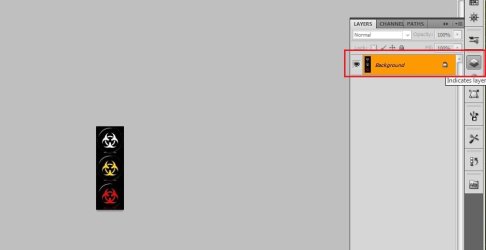
You can do it yourself, as you have photoshop . First , open the image in photoshop, anf double click on the lock icon in the layers pallet to unloak the layer .
1.jpg

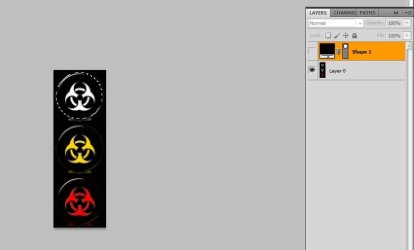
Now zoom it a bit .... and select the ellipse tool , hold shift, and draw a rectangle beside the top circle . Control+click on one to select it , and click on 2 to make the layer invisible .
3.jpg

Now click on Layer 0 , take the lasso tool , right click on the image and select inverse in the context menu ; and hit delete .

Now Image> Trim > OK to reduce the transparent background.

Now Image> Image Size > give the size 39x39 and ok .

Save the result as A.png .

Do the same thing for the other two circles and save as B and C . So you have the materials to go with ZaLiTH's tutorial now :)
 

My Computer

Computer type
PC/Desktop
Computer Manufacturer/Model Number
Self Assembled
OS
Microsoft Windows 10 Pro Insider Preview 64-bit
CPU
Intel(R) Core(TM) i3-4130 CPU @ 3.40GHz
Motherboard
Gigabyte Technology Co., Ltd. B85M-D3H
Memory
Corsair Vengence 4GB x2 (8.00GB Dual-Channel DDR3 @ 798MHz)
Graphics Card(s)
2047MB GeForce GTS 450 (ZOTAC International)
Sound Card
Onboard (Realtek High Definition Audio)
Monitor(s) Displays
LG Flatron E2040T
Screen Resolution
1600x900
Hard Drives
Western Digital 1 TB
Seagate 500 GB
PSU
Corsair VS550
Case
Cooler Master K380
Cooling
Cooler Master Seidon 120V Plus
Keyboard
Logitech MK260r
Mouse
Logitech MK260r
Internet Speed
PMPL Broadband
Antivirus
Windows Defender + MBAM
Browser
Firefox
Other Info
Dell Studio 15" Laptop
Sorry about that Cainicorn, I'm definitely guilty of not seeing your post....
picture.php


So, how about this; I'll make both of them into start orbs for you to make up for it...
picture.php
Give me a few minutes.


Edit:
I didn't do anything with the colour of the leaf, sort of figured if you wanted a purple leaf start orb, you would've said so.. ;) Anyways, the gear cog I made a very dark grey (instead of black), otherwise it would most likely disappear on some taskbars.

As I usually do, 32-bit BMPs are in the RAR, JPG previews attached. Let me know if you have any issues with them or want anything changed, I always keep PSDs of anything I do.

Thank you, thank you! The orbs are beautiful!
 

My Computer

OS
Windows 7 Home Premium 64bit
Arc-

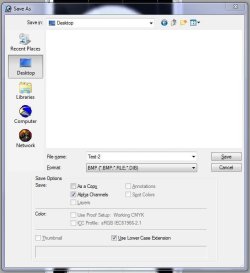
I tried to do it myself (3x) & after a bit of figuring out where the tools in Photoshop 7.0 are that I needed to use (don't use photoshop much) the best I could come up with is what you see in the pics. I have NO idea what I am doing wrong.
 

Attachments

  • Test~1.jpg
    Test~1.jpg
    3.4 KB · Views: 1,407
  • Test~2.jpg
    Test~2.jpg
    12.7 KB · Views: 2

My Computer

Computer type
PC/Desktop
Computer Manufacturer/Model Number
Self built comfuser
OS
10 Pro. 64Bit
CPU
AMD FX 4100, 4-Core Black Edition. Socket AM3+ ~ 3.60GHz
Motherboard
ASUS M5A97 LE R2.0
Memory
2x 4GB Kingston HyperX DDR3-1866 (PC3-14900) - 8GB Total
Graphics Card(s)
ASUS Radeon HD 6670-2GD3
Sound Card
Onboard High Definition Audio Device
Monitor(s) Displays
HP 2009m LCD
Screen Resolution
1600x900, True Color (32bit), 60Hertz
Hard Drives
WD Blue - 1TB, 3D NAND - SATA SSD
PSU
XFX Pro 450W Core Edition - Fully Wired
Case
Antec Super Lanboy
Cooling
Stock CPU fan + 2 (1 front, 1 back) 120mm Antec fans
Keyboard
Logitech MK700/MK710
Mouse
Logitech M705
Internet Speed
Frontier FiOS 50/50
Antivirus
Windows Security
Browser
Vivaldi
Other Info
1x ASUS DRW-24B1ST Multi-DVD Rewriter
1x RocketFish AIO Media Card Reader
1x WD 1TB Passport USB External Drive
Arc-

I tried to do it myself (3x) & after a bit of figuring out where the tools in Photoshop 7.0 are that I needed to use (don't use photoshop much) the best I could come up with is what you see in the pics. I have NO idea what I am doing wrong.

It looks like you missed the step where you create the alpha layer (transparency) step in my tutorial; when working with an alpha layer, anything that is white is visible, anything that's black is not.

Maybe this will help a bit:
alpha-layer-1
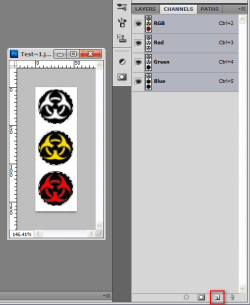
Select the areas of the image you want to be visible on the start orb, then click the "New Layer" button while on the "Channels" panel (NOT the "Layers" panel).

alpha-layer-2
You should now see your image go black, but your selection is still there.

alpha-layer-3
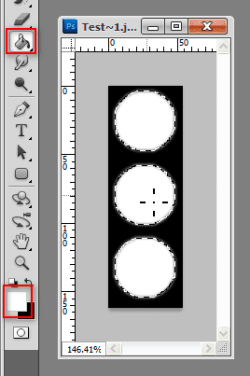
Using the "Fill" tool with white, click once inside the selection on your orb image.

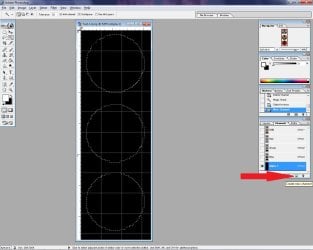
When you clear the selection and go back to the RGB channel (instead of the Alpha channel), you'll see your start orb again as though nothing had changed, but Windows uses this layer to determine what areas of the orb must be shown on the taskbar.

alpha-layer-4
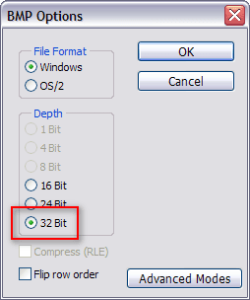
When you save it as a BMP, PhotoShop should default to saving as a 32-bit BMP, not a 24-bit BMP. BMPs are 8-bits per channel: 24-bit covers 8-bits red, 8-bits green and 8-bits blue, 32-bit does all three colours plus 8-bits for alpha.

If PhotoShop doesn't automatically select 32-bit when you try and save it, then stop, and go check your alpha layer.

Note: I've attached a RAR file with a 32-bit BMP of your start orb, open that picture in PhotoShop, switch to the "Channels" panel and select the "Alpha" channel, you'll see what an example of what it should be like.
 

Attachments

  • Test-1.rar
    Test-1.rar
    15 KB · Views: 34
  • alpha-layer-4.png
    alpha-layer-4.png
    10.9 KB · Views: 1,412
  • alpha-layer-3.png
    alpha-layer-3.png
    24.2 KB · Views: 81
  • alpha-layer-2.png
    alpha-layer-2.png
    21.6 KB · Views: 95
  • alpha-layer-1.png
    alpha-layer-1.png
    55.3 KB · Views: 87

My Computer

Computer type
PC/Desktop
OS
Win 10 x64 Pro x64 / Ubuntu 15.10 x64
CPU
Intel i7-4960X
Motherboard
Asus Rampage IV Black Edition
Memory
4x8GB Corsair Dominator Platinum @2400MHz 10-12-12-31
Graphics Card(s)
2x MSI GTX780Ti 3GB (SLI)
Sound Card
Onboard SupremeFX (Cirrus Logic CS4398)
Monitor(s) Displays
3x LG Cinema 27" IPS LED (27MP65)
Screen Resolution
[1920x1080]x3
Hard Drives
Crucial M500 120GB, Crucial M500 480GB, Toshiba DT01ACA200 2TB
PSU
CoolerMaster V1000
Case
Corsair Obsidian 750D
Cooling
ThermalTake Water 3.0 Extreme, 4xSP120, 3xAF120
Keyboard
Moshi Luna
Mouse
Logitech G700s / Roccat Tyon
Internet Speed
4Mb uncapped ADSL (Afrihost)
Antivirus
MS Security Essentials
Browser
Chrome... Duh. (:
Tried w/the file you had attached.
1. I used the Magic Wand Tool to select just the 3 Orbs
2. Chose 'Create New Channel' button on the "Channels" panel & image turned black, but my 3 selections were still outlined (but invisible)
3. I then filled those 3 with White & Deselected the Orbs
4. Used "Save-As', .BMP Windows 32Bit file & made sure Alpha Channels is checked

I get the same result. Oh well, I'm just not good at graphics work. Thanks for trying to help Arc & Zalith.
 

Attachments

  • 1.jpg
    1.jpg
    203.2 KB · Views: 9
  • 2.JPG
    2.JPG
    69.4 KB · Views: 88

My Computer

Computer type
PC/Desktop
Computer Manufacturer/Model Number
Self built comfuser
OS
10 Pro. 64Bit
CPU
AMD FX 4100, 4-Core Black Edition. Socket AM3+ ~ 3.60GHz
Motherboard
ASUS M5A97 LE R2.0
Memory
2x 4GB Kingston HyperX DDR3-1866 (PC3-14900) - 8GB Total
Graphics Card(s)
ASUS Radeon HD 6670-2GD3
Sound Card
Onboard High Definition Audio Device
Monitor(s) Displays
HP 2009m LCD
Screen Resolution
1600x900, True Color (32bit), 60Hertz
Hard Drives
WD Blue - 1TB, 3D NAND - SATA SSD
PSU
XFX Pro 450W Core Edition - Fully Wired
Case
Antec Super Lanboy
Cooling
Stock CPU fan + 2 (1 front, 1 back) 120mm Antec fans
Keyboard
Logitech MK700/MK710
Mouse
Logitech M705
Internet Speed
Frontier FiOS 50/50
Antivirus
Windows Security
Browser
Vivaldi
Other Info
1x ASUS DRW-24B1ST Multi-DVD Rewriter
1x RocketFish AIO Media Card Reader
1x WD 1TB Passport USB External Drive
Tried w/the file you had attached.
1. I used the Magic Wand Tool to select just the 3 Orbs
2. Chose 'Create New Channel' button on the "Channels" panel & image turned black, but my 3 selections were still outlined (but invisible)
3. I then filled those 3 with White & Deselected the Orbs
4. Used "Save-As', .BMP Windows 32Bit file & made sure Alpha Channels is checked

I get the same result. Oh well, I'm just not good at graphics work. Thanks for trying to help Arc & Zalith.

That is really strange...
picture.php
Only thing I can think of is the selection probably didn't work as you thought, but I'm honestly not sure..

Not too sure what else to suggest.. But hey, look at it this way; until we manage to figure it out you can always come request any start orbs here.
picture.php
There are quite a few users here who do requests.
 

My Computer

Computer type
PC/Desktop
OS
Win 10 x64 Pro x64 / Ubuntu 15.10 x64
CPU
Intel i7-4960X
Motherboard
Asus Rampage IV Black Edition
Memory
4x8GB Corsair Dominator Platinum @2400MHz 10-12-12-31
Graphics Card(s)
2x MSI GTX780Ti 3GB (SLI)
Sound Card
Onboard SupremeFX (Cirrus Logic CS4398)
Monitor(s) Displays
3x LG Cinema 27" IPS LED (27MP65)
Screen Resolution
[1920x1080]x3
Hard Drives
Crucial M500 120GB, Crucial M500 480GB, Toshiba DT01ACA200 2TB
PSU
CoolerMaster V1000
Case
Corsair Obsidian 750D
Cooling
ThermalTake Water 3.0 Extreme, 4xSP120, 3xAF120
Keyboard
Moshi Luna
Mouse
Logitech G700s / Roccat Tyon
Internet Speed
4Mb uncapped ADSL (Afrihost)
Antivirus
MS Security Essentials
Browser
Chrome... Duh. (:
Sweet, I created one & it works just fine.
Only thing is, how did ZaLith add guide lines to divide the new image into 3 equal parts for the button states; 1st at 54px & 2nd at 108px?

In Photoshop, I have Rulers, Grid & Extras checked, but my Spiderman Orbs came out just a slight bit off & I have to make them just a few pixels smaller; so trying again. But attached is my 1st try along w/the pics I used.
 

Attachments

My Computer

Computer type
PC/Desktop
Computer Manufacturer/Model Number
Self built comfuser
OS
10 Pro. 64Bit
CPU
AMD FX 4100, 4-Core Black Edition. Socket AM3+ ~ 3.60GHz
Motherboard
ASUS M5A97 LE R2.0
Memory
2x 4GB Kingston HyperX DDR3-1866 (PC3-14900) - 8GB Total
Graphics Card(s)
ASUS Radeon HD 6670-2GD3
Sound Card
Onboard High Definition Audio Device
Monitor(s) Displays
HP 2009m LCD
Screen Resolution
1600x900, True Color (32bit), 60Hertz
Hard Drives
WD Blue - 1TB, 3D NAND - SATA SSD
PSU
XFX Pro 450W Core Edition - Fully Wired
Case
Antec Super Lanboy
Cooling
Stock CPU fan + 2 (1 front, 1 back) 120mm Antec fans
Keyboard
Logitech MK700/MK710
Mouse
Logitech M705
Internet Speed
Frontier FiOS 50/50
Antivirus
Windows Security
Browser
Vivaldi
Other Info
1x ASUS DRW-24B1ST Multi-DVD Rewriter
1x RocketFish AIO Media Card Reader
1x WD 1TB Passport USB External Drive
Sweet, I created one & it works just fine.
Only thing is, how did ZaLith add guide lines to divide the new image into 3 equal parts for the button states; 1st at 54px & 2nd at 108px?

In Photoshop, I have Rulers, Grid & Extras checked, but my Spiderman Orbs came out just a slight bit off & I have to make them just a few pixels smaller; so trying again. But attached is my 1st try along w/the pics I used.

To get guides on your document, first make sure the rulers are visible (shortcut 'ctrl+R'), then just click and drag from a ruler onto your picture.

Also, if you hold 'shift' while dragging a guide, it will 'snap' to the pixels, which will prevent guide sitting halfway through a pixel. You might think "but it's just one pixel, won't make too much difference", but I like to avoid things like that just to be safe.

On my PC at home I have a blank PSD of 54x162px at 96DPI with all guides in place; dividing the three sections and small/large taskbar heights... I don't have it with me at work today, but I'll upload it tomorrow morning if you want?
 

My Computer

Computer type
PC/Desktop
OS
Win 10 x64 Pro x64 / Ubuntu 15.10 x64
CPU
Intel i7-4960X
Motherboard
Asus Rampage IV Black Edition
Memory
4x8GB Corsair Dominator Platinum @2400MHz 10-12-12-31
Graphics Card(s)
2x MSI GTX780Ti 3GB (SLI)
Sound Card
Onboard SupremeFX (Cirrus Logic CS4398)
Monitor(s) Displays
3x LG Cinema 27" IPS LED (27MP65)
Screen Resolution
[1920x1080]x3
Hard Drives
Crucial M500 120GB, Crucial M500 480GB, Toshiba DT01ACA200 2TB
PSU
CoolerMaster V1000
Case
Corsair Obsidian 750D
Cooling
ThermalTake Water 3.0 Extreme, 4xSP120, 3xAF120
Keyboard
Moshi Luna
Mouse
Logitech G700s / Roccat Tyon
Internet Speed
4Mb uncapped ADSL (Afrihost)
Antivirus
MS Security Essentials
Browser
Chrome... Duh. (:
[Hmm, would it be possible to create a small, transparent start orb using this image (with only a very faint glow when you mouse over it)?
http://www.flagid.org/devices/cogwheel.gif

Thanks in advance!]
Reposting it because you may not have seen my post. It's totally okay if you can't/don't want to do it though, I understand, it's just that, since you usually do requests by new users, I thought you might have skipped over it. Also, if the gear is too small, a leaf SO would be pretty cool too :3.

http://www.faqs.org/photo-dict/photofiles/list/3414/4541lilac_leaf.jpg

Sorry about that Cainicorn, I'm definitely guilty of not seeing your post....
picture.php


So, how about this; I'll make both of them into start orbs for you to make up for it...
picture.php
Give me a few minutes.


Edit:
I didn't do anything with the colour of the leaf, sort of figured if you wanted a purple leaf start orb, you would've said so.. ;) Anyways, the gear cog I made a very dark grey (instead of black), otherwise it would most likely disappear on some taskbars.

As I usually do, 32-bit BMPs are in the RAR, JPG previews attached. Let me know if you have any issues with them or want anything changed, I always keep PSDs of anything I do.


I like the leaf ... :cool:
 

My Computer

Computer Manufacturer/Model Number
Home Built
OS
Windows 7 Professional 64-bit SP1
CPU
Intel E8400
Motherboard
MSI P35 Neo
Memory
4GB Crucial Ballistix
Graphics Card(s)
ATI ASUS Radeon HD 4830
Sound Card
Realtek ALC888 on Board
Monitor(s) Displays
Asus 22-inch VH226H Widescreen
Screen Resolution
1920 x 1080
Hard Drives
Two Western Digital 500GB
PSU
Hiper HPU-4M 530W
Case
Thermaltake Tsunami Dream Black
Cooling
Air/Fans
Keyboard
Saitek Eclipse
Mouse
Razer
Internet Speed
Sky Broadband
Other Info
USB Hub/Card Reader - 2 Pen Drives, 1 Phone Dock
Thanks for the offer ZaLiTH, but I did it! Well, as good as I could get it. Take a look if you'd like & anyone who wants to use it, go right ahead; it's in the .rar attachment.

I do have a question though:
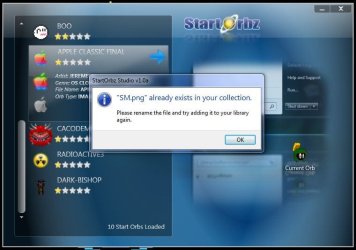
When using Photoshop & I save it as a .bmp, all is fine. But if I save it as a .png & try to Import it into StartOrbz, I get the message below.

I have all files (.png & .bmp) in the same folder, but the SM.png I made does NOT show up in the list & I can't get it imported. Should I ask Blizo?
 

Attachments

  • SM.rar
    SM.rar
    10.7 KB · Views: 36
  • StartOrbz.JPG
    StartOrbz.JPG
    59.7 KB · Views: 45

My Computer

Computer type
PC/Desktop
Computer Manufacturer/Model Number
Self built comfuser
OS
10 Pro. 64Bit
CPU
AMD FX 4100, 4-Core Black Edition. Socket AM3+ ~ 3.60GHz
Motherboard
ASUS M5A97 LE R2.0
Memory
2x 4GB Kingston HyperX DDR3-1866 (PC3-14900) - 8GB Total
Graphics Card(s)
ASUS Radeon HD 6670-2GD3
Sound Card
Onboard High Definition Audio Device
Monitor(s) Displays
HP 2009m LCD
Screen Resolution
1600x900, True Color (32bit), 60Hertz
Hard Drives
WD Blue - 1TB, 3D NAND - SATA SSD
PSU
XFX Pro 450W Core Edition - Fully Wired
Case
Antec Super Lanboy
Cooling
Stock CPU fan + 2 (1 front, 1 back) 120mm Antec fans
Keyboard
Logitech MK700/MK710
Mouse
Logitech M705
Internet Speed
Frontier FiOS 50/50
Antivirus
Windows Security
Browser
Vivaldi
Other Info
1x ASUS DRW-24B1ST Multi-DVD Rewriter
1x RocketFish AIO Media Card Reader
1x WD 1TB Passport USB External Drive

My Computer

Computer type
PC/Desktop
Computer Manufacturer/Model Number
Self Assembled
OS
Microsoft Windows 10 Pro Insider Preview 64-bit
CPU
Intel(R) Core(TM) i3-4130 CPU @ 3.40GHz
Motherboard
Gigabyte Technology Co., Ltd. B85M-D3H
Memory
Corsair Vengence 4GB x2 (8.00GB Dual-Channel DDR3 @ 798MHz)
Graphics Card(s)
2047MB GeForce GTS 450 (ZOTAC International)
Sound Card
Onboard (Realtek High Definition Audio)
Monitor(s) Displays
LG Flatron E2040T
Screen Resolution
1600x900
Hard Drives
Western Digital 1 TB
Seagate 500 GB
PSU
Corsair VS550
Case
Cooler Master K380
Cooling
Cooler Master Seidon 120V Plus
Keyboard
Logitech MK260r
Mouse
Logitech MK260r
Internet Speed
PMPL Broadband
Antivirus
Windows Defender + MBAM
Browser
Firefox
Other Info
Dell Studio 15" Laptop
I'll ask Blizarro, thanks Arc.
 

My Computer

Computer type
PC/Desktop
Computer Manufacturer/Model Number
Self built comfuser
OS
10 Pro. 64Bit
CPU
AMD FX 4100, 4-Core Black Edition. Socket AM3+ ~ 3.60GHz
Motherboard
ASUS M5A97 LE R2.0
Memory
2x 4GB Kingston HyperX DDR3-1866 (PC3-14900) - 8GB Total
Graphics Card(s)
ASUS Radeon HD 6670-2GD3
Sound Card
Onboard High Definition Audio Device
Monitor(s) Displays
HP 2009m LCD
Screen Resolution
1600x900, True Color (32bit), 60Hertz
Hard Drives
WD Blue - 1TB, 3D NAND - SATA SSD
PSU
XFX Pro 450W Core Edition - Fully Wired
Case
Antec Super Lanboy
Cooling
Stock CPU fan + 2 (1 front, 1 back) 120mm Antec fans
Keyboard
Logitech MK700/MK710
Mouse
Logitech M705
Internet Speed
Frontier FiOS 50/50
Antivirus
Windows Security
Browser
Vivaldi
Other Info
1x ASUS DRW-24B1ST Multi-DVD Rewriter
1x RocketFish AIO Media Card Reader
1x WD 1TB Passport USB External Drive
I'm working on some start orbs for football teams here in the UK

Arsenal
Arsenal.png

Liverpool
Liverpool.png

MK Dons
MK_Dons.png

You'll notice that with the Liverpool orb, the fames ignite instead of the whole orb glowing
 

My Computer

Computer Manufacturer/Model Number
Compaq Desktop
OS
Windows 7 Ultimate x64
CPU
AMD Sempron Dual Core
Memory
3GB
Graphics Card(s)
NVIDIA GeForce 6150SE nForce 430
Screen Resolution
1024x768
Hard Drives
150GB Sata
I couldn't help myself with this 1 ;)

Shark.png
 

My Computer

Computer Manufacturer/Model Number
Compaq Desktop
OS
Windows 7 Ultimate x64
CPU
AMD Sempron Dual Core
Memory
3GB
Graphics Card(s)
NVIDIA GeForce 6150SE nForce 430
Screen Resolution
1024x768
Hard Drives
150GB Sata
Nice ORBs :D I also made a shark button earlier ....
 

Attachments

  • Shark.zip
    Shark.zip
    5.9 KB · Views: 81
  • Shark.jpg
    Shark.jpg
    3.4 KB · Views: 1,298

My Computer

Computer type
PC/Desktop
Computer Manufacturer/Model Number
Self Assembled
OS
Microsoft Windows 10 Pro Insider Preview 64-bit
CPU
Intel(R) Core(TM) i3-4130 CPU @ 3.40GHz
Motherboard
Gigabyte Technology Co., Ltd. B85M-D3H
Memory
Corsair Vengence 4GB x2 (8.00GB Dual-Channel DDR3 @ 798MHz)
Graphics Card(s)
2047MB GeForce GTS 450 (ZOTAC International)
Sound Card
Onboard (Realtek High Definition Audio)
Monitor(s) Displays
LG Flatron E2040T
Screen Resolution
1600x900
Hard Drives
Western Digital 1 TB
Seagate 500 GB
PSU
Corsair VS550
Case
Cooler Master K380
Cooling
Cooler Master Seidon 120V Plus
Keyboard
Logitech MK260r
Mouse
Logitech MK260r
Internet Speed
PMPL Broadband
Antivirus
Windows Defender + MBAM
Browser
Firefox
Other Info
Dell Studio 15" Laptop
Last edited:

My Computer

Computer Manufacturer/Model Number
Self Assembled ATI
OS
Windows 7 Ultimate 64bit
CPU
AMD Athlon II x4 3.10 GHz
Motherboard
N-Alvorix-RS880-uATX
Memory
6GB DDR3
Graphics Card(s)
ATI Radeon x1600 512MB
Sound Card
Onboard
Monitor(s) Displays
21in Acer S231HL LED
Screen Resolution
1920x1080
Hard Drives
Western Digital 80gb x2, Western Digital 160gb, Western Digital My Book Essentials 2TB
PSU
250watt
Case
Cooler Master HAF X Blue 942
Cooling
4 standard size case fans
Keyboard
Alienware Tact X
Mouse
Logitech Performance MX
Internet Speed
Unfortunately...hughesnet...

My Computer

Computer type
PC/Desktop
OS
Win 10 x64 Pro x64 / Ubuntu 15.10 x64
CPU
Intel i7-4960X
Motherboard
Asus Rampage IV Black Edition
Memory
4x8GB Corsair Dominator Platinum @2400MHz 10-12-12-31
Graphics Card(s)
2x MSI GTX780Ti 3GB (SLI)
Sound Card
Onboard SupremeFX (Cirrus Logic CS4398)
Monitor(s) Displays
3x LG Cinema 27" IPS LED (27MP65)
Screen Resolution
[1920x1080]x3
Hard Drives
Crucial M500 120GB, Crucial M500 480GB, Toshiba DT01ACA200 2TB
PSU
CoolerMaster V1000
Case
Corsair Obsidian 750D
Cooling
ThermalTake Water 3.0 Extreme, 4xSP120, 3xAF120
Keyboard
Moshi Luna
Mouse
Logitech G700s / Roccat Tyon
Internet Speed
4Mb uncapped ADSL (Afrihost)
Antivirus
MS Security Essentials
Browser
Chrome... Duh. (:

My Computer

Computer Manufacturer/Model Number
Self Assembled ATI
OS
Windows 7 Ultimate 64bit
CPU
AMD Athlon II x4 3.10 GHz
Motherboard
N-Alvorix-RS880-uATX
Memory
6GB DDR3
Graphics Card(s)
ATI Radeon x1600 512MB
Sound Card
Onboard
Monitor(s) Displays
21in Acer S231HL LED
Screen Resolution
1920x1080
Hard Drives
Western Digital 80gb x2, Western Digital 160gb, Western Digital My Book Essentials 2TB
PSU
250watt
Case
Cooler Master HAF X Blue 942
Cooling
4 standard size case fans
Keyboard
Alienware Tact X
Mouse
Logitech Performance MX
Internet Speed
Unfortunately...hughesnet...
I was wondering, how can I get glow effects for these in gimp? When I tried and saved as bitmap it turned the glow into a hard colored splotch. And also, how do i get the boxes that say "Attached Images" and "Attached Files" at the top in my posts?

Thanks
 

My Computer

Computer Manufacturer/Model Number
Self Assembled ATI
OS
Windows 7 Ultimate 64bit
CPU
AMD Athlon II x4 3.10 GHz
Motherboard
N-Alvorix-RS880-uATX
Memory
6GB DDR3
Graphics Card(s)
ATI Radeon x1600 512MB
Sound Card
Onboard
Monitor(s) Displays
21in Acer S231HL LED
Screen Resolution
1920x1080
Hard Drives
Western Digital 80gb x2, Western Digital 160gb, Western Digital My Book Essentials 2TB
PSU
250watt
Case
Cooler Master HAF X Blue 942
Cooling
4 standard size case fans
Keyboard
Alienware Tact X
Mouse
Logitech Performance MX
Internet Speed
Unfortunately...hughesnet...
Back
Top