Custom Themes, Icons and Start Buttons.

Status
Not open for further replies.
That looks allot better but I thought I would give it one last go.

must admit that it looks pretty ugly when it's so small ;P
http://img101.imageshack.us/img101/5421/namnlsx.png

if you don't have something to do, someday, it would be very nice if u could do a small start orb, light gray as the biohazard one, but with the radioactive logo and yellow glow instead :)

by the way, thanks for your patience! :D

Yeah it does look a bit Ugly that small, you could always use large icons on your taskbar instead :p, it looked allot better this size.

View attachment 41252


yeah :P but i like the small icon mode :cool:
 

My Computer

Computer Manufacturer/Model Number
Homebuild
OS
Windows 7 Ultimate x64 Build 7600
CPU
AMD Athlon 64 X2 Dual Core Processor 3800+ 2.00 GHz
Motherboard
Asus M2N68-VM
Memory
2x2Gb
Graphics Card(s)
Radeon X1600 Series
Sound Card
NVIDIA HDMI Audio
Monitor(s) Displays
HP L1910 19-inch LCD Monitor
Screen Resolution
1280x1024
Hard Drives
1x150Gb, 2x500Gb (External)
Case
Raidmax Scorpio 868
Keyboard
Saitek Eclipse II
Mouse
Logitech MX510
Xbox 360 Start Orb

Xbox 360.jpg
 

My Computer

Computer Manufacturer/Model Number
Toshiba Satellite Pro PSL43E
OS
windows 7 ultimate
CPU
Intel Celeron M 440 @1.86 GHz Yonah 65nm architecture
Motherboard
Toshiba Satellite Pro L40 Intel i943/940 GML Chipset
Memory
120 gb Hard Drive/ 1GB Ram
Graphics Card(s)
Intel 945 Express Chipset Family
Screen Resolution
1280x800
Hard Drives
120GB Toshiba MK1237GSX ATA Device
Internet Speed
20mb
Some of my ones :)

Some of my ones :)
 

My Computer

OS
Windows 7 Ultimate x64
CPU
Intel Core 2 Duo E8400
Motherboard
GIGABYTE GA-EX38-DS4
Memory
Mushkin DDR2 4096MB (2048MBx2) 800Mhz CL 5-5-5-18 SP
Graphics Card(s)
Club3D ATI Radeon HD4850 512MB PCIe
Monitor(s) Displays
Asus 22" VK222U 2ms LCD
Screen Resolution
1680x1050
Hard Drives
Seagate ST3500320AS 500GB SATA2 32MB
PSU
Enermax Pro82+ 525W
Case
NZXT Trinity
Cooling
Arctic Cooling Case Fan AF12025 120mm
Keyboard
Logitech Media Keyboard
Mouse
Logitech RX700 Cordless
Carbon Start Orb

Here is a carbon start orb i made but you cant really see much carbon effect.

Carbon Windows.jpg
 
Last edited:

My Computer

Computer Manufacturer/Model Number
Toshiba Satellite Pro PSL43E
OS
windows 7 ultimate
CPU
Intel Celeron M 440 @1.86 GHz Yonah 65nm architecture
Motherboard
Toshiba Satellite Pro L40 Intel i943/940 GML Chipset
Memory
120 gb Hard Drive/ 1GB Ram
Graphics Card(s)
Intel 945 Express Chipset Family
Screen Resolution
1280x800
Hard Drives
120GB Toshiba MK1237GSX ATA Device
Internet Speed
20mb
Arcane Rune Orb

Here is an Arcane rune orb made using Obsidian Dawn's amazing rune brushes in photoshop.

Arcane Rune.jpg
 

My Computer

Computer Manufacturer/Model Number
Toshiba Satellite Pro PSL43E
OS
windows 7 ultimate
CPU
Intel Celeron M 440 @1.86 GHz Yonah 65nm architecture
Motherboard
Toshiba Satellite Pro L40 Intel i943/940 GML Chipset
Memory
120 gb Hard Drive/ 1GB Ram
Graphics Card(s)
Intel 945 Express Chipset Family
Screen Resolution
1280x800
Hard Drives
120GB Toshiba MK1237GSX ATA Device
Internet Speed
20mb
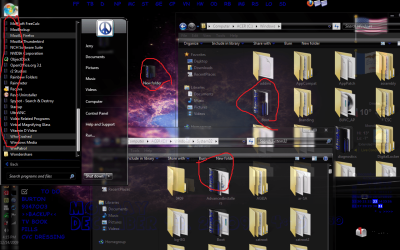
Hi: I installed Mr GRiM's Black Icon's then uninstalled them then used the cleanup cmd inside data folder but I still have some of them in C/Window & C/Window/System32 & in all programs in the start menu & when I make a new folder on the desktop is there a way to get rid of them? Thank You Jerry

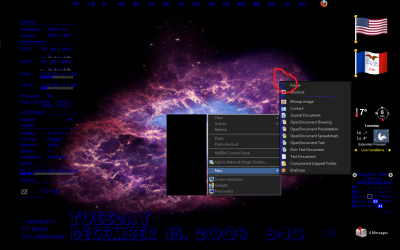
Edit: When I delete a folder somewhere it show up in the recycle bin as a Black Icon too.
 

Attachments

  • Untitled.png
    Untitled.png
    876.2 KB · Views: 105
Last edited:

My Computer

Computer type
Laptop
Computer Manufacturer/Model Number
Sager NP9170
OS
Win 7 Pro x64 / Win 10 Pro
CPU
Intel(R) Core(TM) i7-3630QM CPU @ 2.40GHz
Motherboard
CLEVO P170EM
Memory
12 GB
Graphics Card(s)
(1) Intel(R) HD Graphics 4000 (2) NVIDIA GeForce GTX 675M
Sound Card
(1) Realtek High Definition Audio (2) Intel(R) Display Aud
Monitor(s) Displays
17.3
Screen Resolution
1920x1080
Hard Drives
(1) Samsung 860 EVO 500GB(OS) (1) Samsung 860 EVO 500GB(Data)
Keyboard
Backlite
Antivirus
MSE, Malwarebytes Pro
Browser
Firefox
Other Info
DESKTOP: Custom-built.
OS: Win 10 Pro x64.
CASE: Rosewill R5.
CPU: Intel I5 4670K CPU @ 3.40GHz.
CPU COOLER: Cool Master Hyper 212 EVO.
MOTHERBOARD: Asus Z87-A.
MEMORY: Kingston HyperX 2x4 GB.
GPU: Nvidia Geforce 650 TI.
PSU: Corsair TX750.
DRIVES: (1) Samsung 840 120 GB SSD (2) Western Digital blue 500 GB 7200 RPM.
I found that deleting the iconcache file (appdata/local) sorted that. Make sure to reboot afterwards. you'll also need to set hidden files to show.
 

My Computer

Computer Manufacturer/Model Number
HP Touchsmart IQ771.uk
OS
Windows 7 Ultimate x64
CPU
AMD Turion(tm) 64 X2 Mobile Technology TL-56
Motherboard
ASUS Pheonix
Memory
3GB Nanya PC2-6400 DDR2-SDRAM SO-DIM (400MHz)
Graphics Card(s)
NVIDIA GeForce Go 7600 256MB GDDR3 SDRAM
Sound Card
High Definition Intergrated NVIDIA MCP51
Monitor(s) Displays
46" Sony Bravia HDTV
Screen Resolution
1600x1200
Hard Drives
1.5TB Samsug
320GB Seagate ST3320820AS - SATA 3Gb/s 8MB
500GB Maxtor Basics STM305003EHD301-RK
Internet Speed
↓6.32 Mb/s ↑0.35 Mb/s ↔26ms
Other Info
BIOS - American Megatrends Inc. 5.07
Ethernet Port - NVIDIA nForce 10/100/1000 Mbps
DVD Drive - TSSTcorp DVDR/RW TS-T632L
I found that deleting the iconcache file (appdata/local) sorted that. Make sure to reboot afterwards. you'll also need to set hidden files to show.
I did that it did some but not all so I used Rainbow Folder & changed the color then removed the color & all are OK but when I make a new folder on the desktop it's still the black icon & if I delete a empty folder it's black in the recycle bin & if I right click & go to new new folder is the black icon.
 

Attachments

  • Untitled.png
    Untitled.png
    735.2 KB · Views: 47

My Computer

Computer type
Laptop
Computer Manufacturer/Model Number
Sager NP9170
OS
Win 7 Pro x64 / Win 10 Pro
CPU
Intel(R) Core(TM) i7-3630QM CPU @ 2.40GHz
Motherboard
CLEVO P170EM
Memory
12 GB
Graphics Card(s)
(1) Intel(R) HD Graphics 4000 (2) NVIDIA GeForce GTX 675M
Sound Card
(1) Realtek High Definition Audio (2) Intel(R) Display Aud
Monitor(s) Displays
17.3
Screen Resolution
1920x1080
Hard Drives
(1) Samsung 860 EVO 500GB(OS) (1) Samsung 860 EVO 500GB(Data)
Keyboard
Backlite
Antivirus
MSE, Malwarebytes Pro
Browser
Firefox
Other Info
DESKTOP: Custom-built.
OS: Win 10 Pro x64.
CASE: Rosewill R5.
CPU: Intel I5 4670K CPU @ 3.40GHz.
CPU COOLER: Cool Master Hyper 212 EVO.
MOTHERBOARD: Asus Z87-A.
MEMORY: Kingston HyperX 2x4 GB.
GPU: Nvidia Geforce 650 TI.
PSU: Corsair TX750.
DRIVES: (1) Samsung 840 120 GB SSD (2) Western Digital blue 500 GB 7200 RPM.
I found that deleting the iconcache file (appdata/local) sorted that. Make sure to reboot afterwards. you'll also need to set hidden files to show.
I did that it did some but not all so I used Rainbow Folder & changed the color then removed the color & all are OK but when I make a new folder on the desktop it's still the black icon & if I delete a empty folder it's black in the recycle bin & if I right click & go to new new folder is the black icon.

I'm pretty sure it's just the cache's acting up, not 100% sure why it happens. it's like there's some stored in the actual memory or something when deleting/clearing the cache files. (It's been reported before that this problem happens but it seems very random and sparse. :confused: )

Just incase you don't know, the small icons (upto 32x32 pixels i think) are stored in the icon cache (which you've cleared) but the larger icons are stored in the thumbnail cache which can be cleared via running 'disk cleanup' for your system drive and just selecting 'Thumbnail Cache'.
 

My Computer

Computer Manufacturer/Model Number
Self Built
OS
XP Pro SP3 x86/Vista SP2 x64/Win7 x64 Triple-boot
CPU
AMD64 X2 AM2 5000+
Motherboard
Asus MSN-X Plus
Memory
Corsair TWX 2Gb (2x1Gb) DDR2 800Mhz
Graphics Card(s)
PCI-X 2.0 Inno3D (NVidia) 9500GT 1Gb DDR2
Sound Card
Onboard Realtec ALC662-GR
Monitor(s) Displays
Relisys 17' CRT (model unknown)
Screen Resolution
1024x768
Hard Drives
750Gb Samsung 7200-3Gb/s 32Mb Cache SATA
PSU
500W
Cooling
Standard AMD CPU Fan, One side, front and rear case fan.
Keyboard
Microsoft Multimedia Keyboard
Mouse
Samsung Optical
Internet Speed
10M
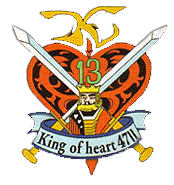
Hello, I'm looking for some help making this my start button. Any help would be super awesome!
 

Attachments

  • The King of Hearts.png
    The King of Hearts.png
    52.5 KB · Views: 1,069

My Computer

OS
Windows 7

My Computer

Computer type
PC/Desktop
Computer Manufacturer/Model Number
Self built.
OS
Windows 7 RTM 64bit, Windows 8 Pro 64bit
CPU
Intel i5-2500K @ 3.3Ghz
Motherboard
Asus Maximus IV GENE-Z/GEN3
Memory
16GB G.Skill RaptorX 1600MHz DDR3
Graphics Card(s)
N570GTX Twin Frozr III Power Edition
Sound Card
SupremeFX X-Fi 2
Monitor(s) Displays
BenQ XL2420T 120Hz 24 inch gaming monitor, Acer V233H 23 inc
Screen Resolution
1920x1080
Hard Drives
320GB Seagate Barracuda
WD 1TB Black Caviar
2TB WD Green Caviar
Samsung SSD 840 PRO Series
PSU
CoolerMaster Silent Pro Gold 1200WATT 80 Plus Gold
Case
CoolerMaster HAF X RC-942
Cooling
CoolerMaster V6GT Multi-Platform CPU Cooler
Keyboard
Logitech G510 Gaming Keyboard
Mouse
Logitech G700 Gaming Mouse
Antivirus
Norton Internet Security
Browser
Firefox 21
Other Info
Logitech Extreme 3D Pro Gaming Joystick, Logitech G930 Wireless Gaming Headset
I found that deleting the iconcache file (appdata/local) sorted that. Make sure to reboot afterwards. you'll also need to set hidden files to show.
I did that it did some but not all so I used Rainbow Folder & changed the color then removed the color & all are OK but when I make a new folder on the desktop it's still the black icon & if I delete a empty folder it's black in the recycle bin & if I right click & go to new new folder is the black icon.

I'm pretty sure it's just the cache's acting up, not 100% sure why it happens. it's like there's some stored in the actual memory or something when deleting/clearing the cache files. (It's been reported before that this problem happens but it seems very random and sparse. :confused: )

Just incase you don't know, the small icons (upto 32x32 pixels i think) are stored in the icon cache (which you've cleared) but the larger icons are stored in the thumbnail cache which can be cleared via running 'disk cleanup' for your system drive and just selecting 'Thumbnail Cache'.

I did disk cleanup it's still the same. If I add something to the new folder on the desktop it changes to a normal folder icon, then delete it it's a normal folder icon in the recycle bin.
 

Attachments

  • Capture1.PNG
    Capture1.PNG
    9 KB · Views: 1,058
  • Capture.PNG
    Capture.PNG
    9.1 KB · Views: 1,062

My Computer

Computer type
Laptop
Computer Manufacturer/Model Number
Sager NP9170
OS
Win 7 Pro x64 / Win 10 Pro
CPU
Intel(R) Core(TM) i7-3630QM CPU @ 2.40GHz
Motherboard
CLEVO P170EM
Memory
12 GB
Graphics Card(s)
(1) Intel(R) HD Graphics 4000 (2) NVIDIA GeForce GTX 675M
Sound Card
(1) Realtek High Definition Audio (2) Intel(R) Display Aud
Monitor(s) Displays
17.3
Screen Resolution
1920x1080
Hard Drives
(1) Samsung 860 EVO 500GB(OS) (1) Samsung 860 EVO 500GB(Data)
Keyboard
Backlite
Antivirus
MSE, Malwarebytes Pro
Browser
Firefox
Other Info
DESKTOP: Custom-built.
OS: Win 10 Pro x64.
CASE: Rosewill R5.
CPU: Intel I5 4670K CPU @ 3.40GHz.
CPU COOLER: Cool Master Hyper 212 EVO.
MOTHERBOARD: Asus Z87-A.
MEMORY: Kingston HyperX 2x4 GB.
GPU: Nvidia Geforce 650 TI.
PSU: Corsair TX750.
DRIVES: (1) Samsung 840 120 GB SSD (2) Western Digital blue 500 GB 7200 RPM.
Is there any orbs for 125% dpi?
 
Last edited:

My Computer

Computer Manufacturer/Model Number
MSI GX623
OS
Windows 7 x86 or x64?
CPU
Intel Core 2 Duo P7350 2.0-2.4Ghz
Memory
4GB DDR2-800
Graphics Card(s)
ATI Mobility Radeon HD 4670
Screen Resolution
1680 x 1050
Hard Drives
320 GB 5400RPM SATA

My Computer

Computer Manufacturer/Model Number
Toshiba Satellite Pro PSL43E
OS
windows 7 ultimate
CPU
Intel Celeron M 440 @1.86 GHz Yonah 65nm architecture
Motherboard
Toshiba Satellite Pro L40 Intel i943/940 GML Chipset
Memory
120 gb Hard Drive/ 1GB Ram
Graphics Card(s)
Intel 945 Express Chipset Family
Screen Resolution
1280x800
Hard Drives
120GB Toshiba MK1237GSX ATA Device
Internet Speed
20mb
I did that it did some but not all so I used Rainbow Folder & changed the color then removed the color & all are OK but when I make a new folder on the desktop it's still the black icon & if I delete a empty folder it's black in the recycle bin & if I right click & go to new new folder is the black icon.

I'm pretty sure it's just the cache's acting up, not 100% sure why it happens. it's like there's some stored in the actual memory or something when deleting/clearing the cache files. (It's been reported before that this problem happens but it seems very random and sparse. :confused: )

Just incase you don't know, the small icons (upto 32x32 pixels i think) are stored in the icon cache (which you've cleared) but the larger icons are stored in the thumbnail cache which can be cleared via running 'disk cleanup' for your system drive and just selecting 'Thumbnail Cache'.

I did disk cleanup it's still the same. If I add something to the new folder on the desktop it changes to a normal folder icon, then delete it it's a normal folder icon in the recycle bin.

Will I got the normal folder icon back I found 2 desktop folders in Jerry folder from the start menu not C/user/jerry folder, 1 in the properties said C/Jerry/Desktop , the other said C/User/Jerry/Saved/Games/Desktop, if I delete it I get a error when I try to make a new folder(the only options in right click-new is just folder nothing more)I put it back. So I started in safe mode & deleted it restarted & the normal folder icon is back, but still 2 desktop folders in Jerry.
It works just fine so I will leave it.
 

My Computer

Computer type
Laptop
Computer Manufacturer/Model Number
Sager NP9170
OS
Win 7 Pro x64 / Win 10 Pro
CPU
Intel(R) Core(TM) i7-3630QM CPU @ 2.40GHz
Motherboard
CLEVO P170EM
Memory
12 GB
Graphics Card(s)
(1) Intel(R) HD Graphics 4000 (2) NVIDIA GeForce GTX 675M
Sound Card
(1) Realtek High Definition Audio (2) Intel(R) Display Aud
Monitor(s) Displays
17.3
Screen Resolution
1920x1080
Hard Drives
(1) Samsung 860 EVO 500GB(OS) (1) Samsung 860 EVO 500GB(Data)
Keyboard
Backlite
Antivirus
MSE, Malwarebytes Pro
Browser
Firefox
Other Info
DESKTOP: Custom-built.
OS: Win 10 Pro x64.
CASE: Rosewill R5.
CPU: Intel I5 4670K CPU @ 3.40GHz.
CPU COOLER: Cool Master Hyper 212 EVO.
MOTHERBOARD: Asus Z87-A.
MEMORY: Kingston HyperX 2x4 GB.
GPU: Nvidia Geforce 650 TI.
PSU: Corsair TX750.
DRIVES: (1) Samsung 840 120 GB SSD (2) Western Digital blue 500 GB 7200 RPM.
Hello, I'm looking for some help making this my start button. Any help would be super awesome!

Not sure what you had in mind, so I just played around a bit. Give me some more details if you want me to change it. ;)

View attachment 42232

View attachment 42233

Hello, I'm looking for some help making this my start button. Any help would be super awesome!

View attachment 42267

or this.


Thanks for the quick reply guys! What I'm looking for is more of the crest itself without the coloured circle. It'd look transparent. Hovering and clicking the crest itself would have the glow on it. Like with the default start button the Windows panel each glow. If that makes sense xD
 

My Computer

OS
Windows 7
[/QUOTE]
Thanks for the quick reply guys! What I'm looking for is more of the crest itself without the coloured circle. It'd look transparent. Hovering and clicking the crest itself would have the glow on it. Like with the default start button the Windows panel each glow. If that makes sense xD[/QUOTE]

King of hearts 2.jpg
 

My Computer

Computer Manufacturer/Model Number
Toshiba Satellite Pro PSL43E
OS
windows 7 ultimate
CPU
Intel Celeron M 440 @1.86 GHz Yonah 65nm architecture
Motherboard
Toshiba Satellite Pro L40 Intel i943/940 GML Chipset
Memory
120 gb Hard Drive/ 1GB Ram
Graphics Card(s)
Intel 945 Express Chipset Family
Screen Resolution
1280x800
Hard Drives
120GB Toshiba MK1237GSX ATA Device
Internet Speed
20mb
I did that it did some but not all so I used Rainbow Folder & changed the color then removed the color & all are OK but when I make a new folder on the desktop it's still the black icon & if I delete a empty folder it's black in the recycle bin & if I right click & go to new new folder is the black icon.

I'm pretty sure it's just the cache's acting up, not 100% sure why it happens. it's like there's some stored in the actual memory or something when deleting/clearing the cache files. (It's been reported before that this problem happens but it seems very random and sparse. :confused: )

Just incase you don't know, the small icons (upto 32x32 pixels i think) are stored in the icon cache (which you've cleared) but the larger icons are stored in the thumbnail cache which can be cleared via running 'disk cleanup' for your system drive and just selecting 'Thumbnail Cache'.

I did disk cleanup it's still the same. If I add something to the new folder on the desktop it changes to a normal folder icon, then delete it it's a normal folder icon in the recycle bin.

Did you run the Uninstall Cleanup batch file provided in the pack?
Here incase you don't have it;
View attachment UninstallCleanup.zip
 

My Computer

Computer Manufacturer/Model Number
HP Touchsmart IQ771.uk
OS
Windows 7 Ultimate x64
CPU
AMD Turion(tm) 64 X2 Mobile Technology TL-56
Motherboard
ASUS Pheonix
Memory
3GB Nanya PC2-6400 DDR2-SDRAM SO-DIM (400MHz)
Graphics Card(s)
NVIDIA GeForce Go 7600 256MB GDDR3 SDRAM
Sound Card
High Definition Intergrated NVIDIA MCP51
Monitor(s) Displays
46" Sony Bravia HDTV
Screen Resolution
1600x1200
Hard Drives
1.5TB Samsug
320GB Seagate ST3320820AS - SATA 3Gb/s 8MB
500GB Maxtor Basics STM305003EHD301-RK
Internet Speed
↓6.32 Mb/s ↑0.35 Mb/s ↔26ms
Other Info
BIOS - American Megatrends Inc. 5.07
Ethernet Port - NVIDIA nForce 10/100/1000 Mbps
DVD Drive - TSSTcorp DVDR/RW TS-T632L
I'm pretty sure it's just the cache's acting up, not 100% sure why it happens. it's like there's some stored in the actual memory or something when deleting/clearing the cache files. (It's been reported before that this problem happens but it seems very random and sparse. :confused: )

Just incase you don't know, the small icons (upto 32x32 pixels i think) are stored in the icon cache (which you've cleared) but the larger icons are stored in the thumbnail cache which can be cleared via running 'disk cleanup' for your system drive and just selecting 'Thumbnail Cache'.

I did disk cleanup it's still the same. If I add something to the new folder on the desktop it changes to a normal folder icon, then delete it it's a normal folder icon in the recycle bin.

Did you run the Uninstall Cleanup batch file provided in the pack?
Here incase you don't have it;
View attachment 42308

Yes. Here what I have now from my last post:

Will I got the normal folder icon back I found 2 desktop folders in Jerry folder from the start menu not C/user/Jerry folder, 1 in the properties said C/Jerry/Desktop , the other said C/User/Jerry/Saved/Games/Desktop, if I delete it I get a error when I try to make a new folder(the only options in right click-new is just folder nothing more)I put it back. So I started in safe mode & deleted it restarted & the normal folder icon is back, but still 2 desktop folders in Jerry.
It works just fine so I will leave it.

Unless you know a fix? Thank You Jerry
 

My Computer

Computer type
Laptop
Computer Manufacturer/Model Number
Sager NP9170
OS
Win 7 Pro x64 / Win 10 Pro
CPU
Intel(R) Core(TM) i7-3630QM CPU @ 2.40GHz
Motherboard
CLEVO P170EM
Memory
12 GB
Graphics Card(s)
(1) Intel(R) HD Graphics 4000 (2) NVIDIA GeForce GTX 675M
Sound Card
(1) Realtek High Definition Audio (2) Intel(R) Display Aud
Monitor(s) Displays
17.3
Screen Resolution
1920x1080
Hard Drives
(1) Samsung 860 EVO 500GB(OS) (1) Samsung 860 EVO 500GB(Data)
Keyboard
Backlite
Antivirus
MSE, Malwarebytes Pro
Browser
Firefox
Other Info
DESKTOP: Custom-built.
OS: Win 10 Pro x64.
CASE: Rosewill R5.
CPU: Intel I5 4670K CPU @ 3.40GHz.
CPU COOLER: Cool Master Hyper 212 EVO.
MOTHERBOARD: Asus Z87-A.
MEMORY: Kingston HyperX 2x4 GB.
GPU: Nvidia Geforce 650 TI.
PSU: Corsair TX750.
DRIVES: (1) Samsung 840 120 GB SSD (2) Western Digital blue 500 GB 7200 RPM.
How bout one of these for us Raider fans? Preferably just the shield.

attachment.php
 

Attachments

  • oakland-raiders-logo.jpg
    oakland-raiders-logo.jpg
    13.4 KB · Views: 52,262

My Computer

OS
Windows 7 x32
Status
Not open for further replies.
Back
Top