Custom Themes, Icons and Start Buttons.

Status
Not open for further replies.

My Computer My Computer

At a glance

windows7 7600 x86itel pentium 43.00 GBdiamond radion x1050
Computer Manufacturer/Model Number
dell optiplex - 2003
OS
windows7 7600 x86
CPU
itel pentium 4
Memory
3.00 GB
Graphics Card(s)
diamond radion x1050
Sound Card
SoundMax
Monitor(s) Displays
dell 2408wfp dell e172fp
Screen Resolution
1920 x 1200 1280 x 1024
Hard Drives
2 - 80 GB internals WD
1 - 01 TB ext
2 - 750 GB ext
1- 500 GB ext
all running on system no problems
Keyboard
old logitech cordless
Mouse
logitech wireless
Internet Speed
16 / 4
Other Info
networked into my sbs2003 server running sp1 still
it's a wonder I could even get windows 7 to connect to it
Here is the BlueRay icon for you, and i was thinking about uploading them dll's as well for all interested.
 

Attachments

My Computer My Computer

At a glance

Windows 7 Ultimate Vista Ultimate x64Core 2 Duo E8500 3.16Ghz @ 3.8Ghz2x2Gigs Patriot PC2-6400 LLInno3D GeForce GTX260 216 SP
Computer Manufacturer/Model Number
Home Brew
OS
Windows 7 Ultimate Vista Ultimate x64
CPU
Core 2 Duo E8500 3.16Ghz @ 3.8Ghz
Motherboard
eVGA 750i FTW
Memory
2x2Gigs Patriot PC2-6400 LL
Graphics Card(s)
Inno3D GeForce GTX260 216 SP
Monitor(s) Displays
ASUS VW222U 22" 2ms Response time
Screen Resolution
1680x1050
Hard Drives
SATA 150GB
SATA II 250GB
USB IDE 750GB Ext.
PSU
HYTEC 600W & Thermaltake 650W Toughpower Power Exp
Case
Thermaltake Armor LCS (Liquid Cooling System)
Cooling
Liquid Cooling System
Keyboard
Logitech G15 Gaming Keyboard
Mouse
Logitech G9 Gaming Mouse
Here is the BlueRay icon for you, and i was thinking about uploading them dll's as well for all interested.

Hey Grimm. Sounds like a fantastic idea. Much easier for us Iconically Challenged atm.

But before you do, there a chance at you making a blue libraries one to throw in? or which one of your blue do you substitute for the libraries one?

Also, I'm sure I can translate from the post you made on page 2 or 3, but a simple "This is where you copy paste the two .dll files and this is the thing you delete," would be nice too!
 

My Computer My Computer

At a glance

Windows 7 RC - 7100 64bitAMD Athlon(tm) 64 x2 4800+ 2.50Ghz Dual Core4 gig Kingston DDR2XFX Nvidia GeForce GTS 250
OS
Windows 7 RC - 7100 64bit
CPU
AMD Athlon(tm) 64 x2 4800+ 2.50Ghz Dual Core
Motherboard
Hewlett Packard
Memory
4 gig Kingston DDR2
Graphics Card(s)
XFX Nvidia GeForce GTS 250
Sound Card
na
Monitor(s) Displays
22" Samsung LCD Syncmaster
Screen Resolution
1680x1050
Hard Drives
300gig Western Digital
PSU
BFG Tech 550watt
Case
Crap stock Dell
Cooling
Side panel open on case, and a box fan blowing in.
Keyboard
G15
Mouse
G9
Internet Speed
Bike Messenger
OK are you still using build 7100, I'm not sure if it makes a difference but I may have to change the version number for different builds.

For the Blue explorer icon you need to replace the one in the Explorer.exe or just right click on the icon you want to change go to properties and change the icon that way.

The 2 dll's you need to change are located in system32 for x86 and if you are running x64 then you will also need to make the changes to them in SysWOW64 as well, unfortunately the dll's in SysWOW64 are not the same as the ones in System32 (even though they have the same name) so you need the correct ones for the correct locations.

That also means I have to send everything twice which means about a 60MB download and unfortunatley I have just hit my usage limit for peak hours so I will have to wait untill Offpeak to upload them which is another 5 and a half hours away.

I will give you some more instructions when I post them.
 

My Computer My Computer

At a glance

Windows 7 Ultimate Vista Ultimate x64Core 2 Duo E8500 3.16Ghz @ 3.8Ghz2x2Gigs Patriot PC2-6400 LLInno3D GeForce GTX260 216 SP
Computer Manufacturer/Model Number
Home Brew
OS
Windows 7 Ultimate Vista Ultimate x64
CPU
Core 2 Duo E8500 3.16Ghz @ 3.8Ghz
Motherboard
eVGA 750i FTW
Memory
2x2Gigs Patriot PC2-6400 LL
Graphics Card(s)
Inno3D GeForce GTX260 216 SP
Monitor(s) Displays
ASUS VW222U 22" 2ms Response time
Screen Resolution
1680x1050
Hard Drives
SATA 150GB
SATA II 250GB
USB IDE 750GB Ext.
PSU
HYTEC 600W & Thermaltake 650W Toughpower Power Exp
Case
Thermaltake Armor LCS (Liquid Cooling System)
Cooling
Liquid Cooling System
Keyboard
Logitech G15 Gaming Keyboard
Mouse
Logitech G9 Gaming Mouse
OK are you still using build 7100, I'm not sure if it makes a difference but I may have to change the version number for different builds.

For the Blue explorer icon you need to replace the one in the Explorer.exe or just right click on the icon you want to change go to properties and change the icon that way.

The 2 dll's you need to change are located in system32 for x86 and if you are running x64 then you will also need to make the changes to them in SysWOW64 as well, unfortunately the dll's in SysWOW64 are not the same as the ones in System32 (even though they have the same name) so you need the correct ones for the correct locations.

That also means I have to send everything twice which means about a 60MB download and unfortunatley I have just hit my usage limit for peak hours so I will have to wait untill Offpeak to upload them which is another 5 and a half hours away.

I will give you some more instructions when I post them.

I'm not computer savvy enough or in that big a need of these icons if it's that big of a pain. Thank you for the attempt. and if someone else wants the .dll's they can request it I guess.

You are still the king Grimm. Thanks!
 

My Computer My Computer

At a glance

Windows 7 RC - 7100 64bitAMD Athlon(tm) 64 x2 4800+ 2.50Ghz Dual Core4 gig Kingston DDR2XFX Nvidia GeForce GTS 250
OS
Windows 7 RC - 7100 64bit
CPU
AMD Athlon(tm) 64 x2 4800+ 2.50Ghz Dual Core
Motherboard
Hewlett Packard
Memory
4 gig Kingston DDR2
Graphics Card(s)
XFX Nvidia GeForce GTS 250
Sound Card
na
Monitor(s) Displays
22" Samsung LCD Syncmaster
Screen Resolution
1680x1050
Hard Drives
300gig Western Digital
PSU
BFG Tech 550watt
Case
Crap stock Dell
Cooling
Side panel open on case, and a box fan blowing in.
Keyboard
G15
Mouse
G9
Internet Speed
Bike Messenger
I'm not computer savvy enough or in that big a need of these icons if it's that big of a pain. Thank you for the attempt. and if someone else wants the .dll's they can request it I guess.

You are still the king Grimm. Thanks!

OK, well I will try and make it fairly easy for you, I will make all the correct directories and then you can just put it straight in your c:/ directory and they will all be placed in there correct locations.

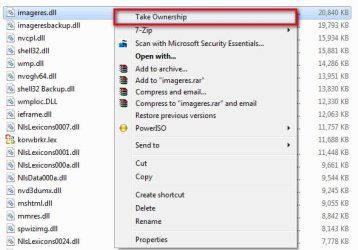
The only thing you will need to do is make some backups of them first and take ownership, which can be very easy if you have added the take ownership shortcut to the context menu.

2009-07-04_195043.jpg

Take Ownership Shortcut

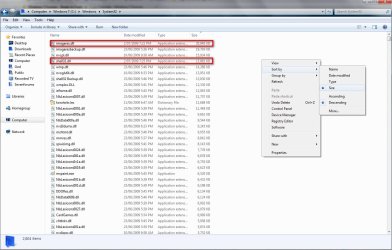
Another tip is to change the view to sort by size and then the files you are trying to find will be at the top of the list as show in the pic.

2009-07-04_194708.jpg
 

My Computer My Computer

At a glance

Windows 7 Ultimate Vista Ultimate x64Core 2 Duo E8500 3.16Ghz @ 3.8Ghz2x2Gigs Patriot PC2-6400 LLInno3D GeForce GTX260 216 SP
Computer Manufacturer/Model Number
Home Brew
OS
Windows 7 Ultimate Vista Ultimate x64
CPU
Core 2 Duo E8500 3.16Ghz @ 3.8Ghz
Motherboard
eVGA 750i FTW
Memory
2x2Gigs Patriot PC2-6400 LL
Graphics Card(s)
Inno3D GeForce GTX260 216 SP
Monitor(s) Displays
ASUS VW222U 22" 2ms Response time
Screen Resolution
1680x1050
Hard Drives
SATA 150GB
SATA II 250GB
USB IDE 750GB Ext.
PSU
HYTEC 600W & Thermaltake 650W Toughpower Power Exp
Case
Thermaltake Armor LCS (Liquid Cooling System)
Cooling
Liquid Cooling System
Keyboard
Logitech G15 Gaming Keyboard
Mouse
Logitech G9 Gaming Mouse
lol Grim. Thanks for the update. I really was just trying to make things easier for you. Not make you explain it more in depth!

Thanks for the assistance either way. Much appreciated.
 

My Computer My Computer

At a glance

Windows 7 RC - 7100 64bitAMD Athlon(tm) 64 x2 4800+ 2.50Ghz Dual Core4 gig Kingston DDR2XFX Nvidia GeForce GTS 250
OS
Windows 7 RC - 7100 64bit
CPU
AMD Athlon(tm) 64 x2 4800+ 2.50Ghz Dual Core
Motherboard
Hewlett Packard
Memory
4 gig Kingston DDR2
Graphics Card(s)
XFX Nvidia GeForce GTS 250
Sound Card
na
Monitor(s) Displays
22" Samsung LCD Syncmaster
Screen Resolution
1680x1050
Hard Drives
300gig Western Digital
PSU
BFG Tech 550watt
Case
Crap stock Dell
Cooling
Side panel open on case, and a box fan blowing in.
Keyboard
G15
Mouse
G9
Internet Speed
Bike Messenger
OK here they are, they are from the latest build 7264 so unless you are using that build I am not sure if they will work so use at your own risk if not and make sure you make a restore point first.

One more very important thing you will have to do is clear the icon cache, located in your user name/AppData/local/IconCache.db to see the AppData folder you will need to set the folder options to show hidden folders.

2009-07-05_022755.jpg

Windows Custom Icons dll's.7z - Windows Live

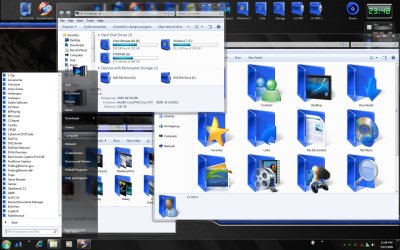
End Result

End Result.jpg
 
Last edited:

My Computer My Computer

At a glance

Windows 7 Ultimate Vista Ultimate x64Core 2 Duo E8500 3.16Ghz @ 3.8Ghz2x2Gigs Patriot PC2-6400 LLInno3D GeForce GTX260 216 SP
Computer Manufacturer/Model Number
Home Brew
OS
Windows 7 Ultimate Vista Ultimate x64
CPU
Core 2 Duo E8500 3.16Ghz @ 3.8Ghz
Motherboard
eVGA 750i FTW
Memory
2x2Gigs Patriot PC2-6400 LL
Graphics Card(s)
Inno3D GeForce GTX260 216 SP
Monitor(s) Displays
ASUS VW222U 22" 2ms Response time
Screen Resolution
1680x1050
Hard Drives
SATA 150GB
SATA II 250GB
USB IDE 750GB Ext.
PSU
HYTEC 600W & Thermaltake 650W Toughpower Power Exp
Case
Thermaltake Armor LCS (Liquid Cooling System)
Cooling
Liquid Cooling System
Keyboard
Logitech G15 Gaming Keyboard
Mouse
Logitech G9 Gaming Mouse
OK here they are, they are from the latest build 7264 so unless you are using that build I am not sure if they will work so use at your own risk if not and make sure you make a restore point first.

One more very important thing you will have to do is clear the icon cache, located in your user name/AppData/local/IconCache.db to see the AppData folder you will need to set the folder options to show hidden folders.

View attachment 16705

Windows Custom Icons dll's.7z - Windows Live

End Result

View attachment 16827

So no one brave enough to try this out yet?
 

My Computer My Computer

At a glance

Windows 7 Ultimate Vista Ultimate x64Core 2 Duo E8500 3.16Ghz @ 3.8Ghz2x2Gigs Patriot PC2-6400 LLInno3D GeForce GTX260 216 SP
Computer Manufacturer/Model Number
Home Brew
OS
Windows 7 Ultimate Vista Ultimate x64
CPU
Core 2 Duo E8500 3.16Ghz @ 3.8Ghz
Motherboard
eVGA 750i FTW
Memory
2x2Gigs Patriot PC2-6400 LL
Graphics Card(s)
Inno3D GeForce GTX260 216 SP
Monitor(s) Displays
ASUS VW222U 22" 2ms Response time
Screen Resolution
1680x1050
Hard Drives
SATA 150GB
SATA II 250GB
USB IDE 750GB Ext.
PSU
HYTEC 600W & Thermaltake 650W Toughpower Power Exp
Case
Thermaltake Armor LCS (Liquid Cooling System)
Cooling
Liquid Cooling System
Keyboard
Logitech G15 Gaming Keyboard
Mouse
Logitech G9 Gaming Mouse
Mr Grim .. i give a try ..but i don t understand what i have to do correctly

The best way to do this is if you are dual booting, have you got a second OS to boot up?
 

My Computer My Computer

At a glance

Windows 7 Ultimate Vista Ultimate x64Core 2 Duo E8500 3.16Ghz @ 3.8Ghz2x2Gigs Patriot PC2-6400 LLInno3D GeForce GTX260 216 SP
Computer Manufacturer/Model Number
Home Brew
OS
Windows 7 Ultimate Vista Ultimate x64
CPU
Core 2 Duo E8500 3.16Ghz @ 3.8Ghz
Motherboard
eVGA 750i FTW
Memory
2x2Gigs Patriot PC2-6400 LL
Graphics Card(s)
Inno3D GeForce GTX260 216 SP
Monitor(s) Displays
ASUS VW222U 22" 2ms Response time
Screen Resolution
1680x1050
Hard Drives
SATA 150GB
SATA II 250GB
USB IDE 750GB Ext.
PSU
HYTEC 600W & Thermaltake 650W Toughpower Power Exp
Case
Thermaltake Armor LCS (Liquid Cooling System)
Cooling
Liquid Cooling System
Keyboard
Logitech G15 Gaming Keyboard
Mouse
Logitech G9 Gaming Mouse
what should i do ??

Nope .. i dont have a second os ... :|
 

Attachments

  • imageres.PNG
    imageres.PNG
    37.4 KB · Views: 33

My Computer My Computer

At a glance

Windows 7
OS
Windows 7
what should i do ??

Nope .. i dont have a second os ... :|

Not sure what that error is exactly but I have the same problem with replacing them while Windows 7 is running and thats why I asked if you have a dual boot with another OS, that way you can boot into the other OS and make all the changes from there without having to worry about a file being in use.
 

My Computer My Computer

At a glance

Windows 7 Ultimate Vista Ultimate x64Core 2 Duo E8500 3.16Ghz @ 3.8Ghz2x2Gigs Patriot PC2-6400 LLInno3D GeForce GTX260 216 SP
Computer Manufacturer/Model Number
Home Brew
OS
Windows 7 Ultimate Vista Ultimate x64
CPU
Core 2 Duo E8500 3.16Ghz @ 3.8Ghz
Motherboard
eVGA 750i FTW
Memory
2x2Gigs Patriot PC2-6400 LL
Graphics Card(s)
Inno3D GeForce GTX260 216 SP
Monitor(s) Displays
ASUS VW222U 22" 2ms Response time
Screen Resolution
1680x1050
Hard Drives
SATA 150GB
SATA II 250GB
USB IDE 750GB Ext.
PSU
HYTEC 600W & Thermaltake 650W Toughpower Power Exp
Case
Thermaltake Armor LCS (Liquid Cooling System)
Cooling
Liquid Cooling System
Keyboard
Logitech G15 Gaming Keyboard
Mouse
Logitech G9 Gaming Mouse
Not sure what that error is exactly but I have the same problem with replacing them while Windows 7 is running and thats why I asked if you have a dual boot with another OS, that way you can boot into the other OS and make all the changes from there without having to worry about a file being in use.


i understand you ...but if its in use ..dont have to do anything ...:rolleyes:
 

My Computer My Computer

At a glance

Windows 7
OS
Windows 7

My Computer My Computer

At a glance

Windows 7 Ultimate Vista Ultimate x64Core 2 Duo E8500 3.16Ghz @ 3.8Ghz2x2Gigs Patriot PC2-6400 LLInno3D GeForce GTX260 216 SP
Computer Manufacturer/Model Number
Home Brew
OS
Windows 7 Ultimate Vista Ultimate x64
CPU
Core 2 Duo E8500 3.16Ghz @ 3.8Ghz
Motherboard
eVGA 750i FTW
Memory
2x2Gigs Patriot PC2-6400 LL
Graphics Card(s)
Inno3D GeForce GTX260 216 SP
Monitor(s) Displays
ASUS VW222U 22" 2ms Response time
Screen Resolution
1680x1050
Hard Drives
SATA 150GB
SATA II 250GB
USB IDE 750GB Ext.
PSU
HYTEC 600W & Thermaltake 650W Toughpower Power Exp
Case
Thermaltake Armor LCS (Liquid Cooling System)
Cooling
Liquid Cooling System
Keyboard
Logitech G15 Gaming Keyboard
Mouse
Logitech G9 Gaming Mouse
i downloaded ..but still shows the same error : file in use
 

My Computer My Computer

At a glance

Windows 7
OS
Windows 7
Sorry that didn't work for me either when I just tried it, I'm trying to search for a solution and the only thing I have come up with so far is this but it's a bit complex.

How to replace files which are in use in Windows

Replacing files which are in use. For non-core files, the simplest solution is often to reboot to Safe Mode and attempt to replace the files. However, some files, such as core-system files, may be in use even in Safe Mode.


Windows offers the ability to replace files on the next boot. This functionality is used by many software installers. To replace a file follow these steps:

  1. While logged in as an administrator, launch your registry editor. Note: On Windows NT and Windows 2000 systems, you must use REGEDT32 as the registry value is a Multi-String (MULTI_SZ) type, which is not supported in REGEDIT. REGEDIT on Windows XP or 2003 systems does support MULTI_SZ.
  2. Browse to: HKEY_LOCAL_MACHINE\SYSTEM\CurrentControlSet\Control\Session Manager
  3. Open the MULTI_SZ registry value PendingFileRenameOperations. Create it if it does not exist.
  4. The format of the entry is as follows:
    • On the first line enter \??\ followed by the path of the new file which will be used as a replacement. The replacement file should be located on a local hard disk to ensure it will be accessible on reboot! It is best to put it in a different folder on the same drive as the file it is replacing.
    • On the second line enter !\??\ followed by the path of the old file which will be replaced.
    • Click OK to save the changes.
    • Close the registry editor.
Example:
I want to update C:\WINDOWS\SYSTEM32\NTOSKRNL.EXE with a new kernel C:\NEWKERNEL\NTOSKRNL.EXE. I edit PendingFileRenameOperations so it reads as follows:
\??\C:\NEWKERNEL\NTOSKRNL.EXE
!\??\C:\WINDOWS\SYSTEM32\NTOSKRNL.EXE

Entries made in this value will cause the files to be changed the next time the system is rebooted or started and all entries will be automatically removed from PendingFileRenameOperations.


You should, of course, use extreme caution whenever replacing files, particularly system files, as it could easily render your system non-functional.


Microsoft also MV.EXE as part of the [ame="http://www.amazon.com/exec/obidos/redirect?link_code=ur2&tag=techbytes0a-20&camp=1789&creative=9325&path=http%3A%2F%2Fwww.amazon.com%2Fgp%2Fproduct%2F0735622329%2Fqid%3D1133466124%2Fsr%3D8-2%2Fref%3Dpd_bbs_2%3Fn%3D507846%2526s%3Dbooks%2526v%3Dglance"]Resource Kit[/ame]
ir
which will automate this registry change through a command-line utility.

http://www.techbytes.ca/techbyte101.html

 

My Computer My Computer

At a glance

Windows 7 Ultimate Vista Ultimate x64Core 2 Duo E8500 3.16Ghz @ 3.8Ghz2x2Gigs Patriot PC2-6400 LLInno3D GeForce GTX260 216 SP
Computer Manufacturer/Model Number
Home Brew
OS
Windows 7 Ultimate Vista Ultimate x64
CPU
Core 2 Duo E8500 3.16Ghz @ 3.8Ghz
Motherboard
eVGA 750i FTW
Memory
2x2Gigs Patriot PC2-6400 LL
Graphics Card(s)
Inno3D GeForce GTX260 216 SP
Monitor(s) Displays
ASUS VW222U 22" 2ms Response time
Screen Resolution
1680x1050
Hard Drives
SATA 150GB
SATA II 250GB
USB IDE 750GB Ext.
PSU
HYTEC 600W & Thermaltake 650W Toughpower Power Exp
Case
Thermaltake Armor LCS (Liquid Cooling System)
Cooling
Liquid Cooling System
Keyboard
Logitech G15 Gaming Keyboard
Mouse
Logitech G9 Gaming Mouse
Anyone else no of a good way of replacing a file in use, feel free to jump in.
 

My Computer My Computer

At a glance

Windows 7 Ultimate Vista Ultimate x64Core 2 Duo E8500 3.16Ghz @ 3.8Ghz2x2Gigs Patriot PC2-6400 LLInno3D GeForce GTX260 216 SP
Computer Manufacturer/Model Number
Home Brew
OS
Windows 7 Ultimate Vista Ultimate x64
CPU
Core 2 Duo E8500 3.16Ghz @ 3.8Ghz
Motherboard
eVGA 750i FTW
Memory
2x2Gigs Patriot PC2-6400 LL
Graphics Card(s)
Inno3D GeForce GTX260 216 SP
Monitor(s) Displays
ASUS VW222U 22" 2ms Response time
Screen Resolution
1680x1050
Hard Drives
SATA 150GB
SATA II 250GB
USB IDE 750GB Ext.
PSU
HYTEC 600W & Thermaltake 650W Toughpower Power Exp
Case
Thermaltake Armor LCS (Liquid Cooling System)
Cooling
Liquid Cooling System
Keyboard
Logitech G15 Gaming Keyboard
Mouse
Logitech G9 Gaming Mouse
Hi Mark,

In addition to your above post the funcionality is provided by the Movefile and pendfiles command line utilities which are part of Sysinternals

PendMoves and MoveFile
 

My Computers My Computers

  • At a glance

    Windows 11 Pro x64 [Latest Release and Releas...Ryzen 9 5950X, 3.8 - 5.2 MHz64GB [2 x 32GB] DDR4 3200MHz4GB NVIDIA GEFORCE GTX 1650 Ti
    Computer type
    PC/Desktop
    Computer Manufacturer/Model Number
    ChillBlast - Custom to my design
    OS
    Windows 11 Pro x64 [Latest Release and Release Preview]
    CPU
    Ryzen 9 5950X, 3.8 - 5.2 MHz
    Motherboard
    Asus Prime X570-Pro
    Memory
    64GB [2 x 32GB] DDR4 3200MHz
    Graphics Card(s)
    4GB NVIDIA GEFORCE GTX 1650 Ti
    Sound Card
    On-board SPDIF to 5.1 System + HDMI [5.1 system]
    Monitor(s) Displays
    32" UHD 32 Bit HDR Monitor + 43" UHD 4K 32Bit HDR TV
    Screen Resolution
    2 x 3840 x 2160 @60Hz
    Hard Drives
    1TB M2 SSD OS, 500GB Fast Access SSD, 2 x 8TB Data + Various Externals from 1TB to 4TB, 10TB NAS
    PSU
    NZXT C750 80 PLUS Gold 750W Modular PSU
    Case
    Workstation Case [Matt Black]
    Cooling
    NZXT Kraken X63 280mm CPU Cooler +2x Quiet Case fans
    Keyboard
    Logitech Wireless MX Keys & K400 + others
    Mouse
    Logitech Wireless MX Master 3S
    Internet Speed
    920 MB Down 50 MB Up
    Antivirus
    BitDefender Total Security Pro
    Browser
    Chrome (always run latest Non-Beta)
    Other Info
    Also run ...
    Laptop - Quad 8GB - Windows 10 Pro x64
    Nexus 7 Android tablet x2
    Samsung 10.2" tablet
    Blackview TAB 8 4G Android Tablet c/w Keyboard
    Wacom Intuos Pro Medium Pen Pad
    Wacom Intuos Pro Small Pen Pad
    Wacom Expresskeys Remote
    Loopdeck+ Graphics Controller
    Shuttle Pro v2 Control
  • At a glance

    Windows 11 Pro x64 Latest RPIntel I7 10750H 5.0GHz32GB [2x16GB] DDR4 2933 MHznVidia GTX1650Ti 4 GB GDDR6
    Computer type
    Laptop
    System Manufacturer/Model Number
    Dell XPS 17 10750H
    OS
    Windows 11 Pro x64 Latest RP
    CPU
    Intel I7 10750H 5.0GHz
    Motherboard
    Dell XPS
    Memory
    32GB [2x16GB] DDR4 2933 MHz
    Graphics Card(s)
    nVidia GTX1650Ti 4 GB GDDR6
    Sound Card
    Stock [Realtek] 4 Speaker
    Monitor(s) Displays
    17" IPS UHD+ Infinity Edge Touchscreen
    Screen Resolution
    3840 x 2400
    Hard Drives
    2TB M2 NVMe, 4TB External + various 500GB & 1TB External NVMe (also have access to spinner HDD from
    PSU
    Stock
    Case
    Stock XPS Aluminium & Carbon Fibre
    Cooling
    Stock - Active Fan Control
    Keyboard
    Backlit + Various Logitech
    Mouse
    Stock Track Pad + Logitech MX Trackball
    Internet Speed
    72 MB Down 18MB Up
    Browser
    Chrome
    Other Info
    Also run ...
    Laptop - Quad 8GB - Windows 10 Pro x64
    Nexus 7 Android tablet x2
    10.2" tablet
    Sony Z3 Android Smartphone
    Wacom Intuos Pro Medium Pen Pad
    Wacom Intuos Pro Small Pen Pad
    Wacom Expresskeys Remote
    Loopdeck+ Graphics Controller
    Shuttle Pro v2 Control Pad
    10TB NAS
OK not sure if this will work but it seemed to when I just tried it, drag the file you want to replace to the desktop and then replace it with the one you downloaded and repeat for each file and let me know when you have done that and we will go from there.
 

My Computer My Computer

At a glance

Windows 7 Ultimate Vista Ultimate x64Core 2 Duo E8500 3.16Ghz @ 3.8Ghz2x2Gigs Patriot PC2-6400 LLInno3D GeForce GTX260 216 SP
Computer Manufacturer/Model Number
Home Brew
OS
Windows 7 Ultimate Vista Ultimate x64
CPU
Core 2 Duo E8500 3.16Ghz @ 3.8Ghz
Motherboard
eVGA 750i FTW
Memory
2x2Gigs Patriot PC2-6400 LL
Graphics Card(s)
Inno3D GeForce GTX260 216 SP
Monitor(s) Displays
ASUS VW222U 22" 2ms Response time
Screen Resolution
1680x1050
Hard Drives
SATA 150GB
SATA II 250GB
USB IDE 750GB Ext.
PSU
HYTEC 600W & Thermaltake 650W Toughpower Power Exp
Case
Thermaltake Armor LCS (Liquid Cooling System)
Cooling
Liquid Cooling System
Keyboard
Logitech G15 Gaming Keyboard
Mouse
Logitech G9 Gaming Mouse
Status
Not open for further replies.
Back
Top