

Ok, I think the Bluray icon is located in 'imagesp1.dll' in both the 'System32' & 'SysWOW64' folders, which means I'll have to alter the installer to include this dll...
If someone with a Blu-Ray drive could confirm that the selected icon shown below is the one please.
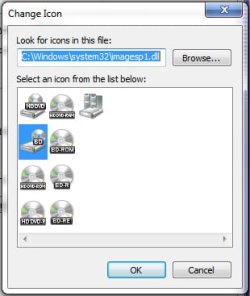

If someone with a Blu-Ray drive could confirm that the selected icon shown below is the one please.
Thanx but Mr GRiM deserves the credit.. he created the icon pack, I just wrote the installer.Good Work..Generators.. !!!! i am too going to launch set of other icon fileZ
My Computer
At a glance
XP Pro SP3 x86/Vista SP2 x64/Win7 x64 Triple-...AMD64 X2 AM2 5000+Corsair TWX 2Gb (2x1Gb) DDR2 800MhzPCI-X 2.0 Inno3D (NVidia) 9500GT 1Gb DDR2
- Computer Manufacturer/Model Number
- Self Built
- OS
- XP Pro SP3 x86/Vista SP2 x64/Win7 x64 Triple-boot
- CPU
- AMD64 X2 AM2 5000+
- Motherboard
- Asus MSN-X Plus
- Memory
- Corsair TWX 2Gb (2x1Gb) DDR2 800Mhz
- Graphics Card(s)
- PCI-X 2.0 Inno3D (NVidia) 9500GT 1Gb DDR2
- Sound Card
- Onboard Realtec ALC662-GR
- Monitor(s) Displays
- Relisys 17' CRT (model unknown)
- Screen Resolution
- 1024x768
- Hard Drives
- 750Gb Samsung 7200-3Gb/s 32Mb Cache SATA
- PSU
- 500W
- Cooling
- Standard AMD CPU Fan, One side, front and rear case fan.
- Keyboard
- Microsoft Multimedia Keyboard
- Mouse
- Samsung Optical
- Internet Speed
- 10M



 )
)


