Solved customizing Aero colors

decibelle

New member
Local time
1:02 AM
Messages
72
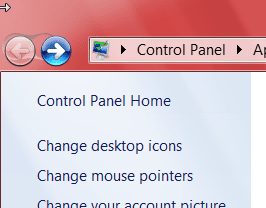
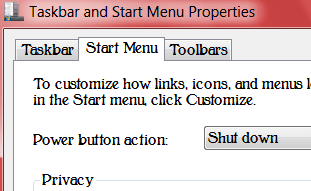
I would like to improve upon Aero colors themes by changing the light blue areas like the menubar, and the gray
areas that you have in some dialog boxes and other
windows, to coordinate with the main color. Changing the
main color without being able to change the other colors is
not particularly appealing, as shown in my attachments
here. I've looked through shellstyle.dll, shellstyle.dll.mui,
and aero.msstyles with ResHacker, and I can't find a way to
change those particular elements. Can anyone tell me if
there is a way?


Thanks,
Ellen
 

Attachments

  • Notepad.png
    Notepad.png
    3.5 KB · Views: 53
  • Personalization.png
    Personalization.png
    10.5 KB · Views: 54
  • Taskbar and Start Menu Properties.png
    Taskbar and Start Menu Properties.png
    6.9 KB · Views: 53

My Computer

Computer type
PC/Desktop
OS
XP Home, Windows 7 Professional 64-bit
That left part of the Control Panel is a bitmap (.bmp) image #632 and 633 in the shell32.dll in C:\Windows\System32 and if you are using a 64-bit system it will be in both C:\Windows\System32 and C:\Windows\SysWOW64

Menubar is image #972 and the gray background is image #820 in the aero.msstyles.
I would recommend that you create a new theme from scratch so you do not corrupt the original look at Post #38 Here it will show you how.

You will need to do 1 of these 2 ways of Enabling custom themes for it to work.
http://www.sevenforums.com/tutorials/34579-enabling-custom-themes-windows-7-a.html
Or
http://www.sevenforums.com/tutorials/28377-theme-how-apply-custom-themes.html?filter

Jerry
 

My Computer

Computer type
Laptop
Computer Manufacturer/Model Number
Sager NP9170
OS
Win 7 Pro x64 / Win 10 Pro
CPU
Intel(R) Core(TM) i7-3630QM CPU @ 2.40GHz
Motherboard
CLEVO P170EM
Memory
12 GB
Graphics Card(s)
(1) Intel(R) HD Graphics 4000 (2) NVIDIA GeForce GTX 675M
Sound Card
(1) Realtek High Definition Audio (2) Intel(R) Display Aud
Monitor(s) Displays
17.3
Screen Resolution
1920x1080
Hard Drives
(1) Samsung 860 EVO 500GB(OS) (1) Samsung 860 EVO 500GB(Data)
Keyboard
Backlite
Antivirus
MSE, Malwarebytes Pro
Browser
Firefox
Other Info
DESKTOP: Custom-built.
OS: Win 10 Pro x64.
CASE: Rosewill R5.
CPU: Intel I5 4670K CPU @ 3.40GHz.
CPU COOLER: Cool Master Hyper 212 EVO.
MOTHERBOARD: Asus Z87-A.
MEMORY: Kingston HyperX 2x4 GB.
GPU: Nvidia Geforce 650 TI.
PSU: Corsair TX750.
DRIVES: (1) Samsung 840 120 GB SSD (2) Western Digital blue 500 GB 7200 RPM.
Jerry,

Thanks for the information. It raises a few more questions.

If you modify any of the files in aero.msstyles and shell32.dll, does it automatically make your system think those files are corrupted? Or is your recommendation to create a new theme simply best practice?

Also, is it simply impossible to modify information somewhere that will change all light blue elements to a different color (like what is possible in Windows Classic)? Does each one have to be done separately? It seems like a ton of work.

Thanks,
Ellen
 

My Computer

Computer type
PC/Desktop
OS
XP Home, Windows 7 Professional 64-bit
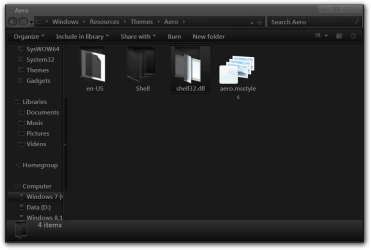
If you modify any of the files in aero.msstyles and shell32.dll, does it automatically make your system think those files are corrupted?
If you need to run sfc /scannow it will replace the shell32.dll and maybe aero.msstyles.
A other way to do this(for the left side of control panel) is to install and use Theme Resource Changer How to use theme resource changer put the shell32.dll folder inside the zip folder below in the new theme folder and edit the images inside that folder.
2.png3.png
View attachment shell32.dll.zip

Or is your recommendation to create a new theme simply best practice?
Yes you do not want to corrupt the default one.

Also, is it simply impossible to modify information somewhere that will change all light blue elements to a different color (like what is possible in Windows Classic)? Does each one have to be done separately? It seems like a ton of work.
It has to be done separately aero uses images, Classic does it differently.

Jerry
 

My Computer

Computer type
Laptop
Computer Manufacturer/Model Number
Sager NP9170
OS
Win 7 Pro x64 / Win 10 Pro
CPU
Intel(R) Core(TM) i7-3630QM CPU @ 2.40GHz
Motherboard
CLEVO P170EM
Memory
12 GB
Graphics Card(s)
(1) Intel(R) HD Graphics 4000 (2) NVIDIA GeForce GTX 675M
Sound Card
(1) Realtek High Definition Audio (2) Intel(R) Display Aud
Monitor(s) Displays
17.3
Screen Resolution
1920x1080
Hard Drives
(1) Samsung 860 EVO 500GB(OS) (1) Samsung 860 EVO 500GB(Data)
Keyboard
Backlite
Antivirus
MSE, Malwarebytes Pro
Browser
Firefox
Other Info
DESKTOP: Custom-built.
OS: Win 10 Pro x64.
CASE: Rosewill R5.
CPU: Intel I5 4670K CPU @ 3.40GHz.
CPU COOLER: Cool Master Hyper 212 EVO.
MOTHERBOARD: Asus Z87-A.
MEMORY: Kingston HyperX 2x4 GB.
GPU: Nvidia Geforce 650 TI.
PSU: Corsair TX750.
DRIVES: (1) Samsung 840 120 GB SSD (2) Western Digital blue 500 GB 7200 RPM.
I can't find a way to download the
 

My Computer

Computer type
PC/Desktop
OS
XP Home, Windows 7 Professional 64-bit
I've looked all over and can't find a link to download the theme resource changer (for 64-bit). Any ideas? Does one still exist?
 

My Computer

Computer type
PC/Desktop
OS
XP Home, Windows 7 Professional 64-bit
I think you need to join to get it, but here it is for you in a zip folder at the bottom of this post.

Jerry
 

Attachments

My Computer

Computer type
Laptop
Computer Manufacturer/Model Number
Sager NP9170
OS
Win 7 Pro x64 / Win 10 Pro
CPU
Intel(R) Core(TM) i7-3630QM CPU @ 2.40GHz
Motherboard
CLEVO P170EM
Memory
12 GB
Graphics Card(s)
(1) Intel(R) HD Graphics 4000 (2) NVIDIA GeForce GTX 675M
Sound Card
(1) Realtek High Definition Audio (2) Intel(R) Display Aud
Monitor(s) Displays
17.3
Screen Resolution
1920x1080
Hard Drives
(1) Samsung 860 EVO 500GB(OS) (1) Samsung 860 EVO 500GB(Data)
Keyboard
Backlite
Antivirus
MSE, Malwarebytes Pro
Browser
Firefox
Other Info
DESKTOP: Custom-built.
OS: Win 10 Pro x64.
CASE: Rosewill R5.
CPU: Intel I5 4670K CPU @ 3.40GHz.
CPU COOLER: Cool Master Hyper 212 EVO.
MOTHERBOARD: Asus Z87-A.
MEMORY: Kingston HyperX 2x4 GB.
GPU: Nvidia Geforce 650 TI.
PSU: Corsair TX750.
DRIVES: (1) Samsung 840 120 GB SSD (2) Western Digital blue 500 GB 7200 RPM.
Thanks. I actually did join, but I still couldn't find the link.
 

My Computer

Computer type
PC/Desktop
OS
XP Home, Windows 7 Professional 64-bit
>It has to be done separately aero uses images, Classic does it differently.

Jerry<

Jerry,

I'm guessing that the answer to this question will be no, but is there any way to hack Windows classic a little bit to add a texture or something like that?
 

My Computer

Computer type
PC/Desktop
OS
XP Home, Windows 7 Professional 64-bit
I'm guessing that the answer to this question will be no, but is there any way to hack Windows classic a little bit to add a texture or something like that?
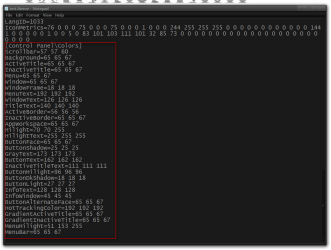
A little, open the test.theme file in the zip folder below with notepad and edit under Control Panel(the number are colors) and put it in C:\Windows\Resources\Ease of Access Themes and test.

Jerry
test.theme - Notepad.png
 

Attachments

My Computer

Computer type
Laptop
Computer Manufacturer/Model Number
Sager NP9170
OS
Win 7 Pro x64 / Win 10 Pro
CPU
Intel(R) Core(TM) i7-3630QM CPU @ 2.40GHz
Motherboard
CLEVO P170EM
Memory
12 GB
Graphics Card(s)
(1) Intel(R) HD Graphics 4000 (2) NVIDIA GeForce GTX 675M
Sound Card
(1) Realtek High Definition Audio (2) Intel(R) Display Aud
Monitor(s) Displays
17.3
Screen Resolution
1920x1080
Hard Drives
(1) Samsung 860 EVO 500GB(OS) (1) Samsung 860 EVO 500GB(Data)
Keyboard
Backlite
Antivirus
MSE, Malwarebytes Pro
Browser
Firefox
Other Info
DESKTOP: Custom-built.
OS: Win 10 Pro x64.
CASE: Rosewill R5.
CPU: Intel I5 4670K CPU @ 3.40GHz.
CPU COOLER: Cool Master Hyper 212 EVO.
MOTHERBOARD: Asus Z87-A.
MEMORY: Kingston HyperX 2x4 GB.
GPU: Nvidia Geforce 650 TI.
PSU: Corsair TX750.
DRIVES: (1) Samsung 840 120 GB SSD (2) Western Digital blue 500 GB 7200 RPM.
Thanks, I know about that, but what about textures -- no go?
 

My Computer

Computer type
PC/Desktop
OS
XP Home, Windows 7 Professional 64-bit
No go.
 

My Computer

Computer type
Laptop
Computer Manufacturer/Model Number
Sager NP9170
OS
Win 7 Pro x64 / Win 10 Pro
CPU
Intel(R) Core(TM) i7-3630QM CPU @ 2.40GHz
Motherboard
CLEVO P170EM
Memory
12 GB
Graphics Card(s)
(1) Intel(R) HD Graphics 4000 (2) NVIDIA GeForce GTX 675M
Sound Card
(1) Realtek High Definition Audio (2) Intel(R) Display Aud
Monitor(s) Displays
17.3
Screen Resolution
1920x1080
Hard Drives
(1) Samsung 860 EVO 500GB(OS) (1) Samsung 860 EVO 500GB(Data)
Keyboard
Backlite
Antivirus
MSE, Malwarebytes Pro
Browser
Firefox
Other Info
DESKTOP: Custom-built.
OS: Win 10 Pro x64.
CASE: Rosewill R5.
CPU: Intel I5 4670K CPU @ 3.40GHz.
CPU COOLER: Cool Master Hyper 212 EVO.
MOTHERBOARD: Asus Z87-A.
MEMORY: Kingston HyperX 2x4 GB.
GPU: Nvidia Geforce 650 TI.
PSU: Corsair TX750.
DRIVES: (1) Samsung 840 120 GB SSD (2) Western Digital blue 500 GB 7200 RPM.
>That left part of the Control Panel is a bitmap (.bmp) image #632 and 633 in the shell32.dll in C:\Windows\System32 and if you are using a 64-bit system it will be in both C:\Windows\System32 and C:\Windows\SysWOW64<

Jerry,

Is it the exact same shell32.dll in both locations? In other words, can I paste the edited copy into both locations? Or would I have to edit each one separately?
 

My Computer

Computer type
PC/Desktop
OS
XP Home, Windows 7 Professional 64-bit
You have to edit each one separately. You can use the same images in both.

Jerry
 

My Computer

Computer type
Laptop
Computer Manufacturer/Model Number
Sager NP9170
OS
Win 7 Pro x64 / Win 10 Pro
CPU
Intel(R) Core(TM) i7-3630QM CPU @ 2.40GHz
Motherboard
CLEVO P170EM
Memory
12 GB
Graphics Card(s)
(1) Intel(R) HD Graphics 4000 (2) NVIDIA GeForce GTX 675M
Sound Card
(1) Realtek High Definition Audio (2) Intel(R) Display Aud
Monitor(s) Displays
17.3
Screen Resolution
1920x1080
Hard Drives
(1) Samsung 860 EVO 500GB(OS) (1) Samsung 860 EVO 500GB(Data)
Keyboard
Backlite
Antivirus
MSE, Malwarebytes Pro
Browser
Firefox
Other Info
DESKTOP: Custom-built.
OS: Win 10 Pro x64.
CASE: Rosewill R5.
CPU: Intel I5 4670K CPU @ 3.40GHz.
CPU COOLER: Cool Master Hyper 212 EVO.
MOTHERBOARD: Asus Z87-A.
MEMORY: Kingston HyperX 2x4 GB.
GPU: Nvidia Geforce 650 TI.
PSU: Corsair TX750.
DRIVES: (1) Samsung 840 120 GB SSD (2) Western Digital blue 500 GB 7200 RPM.
>and the gray background is image #820 in the aero.msstyles<

Jerry,

Actually, 820 is the white part, not the gray, at least on my system. Does this vary from one build to another? Mine is Windows 7 Professional build 7601 (SP1, of course). What a headache that would be. You wouldn't happen to know what other image the gray area might be?
 

My Computer

Computer type
PC/Desktop
OS
XP Home, Windows 7 Professional 64-bit
>and the gray background is image #820 in the aero.msstyles<

Jerry,

Actually, 820 is the white part, not the gray, at least on my system. Does this vary from one build to another? Mine is Windows 7 Professional build 7601 (SP1, of course). What a headache that would be. You wouldn't happen to know what other image the gray area might be?

That 820 number is for the default Aero theme after theme has been changed with Windows style builder number change. Use this location below.
Lists, Menus & Tabs > Tab > Body

Jerry
 

My Computer

Computer type
Laptop
Computer Manufacturer/Model Number
Sager NP9170
OS
Win 7 Pro x64 / Win 10 Pro
CPU
Intel(R) Core(TM) i7-3630QM CPU @ 2.40GHz
Motherboard
CLEVO P170EM
Memory
12 GB
Graphics Card(s)
(1) Intel(R) HD Graphics 4000 (2) NVIDIA GeForce GTX 675M
Sound Card
(1) Realtek High Definition Audio (2) Intel(R) Display Aud
Monitor(s) Displays
17.3
Screen Resolution
1920x1080
Hard Drives
(1) Samsung 860 EVO 500GB(OS) (1) Samsung 860 EVO 500GB(Data)
Keyboard
Backlite
Antivirus
MSE, Malwarebytes Pro
Browser
Firefox
Other Info
DESKTOP: Custom-built.
OS: Win 10 Pro x64.
CASE: Rosewill R5.
CPU: Intel I5 4670K CPU @ 3.40GHz.
CPU COOLER: Cool Master Hyper 212 EVO.
MOTHERBOARD: Asus Z87-A.
MEMORY: Kingston HyperX 2x4 GB.
GPU: Nvidia Geforce 650 TI.
PSU: Corsair TX750.
DRIVES: (1) Samsung 840 120 GB SSD (2) Western Digital blue 500 GB 7200 RPM.
Jerry,

Thanks . . . but I don't understand . . . What do you mean, "the default Aero theme after theme has been changed with Windows style builder number change"? I'm still pretty new at this stuff. I don't use Windows style builder – not yet, anyway.

And I admit I have no idea what you mean by "Use this location below.
Lists, Menus & Tabs > Tab > Body" Could you please explain in a more basic way? thx
 

My Computer

Computer type
PC/Desktop
OS
XP Home, Windows 7 Professional 64-bit
Jerry,

Thanks . . . but I don't understand . . . What do you mean, "the default Aero theme after theme has been changed with Windows style builder number change"? I'm still pretty new at this stuff. I don't use Windows style builder – not yet, anyway.

And I admit I have no idea what you mean by "Use this location below.
Lists, Menus & Tabs > Tab > Body" Could you please explain in a more basic way? thx

Disregard when I had to say up here I have you confused with another person that was using Windows style builder.


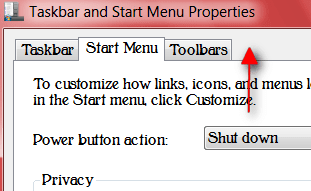
Are you talking about that gray area I have the red arrow pointing to? If so that is not a image that is a fill color that can only be accessed from Windows style builder that I know of.

Jerry
Taskbar and Start Menu Properties.png
 

My Computer

Computer type
Laptop
Computer Manufacturer/Model Number
Sager NP9170
OS
Win 7 Pro x64 / Win 10 Pro
CPU
Intel(R) Core(TM) i7-3630QM CPU @ 2.40GHz
Motherboard
CLEVO P170EM
Memory
12 GB
Graphics Card(s)
(1) Intel(R) HD Graphics 4000 (2) NVIDIA GeForce GTX 675M
Sound Card
(1) Realtek High Definition Audio (2) Intel(R) Display Aud
Monitor(s) Displays
17.3
Screen Resolution
1920x1080
Hard Drives
(1) Samsung 860 EVO 500GB(OS) (1) Samsung 860 EVO 500GB(Data)
Keyboard
Backlite
Antivirus
MSE, Malwarebytes Pro
Browser
Firefox
Other Info
DESKTOP: Custom-built.
OS: Win 10 Pro x64.
CASE: Rosewill R5.
CPU: Intel I5 4670K CPU @ 3.40GHz.
CPU COOLER: Cool Master Hyper 212 EVO.
MOTHERBOARD: Asus Z87-A.
MEMORY: Kingston HyperX 2x4 GB.
GPU: Nvidia Geforce 650 TI.
PSU: Corsair TX750.
DRIVES: (1) Samsung 840 120 GB SSD (2) Western Digital blue 500 GB 7200 RPM.
Ah . . .OK, looks like I'll have to check that out. I've looked at the website. Is there a trial version? I'm not finding one.
 

My Computer

Computer type
PC/Desktop
OS
XP Home, Windows 7 Professional 64-bit
No trial at all, but for just under $23 US it's makes editing the .msstyles very easy.

Jerry
 

My Computer

Computer type
Laptop
Computer Manufacturer/Model Number
Sager NP9170
OS
Win 7 Pro x64 / Win 10 Pro
CPU
Intel(R) Core(TM) i7-3630QM CPU @ 2.40GHz
Motherboard
CLEVO P170EM
Memory
12 GB
Graphics Card(s)
(1) Intel(R) HD Graphics 4000 (2) NVIDIA GeForce GTX 675M
Sound Card
(1) Realtek High Definition Audio (2) Intel(R) Display Aud
Monitor(s) Displays
17.3
Screen Resolution
1920x1080
Hard Drives
(1) Samsung 860 EVO 500GB(OS) (1) Samsung 860 EVO 500GB(Data)
Keyboard
Backlite
Antivirus
MSE, Malwarebytes Pro
Browser
Firefox
Other Info
DESKTOP: Custom-built.
OS: Win 10 Pro x64.
CASE: Rosewill R5.
CPU: Intel I5 4670K CPU @ 3.40GHz.
CPU COOLER: Cool Master Hyper 212 EVO.
MOTHERBOARD: Asus Z87-A.
MEMORY: Kingston HyperX 2x4 GB.
GPU: Nvidia Geforce 650 TI.
PSU: Corsair TX750.
DRIVES: (1) Samsung 840 120 GB SSD (2) Western Digital blue 500 GB 7200 RPM.
Back
Top