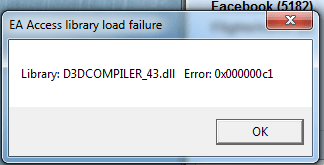
d3dcopiler_43.dll error 0x000000c1

Ataraxey

New member
Local time
2:35 PM
Messages
25
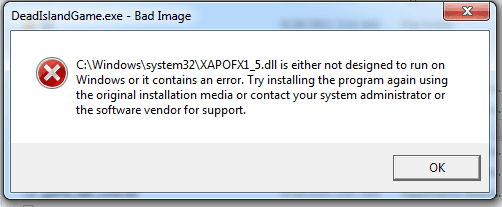
I've been getting this error randomly when using Safari for about a month now, but now it's coming up when attempting to run BF3 or Dead Island. Other games all seem to work fine, but these ones do not.

I attached a picture of the exact error when running BF3 i got when running a log file.

What can i do to fix my d3d file? I've already installed a new version of direct X that seemed like the newest one, but it doesnt seem to have done anything.
 

Attachments

  • d3d error.png
    d3d error.png
    7.3 KB · Views: 778
  • DEAD ISLAND ERROR.png
    DEAD ISLAND ERROR.png
    9 KB · Views: 13

My Computer

OS
Windows 7 Ultimate 64 BIT
CPU
Intel i7-970
Motherboard
Rampage 3 Formula
Memory
6 gigs G.SKILL PI
Graphics Card(s)
EVGA Nvidia GTX 580 Hydro Copper 2
Sound Card
n/a
Monitor(s) Displays
Dell SP2309W
Screen Resolution
2048x1152
Hard Drives
125 GB Crucial C300 (boot drive)
977 GB Samsung spinpoint
625 GB WD Black
PSU
Antec Trupower 750w
Case
CM 690II
Cooling
Watercooling 2 rad loop
How to fix xapofx1_5.dll error

File Name:*XAPOFX1_5.dll
Description:*XAPOFX1_5.dll is Direct3D DLL to support Windows multimedia and PC games.
Common Error Messages:*File Not Found, Missing File, Exception Errors
PC Game Name:*Microsoft DirectX for Windows
Publisher Site:*NTx64
Applied To:*Windows 7, Windows Server 2003, Windows Server 2008, Windows Vista, Windows XP

How to Fix XAPOFX1_5.dll Error

Method 1: Download and then install the latest version of DirectX
To resolve this problem, download and then install the*latest version of DirectX*End-User Runtimes Web Installer.

Method 2: Manually copy the file
To resolve this issue, copy the XAPOFX1_5.dll file from the disc 1 CD/DVD of the game CD/DVD pack to the corresponding game folder. To do this, follow the appropriate steps for your version of Windows:

Windows 7 or Windows Vista*
1. Insert the disc 1 CD/DVD for your game into the CD/DVD drive of the computer.
2. Click Start, and then click Documents.
3. Locate and then click Computer.
4. Locate and then click the CD/DVD drive.
5. Locate and then click the following folder:
CDDrive: DirectX9
Note In this path, CDDrive represents the drive letter of the CD drive.
6. Double-click Apr2005_d3dx9_25_x86.cab, right-click XAPOFX1_5.dll , and then click Copy.
Note Use the Apr2005_d3dx9_25_x64.cab file for the x64-based version of the Windows operating system.
7. Locate the following folder for your game:
Drive:Program FilesMicrosoft GamesGame Title

Note In this path, Drive represents the drive letter on which the game is installed, and Game Title represents the game that you want to repair.
8. Right-click the game folder that corresponds to the game that is installed on the computer, and then click Paste.

Note If you have installed more than one game on the computer, repeat steps 7and 8 for the other games.

Windows XP*
1. Insert the disc 1 CD/DVD for your game into the CD/DVD drive of the computer.
2. Click Start, point to Programs, point to Accessories, and then click Windows Explorer.
3. Locate and then click the following folder:
CDDrive: DirectX9
Note In this path, CDDrive represents the drive letter of the CD drive.
4. Double-click Apr2005_d3dx9_25_x86.cab, right-click XAPOFX1_5.dll , and then click Copy.
Note Use the Apr2005_d3dx9_25_x64.cab file for the x64-based version of the Microsoft Windows operating system.
5. Locate the following folder for your game:
Drive:Program FilesMicrosoft GamesGame Title
Note In this path, Drive represents the drive letter of the drive on which the game is installed, and Game Title represents the game that you want to repair.
6. Right-click the game folder that corresponds to the game that is installed on the computer, and then click Paste.

Note If you have installed more than one game on the computer, repeat steps 5 and 6 for the other games.

Source: How to fix xapofx1_5.dll error | DLL Suite Blog

It's only logical to do the same thing with the other dll extension as well, but it seems like the directx is corrupt all over, have you tried installing directx off the disc.
 

My Computer

Computer type
PC/Desktop
Computer Manufacturer/Model Number
Custom Build
OS
Windows 7 Ultimate x64 SP1
CPU
Intel Q6600 @ 2.6Ghz
Motherboard
Evga NF78-CK-132-A 3-Way SLI
Memory
4Gb DDR2 Corsair Dominator @ 800Mhz 5-5-5-15
Graphics Card(s)
EVGA 560 GTX SC FTW 1GB
Sound Card
Realtek HD 7.1 Audio, Plantronics GameCom780 7.1 Headset
Monitor(s) Displays
Dell S2409W
Screen Resolution
1920 x 1080
Hard Drives
SanDisk SDSSDHII-120G-G25 120GB SSD
Samsung 7200RPM 750Gb SATA
Samsung 850 EVO 120GB SSD
Western Digital Green 1TB 7200RPM
PSU
Xigmatek 750W Quad sli quad core 80% eff
Case
Antec 900 Gaming Case
Cooling
Zalman CNPS9700-NT NVIDIA Tritium
Keyboard
Logitech generic keyboard, MS wireless keyboard
Mouse
Razor Lachesis Banshee V2 Blue, 4000DPI, MS wireless mouse
Internet Speed
152Mb Virgin Media Fibre Optic
Antivirus
Microsoft Security Essentials
Browser
Google Chrome
Other Info
Wireless Gaming Receiver for Windows, Wireless Xbox 360 Pad

My Computer

OS
Windows 7 Ultimate 64 BIT
CPU
Intel i7-970
Motherboard
Rampage 3 Formula
Memory
6 gigs G.SKILL PI
Graphics Card(s)
EVGA Nvidia GTX 580 Hydro Copper 2
Sound Card
n/a
Monitor(s) Displays
Dell SP2309W
Screen Resolution
2048x1152
Hard Drives
125 GB Crucial C300 (boot drive)
977 GB Samsung spinpoint
625 GB WD Black
PSU
Antec Trupower 750w
Case
CM 690II
Cooling
Watercooling 2 rad loop
Also - i'm confused

Previously i put the new DLL's into the c/windows/win32 folder, but in that you say to put it into the actual games folder?
 

My Computer

OS
Windows 7 Ultimate 64 BIT
CPU
Intel i7-970
Motherboard
Rampage 3 Formula
Memory
6 gigs G.SKILL PI
Graphics Card(s)
EVGA Nvidia GTX 580 Hydro Copper 2
Sound Card
n/a
Monitor(s) Displays
Dell SP2309W
Screen Resolution
2048x1152
Hard Drives
125 GB Crucial C300 (boot drive)
977 GB Samsung spinpoint
625 GB WD Black
PSU
Antec Trupower 750w
Case
CM 690II
Cooling
Watercooling 2 rad loop
Ignore that nonsense.
Just update your DirectX components using the official Microsoft Directx update
Nevermind copying anything manually, install it using the link i provided.
 

My Computer

Computer Manufacturer/Model Number
Selfbuilt
OS
Windows 7 Ultimate 64bit
CPU
i7 2600k
Motherboard
asus P8Z68-V LE
Memory
16GB (4x4) corsair vengeance
Graphics Card(s)
Intel HD3000 iGPU / AMD HD6870 1024MB
Sound Card
bitstreamed to an Onkyo 609
Monitor(s) Displays
Asus VE278 27" LED / Bravia EX7 60" LED
Screen Resolution
native 1080p x2
Hard Drives
4x 2TB int. + 2x 2TB external and a SSD for the boot drive.
PSU
650w Antec
Case
NZXT tempest evo
Cooling
air/stock
Keyboard
Dell
Mouse
logitech m505
Internet Speed
dual: cable/blackberry tether for travel use
Other Info
BD re-writer //
asus notebook G73Jw
I already tried that, whenever i do it says it cant update because im already on a newer version
 

My Computer

OS
Windows 7 Ultimate 64 BIT
CPU
Intel i7-970
Motherboard
Rampage 3 Formula
Memory
6 gigs G.SKILL PI
Graphics Card(s)
EVGA Nvidia GTX 580 Hydro Copper 2
Sound Card
n/a
Monitor(s) Displays
Dell SP2309W
Screen Resolution
2048x1152
Hard Drives
125 GB Crucial C300 (boot drive)
977 GB Samsung spinpoint
625 GB WD Black
PSU
Antec Trupower 750w
Case
CM 690II
Cooling
Watercooling 2 rad loop
Did you try with the link I provided?
The link you had posted to was for the redistributables.
 

My Computer

Computer Manufacturer/Model Number
Selfbuilt
OS
Windows 7 Ultimate 64bit
CPU
i7 2600k
Motherboard
asus P8Z68-V LE
Memory
16GB (4x4) corsair vengeance
Graphics Card(s)
Intel HD3000 iGPU / AMD HD6870 1024MB
Sound Card
bitstreamed to an Onkyo 609
Monitor(s) Displays
Asus VE278 27" LED / Bravia EX7 60" LED
Screen Resolution
native 1080p x2
Hard Drives
4x 2TB int. + 2x 2TB external and a SSD for the boot drive.
PSU
650w Antec
Case
NZXT tempest evo
Cooling
air/stock
Keyboard
Dell
Mouse
logitech m505
Internet Speed
dual: cable/blackberry tether for travel use
Other Info
BD re-writer //
asus notebook G73Jw
yes, when i attempt to update it says it cant because im on a newer version
 

My Computer

OS
Windows 7 Ultimate 64 BIT
CPU
Intel i7-970
Motherboard
Rampage 3 Formula
Memory
6 gigs G.SKILL PI
Graphics Card(s)
EVGA Nvidia GTX 580 Hydro Copper 2
Sound Card
n/a
Monitor(s) Displays
Dell SP2309W
Screen Resolution
2048x1152
Hard Drives
125 GB Crucial C300 (boot drive)
977 GB Samsung spinpoint
625 GB WD Black
PSU
Antec Trupower 750w
Case
CM 690II
Cooling
Watercooling 2 rad loop
Back
Top