Solved Constant .dll errors trying to do anything on Windows 7

soliunasm

New member
Local time
11:55 AM
Messages
34
I'm having some major problems trying to use any of the actual computer services or Microsoft-specific programs. I can access Control Panel and some of the sections, but most of them either say they fail to load or (null). All administrative tools refuse to load, and sfc /scannow is unable to be run at all even in safe mode. Safe Mode has the same error messages as base mode.

The problem is specifically "The procedure entry point could not be located in the dynamic link library KERNEL32.dll", this shows up whenever I try to use anything Microsoft related. Firefox loads up just fine including watching stuff via Flash Player, programs like Steam load up just fine (Though I haven't tested games yet), and I can normally browse My Computer just fine, however trying to do something like opening MS Paint is impossible, running Media Player Classic isn't possible, Aero doesn't want to load at all so I just have the default taskbar, Windows Updates refuses to load for about 20 minutes and then when it finally does it says it has an error, things like viewing the error reports don't even load a window, and so on. There is also a massive error that happens when I try to log in, there's a lot of Hexidecimal error messages that show up, I'll see if I can attach a picture but I'm not sure if it's possible.

This computer was fine up until this morning when I turned it on. I nor anyone else have installed any system updates or programs within the past month or so and it has been problem free for a couple years now, however it did install a "critical system update" two days ago on its own which I could system restore off of, but even when it did succeed it fixed nothing and trying to do it again just gave a bunch of error messages. Running a repair disc also said it found no errors and when I try to run sfc /scannow from it it tells me it's in the middle of a repair so it can't do it.

I have run a virus scan via Malware Bytes which did succeed, and it said it found nothing after an hour of its threat scan. Kernel32.dll is still kernel32.dll in System32, it's not Kernel32.exe like some things I found mentioning it on Google so I'm at a complete loss here, does anyone have any ideas? I'm trying to avoid a clean install as that would mean purchasing another hard drive to backup everything to.

One other thing I found mentioned installing a C++ redistributable from Microsoft's site and while it could load up, it eventually just told me there was a fatal error and it can't even install. I keep noticing that when people bring up this issue there's also a specific name between "entry" and "could" but I don't have any sort of code, it looks like two spaces were put there instead of any sort of name.
 

My Computer

Computer type
PC/Desktop
OS
Windows 7 Professional x64
CPU
AMD Phenom II X2 555
Motherboard
ASUSTeK Computer INC. M4A87TD/USB3
Memory
8.00 GB Dual-Channel DDR3 @ 668MHz
Graphics Card(s)
ATI Radeon Sapphire 5770
Screen Resolution
1920x1080 & 1600x1200
Hard Drives
977GB SAMSUNG SAMSUNG HD103SJ ATA Device
977GB Western Digital WDC WD1002FAEX-00Y9A0 ATA Device
A "critical system update" I haven`t seen any critical update lately. Did you read it`s description ?

And how did it do this update on it`s own ?

Can you do an earlier system restore then the one you tried ?

The system restore mentioned it as a "Critical restore point" or something like that, I didn't mean to mislead or anything. There was one on 12/28 and 12/25, I just tend to leave these updates for ages and occasionally Microsoft just forces a handful every so often when I go to shut down the computer.

I did the 12/25 restore point and it worked, tried doing another restore after I noticed nothing got fixed and it gave me errors after that. I'm at my wit's end here, I've been at this for about six hours now and it seems like I'm the only one with this issue with the only solutions being to get a third-party download of it and that's just not a smart thing to do.

I feel like it can't be a virus since Malware Bytes didn't catch it and that thing is updated so often and has fantastic support on top of me taking advantage of an adblocker and tracking stopper and not really visiting seedy sites in the first place. It's always possible it could be, so I'm not ruling it out, but that's how I feel about it.
 

My Computer

Computer type
PC/Desktop
OS
Windows 7 Professional x64
CPU
AMD Phenom II X2 555
Motherboard
ASUSTeK Computer INC. M4A87TD/USB3
Memory
8.00 GB Dual-Channel DDR3 @ 668MHz
Graphics Card(s)
ATI Radeon Sapphire 5770
Screen Resolution
1920x1080 & 1600x1200
Hard Drives
977GB SAMSUNG SAMSUNG HD103SJ ATA Device
977GB Western Digital WDC WD1002FAEX-00Y9A0 ATA Device
Sorry, I deleted my message after re reading and seeing you could not do an earlier restore.

And you don`t have a disk image to fall back to ?
 

My Computer

Computer type
PC/Desktop
Computer Manufacturer/Model Number
Skylake Special #666
OS
Windows 10 Pro x64
CPU
Intel Core i7 6700K
Motherboard
Asus Sabertooth Z170 Mark 1
Memory
GSkill TridentZ RGB 16GB 3600 16-16-16-36
Graphics Card(s)
EVGA GTX 980 Ti SC x2
Sound Card
Realtek High Definition
Monitor(s) Displays
AOC G2460PG
Screen Resolution
1920 x 1080 144Hz
Hard Drives
Samsung 860 Pro 256GB, Seagate Barracuda 4TB x2
PSU
EVGA 1000 P2, EVGA White Custom Braided Cables
Case
Corsair Vengeance C70 Gunmetal Black
Cooling
Corsair H100i v2, Corsair ML120 x2, Thermal Grizzly Kryonaut
Keyboard
Logitech G910 Orion Spectrum
Mouse
Logitech G700s
Internet Speed
Verizon Fios Quantum Gateway 75/75
Antivirus
Windows Defender, Malwarebytes Free 3.8.3
Browser
Chrome
Other Info
Corsair SP120 x4, LG Blu-ray Drive, Durabrand HT-395 100 Watt Dolby Digital Amp, Corsair H2100 Wireless 7.1 Headset
Sorry, I deleted my message after re reading and seeing you could not do an earlier restore.

And you don`t have a disk image to fall back to ?
I thought I had a fall back but it seems I never made one or forgot to. Using an installation disk provided by Microsoft to try and fix anything doesn't work, and the biggest problem is that I can't even access sfc /scannow because I just get a .dll error that I mentioned. All of Microsoft's solutions are to run that but I can't even do it.
 

My Computer

Computer type
PC/Desktop
OS
Windows 7 Professional x64
CPU
AMD Phenom II X2 555
Motherboard
ASUSTeK Computer INC. M4A87TD/USB3
Memory
8.00 GB Dual-Channel DDR3 @ 668MHz
Graphics Card(s)
ATI Radeon Sapphire 5770
Screen Resolution
1920x1080 & 1600x1200
Hard Drives
977GB SAMSUNG SAMSUNG HD103SJ ATA Device
977GB Western Digital WDC WD1002FAEX-00Y9A0 ATA Device
Maybe a repair install is in order.

If possible backup your data now.

Repair Install
 

My Computer

Computer type
PC/Desktop
Computer Manufacturer/Model Number
Skylake Special #666
OS
Windows 10 Pro x64
CPU
Intel Core i7 6700K
Motherboard
Asus Sabertooth Z170 Mark 1
Memory
GSkill TridentZ RGB 16GB 3600 16-16-16-36
Graphics Card(s)
EVGA GTX 980 Ti SC x2
Sound Card
Realtek High Definition
Monitor(s) Displays
AOC G2460PG
Screen Resolution
1920 x 1080 144Hz
Hard Drives
Samsung 860 Pro 256GB, Seagate Barracuda 4TB x2
PSU
EVGA 1000 P2, EVGA White Custom Braided Cables
Case
Corsair Vengeance C70 Gunmetal Black
Cooling
Corsair H100i v2, Corsair ML120 x2, Thermal Grizzly Kryonaut
Keyboard
Logitech G910 Orion Spectrum
Mouse
Logitech G700s
Internet Speed
Verizon Fios Quantum Gateway 75/75
Antivirus
Windows Defender, Malwarebytes Free 3.8.3
Browser
Chrome
Other Info
Corsair SP120 x4, LG Blu-ray Drive, Durabrand HT-395 100 Watt Dolby Digital Amp, Corsair H2100 Wireless 7.1 Headset
Maybe a repair install is in order.

If possible backup your data now.

Repair Install
At this point I'm going to have to consider this a virus. It just made my legitimately purchased copy of Windows 7 not genuine anymore for whatever reason, and the button to resolve the issue that Microsoft themselves give you produces a link that doesn't connect. Thank you for your help, I think I'm at gunpoint here to just get a W10 key and do a clean install of that instead along with buying another hard drive as well.

I'm just angry since yesterday evening it was working just fine and I'm the only one who uses the machine in the first place.
 

My Computer

Computer type
PC/Desktop
OS
Windows 7 Professional x64
CPU
AMD Phenom II X2 555
Motherboard
ASUSTeK Computer INC. M4A87TD/USB3
Memory
8.00 GB Dual-Channel DDR3 @ 668MHz
Graphics Card(s)
ATI Radeon Sapphire 5770
Screen Resolution
1920x1080 & 1600x1200
Hard Drives
977GB SAMSUNG SAMSUNG HD103SJ ATA Device
977GB Western Digital WDC WD1002FAEX-00Y9A0 ATA Device
Hi,
Not sure I'd waste $$ on a win-10 oem key just to reinstall you can reinstall 7 for free well for the cost of a new hdd or ssd that is :)
 

My Computer

Computer type
PC/Desktop
Computer Manufacturer/Model Number
Custom assembled by me :}
OS
Win-7-Pro64bit 7-H-Prem-64bit
CPU
i7-5930K 2nd i9-9940x both water blocked VRM's too
Motherboard
ASUS SABERTOOTH X99 2nd ASUS x299 Apex
Memory
Trident-z 3200C14 2nd Trident-z 3600C16
Graphics Card(s)
EVGA 1080ti ftw3 2nd Titan Xp both water blocked
Sound Card
Built-in Realtek
Monitor(s) Displays
1-AOC G2460PG 24"G-Sync 144Hz/ 2nd 1-ASUS VG248QE 24" 144Hz
Screen Resolution
1920 x 1080 144Hz
Hard Drives
2-Samsung M.2 Evo & Evo Plus
2-Samsung 850 EVO 500GB SSD's/ 3-2.5 W.D. Black 1tb-&3-1tb/3-3.5 WD Black 1tb hdd's
PSU
EVGA SuperNOVA 1000-P2 2nd 1200-P2
Case
2-Corsair Obsidian Series 450D Black ATX Mid Tower
Cooling
Custom water loops
Keyboard
Logitech G710+/ 2nd Logitech G910
Mouse
2-RedDragon M901 Perdition 16400 dpi Gaming mouse = wired
Internet Speed
Comcast Ping 19ms 89.31mbps download speed 6.12mbps upload
Antivirus
Malwarebytes Pro/ Superantispyware Pro
Browser
FireFox & Pale moon
Other Info
2nd ASUS X299 Apex/Intel i9-9940x with Custom water loop/7H-Prem-x64/Corsair 450D case/Ram Trident-z 3600C16 4x8gb / Samsung970Evo plus 500gb SSD/Dual ssd EZ swap evo/PSU EVGA SuperNova 1200w-P2 80+Platinum/GPU Titan Xp /8-ML-140 on push-pull on 2-280GTX rads
You can reinstall 7 and if you wanted 10 you can just use your 7 key to activate it, yes that still works.

Just reinstall 7.

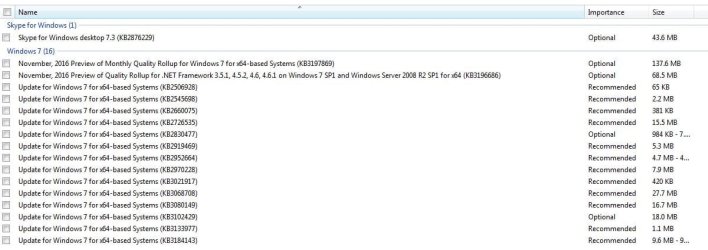
Then do reply #2 here to get windows update working properly, and here`s a list of optional updates you don`t need, but install all the security updates.

Windows Update will not update and I've tried multiple fixes

And there are also 2 updates that just say Intel System, you may have them show up even though you`re using AMD, don`t install them either.

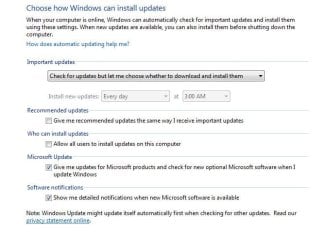
And set windows update like this.
 

Attachments

  • Hidden Updates.JPG
    Hidden Updates.JPG
    98.4 KB · Views: 0
  • WUS.JPG
    WUS.JPG
    65.1 KB · Views: 5

My Computer

Computer type
PC/Desktop
Computer Manufacturer/Model Number
Skylake Special #666
OS
Windows 10 Pro x64
CPU
Intel Core i7 6700K
Motherboard
Asus Sabertooth Z170 Mark 1
Memory
GSkill TridentZ RGB 16GB 3600 16-16-16-36
Graphics Card(s)
EVGA GTX 980 Ti SC x2
Sound Card
Realtek High Definition
Monitor(s) Displays
AOC G2460PG
Screen Resolution
1920 x 1080 144Hz
Hard Drives
Samsung 860 Pro 256GB, Seagate Barracuda 4TB x2
PSU
EVGA 1000 P2, EVGA White Custom Braided Cables
Case
Corsair Vengeance C70 Gunmetal Black
Cooling
Corsair H100i v2, Corsair ML120 x2, Thermal Grizzly Kryonaut
Keyboard
Logitech G910 Orion Spectrum
Mouse
Logitech G700s
Internet Speed
Verizon Fios Quantum Gateway 75/75
Antivirus
Windows Defender, Malwarebytes Free 3.8.3
Browser
Chrome
Other Info
Corsair SP120 x4, LG Blu-ray Drive, Durabrand HT-395 100 Watt Dolby Digital Amp, Corsair H2100 Wireless 7.1 Headset
Back
Top