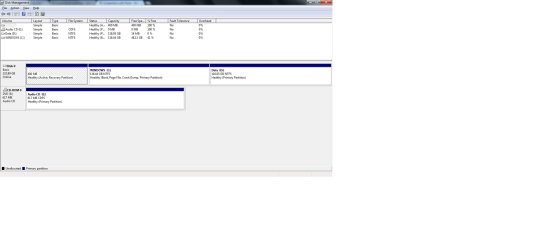
Data D drive is nie on full. How can I free some space?

Panchowski

New member
Local time
6:11 PM
Messages
4
Hi,
I believe that this is a common problem and indeed one plaguing me! My data D drive is basically full and I wondered if there was any way to free some space and stop these notifications appearing. I have recently bought an external hard drive so can store things if required?

I couldn't put a screen shot directly on here (pc iliterate!) so have hopefully attached one?

Look forward to someones help!

Regards

Paul
 

Attachments

My Computer My Computer

At a glance

Windows 7 Home Premium 32bit
OS
Windows 7 Home Premium 32bit
Hi Paul and welcome to the forum
Attache the new one to a usb slot, format it and then copy your data from D then verify that the copied data is working and delete all on D.
Or you can swap the D drive with the new one.
If you are in need for more help, just do it.
Good luck
 

My Computer My Computer

At a glance

win7 home premium-64bit-SP1-IE10T6600 2.2Ghz4 GbATI Mobility Radeon HD 4530
Computer type
Laptop
Computer Manufacturer/Model Number
HP pavilion DV6
OS
win7 home premium-64bit-SP1-IE10
CPU
T6600 2.2Ghz
Motherboard
HP Model 3628
Memory
4 Gb
Graphics Card(s)
ATI Mobility Radeon HD 4530
Sound Card
IDT High Definition
Screen Resolution
1366x768 @ 60Hz
Hard Drives
500Gb Western Digital
Antivirus
MSE
Other Info
Malwarebytes Antimalware + Spybot-Search&Destroy
Paul,
Welcome to SevenForums.

First, let's get you at least a little headroom.

WIN | type %TEMP% | ENTER | CTRL + A keycombo | CTRL + D keycombo
WIN=key with Microsoft logo on top

WIN | type CLEANMGR | ENTER | respond to prompts shown to you.

This is Microsofts Disk Cleaner program

Download, install, run CCLEANER | RUN CLEANER button

Link to CCLEANER is in my signature.

Let me know how much free space you have after this.

I'll then make some more suggestions and requests so that are not squeezed for space on your hard drive.

karl
 

My Computer My Computer

At a glance

MS Windows 7 Ultimate SP1 64-bitAMD A10-4600M6.00 GB Dual-Channel DDR3 @ 798MHz (11-11-12-28)AMD Radeon HD 7660G
Computer Manufacturer/Model Number
Toshiba Satellite S875D-S7239 laptop
OS
MS Windows 7 Ultimate SP1 64-bit
CPU
AMD A10-4600M
Motherboard
AMD Pumori (Socket FT1)
Memory
6.00 GB Dual-Channel DDR3 @ 798MHz (11-11-12-28)
Graphics Card(s)
AMD Radeon HD 7660G
Sound Card
High Definition Audio Device
Monitor(s) Displays
Generic PnP Monitor (1600x900@60Hz)
Screen Resolution
1600x900@60Hz
Hard Drives
SSD 119GB Corsair CSSD-V128GB2 ATA Device
Keyboard
Standard PS/2 Keyboard
Mouse
HP Wireless Optical Mobile Mouse Model FHA-3410
Internet Speed
What the local pub, local coffee shop offers.
Other Info
Optical Drive:MATSHITA BD-CMB UJ160B ATA Device


Also have an Asus ha1002xp netbook with Win 7 Ultimate installed.
Hi and many thanks for your kind replys.

Firstly I have followed Karl's instructions and CLEANMGR didn't remove anything and CCleaner removed 2806MB from my C Drive, however this has not cleaned or removed anything from the D drive?

Secondly, Hanna I don't have my external drive with me at the mo, but is this not dangerous to copy D drive contents to this and remove from PC? As it may crash?

Thirdly, is the fact that the D drive is full a problem?

Many Thanks

Paul
 

My Computer My Computer

At a glance

Windows 7 Home Premium 32bit
OS
Windows 7 Home Premium 32bit
I take it that your D: drive is your data drive. What sort of data is it?

You can use WinDirStat to show how your drive is being used and to perhaps decide that some can be removed. The link is in my signature.
 

My Computer My Computer

At a glance

Microsoft Windows 7 Home Premium 64-bit Servi...Intel(R) Core(TM) i3 CPU M 330 @ 2.13GHz8 GB DDR3Intel(R) HD Graphics
Computer type
Laptop
Computer Manufacturer/Model Number
Hewlett-Packard/G62-107SA Notebook
OS
Microsoft Windows 7 Home Premium 64-bit Service Pack 1
CPU
Intel(R) Core(TM) i3 CPU M 330 @ 2.13GHz
Motherboard
Hewlett-Packard 1425
Memory
8 GB DDR3
Graphics Card(s)
Intel(R) HD Graphics
Sound Card
Realtek High Definition Audio
Monitor(s) Displays
Builtin
Screen Resolution
1366 x 768 x 32 bits (4294967296 colors) @ 60 Hz
Hard Drives
250 GB SATA Hard Disk Drive 7200 rpm
2TB Seagate GoFlex USB 2 Drive
1TB Iomega Prestige USB 2 Drive
1.5TB Iomega Prestige USB 2 Drive (Samsung)
2TB WD MyBook Live NAS.
Mouse
Logitech Anywhere MX
Internet Speed
152 Mbs download 10 Mbs upload
Antivirus
Norton 360
Browser
Chrome
panchowoski,

My favorite program to see what is using what space is: TreeSize Free.
JAM Software - Windows Freeware

=================================================
Could you post a sniip of DiskManagement display?

Be sure and use this procedure. Do not deviate one iota from this procedure. Thanks, karl

HOW TO POST A SNAPSHOT OF DISK MANAGEMENT DISPLAY
Run disk management:
WIN |
type DISKMGMT.MSC | ENTER
This method gives you a display without the unneeded navigation pane.
WIN=key with Microsoft logo on top.


Maximize the output of Disk Management:
ALT-Spacebar
key combo | X key (selects Maximize) |
Drag the field separators (such as between Status and Capacity) to show entire field.


Make a snapshot:
WIN |
type SNIPPING | ENTER | New
Drag the cursor around the area you want to snip.
File | Save as | select save location and name | Save


Post the snapshot:
Post a File or Screenshot in Seven Forums

===========================================
 

My Computer My Computer

At a glance

MS Windows 7 Ultimate SP1 64-bitAMD A10-4600M6.00 GB Dual-Channel DDR3 @ 798MHz (11-11-12-28)AMD Radeon HD 7660G
Computer Manufacturer/Model Number
Toshiba Satellite S875D-S7239 laptop
OS
MS Windows 7 Ultimate SP1 64-bit
CPU
AMD A10-4600M
Motherboard
AMD Pumori (Socket FT1)
Memory
6.00 GB Dual-Channel DDR3 @ 798MHz (11-11-12-28)
Graphics Card(s)
AMD Radeon HD 7660G
Sound Card
High Definition Audio Device
Monitor(s) Displays
Generic PnP Monitor (1600x900@60Hz)
Screen Resolution
1600x900@60Hz
Hard Drives
SSD 119GB Corsair CSSD-V128GB2 ATA Device
Keyboard
Standard PS/2 Keyboard
Mouse
HP Wireless Optical Mobile Mouse Model FHA-3410
Internet Speed
What the local pub, local coffee shop offers.
Other Info
Optical Drive:MATSHITA BD-CMB UJ160B ATA Device


Also have an Asus ha1002xp netbook with Win 7 Ultimate installed.
If you only use your external drive when copying new data and accessing the data currently on it, and leave it turned off the rest of the time, it should have less of a chance of failing than your D: drive. The fact that the D: drive is full isn't a serious problem. It just keeps you from copying new files and possibly altering old files, especially if the file size increases after changing it.
 

My Computer My Computer

At a glance

Windows 7 Professional SP1 64-bitIntel Core i5-2450M @2.5 GHz6 GB DDR3 1333MHzIntel HD 3000
Computer type
Laptop
Computer Manufacturer/Model Number
Toshiba P775-S7100
OS
Windows 7 Professional SP1 64-bit
CPU
Intel Core i5-2450M @2.5 GHz
Memory
6 GB DDR3 1333MHz
Graphics Card(s)
Intel HD 3000
Monitor(s) Displays
Built-in 17.3" LED; 22" Insignia NS-L22Q-10A
Screen Resolution
1600x900; 1360x768
Hard Drives
750 GB Hitachi
1TB Seagate FreeAgent External
Internet Speed
Verizon DSL Speed(Down/Up): 3360 Kbps / 800 Kbps
Antivirus
MSE and MBAM Pro
Browser
IE10
Hi,
I've attached a screenshot of Disk Mgt for your perusal.
Regards

Paul
 

Attachments

My Computer My Computer

At a glance

Windows 7 Home Premium 32bit
OS
Windows 7 Home Premium 32bit

My Computer My Computer

At a glance

MS Windows 7 Ultimate SP1 64-bitAMD A10-4600M6.00 GB Dual-Channel DDR3 @ 798MHz (11-11-12-28)AMD Radeon HD 7660G
Computer Manufacturer/Model Number
Toshiba Satellite S875D-S7239 laptop
OS
MS Windows 7 Ultimate SP1 64-bit
CPU
AMD A10-4600M
Motherboard
AMD Pumori (Socket FT1)
Memory
6.00 GB Dual-Channel DDR3 @ 798MHz (11-11-12-28)
Graphics Card(s)
AMD Radeon HD 7660G
Sound Card
High Definition Audio Device
Monitor(s) Displays
Generic PnP Monitor (1600x900@60Hz)
Screen Resolution
1600x900@60Hz
Hard Drives
SSD 119GB Corsair CSSD-V128GB2 ATA Device
Keyboard
Standard PS/2 Keyboard
Mouse
HP Wireless Optical Mobile Mouse Model FHA-3410
Internet Speed
What the local pub, local coffee shop offers.
Other Info
Optical Drive:MATSHITA BD-CMB UJ160B ATA Device


Also have an Asus ha1002xp netbook with Win 7 Ultimate installed.
Did you make D: your RESTORE POINT or IMAGES of your OS?
 

My Computer My Computer

At a glance

win7 home premium-64bit-SP1-IE10T6600 2.2Ghz4 GbATI Mobility Radeon HD 4530
Computer type
Laptop
Computer Manufacturer/Model Number
HP pavilion DV6
OS
win7 home premium-64bit-SP1-IE10
CPU
T6600 2.2Ghz
Motherboard
HP Model 3628
Memory
4 Gb
Graphics Card(s)
ATI Mobility Radeon HD 4530
Sound Card
IDT High Definition
Screen Resolution
1366x768 @ 60Hz
Hard Drives
500Gb Western Digital
Antivirus
MSE
Other Info
Malwarebytes Antimalware + Spybot-Search&Destroy
Is this ok
 

Attachments

  • DiskMgtPic.jpg
    DiskMgtPic.jpg
    74 KB · Views: 28

My Computer My Computer

At a glance

Windows 7 Home Premium 32bit
OS
Windows 7 Home Premium 32bit
I can't see clearly from the screen shot but it appears you have 41% ( about 48Gb)of drive C: unused. Could you transfer some files now temporarily to there until you get your external drive ? after which time Hannah's suggestion is ideal.
 

My Computer My Computer

At a glance

Windows 7 home premium x64AMD FX-4100 AM3+ 3.6GHz 12MB Black EditionCrsair vengeance 12Gb DDR3 1600MHz CL9Asus GTX 560 1GB
Computer Manufacturer/Model Number
DIY
OS
Windows 7 home premium x64
CPU
AMD FX-4100 AM3+ 3.6GHz 12MB Black Edition
Motherboard
Asus M5A97 Pro
Memory
Crsair vengeance 12Gb DDR3 1600MHz CL9
Graphics Card(s)
Asus GTX 560 1GB
Sound Card
Realtek onboard
Monitor(s) Displays
Hanns G 1680x1050 native
Hard Drives
OCZ 128Gb Petrol ssd
2x500 Gb Samsung
PSU
OCZ StealthXstream II 500W
Internet Speed
8Mb or better
Usually D drive does not contain any system elements, unless the installation paths are changer to D. For getting sure, follow what kado897 suggested in the post http://www.sevenforums.com/backup-r...ll-how-can-i-free-some-space.html#post1942544 .

If there is no system or program elements in D drive, just move its items into the external one.

There is no other way to free up the space of D drive, other than either deleting items or moving those to other locations. Ccleaner can clean up C drive, but not D.
 

My Computer My Computer

At a glance

Microsoft Windows 10 Pro Insider Preview 64-bitIntel(R) Core(TM) i3-4130 CPU @ 3.40GHzCorsair Vengence 4GB x2 (8.00GB Dual-Channel ...2047MB GeForce GTS 450 (ZOTAC International)
Computer type
PC/Desktop
Computer Manufacturer/Model Number
Self Assembled
OS
Microsoft Windows 10 Pro Insider Preview 64-bit
CPU
Intel(R) Core(TM) i3-4130 CPU @ 3.40GHz
Motherboard
Gigabyte Technology Co., Ltd. B85M-D3H
Memory
Corsair Vengence 4GB x2 (8.00GB Dual-Channel DDR3 @ 798MHz)
Graphics Card(s)
2047MB GeForce GTS 450 (ZOTAC International)
Sound Card
Onboard (Realtek High Definition Audio)
Monitor(s) Displays
LG Flatron E2040T
Screen Resolution
1600x900
Hard Drives
Western Digital 1 TB
Seagate 500 GB
PSU
Corsair VS550
Case
Cooler Master K380
Cooling
Cooler Master Seidon 120V Plus
Keyboard
Logitech MK260r
Mouse
Logitech MK260r
Internet Speed
PMPL Broadband
Antivirus
Windows Defender + MBAM
Browser
Firefox
Other Info
Dell Studio 15" Laptop
Panchowoski,

Please reread following and carry out precisely as written so that we have a diskmanagement display that we can read. Thanks for your understanding and cooperation.

HOW TO POST A SNAPSHOT OF DISK MANAGEMENT DISPLAY
Run disk management:
WIN |
type DISKMGMT.MSC | ENTER
This method gives you a display without the unneeded navigation pane.
WIN=key with Microsoft logo on top.


Maximize the output of Disk Management:
ALT-Spacebar
key combo | X key (selects Maximize) |
Drag the field separators (such as between Status and Capacity) to show entire field.


Make a snapshot:
WIN |
type SNIPPING | ENTER | New
Drag the cursor around the area you want to snip.
File | Save as | select save location and name | Save


Post the snapshot:
Post a File or Screenshot in Seven Forums
 

My Computer My Computer

At a glance

MS Windows 7 Ultimate SP1 64-bitAMD A10-4600M6.00 GB Dual-Channel DDR3 @ 798MHz (11-11-12-28)AMD Radeon HD 7660G
Computer Manufacturer/Model Number
Toshiba Satellite S875D-S7239 laptop
OS
MS Windows 7 Ultimate SP1 64-bit
CPU
AMD A10-4600M
Motherboard
AMD Pumori (Socket FT1)
Memory
6.00 GB Dual-Channel DDR3 @ 798MHz (11-11-12-28)
Graphics Card(s)
AMD Radeon HD 7660G
Sound Card
High Definition Audio Device
Monitor(s) Displays
Generic PnP Monitor (1600x900@60Hz)
Screen Resolution
1600x900@60Hz
Hard Drives
SSD 119GB Corsair CSSD-V128GB2 ATA Device
Keyboard
Standard PS/2 Keyboard
Mouse
HP Wireless Optical Mobile Mouse Model FHA-3410
Internet Speed
What the local pub, local coffee shop offers.
Other Info
Optical Drive:MATSHITA BD-CMB UJ160B ATA Device


Also have an Asus ha1002xp netbook with Win 7 Ultimate installed.
You need to describe in more detail what is on D:. If you are using it for Windows Backup and Restore and have the "let Windows choose" option then you can easily start to fill up a drive. In this case you are best to self manage at least your images.
 

My Computer My Computer

At a glance

Windows 7x64 Home Premium SP1Intel i7 2600kG.Skill Ripjaws (DDR3-1600) 2x4GBNvidia GeForce GTS 450; Intel HD Graphics 300...
Computer type
PC/Desktop
Computer Manufacturer/Model Number
Own build
OS
Windows 7x64 Home Premium SP1
CPU
Intel i7 2600k
Motherboard
ASUS P8Z68 Deluxe
Memory
G.Skill Ripjaws (DDR3-1600) 2x4GB
Graphics Card(s)
Nvidia GeForce GTS 450; Intel HD Graphics 3000(GT2+)
Monitor(s) Displays
Dell Ultrasharp IPS panel U2311H, Samsung SyncMaster P2350
Screen Resolution
1920x1080
Hard Drives
Samsung 850 Pro SSD 256GB, Samsung SSD 840 120GB, Seagates 1TB Barracuda ST31000528AS x2
PSU
Seasonic M12II 520W
Case
Lian Li Lancool PC-K60
Cooling
Case: 1x120mm, 3x140mm CPU: Hyper 212+
Keyboard
Logitech MK520 (wireless)
Mouse
Logitech MK520
Internet Speed
6-7 Mbps
Antivirus
Norton Security Premium, Malwarebytes on 2 (MSE on 3rd PC)
Browser
FireFox
Other Info
Audio: Logitech Z523 2.1
Back
Top