Data file check in progress??

billberry12

New member
Member
VIP
Local time
9:47 PM
Messages
292
Mail Outlook 2007 has started dragging, slowing down to almost freeezing, In trying to find out the problem, I noticed in the lower right corner of the outlook screen there are two little gear looking things, and when I put my cursur on it, it saya data file check is in progress. What amkes that happen. That's what slowing things down. I get out of Outlook and then back in, but the same thing happens when I try to open a folder. Any ideas??
Thanks,
Bill
 

My Computer

Computer type
Laptop
Computer Manufacturer/Model Number
Dell Vostro 3750
OS
Windows 7 Professional
CPU
Core I5
Memory
8GB
Hard Drives
Seagate 600 240GB SSD
Antivirus
MSE
Browser
Chrome, IE, Firfox
Hi Billberry12, welcome to SevenForums.:)

Please follow the following steps to sort out your problem. It is a procedure that sounds more complicated than it actually is, so don't be concerned.;)

-Open Outllook and click on the Tools menu and select Options.
-In the Options dialog box, click the Mail Setup tab and then click the Data Files button.
-In the Account settings window, you will see all of your personal Outlook data files listed. Here, you want to note the full path to each data file. ( The easiest way to do this is to open a "new text document" on your desktop and then copy the path from account settings and paste it in your text doc.)
-The path should read something similar to C:\Documents and Settings\*user name*\Local Settings\Application Data\Microsoft\Outlook
-Once you have this information, close the Account Settings dialog box and then close the Outlook Options window.

Now that you have the location of your Outlook data files, you need to check and repair them using the Microsoft Office Outlook 2007 Inbox Repair Tool-SCANPST.exe. By default, you should see SCANPST.exe in the Microsoft Office installation folder's "Office 12" subfolder.

On my system, SCANPST.exe is located in D:\Program Files\Microsoft Office\Office 12.

Right, now to check and repair your Outlook data files, follow these steps:

-First, close Outlook 2007.
-Use Windows Explorer to browse to SCANPST.exe, then double-click it.
-When the Outlook 2007 Inbox Repair Tool opens, click Browse and navigate to the Outlook data file location that you found earlier. (or, if you saved the file paths to your text file, copy and paste the path into the application.)
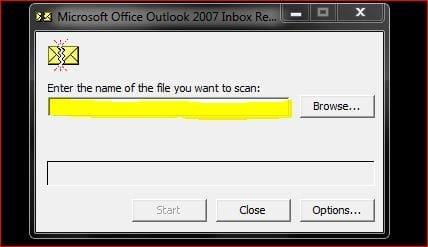
pst.JPG


-You will need to check each file listed.;)
-Now click Start to begin the repair process. If errors are encountered, you will see a window requesting you to "Repair" the errors.
-Make sure you tick "Make backup of scanned file before repairing" and click Repair.

pst1.JPG

-Once you see the "Repair Complete" popup, click OK.
-Repeat steps 2-6 to scan the same file that was just checked and repaired by SCANPST.exe.
-If necessary continue to run the check against the same file until no errors are found.
-Repeat the above steps for all additional pst files that are located in your Outlook folder.

And that is that.:D

Once all of your Outlook .pst files are successfully repaired, you should be able to open Outlook and no longer see the error message that had been plaguing you.

I hope this helps.


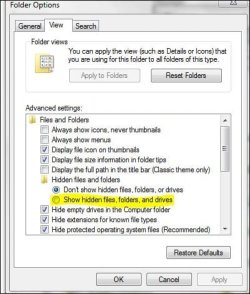
Edit: To find C:\Documents and Settings\*user name*\Local Settings\Application Data\Microsoft\Outlook you may have to go to your "Folder options" and enable "Show hidden files, folders and drives"

 
Last edited:

My Computer

Computer Manufacturer/Model Number
Samsung R60 Plus
OS
Operating System Microsoft Windows 7 Ultimate Build 7600
CPU
Mobile DualCore Intel Core 2 Duo T5550, 1833 MHz (1
Motherboard
ATI Radeon Xpress 1100/1250
Memory
2GB (DDR2-667 DDR2 SDRAM)
Graphics Card(s)
ATI Radeon Xpress 1200 Series (256 MB)
Sound Card
Realtek ALC262 @ ATI SB600 - High Definition
Monitor(s) Displays
Samsung LTN154X3-L01 [15.4" LCD]
Screen Resolution
1280x800
PSU
na
Case
na
Cooling
na
Keyboard
na
Thanks. I did all that last night,,,twice. I even delelted most of my old messages because I had not done that in a while. That helped a lot, but Oulook is still slow when I gie it a command. It just kind of sits there a few seconds before it decided to go forward. Defragments and cleaned mt HD And it still freezes sometime. Any other ideas?
Thanks,
Bill
 

My Computer

Computer type
Laptop
Computer Manufacturer/Model Number
Dell Vostro 3750
OS
Windows 7 Professional
CPU
Core I5
Memory
8GB
Hard Drives
Seagate 600 240GB SSD
Antivirus
MSE
Browser
Chrome, IE, Firfox
When I try to delete a message, I get a error message that I need to do a repair as you suggessted. It won't let me delete a message. Doesn't make sense does it?
 

My Computer

Computer type
Laptop
Computer Manufacturer/Model Number
Dell Vostro 3750
OS
Windows 7 Professional
CPU
Core I5
Memory
8GB
Hard Drives
Seagate 600 240GB SSD
Antivirus
MSE
Browser
Chrome, IE, Firfox
V3xar, good information. Thank you for the post.
 

My Computer

Computer Manufacturer/Model Number
Home built
OS
Windows 7 Ultimate 32 bit
CPU
Intel(R) Pentium(R) 4 CPU 3.00GHz
Motherboard
ASUS P4P800-VM Motherboard Chipset: Intel 865G + ICH5
Memory
2.50 GB RAM
Graphics Card(s)
NVIDIA GeForce 7600 GS
Sound Card
SoundMax Integrated Digital Audio (Chip)
Monitor(s) Displays
ViewSonic VX 1962 wm
Screen Resolution
1680 X 1050
Hard Drives
Seagate Barracuda 7200.10 80 GB
ST380215A ATA Device 18.6 GB
Western Digital "My Book" external hard drive 750 GB
Cooling
Fan based
Keyboard
Microsoft Comfort Curve Keyboard 2000 v10 USB
Mouse
Logitec optic USB
Internet Speed
3.01 Mb/s download 0.64 Mb/s upload
When
I go to optiions, mail set up etc. It shows the file path as follows:
Users\user\app data\local\misrosoft\outlook and look at the pst file

It shows it being 1,634,833 kb in size.

But... when I go into exploer to locat the file to repair, I get no app data option....I get, after user, contact, desktop, downloads, favorites, links,my documents,my music, my picures,my videos,office genuine advantage, save games, searchs, usrumst2.tmp,windows.
The only oulook file I can find is in Documents. That is the one I have been repairing. It says the size of it is 636,137 kb.

Outlook still does not work properly, and I don't know where to go from here. Please offer suggetions if anyone has any.
Thanks,
Bill
 

My Computer

Computer type
Laptop
Computer Manufacturer/Model Number
Dell Vostro 3750
OS
Windows 7 Professional
CPU
Core I5
Memory
8GB
Hard Drives
Seagate 600 240GB SSD
Antivirus
MSE
Browser
Chrome, IE, Firfox
Hi Billberry,

Sorry for the delay in replying I have been out.;)

To access your app data file you need to go to your "Folder options" and enable "Show hidden files, folders and drives".

dd1.JPG

This will allow the app data file to be visible.

Try the repair option you find in those files. ( C:\Documents and Settings\*user name*\Local Settings\Application Data\Microsoft\Outlook)

Let me know if you need further assistance.

.
 

My Computer

Computer Manufacturer/Model Number
Samsung R60 Plus
OS
Operating System Microsoft Windows 7 Ultimate Build 7600
CPU
Mobile DualCore Intel Core 2 Duo T5550, 1833 MHz (1
Motherboard
ATI Radeon Xpress 1100/1250
Memory
2GB (DDR2-667 DDR2 SDRAM)
Graphics Card(s)
ATI Radeon Xpress 1200 Series (256 MB)
Sound Card
Realtek ALC262 @ ATI SB600 - High Definition
Monitor(s) Displays
Samsung LTN154X3-L01 [15.4" LCD]
Screen Resolution
1280x800
PSU
na
Case
na
Cooling
na
Keyboard
na
How do I get to folder options in Windows 7?
 

My Computer

Computer type
Laptop
Computer Manufacturer/Model Number
Dell Vostro 3750
OS
Windows 7 Professional
CPU
Core I5
Memory
8GB
Hard Drives
Seagate 600 240GB SSD
Antivirus
MSE
Browser
Chrome, IE, Firfox
Control Panel\Appearance and Personalization the choose Folder Options.

;)
 

My Computer

Computer Manufacturer/Model Number
Samsung R60 Plus
OS
Operating System Microsoft Windows 7 Ultimate Build 7600
CPU
Mobile DualCore Intel Core 2 Duo T5550, 1833 MHz (1
Motherboard
ATI Radeon Xpress 1100/1250
Memory
2GB (DDR2-667 DDR2 SDRAM)
Graphics Card(s)
ATI Radeon Xpress 1200 Series (256 MB)
Sound Card
Realtek ALC262 @ ATI SB600 - High Definition
Monitor(s) Displays
Samsung LTN154X3-L01 [15.4" LCD]
Screen Resolution
1280x800
PSU
na
Case
na
Cooling
na
Keyboard
na
Control Panel\Appearance and Personalization then choose Folder Options then "view" and the 6th entry down is "show hidden files, folders and drives."

;)


Edit: Sorry about the double post.:o
 

My Computer

Computer Manufacturer/Model Number
Samsung R60 Plus
OS
Operating System Microsoft Windows 7 Ultimate Build 7600
CPU
Mobile DualCore Intel Core 2 Duo T5550, 1833 MHz (1
Motherboard
ATI Radeon Xpress 1100/1250
Memory
2GB (DDR2-667 DDR2 SDRAM)
Graphics Card(s)
ATI Radeon Xpress 1200 Series (256 MB)
Sound Card
Realtek ALC262 @ ATI SB600 - High Definition
Monitor(s) Displays
Samsung LTN154X3-L01 [15.4" LCD]
Screen Resolution
1280x800
PSU
na
Case
na
Cooling
na
Keyboard
na
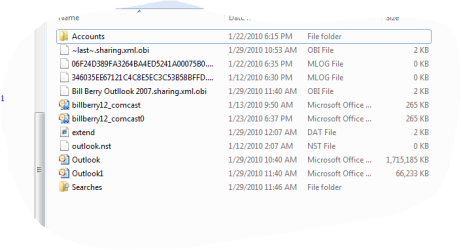
OK. Did that, got to microsoft\outlook and this is what I got. It'greek to me.
 

Attachments

  • Capture.PNG
    Capture.PNG
    11.6 KB · Views: 46

My Computer

Computer type
Laptop
Computer Manufacturer/Model Number
Dell Vostro 3750
OS
Windows 7 Professional
CPU
Core I5
Memory
8GB
Hard Drives
Seagate 600 240GB SSD
Antivirus
MSE
Browser
Chrome, IE, Firfox
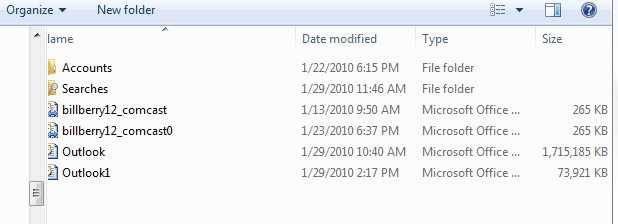
These are the files you need to repair billberry:

saaa.jpg

billberry12_comcast
billberry12_comcast(0)
Outlook
Outlook1

Let us know how it goes.;)
 

My Computer

Computer Manufacturer/Model Number
Samsung R60 Plus
OS
Operating System Microsoft Windows 7 Ultimate Build 7600
CPU
Mobile DualCore Intel Core 2 Duo T5550, 1833 MHz (1
Motherboard
ATI Radeon Xpress 1100/1250
Memory
2GB (DDR2-667 DDR2 SDRAM)
Graphics Card(s)
ATI Radeon Xpress 1200 Series (256 MB)
Sound Card
Realtek ALC262 @ ATI SB600 - High Definition
Monitor(s) Displays
Samsung LTN154X3-L01 [15.4" LCD]
Screen Resolution
1280x800
PSU
na
Case
na
Cooling
na
Keyboard
na
OK. Got it all flying now. How do I tell which Outlook file I am currently using, and can I delete all the others to keep another problem from arising in the future. I had downloaded Office 2010 beta for about a wekk, and that could be where the problem started. I have uninstalled it now, and gone back to outlook 2007, but I want to clean up all I can, but leave what I need to. Help please and then I will leave everyone alone.
Thanks,
Bill
 

My Computer

Computer type
Laptop
Computer Manufacturer/Model Number
Dell Vostro 3750
OS
Windows 7 Professional
CPU
Core I5
Memory
8GB
Hard Drives
Seagate 600 240GB SSD
Antivirus
MSE
Browser
Chrome, IE, Firfox
Billberry don't worry about taking up our time.:) The members of SevenForums are on here to help because they want to, not because they have to be here.:D

Open Outlook, go to Tools, click on account settings. Under name, highlight the account you use.

Click on "data files". The files listed under "Filename" are the ones you need and use. Make a note which they are and the rest you can safely delete from C:\Documents and Settings\*user name*\Local Settings\Application Data\Microsoft\Outlook.

Note: Just the ones that I marked in my previous post. Don't delete any of the files that are not part of that group of 4.;)

.
 

My Computer

Computer Manufacturer/Model Number
Samsung R60 Plus
OS
Operating System Microsoft Windows 7 Ultimate Build 7600
CPU
Mobile DualCore Intel Core 2 Duo T5550, 1833 MHz (1
Motherboard
ATI Radeon Xpress 1100/1250
Memory
2GB (DDR2-667 DDR2 SDRAM)
Graphics Card(s)
ATI Radeon Xpress 1200 Series (256 MB)
Sound Card
Realtek ALC262 @ ATI SB600 - High Definition
Monitor(s) Displays
Samsung LTN154X3-L01 [15.4" LCD]
Screen Resolution
1280x800
PSU
na
Case
na
Cooling
na
Keyboard
na
That was simple. There was only one file listed under each place. Nothing else. What about al those other files I saw in the attachment I sent.
 

My Computer

Computer type
Laptop
Computer Manufacturer/Model Number
Dell Vostro 3750
OS
Windows 7 Professional
CPU
Core I5
Memory
8GB
Hard Drives
Seagate 600 240GB SSD
Antivirus
MSE
Browser
Chrome, IE, Firfox
You should leave those alone.;) They are required for Outlook to run correctly plus they are very small files, only a MB or two,

PS.Unless you still require access to your hidden files and folders, reverse the process outlined in post #10.

.
 

My Computer

Computer Manufacturer/Model Number
Samsung R60 Plus
OS
Operating System Microsoft Windows 7 Ultimate Build 7600
CPU
Mobile DualCore Intel Core 2 Duo T5550, 1833 MHz (1
Motherboard
ATI Radeon Xpress 1100/1250
Memory
2GB (DDR2-667 DDR2 SDRAM)
Graphics Card(s)
ATI Radeon Xpress 1200 Series (256 MB)
Sound Card
Realtek ALC262 @ ATI SB600 - High Definition
Monitor(s) Displays
Samsung LTN154X3-L01 [15.4" LCD]
Screen Resolution
1280x800
PSU
na
Case
na
Cooling
na
Keyboard
na
ok done. thanks so much for everything. Now where is that place where I mark this thread SOLVED? Do we have one here?
 

My Computer

Computer type
Laptop
Computer Manufacturer/Model Number
Dell Vostro 3750
OS
Windows 7 Professional
CPU
Core I5
Memory
8GB
Hard Drives
Seagate 600 240GB SSD
Antivirus
MSE
Browser
Chrome, IE, Firfox
Send a PM to a Mod. I think you can only mark it solved within a certain timeframe.

.
 

My Computer

Computer Manufacturer/Model Number
Samsung R60 Plus
OS
Operating System Microsoft Windows 7 Ultimate Build 7600
CPU
Mobile DualCore Intel Core 2 Duo T5550, 1833 MHz (1
Motherboard
ATI Radeon Xpress 1100/1250
Memory
2GB (DDR2-667 DDR2 SDRAM)
Graphics Card(s)
ATI Radeon Xpress 1200 Series (256 MB)
Sound Card
Realtek ALC262 @ ATI SB600 - High Definition
Monitor(s) Displays
Samsung LTN154X3-L01 [15.4" LCD]
Screen Resolution
1280x800
PSU
na
Case
na
Cooling
na
Keyboard
na
Can I delete the big file?

Attached is a screen shot of my outllok file folders. The one I use now is Outlook1. As you can see, one of the other folders has1,770,000 kb in it. Can I dump it. It is probably the one I had beore I emtied most of my folders this morning. I'm just try to clean up my hard drive, and have less confusion with Oulook going forward.
Thanks,
Bill
 

Attachments

  • Capture2.PNG
    Capture2.PNG
    6.9 KB · Views: 17

My Computer

Computer type
Laptop
Computer Manufacturer/Model Number
Dell Vostro 3750
OS
Windows 7 Professional
CPU
Core I5
Memory
8GB
Hard Drives
Seagate 600 240GB SSD
Antivirus
MSE
Browser
Chrome, IE, Firfox
If the only file you now use is Outlook1 Then yes you can.:)

Bare in mind that file may have emails that you have saved and may need to access at some stage. Why not copy it to a DVD/CD or a flash drive just in case.;)

.

.
 

My Computer

Computer Manufacturer/Model Number
Samsung R60 Plus
OS
Operating System Microsoft Windows 7 Ultimate Build 7600
CPU
Mobile DualCore Intel Core 2 Duo T5550, 1833 MHz (1
Motherboard
ATI Radeon Xpress 1100/1250
Memory
2GB (DDR2-667 DDR2 SDRAM)
Graphics Card(s)
ATI Radeon Xpress 1200 Series (256 MB)
Sound Card
Realtek ALC262 @ ATI SB600 - High Definition
Monitor(s) Displays
Samsung LTN154X3-L01 [15.4" LCD]
Screen Resolution
1280x800
PSU
na
Case
na
Cooling
na
Keyboard
na
Back
Top