Day One with Windows 7

radarchisels

New member
Local time
1:34 PM
Messages
2
Yesterday I built a non-ambitious machine to replace groaning XP PC. Loading 7 onto a clean disk went very fast with no hang ups whatsoever. Please help a newbie with this question. On the XP machine, I would double click my broadband icon to go online and a symbol would appear in the system tray. If I right-clicked this symbol, I could disconnect and go about my offline business fearlessly. Is anything like this possible in Windows 7. I can go online without trouble but seem unable to disconnect without shutting down. Also, how can I save my broadband password in the connection box? This option seems to have disappeared and is very annoying.
This must be staring me in the face but it is only day one.
All help gratefully received.

radar
 

My Computer My Computer

At a glance

Windows 7AMD Athlon II4 Gb Corsairnone
Computer Manufacturer/Model Number
Home Made
OS
Windows 7
CPU
AMD Athlon II
Motherboard
Gigabyte
Memory
4 Gb Corsair
Graphics Card(s)
none
Sound Card
none
Monitor(s) Displays
17" Flat Philips
Hard Drives
Caviar Blue 250gb
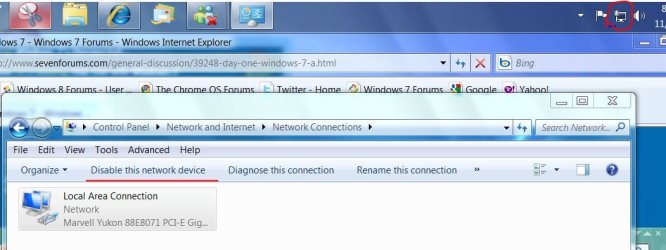
This path seems to get where you can do what you want. Click icon on taskbar. open network and sharing click on change adapter settings, highlight connection and disable
network disable.JPG
 

My Computer My Computer

At a glance

Windows 7 Ulti. x64AMD Phenom 8450 triple-core 2.10 ghz4GBATI Radion HD 3200
Computer Manufacturer/Model Number
Gateway GT5692
OS
Windows 7 Ulti. x64
CPU
AMD Phenom 8450 triple-core 2.10 ghz
Memory
4GB
Graphics Card(s)
ATI Radion HD 3200
Monitor(s) Displays
Gateway FPD1775W
Screen Resolution
1280x720
Hard Drives
465.6613 Gibibytes
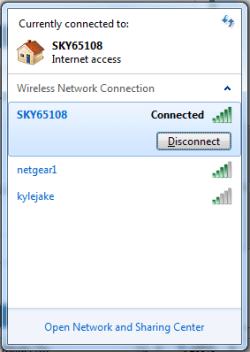
Also, you should be able to left-click the network icon, click on the connected network and select 'Disconnect' and that should disconnect you without the need to disable the hardware. This works for wireless, but i'm not sure about broadband connections so i may be wrong ;)

Network.PNG

Hope this helps :)


OS
 

My Computer My Computer

At a glance

Windows 7 Ultimate x64AMD Sempron Dual Core3GBNVIDIA GeForce 6150SE nForce 430
Computer Manufacturer/Model Number
Compaq Desktop
OS
Windows 7 Ultimate x64
CPU
AMD Sempron Dual Core
Memory
3GB
Graphics Card(s)
NVIDIA GeForce 6150SE nForce 430
Screen Resolution
1024x768
Hard Drives
150GB Sata
Your broadband connection that you have detailed uses a software that allows you to connect and disconnet your internet connection. This utility override window's build-in software. With w7, it's very automated and you just have the icon as show in Orbital's post. You can disconnect and connect using the buton as shown.

Your broadband utility that you use in Xp, if you are able to install it, this might also override (or even co-exist) with w7's wireless function.

If this post was a day earlier i would have tested my Huawei broadband and can confirm.
 

My Computer My Computer

At a glance

Windows 7 Ultimate 64BitGenuineIntel Intel(R) Core(TM) DuoCore T2400 ...2.00 GBMobile Intel(R) 945 Express Chipset
Computer Manufacturer/Model Number
Lenovo ThinkPad T60
OS
Windows 7 Ultimate 64Bit
CPU
GenuineIntel Intel(R) Core(TM) DuoCore T2400 @ 1.83GHz
Motherboard
Intel(R) 82801G (ICH7 Family)
Memory
2.00 GB
Graphics Card(s)
Mobile Intel(R) 945 Express Chipset
Sound Card
SoundMAX Integrated Digital HD Audio
Monitor(s) Displays
ThinkPad Display
Screen Resolution
1400x1050
Hard Drives
100Gb SATA
Keyboard
Standard Keyboard
Mouse
HID-compliant Mouse
Internet Speed
Cable Broadband - 54Mbps
Other Info
Intel(R) PRO/1000 PL Network Connection
11a/b/g Wireless LAN Mini PCI Express Adapter
Thanks for these posts. On Day two with Windows 7 I found the way through it. There are people in the world who have a single desktop PC in their home, no wireless, no network and a single Broadband connection through a USB modem. We are a dying breed it seems. Modem drivers difficult to load under Windows 7 and Modem support from ISP non-existent.
 

My Computer My Computer

At a glance

Windows 7AMD Athlon II4 Gb Corsairnone
Computer Manufacturer/Model Number
Home Made
OS
Windows 7
CPU
AMD Athlon II
Motherboard
Gigabyte
Memory
4 Gb Corsair
Graphics Card(s)
none
Sound Card
none
Monitor(s) Displays
17" Flat Philips
Hard Drives
Caviar Blue 250gb
Thanks for these posts. On Day two with Windows 7 I found the way through it. There are people in the world who have a single desktop PC in their home, no wireless, no network and a single Broadband connection through a USB modem. We are a dying breed it seems. Modem drivers difficult to load under Windows 7 and Modem support from ISP non-existent.

Good to hear you have "found a way through it"?

At my work, we have many levels of people with many levels of expertises and we all work together to solve issuse as you would in a team. One day i came across an issue and i needed a higher expertised person to help (my mate would be this person). I then asked him for help and he guided me to deal with my issue, but didnt give me the answers rather wanted me to do it myself so i can learn. The following week i still haven't fully fixed my issue (but nearly) i then went to him and ask for more help knowing that i must solve the issue before he goes on leave in a few days time. At the time when i approached him i didnt realised that day was his last day, and he wasnt able to cos he was doing other things, i then asked him if you are not here tommrow who is going to help me? his reply was "you can help yourself."

A valued that answer cos it's very valid. the point of all that? Instead of seeking other's help, try and helpself. You never know maybe you can actuall do it. Just have to try.

==== > "Modem drivers difficult to load under Windows 7 and Modem support from ISP non-existent." "you can help yourself."
 

My Computer My Computer

At a glance

Windows 7 Ultimate 64BitGenuineIntel Intel(R) Core(TM) DuoCore T2400 ...2.00 GBMobile Intel(R) 945 Express Chipset
Computer Manufacturer/Model Number
Lenovo ThinkPad T60
OS
Windows 7 Ultimate 64Bit
CPU
GenuineIntel Intel(R) Core(TM) DuoCore T2400 @ 1.83GHz
Motherboard
Intel(R) 82801G (ICH7 Family)
Memory
2.00 GB
Graphics Card(s)
Mobile Intel(R) 945 Express Chipset
Sound Card
SoundMAX Integrated Digital HD Audio
Monitor(s) Displays
ThinkPad Display
Screen Resolution
1400x1050
Hard Drives
100Gb SATA
Keyboard
Standard Keyboard
Mouse
HID-compliant Mouse
Internet Speed
Cable Broadband - 54Mbps
Other Info
Intel(R) PRO/1000 PL Network Connection
11a/b/g Wireless LAN Mini PCI Express Adapter
Back
Top