
Hey guys,
Recently my laptop was smashed. I savaged the hard drive hoping there would be a small chance it might still work. I've gotten a new laptop, as well as a SATA to USB cable.
I've plugged in the cable, and the device driver installed however the hard drive doesn't appear under Explorer. I went to Disk Drive > Device Manager, and the drive shows up as a bunch of random characters. Under properties there is no information listed under Is this evidence that the HDD has suffered physical damage?
If so, does anyone know of any recovery methods?
Picture below, also when I powered up the drive, there's no clicking, everything sounds fine.
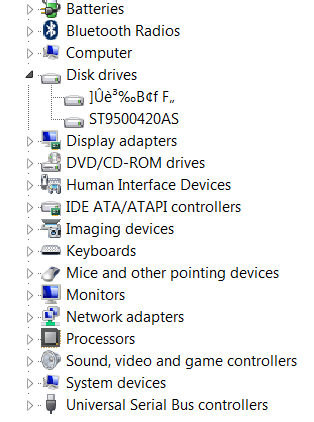
edit: Nevermind I just got it to appear,
Recently my laptop was smashed. I savaged the hard drive hoping there would be a small chance it might still work. I've gotten a new laptop, as well as a SATA to USB cable.
I've plugged in the cable, and the device driver installed however the hard drive doesn't appear under Explorer. I went to Disk Drive > Device Manager, and the drive shows up as a bunch of random characters. Under properties there is no information listed under Is this evidence that the HDD has suffered physical damage?
If so, does anyone know of any recovery methods?
Picture below, also when I powered up the drive, there's no clicking, everything sounds fine.
edit: Nevermind I just got it to appear,
My Computer
- Computer Manufacturer/Model Number
- HP dv6500t
- OS
- Windows 7 Ultimate
- CPU
- Intel Core 2 Duo 2.0ghz
- Motherboard
- unsure
- Memory
- 2 gigs DDR2
- Graphics Card(s)
- Nvdia Geforce 8400
- Hard Drives
- Western Digital Blue Scorpio 500gig (7200 RPM
