Death by cables. How do you organize your's?

bobland

Not a Power User
Power User
Local time
4:51 AM
Messages
247
Location
Boise
I've got 3 power strips with wires running up, down and across the desk. I'm trying to find a way to organize the snake pit of wires.

My set up is 1 monitor, modem, speakers, headphone, keyboard, mouse, Logitech G13, 2 powered USB hubs, wireless adapter for 360 controller, cable for phone charger. Cables to printer, scanner, HDMI to TV thru wall, USB extender thru wall, cables from basement to and from modem.

One major problem is all the external power boxes that take up so much room on the power strips, thus requiring many strips. Probably have some peripheral buried under the mess.

Anybody find a reasonable way out of this mess?
 

My Computer My Computer

At a glance

Windows 7 Professional SP1 64 bit RetailIntel i7-4790K2 x 4GB G.Skill RipJaws 13800MSI GTX 970 Gaming
Computer type
PC/Desktop
Computer Manufacturer/Model Number
Crafted by Hand
OS
Windows 7 Professional SP1 64 bit Retail
CPU
Intel i7-4790K
Motherboard
ASRock Z97 Extreme6
Memory
2 x 4GB G.Skill RipJaws 13800
Graphics Card(s)
MSI GTX 970 Gaming
Sound Card
Focusrite Scarlett 2i2
Monitor(s) Displays
BenQ 3200
Screen Resolution
1440p
Hard Drives
Corsair 250GB SSD
WD RED 2 TB SATA
WD 500GB Green SATA
WD 1TB Black SATA x2
PSU
Corsair CMPSU 750TX
Case
Cooler Master 932 HAF
Cooling
Noctua NH-D14
Keyboard
Roccat Ryos MK
Mouse
Roccat Kone XTD
Internet Speed
20 Mb - CenturyLink
Antivirus
Security Essentials
Browser
FireFox Latest
Other Info
Moving to Windows 10
I've got 3 power strips with wires running up, down and across the desk. I'm trying to find a way to organize the snake pit of wires.

My set up is 1 monitor, modem, speakers, headphone, keyboard, mouse, Logitech G13, 2 powered USB hubs, wireless adapter for 360 controller, cable for phone charger. Cables to printer, scanner, HDMI to TV thru wall, USB extender thru wall, cables from basement to and from modem.

One major problem is all the external power boxes that take up so much room on the power strips, thus requiring many strips. Probably have some peripheral buried under the mess.

Anybody find a reasonable way out of this mess?

No. :p

Periodically I take everything apart, take my desktop computer and give it a good compressed air cleaning, and put it all back together again as rationally as I can. But it always turns into a rat's nest.

There are some commercial products out there that purport to organize your cables, but I've never really looked into it.
 

My Computer My Computer

At a glance

Windows 7 Home Premium 64bitIntel Pentium Dual Core E2180 @2GHz4 GBNVIDIA GeForce 8500 GT
Computer Manufacturer/Model Number
Compaq Presario SR5518F (desktop)
OS
Windows 7 Home Premium 64bit
CPU
Intel Pentium Dual Core E2180 @2GHz
Motherboard
MSI "Boston"
Memory
4 GB
Graphics Card(s)
NVIDIA GeForce 8500 GT
Sound Card
Integrated - Realtek High Definition Audio
Monitor(s) Displays
Acer
Hard Drives
Hitachi HDP725025GLA380 ATA Device
Optiarc DVD RW AD-7201S5 ATA Device
Internet Speed
5 Mbps
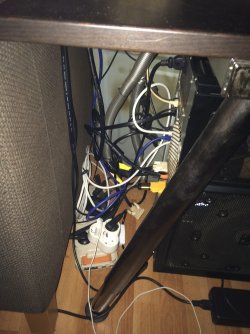
Mine looks like this, but seems you have more going on:

Behind the case is a mess :o
20150614_231027197_iOS.jpg

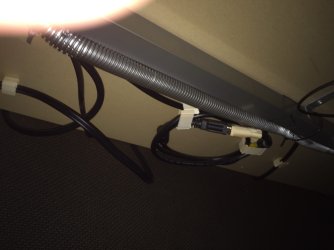
Cable channels etc underneath the desk
20150614_231156387_iOS.jpg

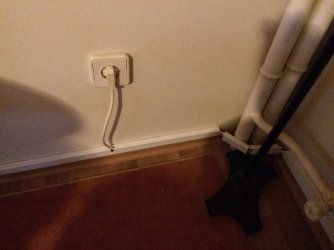
Using the carpet to hide a bit
20150614_231311688_iOS.jpg

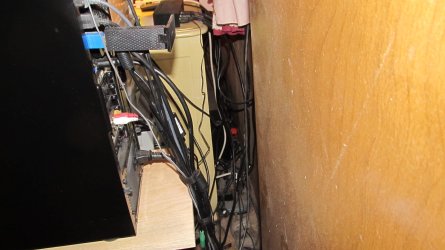
Cable channels for the rest
20150614_231329191_iOS.jpg
 

My Computer My Computer

At a glance

Windows 7 Ultimate x64 SP1AMD Phenom 2 1090T2x8GB Kingston HyperX Fury Black 1600Mhz Unga...MSI GTX 970 Gaming 4G
Computer type
PC/Desktop
Computer Manufacturer/Model Number
Custom Build
OS
Windows 7 Ultimate x64 SP1
CPU
AMD Phenom 2 1090T
Motherboard
Gigabyte GA-890FXA-UD5
Memory
2x8GB Kingston HyperX Fury Black 1600Mhz Unganged
Graphics Card(s)
MSI GTX 970 Gaming 4G
Sound Card
Realtek On-Board HD 7.1 Audio / Logitech G35
Monitor(s) Displays
3xAcer GD245HQ
Screen Resolution
1920x1080
Hard Drives
Samsung 850 Pro 512GB SSD - OS /
WD Caviar Black SATA 3 - 1 TBx2 - Dynamic RAID 0 /
WD Caviar Green SATA 2 - 640GBx2 - Dynamic RAID 0 /
WD Caviar Green SATA 2 - 640GB - Internal Backup /
Seagate Barracude SATA 3 - 3TB - External Backup/ Sync
PSU
HighPower 1000W
Case
Cooler Master HAF 932
Cooling
Noctua NH-D14
Keyboard
Logitech G19
Mouse
Logitech G500
Internet Speed
100/4 Mbit Cable (100GB quota)
Antivirus
ZoneAlarm Extreme Security / MBAM Pro / MBAE Free / SAS Free
Browser
IE 11 - Firefox - Chrome
Other Info
Logitech F710/ G27/ G940/ Z5500 // TrackIR 5 // Nvidia 3D Surround Vision
Actually, compared to my miserable, magnificent mess, your setup looks great, Gokhan! :o

I used to keep my cables all neatly bundled but I've gotten too old and decrepit to be crawling around back there to undo everything anytime I want to add, remove, reroute, or replace a cable. Now, I just let them lay loose so I can detach both ends of a cable, then pull it out from one end. Sometimes, I'll attach a string to the far end of a cable before pulling so I can retrieve it in case it gets hung up.

To clean out dust from behind my desk and the drawers my printer, scanners, and computer are on, I wait until I'm going to be out of the house for at least a couple of hours, then, just before leaving, I grab my DataVac Electric Duster (a really powerful blower used for cleaning computer gear; much better and cheaper than canned "air" in the long run), hold my breath, reach over the, printer, monitors, and computer and blow out as much dust as I can, and get out of the house fast so I can breathe again! After I get back, dust will have settled over the room but I can reach that and it doesn't take long to clean it up.

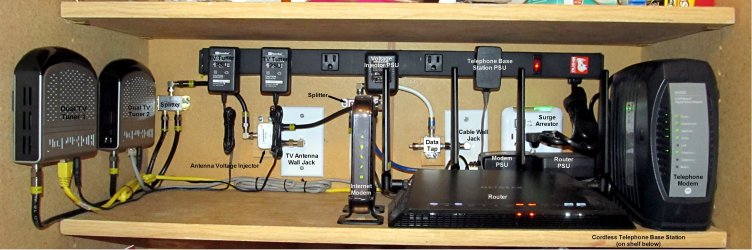
Anyway, this is the miserable, magnificent mess:

IMG_0005.JPG

I have all my network hardware on a shelf inside the linen closet in my bathroom (more room there). I just revamped everything in there to get a bit more usable space for possible future hardware. The TV tuners are now Velcroed to the wall of the closet. Except for the coax cables, which I was able to custom make, the power cables that are attached to the PSUs and the Ethernet cables have been bundled to corral excessive length (I didn't want to void the warranties on the PSUs and it is difficult to custom make the Ethernet cables because I'm color blind). The cables other wise lay loose but are fairly neatly routed out of the way so I can more easily get at them.

Network 2.jpg
 

My Computer My Computer

At a glance

Win 7 Ultimate 64 bitIntel i7-3930KKingston HyperX Genesis 32GB Kit (8x4GB Modul...MSI R7850 Twin Frozr 2GD5/OC Radeon HD 7850 2...
Computer type
PC/Desktop
Computer Manufacturer/Model Number
Custom Build
OS
Win 7 Ultimate 64 bit
CPU
Intel i7-3930K
Motherboard
ASUS P9X79 WS
Memory
Kingston HyperX Genesis 32GB Kit (8x4GB Modules) 1600MHz DDR
Graphics Card(s)
MSI R7850 Twin Frozr 2GD5/OC Radeon HD 7850 2GB 256-bit GDDR
Sound Card
Asus Xonar Essence STX
Monitor(s) Displays
3x Asus VG248QE 24", Vizio 32" TV
Screen Resolution
1920 x 1080, ?
Hard Drives
Samsung 128GB 840 Pro SSD (1),
Samsung 4TB 850 EVO SSDs (4)
Samsung 4TB 850 EVO SSDs (16) external backup drives used in 2.5" hot swap bays in the computer.
PSU
Corsair HX750w
Case
Antec Two Hundred v2 (modified)
Cooling
Cooler Master GeminII S524 120mm (fan replaced with a 140mm)
Keyboard
Logitech G510s
Mouse
Logitech M525 (two in use)
Internet Speed
=< 32Mbps down, 8Mbps up
Antivirus
AVAST!, MBAM, SAS, Spybot S&D (all but MBAM free) Glary Util
Browser
IE11
Other Info
LSI 9211-8i HBA card (8 SATA III ports), 2.5" & 3.5" Hot Swap Bays, HooToo HT-CR001 PCI-E to USB 3.0 Internal Hub + 6 Slot Card Reader, and LG Model CH12LS28 BD-ROM Optical Drive. Also, ScanSnap S1500 ADF duplexing scanner, Canon 9000F flat bed scanner, Corsair SP2500 2.1 speakers, Samsung CLP 415nw laser color printer, Cyberpower PP2200SW UPS
Furniture hides my cables.

I have an ordinary desk, with the computer on the left, and keyboard, mouse, dual speakers, dual monitors in the middle.

But there's much more: There's a table to the left with a second keyboard and mouse. And a digital piano next to that, with a single monitor.

POWER CABLES
computer
monitor 1, 2, 3
piano
A/V receiver
equalizer 1, 2
DVD player
audio mixer

DATA CABLES
USB keyboard 1, 2
USB mouse 1, 2
USB web cam
USB Presonus audio interface
MIDI cables x 2

VIDEO CABLES
VGA cable, computer to monitor 2
VGA cable, computer to switch box
VGA cable, switch box to monitor 1
VGA cable, switch box to monitor 3

AUDIO CABLES
computer to desktop speakers
piano to mixer
DVD player to mixer
Presonus interface to mixer
mixer to equalizer 1
mixer to equalizer 2
equalizer 1 A/V receiver
equalizer 2 A/V receiver
speaker cables x 4

All of the cables hang behind the desk, behind the piano, and behind the speakers. Invisible.

Gravity handles all of the "cable management".
 

My Computer My Computer

At a glance

Windows 10 x64i7-7700K16 GB 2400 MHzGTX 1060
Computer type
PC/Desktop
Computer Manufacturer/Model Number
Dell
OS
Windows 10 x64
CPU
i7-7700K
Memory
16 GB 2400 MHz
Graphics Card(s)
GTX 1060
Sound Card
Integrated, plus external Presonus Audiobox USB
Monitor(s) Displays
2x AOC 27"
Screen Resolution
1920x1080
Hard Drives
512 GB M.2 SSD
2 TB 7200 RPM disk
Internet Speed
110 Mbps
Browser
Firefox
Back
Top