December 9th 2014 Windows Updates

Brink

Administrator
Staff member
Local time
7:30 AM
Messages
74,808
Location
Oklahoma
Today, as part of Update Tuesday, we released seven security updates – three rated Critical and four rated Important in severity, to address 24 unique Common Vulnerabilities and Exposures (CVEs) in Microsoft Windows, Internet Explorer (IE), Office and Exchange.

We encourage you to apply all of these updates. For more information about this month’s security updates, including the detailed view of the Exploit Index (XI) broken down by each CVE, visit the Microsoft Bulletin Summary webpage. If you are not familiar with how we calculate XI, a full description can be found here.

We re-released two Security Bulletins:
One Security Advisory was revised:
For the latest information, you can follow the MSRC team on Twitter at @MSFTSecResponse.

Tracey Pretorius, Director
Response Communications

Source...
 

My Computer

Computer type
PC/Desktop
Computer Manufacturer/Model Number
Self built custom
OS
64-bit Windows 11 Pro for Workstations
CPU
Intel i7-8700K OC'd to 5 GHz
Motherboard
ASUS ROG Maximus XI Formula Z390
Memory
64 GB (4x16GB) G.SKILL TridentZ RGB DDR4 3600 MHz
Graphics Card(s)
ASUS ROG-STRIX-GTX1080TI-O11G-GAMING
Sound Card
Integrated
Monitor(s) Displays
2 x Samsung Odyssey G7 27"
Screen Resolution
2560x1440
Hard Drives
1TB Samsung 990 PRO M.2,
4TB Samsung 990 PRO PRO M.2,
TerraMaster F8 SSD Plus NAS
PSU
Seasonic Prime Titanium 850W
Case
Thermaltake Core P3
Cooling
Corsair Hydro H115i
Keyboard
Logitech wireless K800
Mouse
Logitech MX Master 4
Internet Speed
2 Gb/s Download and 100 Mb/s Upload
Antivirus
Malwarebyte Anti-Malware Premium
Browser
Google Chrome
Other Info
Logitech Z625 speaker system,
Logitech BRIO 4K Pro webcam,
HP Color LaserJet Pro MFP M477fdn,
APC SMART-UPS RT 1000 XL - SURT1000XLI,
Galaxy S23 Plus phone
well as you know here we go again, has anyone had any problems with these updates? yes or no
thanks
 

My Computer

Computer type
PC/Desktop
Computer Manufacturer/Model Number
Dell Computers
OS
Windows 7 Pro 32/64 bit and Windows 10 Pro 32 Bit/64bit
Memory
4gigs
Graphics Card(s)
AMD Radeon HD and Nvidia
Monitor(s) Displays
Samsung 24". INC 19". Dell 22 ". Dell 17" & 19"

My Computer

Computer type
PC/Desktop
Computer Manufacturer/Model Number
Custom assembled by me :}
OS
Win-7-Pro64bit 7-H-Prem-64bit
CPU
i7-5930K 2nd i9-9940x both water blocked VRM's too
Motherboard
ASUS SABERTOOTH X99 2nd ASUS x299 Apex
Memory
Trident-z 3200C14 2nd Trident-z 3600C16
Graphics Card(s)
EVGA 1080ti ftw3 2nd Titan Xp both water blocked
Sound Card
Built-in Realtek
Monitor(s) Displays
1-AOC G2460PG 24"G-Sync 144Hz/ 2nd 1-ASUS VG248QE 24" 144Hz
Screen Resolution
1920 x 1080 144Hz
Hard Drives
2-Samsung M.2 Evo & Evo Plus
2-Samsung 850 EVO 500GB SSD's/ 3-2.5 W.D. Black 1tb-&3-1tb/3-3.5 WD Black 1tb hdd's
PSU
EVGA SuperNOVA 1000-P2 2nd 1200-P2
Case
2-Corsair Obsidian Series 450D Black ATX Mid Tower
Cooling
Custom water loops
Keyboard
Logitech G710+/ 2nd Logitech G910
Mouse
2-RedDragon M901 Perdition 16400 dpi Gaming mouse = wired
Internet Speed
Comcast Ping 19ms 89.31mbps download speed 6.12mbps upload
Antivirus
Malwarebytes Pro/ Superantispyware Pro
Browser
FireFox & Pale moon
Other Info
2nd ASUS X299 Apex/Intel i9-9940x with Custom water loop/7H-Prem-x64/Corsair 450D case/Ram Trident-z 3600C16 4x8gb / Samsung970Evo plus 500gb SSD/Dual ssd EZ swap evo/PSU EVGA SuperNova 1200w-P2 80+Platinum/GPU Titan Xp /8-ML-140 on push-pull on 2-280GTX rads
No problems here on 3 systems.
 

My Computer

Computer type
PC/Desktop
Computer Manufacturer/Model Number
Home made Desktop
OS
Windows 10 Pro. 64/ version 1709 Windows 7 Pro/64
CPU
Intel i7-6800K @ 4.3
Motherboard
ASUS X-99 Deluxe II
Memory
Corsair Platinum 16 gig @2400
Graphics Card(s)
EVGA GTX 1070 OC
Monitor(s) Displays
Asus 27" LED LCD/VE278Q
Screen Resolution
1920-1080 or 1280-720 HDMI
Hard Drives
INTEL SSD 730-240 Gb Sata 3.0/
PSU
EVGA Platium 1200W
Case
Phanteks Luxe Tempered Glass 8 fans/ one radiator
Cooling
XSPC/ Water Cooled CPU
Keyboard
Das 4 Professional
Mouse
Logitech M705/MX Anywhere 2-S
Internet Speed
100 mbits
Antivirus
Microsoft Security Essentials/ Malwarebytes Premium 3.0/ SAS
Browser
I.E. 11 default/Firefox/ ISP Time Warner Cable/Spectrum
Other Info
LG BluRay Burner/
Sound system-KLipsch-THX/
Icy Dock ssd Hot Swap bays.
have installed the updates on two computers no issues at all...
 

My Computer

Computer type
PC/Desktop
Computer Manufacturer/Model Number
Custom Build (Monster*212)
OS
Win-7 H-Prem-x64 Linux-M-Mate-x64
CPU
intel i7 4770k
Motherboard
Gigabyte z78x-hd3 gaming
Memory
Corsair Dominator Platinum DDR3 16 GB (1,866 MHz)
Graphics Card(s)
GIGABYTE GeForce GTX 1060 GV-N1060G1 GAMING-3GD 2
Sound Card
NVIDIA High Definition Audio
Monitor(s) Displays
HP 2711x LED 1080p
Screen Resolution
1920x1080
Hard Drives
SAMSUNG 850 EVO 2.5" 250GB SSD
1tb 7200RPM HDD
250GB 7200RPM HDD
PSU
EVGA 600wattB 80+
Case
Cougar Panzer Max
Cooling
CORSAIR H60 liquid cooling
Keyboard
Logitech
Mouse
logitech
Internet Speed
Cable
Antivirus
Avast
Browser
Chrome
Other Info
LG Bluray reader
Nothing but smoooooooth sailing:cool:.
 

My Computer

Computer type
Laptop
Computer Manufacturer/Model Number
MSI GE72VR Apache Pro-416
OS
Windows 10x64 Build 1709
CPU
Intel i7 7700HQ Kaby Lake
Motherboard
Micro-Star Intl. MS-179B (U3C1)
Memory
16 GB DDR4 @2400
Graphics Card(s)
Nvidia Geforce GTX 1060
Screen Resolution
1920x1080 120Hz
Hard Drives
256 GB Nvme M.2 SSD

1TB HDD@7200
Cooling
Cooler Blast 4
Keyboard
Steel Series
Antivirus
Bit Defender Free
Browser
Edge
Update recently installed. No problems :D
 

My Computer

Computer type
PC/Desktop
Computer Manufacturer/Model Number
ASUS X550ZE
OS
Windows 7 Home Premium 64-BIT
CPU
AMD A8 7200P
Motherboard
N/A
Memory
8GB 1600mhz
Graphics Card(s)
Radeon R5 (APU) + Radeon R5 M230 2GB Dual Graphics
Sound Card
Realtek ALC269 with SonicMaster
Monitor(s) Displays
Laptop Display
Screen Resolution
1920 x 1080 @60hz
Hard Drives
WDC WD50 00LPVX-80V0TT0 (500GB)
PSU
Laptop Charger
Mouse
ARMAGGEDON TEXTRON SCORPION 7
Internet Speed
100 mbps DOWN / 50 mbps UP
Antivirus
Windows Defender
Browser
Mozzila FireFox, Valve Steam in-game internet browser
no problems here on both my systems.
 

My Computer

Computer type
PC/Desktop
Computer Manufacturer/Model Number
dell xps 9000
OS
win 10
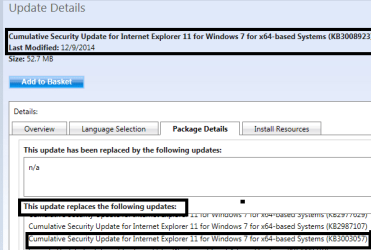
No problems but Windows Update cleanup (Deepclean) did not remove KB3003057 (due to "applicability" in CBS/Deepclean.log) which was superseded by KB3008293. Uninstalled 3003057 thru WU interface, rebooted & checked WU, showed up-to-date. :)

Code:
2014-12-09 16:41:58, Info                  CBS    [B]Skipping: Package_for_KB3003057~31bf3856ad364e35~amd64~~11.2.1.0 due to applicability[/B]
snip.PNG
 
Last edited:

My Computer

Computer type
Laptop
Computer Manufacturer/Model Number
MSI PE60 6QE
OS
Win 10 Pro x64, Win 7 Pro x64
CPU
Intel Core i7-6700HQ Skylake
Motherboard
MSI MS-16J5
Memory
16gb Crucial DDR4
Graphics Card(s)
NVIDIA GeForce GTX 960M 2 GB
Screen Resolution
1920 x 1080
Hard Drives
Samsung 850 EVO 250 GB M.2 SSD (MZ-N5E250BW)
HGST 1TB @7200 RPM HTS721010A9E630
Case
Plastic
Keyboard
Got one...
Mouse
Yep, one of those too.
Internet Speed
FIOS 75/75
Antivirus
Defender
Browser
Chrome/FFox/Ex-PLODE-r/(L)Edge
Other Info
Defender, Custom Hosts, uBlock, regular backups w/ Macrium (Free)
Uninstalled this morning both of them and only the Kb2992611 showed up. Had to manually install the IE cumulative update kb3003057.
 

My Computer

Computer type
PC/Desktop
Computer Manufacturer/Model Number
Custom Build
OS
Windows 7 Professional SP1 - x64 [Non-UEFI Boot]
CPU
Ivy Bridge Core i5 3570K (Delidded)
Motherboard
Asus P8Z77-V LE PLUS
Memory
G.Skill "Ares" DDR3 PC3-12800 - 1600MHz (16Gb)
Graphics Card(s)
Asus Dual-RX480-O4G
Sound Card
Creative Sound Blaster Z w/5.1 sound system
Monitor(s) Displays
Asus IPS 23"
Screen Resolution
16/9
Hard Drives
Internal:
500Go Sata 6Gb/s (x2)
500Go Sata 3Gb/s (x2)
SSD 60Go Sata 6Gb/s
PSU
In Win C 900W Series 80+ Platinum
Case
Thermaltake Chaser A71
Cooling
Custom Water Cooling Loop
Keyboard
Cooler Master QuickFire XTi
Mouse
Razer Imperator 2012 (4G)
Antivirus
MSE
Browser
IE 11.0.xxx Rtm
Other Info
"Raid0" with Intel Smart Response Technology (HDD/SSD)
Installed all of them last night with no issues. Was afraid they would start the automatic changing of some of the internet options again like the last Patch Tuesday updated did, but haven't seen that yet.
 

My Computer

Computer type
PC/Desktop
Computer Manufacturer/Model Number
ASUS
OS
Windows 7 Home Premium 64 bit SP1
CPU
i5-2320 @3.00 GHz
Memory
6GB
Graphics Card(s)
NVIDIA GeForce 7300 LE
Monitor(s) Displays
Acer S200HQL 19.5 LED
Screen Resolution
1280 x 800 (1900 x 900 max)
Hard Drives
Drive 1: 1 TB SATA internal: C drive
Drive 2: 250 GB SATA internal: User Data Backup
Drive 3: 500 GB SATA USB: Full System Backup 1, Father
Drive 4: 500 GB SATA USB: Full System Backup 2, Son
Drive 5: 40 GB IDE USB: Kindle, ASUS Tabl
Keyboard
ASUS KB34211
Mouse
Logitech m325 cordless
Internet Speed
27Mb down, 3 Mb up cable modem w/Netgear R6400 WiFi
Antivirus
NIS, Spybot S&D, CCleaner, Malwarebytes, MSERT, MRT
Browser
FF v44.0.2;IE11 v11.0.9600.18015,uv11.0.23;Chrome v44.0.2403
Other Info
FF has AdBlockPlus and Ghostery plugins,
Is there a rule of thumb for how long to wait before accepting the Windows Updates? I believe that Microsoft sometimes reissues a faulty patch two weeks after it first came out, so would two weeks be a reasonable time to wait?
 

My Computer

Computer type
Laptop
Computer Manufacturer/Model Number
HP ProBook 455 G1
OS
Windows 7 Professional x64
CPU
AMD A4-4300M, Revision TN-A1
Motherboard
HP 194E Socket FS1 Ver. A2019DD203 AMD A55/A60M/A8 (Speccy)*
Memory
4 GB DDR3 (3276 MBytes acc. to Speccy)
Graphics Card(s)
Radeon HD 7420G
Sound Card
IDT High Def Audio CODEC; AMD High Def Audio Device
Screen Resolution
1366 x 768
Hard Drives
Seagate 465 GB ST500LT0 12-1DG142 SATA-III
Keyboard
Std 101/102-Key or Micros. Natural PS/2 Keyb'd for HP Hotkey
Mouse
Synaptics PS/2 Port TouchPad
Antivirus
Microsoft Security Essentials
Browser
Firefox release channel (also Chrome and IE 11)
Other Info
Hard disk is encrypted. In addition to above motherboard info from Speccy, CPU-Z reports: "Model: HP 194E, KBC Vers. 91.0D; Chipset: AMD 15 IMC, Ver. 00; Southbridge: AMD A76M FCH, Rev. 2.6; LPCIO: SMSC"
I installed the updates this morning before going out, and ran into a couple of problems when I got back. The magnifier tool wouldn't work and I was being asked for permission to do things I didn't need to before (using System Restore, viewing processes for all users, etc.). I went to uninstall the updates but wasn't sure which Office updates, if any, needed uninstalling and used System Restore instead. I installed the Office updates and malicious software removal tool again, and everything seems to be working as before. I'm going to wait a bit before trying to install the other updates again.
 

My Computer

Computer type
PC/Desktop
Computer Manufacturer/Model Number
Packard Bell ipower G5800
OS
Windows 7 Home Premium 64bit (Service Pack 1)
CPU
Intel Core i7
Memory
6.00 GB
Graphics Card(s)
NVIDIA GeForce GTX 550 Ti
Antivirus
Avira Free Antivirus
Browser
Firefox
Here's my experience,

I started with a Cumulative security update for Internet Explorer 10 (3003057) then when I went back to Windows Updates (WU) I had another Cumulative security update for Internet Explorer 10 (3008923) :shock: :confused: This obviously has to do with:


In WU history it shows as Cumulative security update for Internet Explorer 10, but in WU Installed updates it shows as just a Security Update for Microsoft Windows......
WUARR.JPG

Yea, yea, I'll be doin' em both, then the rest.


Is there a rule of thumb for how long to wait before accepting the Windows Updates? I believe that Microsoft sometimes reissues a faulty patch two weeks after it first came out, so would two weeks be a reasonable time to wait?
That's a little bit long, usually after a day or so you can find problems cropping up, Lady Fitzgerald usually waits until Saturday. You have to look around here or on other sites. Do a search for Patch Tuesday and the appropriate date i.e. patch tuesday dec. 2014
 

My Computer

Computer type
PC/Desktop
Computer Manufacturer/Model Number
Gateway DX4831-01e (Mid-Tower Desktop)
OS
Originally Win 7 Hm Prem x64 Ver 6.1.7600 Build 7601-SP1 | Upgraded to Windows 10 December 14, 2019
CPU
Intel i3 530 2.93GHz, 2933MHz 2 Cores 4 Logical Processors
Motherboard
Gateway H57M01 133 megahertz
Memory
6GB of 1,333MHz DDR3 SDRAM
Graphics Card(s)
32MB Intel Graphics Media Accelerator HD IGChip
Sound Card
Realtek High Definition Audio
Monitor(s) Displays
Gateway HX2000 20inch TFT active matrix TN
Screen Resolution
1600 x 900 x 59 hertz
Hard Drives
WDC WD10EADS-00M2B0 [HDD] (1000.20 GB) -- drive 0,
HL-DT-ST DVDRAM GH41N [CD-ROM dr]
Four card readers, and Four USB 2.0
PSU
300watts.
Case
Mid-Tower Desktop
Cooling
Stock from Gateway
Keyboard
Natural Ergonomic Keyboard 4000, see Other Info
Mouse
Orig. Gateway wore out now using Insignia USB wired optical
Internet Speed
Vz FIOS 10ms png 57.64Mbps down 65.53Mbps up Speedtest.org
Antivirus
Zamana Anti-logger with Anti-malware, MSE, Windows Firewall,
Browser
IE11.0.9600.19399-Upd ver11.0.135, Firefox 68.0.1 x64
Other Info
System Specs by Belarc.

BIOS: American Megatrends Inc. P01-A0 11/17/2009

Replaced the MS 'Natural' Standard PS/2 Enhanced 101-102 Keyboard with a new Natural Ergonomic Keyboard 4000 on August 1st 2014.

Canon Pixma MG3222 Printer.

Updated to IE11 on 12102015 | Fios Quantum Router g1100

Additional AV: SpywareBlaster, manual Mbam, SAS
I installed the updates this morning before going out, and ran into a couple of problems when I got back. The magnifier tool wouldn't work and I was being asked for permission to do things I didn't need to before (using System Restore, viewing processes for all users, etc.). I went to uninstall the updates but wasn't sure which Office updates, if any, needed uninstalling and used System Restore instead. I installed the Office updates and malicious software removal tool again, and everything seems to be working as before. I'm going to wait a bit before trying to install the other updates again.

This is caused by update KB3004394. Uninstall it and your system will go back to normal.

Microsoft has pulled this update from Windows update.
 

My Computer

Computer type
PC/Desktop
Computer Manufacturer/Model Number
Custom Built
OS
Windows 10 Pro x64, Windows 8.1 Pro x64, Windows 7 Ultimate x64 SP1,
CPU
INTEL i9-7920X LGA 2066
Motherboard
Gigabyte X299-WU8 F3
Memory
64 GB (4 X 16 GB) G-Skill V Series DDR4 3200 Quad Channel
Graphics Card(s)
EVGA GTX 1060 SC 3 GB
Sound Card
Realtek Onboard ALC1220
Monitor(s) Displays
2 x Samsung S27E310
Screen Resolution
1920x1080
Hard Drives
Samsung 2 x 970 EVO Plus 500 GB NVMe
1 x 6TB WD 6003FZBX SATA
1 x 6TB WD 60EFRX SATA
12 x 3TB WD 30EFRX SATA
PSU
Seasonic X-1050
Case
Thermaltake Armor+
Cooling
Corsair H80i V2 Liquid AOI Cooler
Keyboard
Logitech G510s
Mouse
Logitech MX Master 2S
Internet Speed
200 Mb/s
Antivirus
ESET NOD32 13.1
Browser
EDGE (Dev, Canary, Beta), Chrome
Other Info
ASUS RT-AC68U router
Malwarebytes 4.0.4
Last edited:

My Computer

Computer type
Laptop
Computer Manufacturer/Model Number
MSI PE60 6QE
OS
Win 10 Pro x64, Win 7 Pro x64
CPU
Intel Core i7-6700HQ Skylake
Motherboard
MSI MS-16J5
Memory
16gb Crucial DDR4
Graphics Card(s)
NVIDIA GeForce GTX 960M 2 GB
Screen Resolution
1920 x 1080
Hard Drives
Samsung 850 EVO 250 GB M.2 SSD (MZ-N5E250BW)
HGST 1TB @7200 RPM HTS721010A9E630
Case
Plastic
Keyboard
Got one...
Mouse
Yep, one of those too.
Internet Speed
FIOS 75/75
Antivirus
Defender
Browser
Chrome/FFox/Ex-PLODE-r/(L)Edge
Other Info
Defender, Custom Hosts, uBlock, regular backups w/ Macrium (Free)
Is there a rule of thumb for how long to wait before accepting the Windows Updates? I believe that Microsoft sometimes reissues a faulty patch two weeks after it first came out, so would two weeks be a reasonable time to wait?

I normally wait until the Saturday morning after Patch Tuesday to download and install updates (I have Updates set to notify me when there are updates but to let me decide when to download and install them). By then, if there are any problems being reported, they will be posted on forums like this one and, usually, M$ will have pulled the offender.
 

My Computer

Computer type
PC/Desktop
Computer Manufacturer/Model Number
Custom Build
OS
Win 7 Ultimate 64 bit
CPU
Intel i7-3930K
Motherboard
ASUS P9X79 WS
Memory
Kingston HyperX Genesis 32GB Kit (8x4GB Modules) 1600MHz DDR
Graphics Card(s)
MSI R7850 Twin Frozr 2GD5/OC Radeon HD 7850 2GB 256-bit GDDR
Sound Card
Asus Xonar Essence STX
Monitor(s) Displays
3x Asus VG248QE 24", Vizio 32" TV
Screen Resolution
1920 x 1080, ?
Hard Drives
Samsung 128GB 840 Pro SSD (1),
Samsung 4TB 850 EVO SSDs (4)
Samsung 4TB 850 EVO SSDs (16) external backup drives used in 2.5" hot swap bays in the computer.
PSU
Corsair HX750w
Case
Antec Two Hundred v2 (modified)
Cooling
Cooler Master GeminII S524 120mm (fan replaced with a 140mm)
Keyboard
Logitech G510s
Mouse
Logitech M525 (two in use)
Internet Speed
=< 32Mbps down, 8Mbps up
Antivirus
AVAST!, MBAM, SAS, Spybot S&D (all but MBAM free) Glary Util
Browser
IE11
Other Info
LSI 9211-8i HBA card (8 SATA III ports), 2.5" & 3.5" Hot Swap Bays, HooToo HT-CR001 PCI-E to USB 3.0 Internal Hub + 6 Slot Card Reader, and LG Model CH12LS28 BD-ROM Optical Drive. Also, ScanSnap S1500 ADF duplexing scanner, Canon 9000F flat bed scanner, Corsair SP2500 2.1 speakers, Samsung CLP 415nw laser color printer, Cyberpower PP2200SW UPS
This is caused by update KB3004394. Uninstall it and your system will go back to normal.

Microsoft has pulled this update from Windows update.

Thanks. I saw another thread confirming that was the update responsible.
 

My Computer

Computer type
PC/Desktop
Computer Manufacturer/Model Number
Packard Bell ipower G5800
OS
Windows 7 Home Premium 64bit (Service Pack 1)
CPU
Intel Core i7
Memory
6.00 GB
Graphics Card(s)
NVIDIA GeForce GTX 550 Ti
Antivirus
Avira Free Antivirus
Browser
Firefox
yep; here we go again is right. I just installed the latest batch of updates as well; but i have not rebooted yet to finish the install. Im waiting for a bit to do that as im sorta in the middle of something right now. But it will happen later and then i will find out whether there are any issues for me or not.
 

My Computer

Computer type
PC/Desktop
Computer Manufacturer/Model Number
custom built
OS
Windows 7 ultimate 64-bit
CPU
Intel I7 2600K 3.4ghz
Motherboard
Asus Evo P8P67
Memory
Corsair 16gb ddr3 1600mhz
Graphics Card(s)
Nvidia Geforce gt 430
Sound Card
Sound Blaster Titanium x-fi pci express
Monitor(s) Displays
Dell E198WFP
Hard Drives
1 western digital 2TB drive.
PSU
Antec 1200 watt
Case
Inwin Dragon Rider
Cooling
6 case supplied cooling fans
Keyboard
logitech mk700
Mouse
logitech m705
Internet Speed
25-50mbps download; 10mbps upload(i think)
Antivirus
avg free 2014
Browser
mozilla firefox
Other Info
Also have a pretty bad speaker setup which is a klipsch promedia 5.1 surround speaker setup with huge subwoofer and lg blu ray player/writer. Also a hp officejet pro 8600 plus wireless all in one and a logitech s7500 webcam.
Is there a rule of thumb for how long to wait before accepting the Windows Updates? I believe that Microsoft sometimes reissues a faulty patch two weeks after it first came out, so would two weeks be a reasonable time to wait?

I normally wait until the Saturday morning after Patch Tuesday to download and install updates (I have Updates set to notify me when there are updates but to let me decide when to download and install them). By then, if there are any problems being reported, they will be posted on forums like this one and, usually, M$ will have pulled the offender.

This is definitely a good way to do things i think Lady. I think you have the right idea here. I may have to start doing something like that myself. Right now i just have it set to notify me; but not download anything until i tell it to.
 

My Computer

Computer type
PC/Desktop
Computer Manufacturer/Model Number
custom built
OS
Windows 7 ultimate 64-bit
CPU
Intel I7 2600K 3.4ghz
Motherboard
Asus Evo P8P67
Memory
Corsair 16gb ddr3 1600mhz
Graphics Card(s)
Nvidia Geforce gt 430
Sound Card
Sound Blaster Titanium x-fi pci express
Monitor(s) Displays
Dell E198WFP
Hard Drives
1 western digital 2TB drive.
PSU
Antec 1200 watt
Case
Inwin Dragon Rider
Cooling
6 case supplied cooling fans
Keyboard
logitech mk700
Mouse
logitech m705
Internet Speed
25-50mbps download; 10mbps upload(i think)
Antivirus
avg free 2014
Browser
mozilla firefox
Other Info
Also have a pretty bad speaker setup which is a klipsch promedia 5.1 surround speaker setup with huge subwoofer and lg blu ray player/writer. Also a hp officejet pro 8600 plus wireless all in one and a logitech s7500 webcam.
Back
Top