Decreasing Laptop wireless signal to router

Brian6121990

Black Ops
Power User
VIP
Local time
9:20 PM
Messages
319
Location
san diego, ca
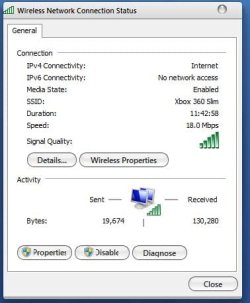
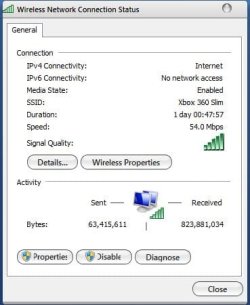
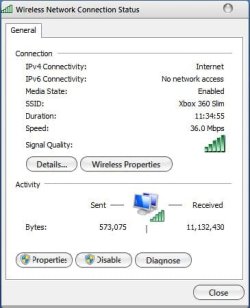
Its going really bad. And the signal i meant is the speed of my wireless network connection from the status. It goes form 54 to 48 to 36, 24,11,5.5,3,2,1. I am getting signal interference from the nearby wireless routers and laptops connected to that. Is there a way i can really stop this annoying problem?
The picture will show you the problem.
 

Attachments
  • Capture.JPG
    Capture.JPG
    28.8 KB · Views: 12
  • fail.JPG
    fail.JPG
    30.3 KB · Views: 11

My Computer My Computer

At a glance

Mac OS X Yosemite2.4 GHz Intel Core i78 GB 1600 MHz DDR3NVIDIA GeForce GT 650M
Computer type
PC/Desktop
Computer Manufacturer/Model Number
Macbook Pro Retina
OS
Mac OS X Yosemite
CPU
2.4 GHz Intel Core i7
Memory
8 GB 1600 MHz DDR3
Graphics Card(s)
NVIDIA GeForce GT 650M
Monitor(s) Displays
Retina
Screen Resolution
Retina
Hard Drives
250GB SSD
Other Info
Macbook Pro Retina (2013)
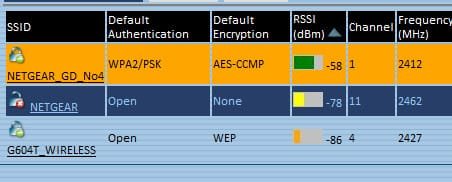
do you have your own router? if so, change the channel it broadcasts on. the channel frequencies overlap a bit, so get as far away by channel number as possible from the others. xirrus has a sidebar gadget that will show all the channels in use in your vicinity. the screenshot attached shows my router at top set on channel 1, with the others in the neighbourhood on 4 and 11, i could have set it to 7 or 8 as well, keeping 2 channel numbers in between me and the others. i didn't as there is a weak one on 7 that shows occasionally.

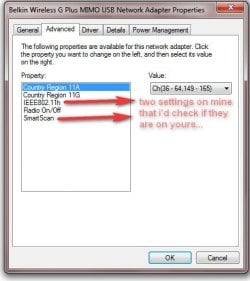
if you are using a router that you cannot change the channel of, ie. at school or work, there may be an 'advanced' property for your adapter, ie. 'smartscan', or 802.11h that you can change. the examples you attached show a strong signal quality but the speed drops as you note. most systems negotiate the speed down to a level that is acceptable in terms of errors, but they tend not to negotiate back up again & a reboot may be needed. if you are sharing a router, the more active connections, the slower your speed will be as the speed is shared out by dividing it up.
 

Attachments

  • ScreenShot00032.jpg
    ScreenShot00032.jpg
    16.3 KB · Views: 22

My Computer My Computer

At a glance

Win 7 ultimate x64 sp1Intel i7 4 core 3770k ivy bridge o/c to 4.2ghz16 GBNvidia geforce GTX650
Computer type
PC/Desktop
Computer Manufacturer/Model Number
Custom build Nanu by 3SX
OS
Win 7 ultimate x64 sp1
CPU
Intel i7 4 core 3770k ivy bridge o/c to 4.2ghz
Motherboard
Asus p8z77-i Deluxe
Memory
16 GB
Graphics Card(s)
Nvidia geforce GTX650
Sound Card
Realtek on mb
Monitor(s) Displays
24in. lcd/led
Screen Resolution
1920x1080
Hard Drives
128GB Kingston SSD
500GB seagate maximus xt hybrid
500GB hitachi HD
500GB external WD Passport usb3
PSU
Silverstone 450 watt
Case
Silverstone FT03 Black Fortress
Cooling
Water cooler
Keyboard
Logitech wireless kbd/mouse mk300
Mouse
Logitech wireless kbd/mouse mk300
Internet Speed
8mb adsl (actuall speed is around 6mb)
Other Info
Asus DSL-N55U wireless router
SONY BC-5850H 6X BLURAY writer
OUTPOST Security Suite
do you have your own router? if so, change the channel it broadcasts on. the channel frequencies overlap a bit, so get as far away by channel number as possible from the others. xirrus has a sidebar gadget that will show all the channels in use in your vicinity. the screenshot attached shows my router at top set on channel 1, with the others in the neighbourhood on 4 and 11, i could have set it to 7 or 8 as well, keeping 2 channel numbers in between me and the others. i didn't as there is a weak one on 7 that shows occasionally.

if you are using a router that you cannot change the channel of, ie. at school or work, there may be an 'advanced' property for your adapter, ie. 'smartscan', or 802.11h that you can change. the examples you attached show a strong signal quality but the speed drops as you note. most systems negotiate the speed down to a level that is acceptable in terms of errors, but they tend not to negotiate back up again & a reboot may be needed. if you are sharing a router, the more active connections, the slower your speed will be as the speed is shared out by dividing it up.

I have my own router. ITs the Belkin Router N+....i wish i can change the channel if i had the tv remote LOL jk jk
How exactly i can change the channel? Sorry, but this is something new to me.

Oh and i share the router with the desktop downstairs and a ps3. That's it. And i share my laptop connection with the xbox 360. I didn't had this problem before i moved into the apartments. I had a house before this so i rarely get this speed dropped as i get now. 5 times it happend so far in 3 weeks than 3 times in 1 year in the house i was at before i moved here.
 

My Computer My Computer

At a glance

Mac OS X Yosemite2.4 GHz Intel Core i78 GB 1600 MHz DDR3NVIDIA GeForce GT 650M
Computer type
PC/Desktop
Computer Manufacturer/Model Number
Macbook Pro Retina
OS
Mac OS X Yosemite
CPU
2.4 GHz Intel Core i7
Memory
8 GB 1600 MHz DDR3
Graphics Card(s)
NVIDIA GeForce GT 650M
Monitor(s) Displays
Retina
Screen Resolution
Retina
Hard Drives
250GB SSD
Other Info
Macbook Pro Retina (2013)
Nevermind, i changed the channel. There was like only 1 person besides me with the same channel and lots of 2's and 6's and one 11's. I picked 8 because it was away from 6 and 11 :)
Thanks....lets hope my speed don't drop.
[EDIT]-It is still the same, but what i can do is use3 the soda can/alluminum trick to boost wifi :D
 
Last edited:

My Computer My Computer

At a glance

Mac OS X Yosemite2.4 GHz Intel Core i78 GB 1600 MHz DDR3NVIDIA GeForce GT 650M
Computer type
PC/Desktop
Computer Manufacturer/Model Number
Macbook Pro Retina
OS
Mac OS X Yosemite
CPU
2.4 GHz Intel Core i7
Memory
8 GB 1600 MHz DDR3
Graphics Card(s)
NVIDIA GeForce GT 650M
Monitor(s) Displays
Retina
Screen Resolution
Retina
Hard Drives
250GB SSD
Other Info
Macbook Pro Retina (2013)
i don't think your problem is the signal strength, it's that all the other routers are so close that their signals are as strong as yours, swamping it.

a directional antenna would help, not by increasing your routers received strength, but by it's directionality allowing you to block out the others.

i use a usb wireless network adapter on a usb extension cable at the focus of a parabolic reflector i made out of a thin piece of screening which i then covered in tin foil. i used a section of packing foam cut to shape to maintain the parabola. (it's only bent in one direction, it's not a dish). anyhow, with it i get a signal in the 80% range, without it is down to about 10% as i am about 50 ft. from the router location with a few walls in between.

a simpler one would be to make a small corner reflector. see this linky. the reflector is put on the router antenna in the linked article, but could also be put on the pc's antenna. rotate till the offending routers are blocked while your signal is best. if that helps, you could make one of the more complex directionals.

hopefully your pc's adapter is also an N+, a std. 802.11G pc adapter would work, but not as effectively. try seeing if the adapter's advanced settings have any parameters you can tweak as i mentioned earlier.
 

Attachments

  • ScreenShot00032.jpg
    ScreenShot00032.jpg
    34.2 KB · Views: 11
  • ScreenShot00033.jpg
    ScreenShot00033.jpg
    28 KB · Views: 18

My Computer My Computer

At a glance

Win 7 ultimate x64 sp1Intel i7 4 core 3770k ivy bridge o/c to 4.2ghz16 GBNvidia geforce GTX650
Computer type
PC/Desktop
Computer Manufacturer/Model Number
Custom build Nanu by 3SX
OS
Win 7 ultimate x64 sp1
CPU
Intel i7 4 core 3770k ivy bridge o/c to 4.2ghz
Motherboard
Asus p8z77-i Deluxe
Memory
16 GB
Graphics Card(s)
Nvidia geforce GTX650
Sound Card
Realtek on mb
Monitor(s) Displays
24in. lcd/led
Screen Resolution
1920x1080
Hard Drives
128GB Kingston SSD
500GB seagate maximus xt hybrid
500GB hitachi HD
500GB external WD Passport usb3
PSU
Silverstone 450 watt
Case
Silverstone FT03 Black Fortress
Cooling
Water cooler
Keyboard
Logitech wireless kbd/mouse mk300
Mouse
Logitech wireless kbd/mouse mk300
Internet Speed
8mb adsl (actuall speed is around 6mb)
Other Info
Asus DSL-N55U wireless router
SONY BC-5850H 6X BLURAY writer
OUTPOST Security Suite
i don't think your problem is the signal strength, it's that all the other routers are so close that their signals are as strong as yours, swamping it.

a directional antenna would help, not by increasing your routers received strength, but by it's directionality allowing you to block out the others.

i use a usb wireless network adapter on a usb extension cable at the focus of a parabolic reflector i made out of a thin piece of screening which i then covered in tin foil. i used a section of packing foam cut to shape to maintain the parabola. (it's only bent in one direction, it's not a dish). anyhow, with it i get a signal in the 80% range, without it is down to about 10% as i am about 50 ft. from the router location with a few walls in between.

a simpler one would be to make a small corner reflector. see this linky. the reflector is put on the router antenna in the linked article, but could also be put on the pc's antenna. rotate till the offending routers are blocked while your signal is best. if that helps, you could make one of the more complex directionals.

hopefully your pc's adapter is also an N+, a std. 802.11G pc adapter would work, but not as effectively. try seeing if the adapter's advanced settings have any parameters you can tweak as i mentioned earlier.


Yeah, my laptop has a wireless N+ network (which makes it better than a average netbook/notebook.
Also with the boost, check out my connection. Usually i would get about 10-40 million in recieved but not i got over 200mil :D
And this was taken while sharing connection with my xbox 360 :D

Also in the pix you uploaded, if i have my settings checked exactly like yours, would it make an improvement?
 

Attachments

  • increase wifi.JPG
    increase wifi.JPG
    29.8 KB · Views: 6

My Computer My Computer

At a glance

Mac OS X Yosemite2.4 GHz Intel Core i78 GB 1600 MHz DDR3NVIDIA GeForce GT 650M
Computer type
PC/Desktop
Computer Manufacturer/Model Number
Macbook Pro Retina
OS
Mac OS X Yosemite
CPU
2.4 GHz Intel Core i7
Memory
8 GB 1600 MHz DDR3
Graphics Card(s)
NVIDIA GeForce GT 650M
Monitor(s) Displays
Retina
Screen Resolution
Retina
Hard Drives
250GB SSD
Other Info
Macbook Pro Retina (2013)
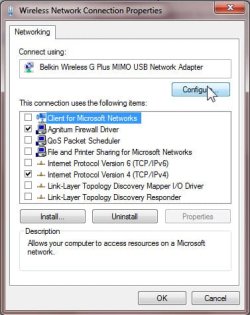
well, if you are not on a lan, for internet you only need tcp/ip & can untick everything but tcp/ipv4 (and a firewall driver if present). which if any of the ones there you may need for the xbox i do not know, not having one myself.

try it, you can always re-tick them till it works again to find which one(s) are needed.

ipv6 is at present used by win7 homegroups but may in future be needed for the internet, the others are needed if you have your own network with multiple pc's, but windows networking/file and print sharing are very 'chatty' protocols forever talking to other lan members, router, etc. and taking up some of your bandwidth. even if you do NOT have any other pc's yours is continually looking to see if you do, and announcing itself and all your shares to the rest of your world (but not thru the router to the internet). again,, you may or may not need these for the xbox. if it appears in your network neighbourhood as a named device/drive, you probably will need all the boxes, if it is controlled thru a browser interface or an application, you might not need all of them.

experiment. it's half the fun.
 

My Computer My Computer

At a glance

Win 7 ultimate x64 sp1Intel i7 4 core 3770k ivy bridge o/c to 4.2ghz16 GBNvidia geforce GTX650
Computer type
PC/Desktop
Computer Manufacturer/Model Number
Custom build Nanu by 3SX
OS
Win 7 ultimate x64 sp1
CPU
Intel i7 4 core 3770k ivy bridge o/c to 4.2ghz
Motherboard
Asus p8z77-i Deluxe
Memory
16 GB
Graphics Card(s)
Nvidia geforce GTX650
Sound Card
Realtek on mb
Monitor(s) Displays
24in. lcd/led
Screen Resolution
1920x1080
Hard Drives
128GB Kingston SSD
500GB seagate maximus xt hybrid
500GB hitachi HD
500GB external WD Passport usb3
PSU
Silverstone 450 watt
Case
Silverstone FT03 Black Fortress
Cooling
Water cooler
Keyboard
Logitech wireless kbd/mouse mk300
Mouse
Logitech wireless kbd/mouse mk300
Internet Speed
8mb adsl (actuall speed is around 6mb)
Other Info
Asus DSL-N55U wireless router
SONY BC-5850H 6X BLURAY writer
OUTPOST Security Suite
Back
Top