
Dedicated area for Gadgets? I.e. maximize window and still see gadget?

myurkus

New member
Local time
3:16 AM
Messages
6
Is there a way to make it so that hitting "maximize" on a window will not cover-up the gadgets? I know that you can have Gadgets always display on-top; however, I want to be able to have a dedicated area on the desktop where the gadgets will be located even if a window is maximized.


Here is an example of what I am thinking, the only difference is that this window would be maximized instead of manually resizing it to allow for space for the gadgets.
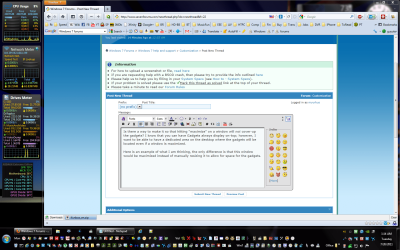
MaximizeWithGadgets2.png


I understand that with the nature of Gadgets in Windows 7 there is no dedicated "sidebar" space like there was in Vista; however, I am fine with dedicating a specific space for this "zone" while ignoring other Gadgets that may be all over the place.

I am a software engineer and am proficient in .net etc, so if the only solution is programatic; that is fine, I am willing to work on it. However, I want to know if this is the only way and if anyone has any suggestions on how to go about doing this (even from a high-level.)

Thank you very much in advance for your help! I am excited if there is a way to make this work!. :party:

MikeY
 

My Computer My Computer

At a glance

Windows 7 Ultimate x64
OS
Windows 7 Ultimate x64

My Computer My Computer

At a glance

Windows 7 Ultimate x64Athlon x64 5600+4GB DDR2NV 7600GS
Computer Manufacturer/Model Number
Nonane
OS
Windows 7 Ultimate x64
CPU
Athlon x64 5600+
Motherboard
MSI
Memory
4GB DDR2
Graphics Card(s)
NV 7600GS
Sound Card
Realtek HDA
Monitor(s) Displays
17"
Hard Drives
WD 1.5TB

My Computer My Computer

At a glance

Windows 7 Ultimate X64 SP1Intel i5-2550K, Differing ~4.4-4.8GHz No buil...16GB G.Skill Sniper 1866MHz @ 2133MHz 2x8GBASUS GTX650TIB-DC2OC-2GD5, (650TI Boost)
Computer type
PC/Desktop
Computer Manufacturer/Model Number
Home Built Desktop By DataTech
OS
Windows 7 Ultimate X64 SP1
CPU
Intel i5-2550K, Differing ~4.4-4.8GHz No built in GPU
Motherboard
ASUS P8Z68-V PRO/GEN3
Memory
16GB G.Skill Sniper 1866MHz @ 2133MHz 2x8GB
Graphics Card(s)
ASUS GTX650TIB-DC2OC-2GD5, (650TI Boost)
Sound Card
Onboard Realtek 5-1
Monitor(s) Displays
Samsung P2570HD
Screen Resolution
1920x1080
Hard Drives
Samsung 840 Pro 256GB SSD for OS, 500GB Seagate Constellation (Enterprise drive) for Data
PSU
Corsair HX650W
Case
Inwin Dragon Rider
Cooling
Hyper 212 EVO w/two Noctua fans, push-pull, @1300 RPM
Keyboard
E-Z Eyes, bright yellow keys with large characters
Mouse
steelseries SENSEI Laser Pro Gaming
Internet Speed
48-51Mbs Mbs down, 11 Mbs up Xfinity Cable
Antivirus
Norton Internet Security 2013
Browser
IE 10, Opera, Pale Moon if needed
Other Info
4 case fans, LG BluRay-RE, ASUS DVD-RW, Mr. Fusion power supply, 1.21 gigawatts.
myurkus,

Welcome to SevenForums.

Another approach:

Live with it, but use WIN + Spacebar key combo to see desktop until you release the WIN key. This is the approach I use.

WIN is the key with the Microsoft flag on top..
 
Last edited:

My Computer My Computer

At a glance

MS Windows 7 Ultimate SP1 64-bitAMD A10-4600M6.00 GB Dual-Channel DDR3 @ 798MHz (11-11-12-28)AMD Radeon HD 7660G
Computer Manufacturer/Model Number
Toshiba Satellite S875D-S7239 laptop
OS
MS Windows 7 Ultimate SP1 64-bit
CPU
AMD A10-4600M
Motherboard
AMD Pumori (Socket FT1)
Memory
6.00 GB Dual-Channel DDR3 @ 798MHz (11-11-12-28)
Graphics Card(s)
AMD Radeon HD 7660G
Sound Card
High Definition Audio Device
Monitor(s) Displays
Generic PnP Monitor (1600x900@60Hz)
Screen Resolution
1600x900@60Hz
Hard Drives
SSD 119GB Corsair CSSD-V128GB2 ATA Device
Keyboard
Standard PS/2 Keyboard
Mouse
HP Wireless Optical Mobile Mouse Model FHA-3410
Internet Speed
What the local pub, local coffee shop offers.
Other Info
Optical Drive:MATSHITA BD-CMB UJ160B ATA Device


Also have an Asus ha1002xp netbook with Win 7 Ultimate installed.
You could set up Winsplit Revolution and disable the standard Aero Snap feature. I use WIN+[numpad] to set up upper and lower left and right and a few sizes of left, center, and right. You could set it so that there is no "maximize", only left 15%-100%, which would leave the same space. You'd still have to avoid the "maximize" button, but it's a workaround.
 

My Computer My Computer

At a glance

Windows 7 64-Bit
OS
Windows 7 64-Bit
Back
Top