Username and password required for gadgets?

miro8

New member
Local time
4:30 AM
Messages
19
Location
Torremolinos
This is an intermittent problem, but most times when I switch on my PC I get a Windows security message popping up:
The server money.service.msn.com at ASL26555 requires a username and password. Warning: this server is requesting that your username and password be sent in an insecure manner (basic authentication without a secure connection).
I get a similar message for weather.service.msn
The only change I have made recently is installing a new router supplied by my ISP. I have spoken to them, they are clueless; I have searched for answers (others have had the same problem) but I cannot find a solution. Disabling my weather and currency conversion desktop gadgets obviously gets rid of the messages, but there must surely be an answer to why this has started happening?
Also, Windows Live Mail sometimes fails to connect to Hotmail (no problem with other mail such as Gmail)
Any suggestions?
 

My Computer My Computer

OS
W7 32 bit Home Premium
CPU
Pentium(R) Dual-Core E5300
Memory
4GB
Keyboard
yes
Mouse
yes
Internet Speed
6 Mbps
Looking around, this is a router issue. Basically the feeds the gadgets use are triggering a user name/password request that is unencrypted. This triggers the security warning. When you 1st started using the gadgets, was it necessary to set up a user/pass? If not, then it sounds like the sites need to be added to the allowed list through router configuration somehow. I was unable to find any fix for this issue beyond removing the gadgets to fix the popup :(

A Guy
 

My Computer My Computer

Computer type
PC/Desktop
OS
Windows 10 Home x64
CPU
INTEL Core i5-750 Quad-Core 3.37GHz
Motherboard
ASUS P7P55D
Memory
HyperX Fury Black Series 8GB (2 x 4GB) 1866Mhz
Graphics Card(s)
EVGA GeForce GTX 750 Superclocked 1GB 128-Bit GDDR5
Monitor(s) Displays
LG 32MA68HY 32" IPS
Screen Resolution
1920 x 1080
Hard Drives
Samsung 840 Evo 120GB, SEAGATE 500GB Barracuda® 7200.12, SATA 3 Gb/s, 7200 RPM, 16MB cache
PSU
ANTEC TruePower New TP-550, 80 PLUS, 550W
Case
ANTEC Three Hundred Illusion
Cooling
COOLER MASTER Hyper 212 Plus, 4 x 120mm 1 x 140mm Noctua's
Internet Speed
85 + Mbps
Antivirus
Avast
Browser
Vivaldi
Thanks for the reply. Amazingly, I've posted this on other forums as well and received nada in repsonse! Searching around, there have been plenty of others experiencing the same thing from time to time, but never a definitive solution or explanation. It does, as you say, seem to be router related, since it coincided with me replacing the router.
I installed some software from a disc provided with the new router (technical assistance, configuration assistance etc.) and a threat was detected by AVG (this is Movistar/Telefonica, not some dodgy unknown ISP!) so I duly removed them again; I found an application in my firewall settings that I think was related (aplicaión MFC awcbrowser) so I disabled it; I removed the gadgets and re-installed them several times; I ran Malwarebytes, Spybot, CCleaner, AVG etc; none of this seemed to make much difference - but for some reason the problem has not reoccurred for a few days now, so I'm wondering if it was all just coincidence and perhaps a Windows glitch that has been fixed by updates? I'm hoping so.
I removed Hotmail from Windows Live Mail and added it again, and it seems to be connecting every time without a problem.
I had a further problem with the new router, in that when I hid my SSID, my wireless device lost the connection and had to be connected manually every time. I asked my ISP about this too, and got no response (this is quite normal for Movistar and in fact Spain!), but curiously, even that seems to have righted itself now too. It's all rather strange.
 

My Computer My Computer

OS
W7 32 bit Home Premium
CPU
Pentium(R) Dual-Core E5300
Memory
4GB
Keyboard
yes
Mouse
yes
Internet Speed
6 Mbps
The problem has re-occurred after a couple of days absence. It's driving me nuts! Turning the router off and back on again solves it - until the next time. Surely somebody must have an idea?

Windowssecurity.jpg
 

My Computer My Computer

OS
W7 32 bit Home Premium
CPU
Pentium(R) Dual-Core E5300
Memory
4GB
Keyboard
yes
Mouse
yes
Internet Speed
6 Mbps
It may be worth your while to run the System File Checker, although that would only apply if something done during the install of the router software changes a windows file somehow.

http://www.sevenforums.com/tutorials/1538-sfc-scannow-command-system-file-checker.html

Ironically, if you had a name and password, and clicked remember, it would likely stop. What happens if you leave the fields empty, click remember, and click OK?

A Guy
 

My Computer My Computer

Computer type
PC/Desktop
OS
Windows 10 Home x64
CPU
INTEL Core i5-750 Quad-Core 3.37GHz
Motherboard
ASUS P7P55D
Memory
HyperX Fury Black Series 8GB (2 x 4GB) 1866Mhz
Graphics Card(s)
EVGA GeForce GTX 750 Superclocked 1GB 128-Bit GDDR5
Monitor(s) Displays
LG 32MA68HY 32" IPS
Screen Resolution
1920 x 1080
Hard Drives
Samsung 840 Evo 120GB, SEAGATE 500GB Barracuda® 7200.12, SATA 3 Gb/s, 7200 RPM, 16MB cache
PSU
ANTEC TruePower New TP-550, 80 PLUS, 550W
Case
ANTEC Three Hundred Illusion
Cooling
COOLER MASTER Hyper 212 Plus, 4 x 120mm 1 x 140mm Noctua's
Internet Speed
85 + Mbps
Antivirus
Avast
Browser
Vivaldi
Thanks for the suggestion. SFC found no integrity violations.
I disabled the offending desktop gadgets, so I will re-enable them and wait for the warning window to next appear to try out your suggestion of leaving the fields blank and selecting remember. I'll let you know the outcome.
 

My Computer My Computer

OS
W7 32 bit Home Premium
CPU
Pentium(R) Dual-Core E5300
Memory
4GB
Keyboard
yes
Mouse
yes
Internet Speed
6 Mbps
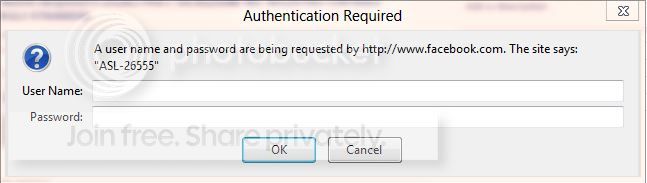
So, it now happens that I have the same problem. Since yesterday it asks passwords mostly for any site that has a sort of log in, it just prompted the one for facebook, below (I am using windows 8 consumer preview, hence the nicer window)

facebook.jpg


Yes, I obviously know the ID & password, and inserting them Aurora prompts a little window asking if I want to "save the password for facebook.com". Unfortunately, this doesn't prevent from prompting again the above window each time the router disconnects. Yes, the router disconnects from time to time, I can hear my wife's metatrader making noise because it loses the connection (via wifi) and sometimes looking at my pc I can see that also my ethernet is missing.
Ironically, I was in queue with the ISP's chat, and the connection went bang.
The ISP is the same of miro8, Movistar España.
Anyway, they now did something from the help desk, made me reset the router, and everything seems much more stable.

Did you miro8 experience a connection failure or something every time you see those messages?
_______

Sorry, I left this message open, so after an hour I have some news.
I noticed that I was keeping the windows http://192.168.1.1 and http://192.168.1.1:8000 open in order to monitor the internet connection, and now that I closed them, these problems are visibly reduced. I noticed that just pressing "cancel" in the settings was causing the router to go bang, and starting prompting log in messages. Still, I am clueless, because I have not been in front of 192.168.1.1 for 1½ day while I was getting all those authentication requests.

And as those windows appear from time to time, I still would like to know why, please...
 
Last edited:

My Computer My Computer

Computer Manufacturer/Model Number
self built form scratch
OS
Windows 7 Ultimate 64 bit/Linux Mint 17-64-Cinnamon
CPU
core i3
Motherboard
ASRock H55DE3
Memory
Corsair 2 Gb x 2
Graphics Card(s)
on board
Sound Card
on board
Monitor(s) Displays
1, 1920 x 1080
Hard Drives
Samsung Spinpoint 7200 rpm 1Tb
PSU
500W
Case
Cooler Master
Cooling
Arctic Cooling
Keyboard
Logitech
Mouse
Logitech, wired and with the ball!
Internet Speed
http://www.speedtest.net/my-result/3877691654
Browser
Nightly
¡Hola ElStellino!
Good to know I am not the only one experiencing this problem. I'm now thinking this definitely has something to do with Movistar in Spain - but they don't seem to have any idea at all.
Since my last post, I re-activated the currency conversion gadget, but not the weather gadget; I haven't yet seen the message again.
However, I do still from time to time find that Windows Live Mail cannot connect to Hotmail. Usually, if I just wait a few minutes and update Live Mail, it connects. Failing that, switching off the router and switching it back on seems to solve the problem.
I have not had any problems with the internet connection at all. My wireless devices also no longer have any problem connecting to the router, even when I have hidden the SSID.
Excuse my ignorance, but I don't know what http://192.168.1.1:8000 is for - but if I go to that url, I just get the same authentication message; I don't know what username or password it wants! It won't accept the router user/pw.
 

My Computer My Computer

OS
W7 32 bit Home Premium
CPU
Pentium(R) Dual-Core E5300
Memory
4GB
Keyboard
yes
Mouse
yes
Internet Speed
6 Mbps
¡Hola miro8! :)

The :8000 link came out after reading at this link:
Security By Default: Nuevos routers ASL 26555 de Movistar, configuración y uso avanzado ... y backdoor (!)
Talking about a security bug (or more probable a back-door) in our routers.

192.168.1.1 is the address at which you will find normally the Movistar page to set up your router. Mine works with a standard (wow-wow be prepared) 1234 both for username and password. The :8000 opens a more advanced setup through the door 8000, it works with the same 1234 for me, but I read online that some have a different log in, which is

username: user
password: MOV15tar$$

In theory find yours at http://192.168.1.1:8000/APIS/returnJSON.htm, it's the back-door they are talking about.

It has many more (and some really obscure) settings from Alpha, the producer of the router.
In all honestly, just leave it alone unless you know what you are doing, but I wouldn't be surprised if the solution was laying there.

I spent almost an hour with the Movistar support chat, with the result that the girl told me to try again in the evening (when basically she will finish her shift) and if the problem in the meanwhile comes out again to re-contact them, so I will have to explain everything again to the next clueless person.

Interestingly enough, everything seems fine for now.

It all started when I logged in the 192.168.1.1 page to open the doors for eMule and uTorrent, and I know that it's one of those cases when you change a wheel to your car, and then your radiator starts leaking immediately after: it seems related, it is obviously not.
As a proof of this I reset the router twice, and the problem came out again anyway.

Another (in my opinion unrelated) fact is that my wife found in her laptop some Windows Firewall warning, she sorted it out and since then everything works fine.:doh:

If you find a valid solution I would be grateful if you were posting it here, helping me out (and for future reference to the next poor soul seeking for a clue) ;)
 

My Computer My Computer

Computer Manufacturer/Model Number
self built form scratch
OS
Windows 7 Ultimate 64 bit/Linux Mint 17-64-Cinnamon
CPU
core i3
Motherboard
ASRock H55DE3
Memory
Corsair 2 Gb x 2
Graphics Card(s)
on board
Sound Card
on board
Monitor(s) Displays
1, 1920 x 1080
Hard Drives
Samsung Spinpoint 7200 rpm 1Tb
PSU
500W
Case
Cooler Master
Cooling
Arctic Cooling
Keyboard
Logitech
Mouse
Logitech, wired and with the ball!
Internet Speed
http://www.speedtest.net/my-result/3877691654
Browser
Nightly
I spent almost an hour with the Movistar support chat, with the result that the girl told me to try again in the evening (when basically she will finish her shift) and if the problem in the meanwhile comes out again to re-contact them, so I will have to explain everything again to the next clueless person.

:D Sounds SO familiar!

I also came across the user/MOV15tar$$ suggestion; I think it was on a forum about Movistar in Chile. It didn't work for me. I tried 1234/1234; it didn't work. I tried 1234/"my router password" - which is what showed up when I went o the link http://192.168.1.1:8000/APIS/returnJSON.htm; it didn't work.

At 192.168.1.1 I can access the Home Station Mapa de Red, and log in using my router's password, but the options there are very limited. There is an option "Configurar aplicaciones y puertos", maybe the answer is in there somewhere. I shall read the help section and see if I can figure anything out.
 

My Computer My Computer

OS
W7 32 bit Home Premium
CPU
Pentium(R) Dual-Core E5300
Memory
4GB
Keyboard
yes
Mouse
yes
Internet Speed
6 Mbps
It sound so familiar everywhere, don't worry...

Configurar aplicaciones y puertos only allows you to open ports for some applications/devices, e.g. eMule, uTorrent, XBox or Playstation and so on. And giving a name to the rule you just created. That's it.

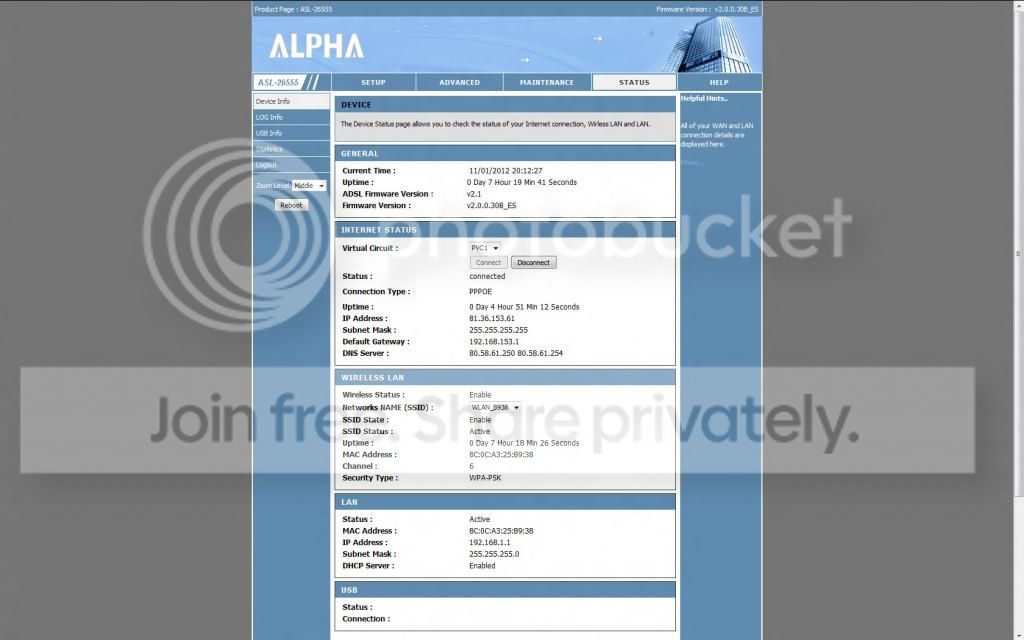
Pity you can't see the Alpha screen, it would be useful:

alpha2.jpg
 
Last edited:

My Computer My Computer

Computer Manufacturer/Model Number
self built form scratch
OS
Windows 7 Ultimate 64 bit/Linux Mint 17-64-Cinnamon
CPU
core i3
Motherboard
ASRock H55DE3
Memory
Corsair 2 Gb x 2
Graphics Card(s)
on board
Sound Card
on board
Monitor(s) Displays
1, 1920 x 1080
Hard Drives
Samsung Spinpoint 7200 rpm 1Tb
PSU
500W
Case
Cooler Master
Cooling
Arctic Cooling
Keyboard
Logitech
Mouse
Logitech, wired and with the ball!
Internet Speed
http://www.speedtest.net/my-result/3877691654
Browser
Nightly
I never did really find a solution to the problem that was related to the W7 desktop gadgets, other than reading somewhere else that the gadgets had become corrupted or something and that Windows had dumped them. So I did too. Problem solved!
On a slightly unrelated issue, but maybe of interest to ElStellino if he/she is still around, I have today successfully accessed the router setting via http://192.168.1.1:8000 in order to change the DNS settings, to allow use of a SmartDNS service so I can watch BBC iPlayer etc. down here in Andalucia, since the Big Switch-Off!
 

My Computer My Computer

OS
W7 32 bit Home Premium
CPU
Pentium(R) Dual-Core E5300
Memory
4GB
Keyboard
yes
Mouse
yes
Internet Speed
6 Mbps
miro8! I forgot to reply here!
So, we moved to San Isidro in a new-ish house, there is not comunidad and for this reason no landline. Telefónica wouldn't install the line either, because if they do, the técnico pays. So we contacted wificanarias.com, got their system installed, and we no longer have problems. As the line drops quite often though, it's possible that we'll get again a conventional broadband, I don't know whether with Movistar or some other provider.
For watching BBC related stuff I generally use expatshield, it's free, it's fast, it's easy to disconnect once not in use.
 

My Computer My Computer

Computer Manufacturer/Model Number
self built form scratch
OS
Windows 7 Ultimate 64 bit/Linux Mint 17-64-Cinnamon
CPU
core i3
Motherboard
ASRock H55DE3
Memory
Corsair 2 Gb x 2
Graphics Card(s)
on board
Sound Card
on board
Monitor(s) Displays
1, 1920 x 1080
Hard Drives
Samsung Spinpoint 7200 rpm 1Tb
PSU
500W
Case
Cooler Master
Cooling
Arctic Cooling
Keyboard
Logitech
Mouse
Logitech, wired and with the ball!
Internet Speed
http://www.speedtest.net/my-result/3877691654
Browser
Nightly
Back
Top