Default Audio Device Problem

Realtek HD Audio Properties

For Realtek HD users, this might help;

In Realtek's HD Audio Manager
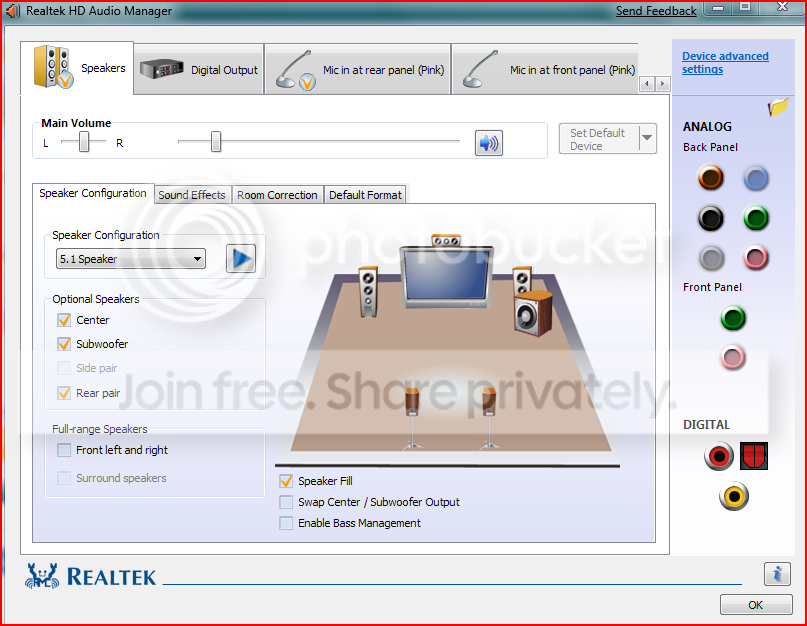
Capture2.png


I find it very useful to not combine inputs and outputs. You can do this by clicking on advanced device properties
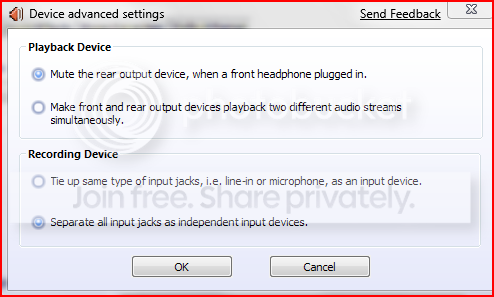
Capture-1.png


Under Playback, select "Make front and rear output devices playback two different audio streams simultaneously" and
Under Recording, select "Separate all input jacks as independent input devices

Clicking "Ok" on this page will separate all output devices and separate all input devices you have on your system. Once on the main GUI, you can then select the default device you want to use as your input/output.

If you've plugged something on your front panel, you might want to click on the "Folder" icon which brings up this control
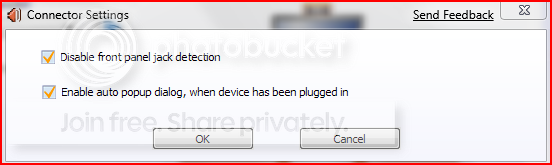
Capture3.png


Then select the appropriate ones for your setup.

These two property windows will let you effectively control your input/output devices properly.

In my experience, combining or tying up input/output devices works well only if you have single input/output devices attached but not so great with multiple input/output devices.
This might work with other audio controllers as well ;)
 
Last edited:

My Computer

Computer Manufacturer/Model Number
Custom Build
OS
Windows 7 Build 7048 x64
CPU
Athlon 64 X2 Dual Core 4600+
Motherboard
EMX-AMD750G-PRO
Memory
4 x 1GB Kingston 400MHz 6-6-6-18 (800MHz)
Graphics Card(s)
ATI Radeon 3650
Sound Card
Realtek HD Audio
Monitor(s) Displays
22" AOC 2216Vw
Screen Resolution
1680x1050
Cooling
Arctic Cooling Freezer 64 Pro PWM
Keyboard
Generic Enhanced Natural Keyboard
Mouse
Logitech VX Nano
Other Info
Edifier M1550
Same here it's a bit annoying, has anyone tried going into properties for their USB device and changed the Exclusive mode setting, not sure what it does but I thought I would see if it makes a difference if you disable it, has anyone else tried it?

View attachment 4114
I tried playing with this but honestly, I couldn't tell the difference in sound quality and I consider myself and audio freak :cry:
 

My Computer

Computer Manufacturer/Model Number
Custom Build
OS
Windows 7 Build 7048 x64
CPU
Athlon 64 X2 Dual Core 4600+
Motherboard
EMX-AMD750G-PRO
Memory
4 x 1GB Kingston 400MHz 6-6-6-18 (800MHz)
Graphics Card(s)
ATI Radeon 3650
Sound Card
Realtek HD Audio
Monitor(s) Displays
22" AOC 2216Vw
Screen Resolution
1680x1050
Cooling
Arctic Cooling Freezer 64 Pro PWM
Keyboard
Generic Enhanced Natural Keyboard
Mouse
Logitech VX Nano
Other Info
Edifier M1550
I tried playing with this but honestly, I couldn't tell the difference in sound quality and I consider myself and audio freak :cry:

Sorry I was not commenting on audio quality, merely the fact that using a USB sound device and having it always being set back to default on every startup, I have tried a restart after posting and now this device is not being used as default after a restart, so I beleive that may be the fix for that particular problem or I might have just been lucky that time and yes I have Realtek but that does not have anything to do with my USB headphones as they are seperate devices and your previous post will only effect using the front panel.
 

My Computer

Computer Manufacturer/Model Number
Home Brew
OS
Windows 7 Ultimate Vista Ultimate x64
CPU
Core 2 Duo E8500 3.16Ghz @ 3.8Ghz
Motherboard
eVGA 750i FTW
Memory
2x2Gigs Patriot PC2-6400 LL
Graphics Card(s)
Inno3D GeForce GTX260 216 SP
Monitor(s) Displays
ASUS VW222U 22" 2ms Response time
Screen Resolution
1680x1050
Hard Drives
SATA 150GB
SATA II 250GB
USB IDE 750GB Ext.
PSU
HYTEC 600W & Thermaltake 650W Toughpower Power Exp
Case
Thermaltake Armor LCS (Liquid Cooling System)
Cooling
Liquid Cooling System
Keyboard
Logitech G15 Gaming Keyboard
Mouse
Logitech G9 Gaming Mouse
You're absolutely correct. Point taken :)
Post corrected.
 

My Computer

Computer Manufacturer/Model Number
Custom Build
OS
Windows 7 Build 7048 x64
CPU
Athlon 64 X2 Dual Core 4600+
Motherboard
EMX-AMD750G-PRO
Memory
4 x 1GB Kingston 400MHz 6-6-6-18 (800MHz)
Graphics Card(s)
ATI Radeon 3650
Sound Card
Realtek HD Audio
Monitor(s) Displays
22" AOC 2216Vw
Screen Resolution
1680x1050
Cooling
Arctic Cooling Freezer 64 Pro PWM
Keyboard
Generic Enhanced Natural Keyboard
Mouse
Logitech VX Nano
Other Info
Edifier M1550

My Computer

Computer Manufacturer/Model Number
Home Brew
OS
Windows 7 Build 7000
CPU
Intel Core 2 Duo E6600 Conroe 2.4GHz
Motherboard
ECS G33T-M2 Intel® G33 and ICH9 chipsets
Memory
CORSAIR 4GB (2 x 2GB) 240-Pin DDR2 SDRAM DDR2 800
Graphics Card(s)
onboard
Sound Card
onboard
Monitor(s) Displays
ViewSonic VA902B 19-inch LCD Monitor
Screen Resolution
1280 x 1024
Hard Drives
Western Digital 500GB 7200 RPM 16MB Cache SATA 3.0Gb/s
PSU
Corsair HX620W Power supply - 620 Watt
Case
RAIDMAX SMILODON ATX-612WBP Black
Cooling
Stock Intel
Keyboard
Cordless Desktop® S 510
Mouse
Logitech® LX5 cordless
Internet Speed
Cox HSI 12/1.5
Other Info
Lite-On DH-20A3S 20x/48x Serial ATA DVD-RW drive
Same here it's a bit annoying, has anyone tried going into properties for their USB device and changed the Exclusive mode setting, not sure what it does but I thought I would see if it makes a difference if you disable it, has anyone else tried it?

View attachment 4114
I just tried this and after restart Windows 7 has to reinstall the device driver for the Magicjack, which failed to install BTW. LOL
 
Last edited:

My Computer

Computer Manufacturer/Model Number
Home Brew
OS
Windows 7 Build 7000
CPU
Intel Core 2 Duo E6600 Conroe 2.4GHz
Motherboard
ECS G33T-M2 Intel® G33 and ICH9 chipsets
Memory
CORSAIR 4GB (2 x 2GB) 240-Pin DDR2 SDRAM DDR2 800
Graphics Card(s)
onboard
Sound Card
onboard
Monitor(s) Displays
ViewSonic VA902B 19-inch LCD Monitor
Screen Resolution
1280 x 1024
Hard Drives
Western Digital 500GB 7200 RPM 16MB Cache SATA 3.0Gb/s
PSU
Corsair HX620W Power supply - 620 Watt
Case
RAIDMAX SMILODON ATX-612WBP Black
Cooling
Stock Intel
Keyboard
Cordless Desktop® S 510
Mouse
Logitech® LX5 cordless
Internet Speed
Cox HSI 12/1.5
Other Info
Lite-On DH-20A3S 20x/48x Serial ATA DVD-RW drive
I tried playing with this but honestly, I couldn't tell the difference in sound quality and I consider myself and audio freak :cry:
I followed your examples exactly but unfortunately that did not fix the problem.
 

My Computer

Computer Manufacturer/Model Number
Home Brew
OS
Windows 7 Build 7000
CPU
Intel Core 2 Duo E6600 Conroe 2.4GHz
Motherboard
ECS G33T-M2 Intel® G33 and ICH9 chipsets
Memory
CORSAIR 4GB (2 x 2GB) 240-Pin DDR2 SDRAM DDR2 800
Graphics Card(s)
onboard
Sound Card
onboard
Monitor(s) Displays
ViewSonic VA902B 19-inch LCD Monitor
Screen Resolution
1280 x 1024
Hard Drives
Western Digital 500GB 7200 RPM 16MB Cache SATA 3.0Gb/s
PSU
Corsair HX620W Power supply - 620 Watt
Case
RAIDMAX SMILODON ATX-612WBP Black
Cooling
Stock Intel
Keyboard
Cordless Desktop® S 510
Mouse
Logitech® LX5 cordless
Internet Speed
Cox HSI 12/1.5
Other Info
Lite-On DH-20A3S 20x/48x Serial ATA DVD-RW drive
Sorry I was not commenting on audio quality, merely the fact that using a USB sound device and having it always being set back to default on every startup, I have tried a restart after posting and now this device is not being used as default after a restart, so I beleive that may be the fix for that particular problem or I might have just been lucky that time and yes I have Realtek but that does not have anything to do with my USB headphones as they are seperate devices and your previous post will only effect using the front panel.
After reading this I tried it again but upon restart Magicjack will not start at all, even if I double click the icon. So I had to unplug Magicjack from the USB in the back of the computer, then replug it and it started but changed my default back to USB, so I manually changed the default back to Realtek.

So if I restart, shut down, or just unplug Magicjack and replug it, it resets the audio default to USB every single time. I gotta say, I am getting used to it though. LOL
 

My Computer

Computer Manufacturer/Model Number
Home Brew
OS
Windows 7 Build 7000
CPU
Intel Core 2 Duo E6600 Conroe 2.4GHz
Motherboard
ECS G33T-M2 Intel® G33 and ICH9 chipsets
Memory
CORSAIR 4GB (2 x 2GB) 240-Pin DDR2 SDRAM DDR2 800
Graphics Card(s)
onboard
Sound Card
onboard
Monitor(s) Displays
ViewSonic VA902B 19-inch LCD Monitor
Screen Resolution
1280 x 1024
Hard Drives
Western Digital 500GB 7200 RPM 16MB Cache SATA 3.0Gb/s
PSU
Corsair HX620W Power supply - 620 Watt
Case
RAIDMAX SMILODON ATX-612WBP Black
Cooling
Stock Intel
Keyboard
Cordless Desktop® S 510
Mouse
Logitech® LX5 cordless
Internet Speed
Cox HSI 12/1.5
Other Info
Lite-On DH-20A3S 20x/48x Serial ATA DVD-RW drive
After reading this I tried it again but upon restart Magicjack will not start at all, even if I double click the icon. So I had to unplug Magicjack from the USB in the back of the computer, then replug it and it started but changed my default back to USB, so I manually changed the default back to Realtek.

So if I restart, shut down, or just unplug Magicjack and replug it, it resets the audio default to USB every single time. I gotta say, I am getting used to it though. LOL

LOL :D
Ok... This is a different approach, let's try this one ;)
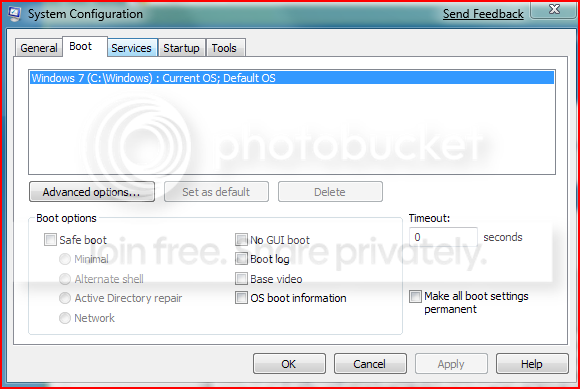
With MagicJack plugged in and running, open a run command (Win+R) type in msconfig then go to "Boot" and put a check mark on "Make all boot settings permanent"

Capturex.png


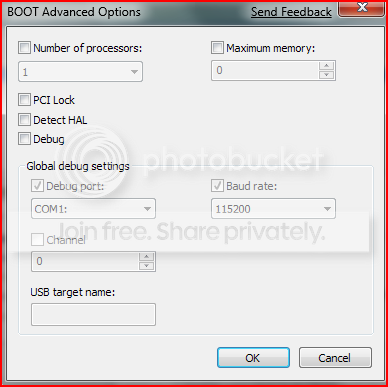
Click on "Advanced Options" and put a check on "Detect HAL"

Capturez.png


Click on "OK" and "OK" again.
It will then prompt for a restart. Restart.
Let it boot normally even if it pauses while detecting your USB devices.

Let us know how it turns out ;)
 

My Computer

Computer Manufacturer/Model Number
Custom Build
OS
Windows 7 Build 7048 x64
CPU
Athlon 64 X2 Dual Core 4600+
Motherboard
EMX-AMD750G-PRO
Memory
4 x 1GB Kingston 400MHz 6-6-6-18 (800MHz)
Graphics Card(s)
ATI Radeon 3650
Sound Card
Realtek HD Audio
Monitor(s) Displays
22" AOC 2216Vw
Screen Resolution
1680x1050
Cooling
Arctic Cooling Freezer 64 Pro PWM
Keyboard
Generic Enhanced Natural Keyboard
Mouse
Logitech VX Nano
Other Info
Edifier M1550
I'll do that in just a second but before I do I want to let you know that on my laptop this problem absolutely does not happen. I can restart, shut down, and Windows 7 saves the default audio device correctly every single time. So, could it be hardware related? My laptop uses Mobile Intel GL960 Express Chipset but my PC uses Intel® G33 and ICH9 chipsets.
 

My Computer

Computer Manufacturer/Model Number
Home Brew
OS
Windows 7 Build 7000
CPU
Intel Core 2 Duo E6600 Conroe 2.4GHz
Motherboard
ECS G33T-M2 Intel® G33 and ICH9 chipsets
Memory
CORSAIR 4GB (2 x 2GB) 240-Pin DDR2 SDRAM DDR2 800
Graphics Card(s)
onboard
Sound Card
onboard
Monitor(s) Displays
ViewSonic VA902B 19-inch LCD Monitor
Screen Resolution
1280 x 1024
Hard Drives
Western Digital 500GB 7200 RPM 16MB Cache SATA 3.0Gb/s
PSU
Corsair HX620W Power supply - 620 Watt
Case
RAIDMAX SMILODON ATX-612WBP Black
Cooling
Stock Intel
Keyboard
Cordless Desktop® S 510
Mouse
Logitech® LX5 cordless
Internet Speed
Cox HSI 12/1.5
Other Info
Lite-On DH-20A3S 20x/48x Serial ATA DVD-RW drive
I have another PC motherboard here with VIA® P4M890/ VT8237R Plus Chipset and I am considering swapping it to see what happens.
 

My Computer

Computer Manufacturer/Model Number
Home Brew
OS
Windows 7 Build 7000
CPU
Intel Core 2 Duo E6600 Conroe 2.4GHz
Motherboard
ECS G33T-M2 Intel® G33 and ICH9 chipsets
Memory
CORSAIR 4GB (2 x 2GB) 240-Pin DDR2 SDRAM DDR2 800
Graphics Card(s)
onboard
Sound Card
onboard
Monitor(s) Displays
ViewSonic VA902B 19-inch LCD Monitor
Screen Resolution
1280 x 1024
Hard Drives
Western Digital 500GB 7200 RPM 16MB Cache SATA 3.0Gb/s
PSU
Corsair HX620W Power supply - 620 Watt
Case
RAIDMAX SMILODON ATX-612WBP Black
Cooling
Stock Intel
Keyboard
Cordless Desktop® S 510
Mouse
Logitech® LX5 cordless
Internet Speed
Cox HSI 12/1.5
Other Info
Lite-On DH-20A3S 20x/48x Serial ATA DVD-RW drive
Yes, it is highly likely that this is hardware related.
BIOS upgrade is normally the way to go in these cases. Check here
and just for safe measure, please install the chipset driver, here
 

My Computer

Computer Manufacturer/Model Number
Custom Build
OS
Windows 7 Build 7048 x64
CPU
Athlon 64 X2 Dual Core 4600+
Motherboard
EMX-AMD750G-PRO
Memory
4 x 1GB Kingston 400MHz 6-6-6-18 (800MHz)
Graphics Card(s)
ATI Radeon 3650
Sound Card
Realtek HD Audio
Monitor(s) Displays
22" AOC 2216Vw
Screen Resolution
1680x1050
Cooling
Arctic Cooling Freezer 64 Pro PWM
Keyboard
Generic Enhanced Natural Keyboard
Mouse
Logitech VX Nano
Other Info
Edifier M1550
OK I tried it and MY COMPUTER EXPLODED! LMAO

Just Kidding, sorry I couldn't resist. That did not correct the problem either, I have nothing better to do right now so I am going to replace the motherboard and reinstall the OS. See you in an hour!
 

My Computer

Computer Manufacturer/Model Number
Home Brew
OS
Windows 7 Build 7000
CPU
Intel Core 2 Duo E6600 Conroe 2.4GHz
Motherboard
ECS G33T-M2 Intel® G33 and ICH9 chipsets
Memory
CORSAIR 4GB (2 x 2GB) 240-Pin DDR2 SDRAM DDR2 800
Graphics Card(s)
onboard
Sound Card
onboard
Monitor(s) Displays
ViewSonic VA902B 19-inch LCD Monitor
Screen Resolution
1280 x 1024
Hard Drives
Western Digital 500GB 7200 RPM 16MB Cache SATA 3.0Gb/s
PSU
Corsair HX620W Power supply - 620 Watt
Case
RAIDMAX SMILODON ATX-612WBP Black
Cooling
Stock Intel
Keyboard
Cordless Desktop® S 510
Mouse
Logitech® LX5 cordless
Internet Speed
Cox HSI 12/1.5
Other Info
Lite-On DH-20A3S 20x/48x Serial ATA DVD-RW drive
Yes, it is highly likely that this is hardware related.
BIOS upgrade is normally the way to go in these cases. Check here
I am running the latest BIOS, great suggestions BTW. Also everything in Device Manager is working properly, no yellow question marks. Powering down be back soon!
 

My Computer

Computer Manufacturer/Model Number
Home Brew
OS
Windows 7 Build 7000
CPU
Intel Core 2 Duo E6600 Conroe 2.4GHz
Motherboard
ECS G33T-M2 Intel® G33 and ICH9 chipsets
Memory
CORSAIR 4GB (2 x 2GB) 240-Pin DDR2 SDRAM DDR2 800
Graphics Card(s)
onboard
Sound Card
onboard
Monitor(s) Displays
ViewSonic VA902B 19-inch LCD Monitor
Screen Resolution
1280 x 1024
Hard Drives
Western Digital 500GB 7200 RPM 16MB Cache SATA 3.0Gb/s
PSU
Corsair HX620W Power supply - 620 Watt
Case
RAIDMAX SMILODON ATX-612WBP Black
Cooling
Stock Intel
Keyboard
Cordless Desktop® S 510
Mouse
Logitech® LX5 cordless
Internet Speed
Cox HSI 12/1.5
Other Info
Lite-On DH-20A3S 20x/48x Serial ATA DVD-RW drive
OK I tried it and MY COMPUTER EXPLODED! LMAO

Just Kidding, sorry I couldn't resist. That did not correct the problem either, I have nothing better to do right now so I am going to replace the motherboard and reinstall the OS. See you in an hour!

LOL! A good one! Good luck ;)
 

My Computer

Computer Manufacturer/Model Number
Custom Build
OS
Windows 7 Build 7048 x64
CPU
Athlon 64 X2 Dual Core 4600+
Motherboard
EMX-AMD750G-PRO
Memory
4 x 1GB Kingston 400MHz 6-6-6-18 (800MHz)
Graphics Card(s)
ATI Radeon 3650
Sound Card
Realtek HD Audio
Monitor(s) Displays
22" AOC 2216Vw
Screen Resolution
1680x1050
Cooling
Arctic Cooling Freezer 64 Pro PWM
Keyboard
Generic Enhanced Natural Keyboard
Mouse
Logitech VX Nano
Other Info
Edifier M1550

My Computer

Computer Manufacturer/Model Number
Home Brew
OS
Windows 7 Build 7000
CPU
Intel Core 2 Duo E6600 Conroe 2.4GHz
Motherboard
ECS G33T-M2 Intel® G33 and ICH9 chipsets
Memory
CORSAIR 4GB (2 x 2GB) 240-Pin DDR2 SDRAM DDR2 800
Graphics Card(s)
onboard
Sound Card
onboard
Monitor(s) Displays
ViewSonic VA902B 19-inch LCD Monitor
Screen Resolution
1280 x 1024
Hard Drives
Western Digital 500GB 7200 RPM 16MB Cache SATA 3.0Gb/s
PSU
Corsair HX620W Power supply - 620 Watt
Case
RAIDMAX SMILODON ATX-612WBP Black
Cooling
Stock Intel
Keyboard
Cordless Desktop® S 510
Mouse
Logitech® LX5 cordless
Internet Speed
Cox HSI 12/1.5
Other Info
Lite-On DH-20A3S 20x/48x Serial ATA DVD-RW drive
Motherboard is in and everything is installed and working but wouldn't you know I still have exactly the same problem.
 

My Computer

Computer Manufacturer/Model Number
Home Brew
OS
Windows 7 Build 7000
CPU
Intel Core 2 Duo E6600 Conroe 2.4GHz
Motherboard
ECS G33T-M2 Intel® G33 and ICH9 chipsets
Memory
CORSAIR 4GB (2 x 2GB) 240-Pin DDR2 SDRAM DDR2 800
Graphics Card(s)
onboard
Sound Card
onboard
Monitor(s) Displays
ViewSonic VA902B 19-inch LCD Monitor
Screen Resolution
1280 x 1024
Hard Drives
Western Digital 500GB 7200 RPM 16MB Cache SATA 3.0Gb/s
PSU
Corsair HX620W Power supply - 620 Watt
Case
RAIDMAX SMILODON ATX-612WBP Black
Cooling
Stock Intel
Keyboard
Cordless Desktop® S 510
Mouse
Logitech® LX5 cordless
Internet Speed
Cox HSI 12/1.5
Other Info
Lite-On DH-20A3S 20x/48x Serial ATA DVD-RW drive
Please try the different USB ports to see if it yields the same results and check for BIOS upgrade on your motherboard.

Very interesting...
 

My Computer

Computer Manufacturer/Model Number
Custom Build
OS
Windows 7 Build 7048 x64
CPU
Athlon 64 X2 Dual Core 4600+
Motherboard
EMX-AMD750G-PRO
Memory
4 x 1GB Kingston 400MHz 6-6-6-18 (800MHz)
Graphics Card(s)
ATI Radeon 3650
Sound Card
Realtek HD Audio
Monitor(s) Displays
22" AOC 2216Vw
Screen Resolution
1680x1050
Cooling
Arctic Cooling Freezer 64 Pro PWM
Keyboard
Generic Enhanced Natural Keyboard
Mouse
Logitech VX Nano
Other Info
Edifier M1550
I did, the second motherboard was an Abit IP-95 and the driver support was awful, the onboard video could not support Windows 7. So I am back to the original ECS board and another fresh OS install. I am out of ideas for now. Thank You Very Much for the help everyone, I really appreciate! This forum is a very nice and friendly place to be and I feel right at home here.
 

My Computer

Computer Manufacturer/Model Number
Home Brew
OS
Windows 7 Build 7000
CPU
Intel Core 2 Duo E6600 Conroe 2.4GHz
Motherboard
ECS G33T-M2 Intel® G33 and ICH9 chipsets
Memory
CORSAIR 4GB (2 x 2GB) 240-Pin DDR2 SDRAM DDR2 800
Graphics Card(s)
onboard
Sound Card
onboard
Monitor(s) Displays
ViewSonic VA902B 19-inch LCD Monitor
Screen Resolution
1280 x 1024
Hard Drives
Western Digital 500GB 7200 RPM 16MB Cache SATA 3.0Gb/s
PSU
Corsair HX620W Power supply - 620 Watt
Case
RAIDMAX SMILODON ATX-612WBP Black
Cooling
Stock Intel
Keyboard
Cordless Desktop® S 510
Mouse
Logitech® LX5 cordless
Internet Speed
Cox HSI 12/1.5
Other Info
Lite-On DH-20A3S 20x/48x Serial ATA DVD-RW drive
Back
Top