
Default Flop

BarbeeLT

New member
Member
Local time
7:34 AM
Messages
31
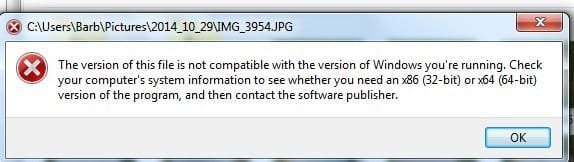
I'm working on my laptop while my desktop is being repairs. Laptop is 7. I'm trying to get my jpegs to open in PSP7. I went to default programs and put it in but when I try to open a Jpeg in it I get this message: (I used this program on Vista, XP, and 8.1)
 

Attachments
  • error.jpg
    error.jpg
    19.3 KB · Views: 24
Last edited:

My Computer

OS
windows 7 32

My Computer

Computer type
PC/Desktop
Computer Manufacturer/Model Number
Custom
OS
Win7 Pro 32-bit, Win8 Pro 32-bit
CPU
AMD Phenom II X6 1090T
Motherboard
Gigabyte
Memory
4GB ddr3 1300
Graphics Card(s)
AMD HD 4290 onboard
Sound Card
Builtin Realtek HD Audio
Monitor(s) Displays
Samsung 24" widescreen, LG 23" widescreen
Screen Resolution
1920x1200/1920x1080
Hard Drives
Kingston 256GB SSD
Keyboard
Logitech Illuminated Keyboard
Mouse
Logitech M705 wireless mouse
Antivirus
Norton Av 2013
Browser
IE v10
Hmmm well I was desperate. I found a way to use it. I open PSP7 and browse to my picture folder and then I can edit the pics and save. I photograph tombstones for Find a Grave. So I have to resize and trim all the photos. Takes a bit longer this way but I can't get the tombstones to open any other way. Posting this for anyone else with this problem.
 

My Computer

OS
windows 7 32
That error message is the typical that appears when a 16 bits program is ran on a 64 bits Windows (that removed support for older 16 bits programs).

Apparently your program uses at least one 16 bits component that's invoked as part of opening files from Explorer. I can't think of an easy solutino other than searching for a newer versión of the program or demoting Windows to 32 bits. Or switching to something different, of course.
 

My Computer

Computer type
Laptop
Computer Manufacturer/Model Number
Toshiba Sattelite A665-S6092
OS
Windows 7 Ultimate x64
CPU
Intel Core i7-740QM
Memory
8 GB DDR3
Graphics Card(s)
NVIDIA GeForce 330GT
Screen Resolution
1366x768
Hard Drives
Samsung 840 SSD 500GB
1TB USB3 external HD
Cooling
Coolermaster Notepal U3 notebook cooling pad
Internet Speed
3mbps ASDL
Antivirus
ClamWin 0.98.7
Browser
Opera 12.17 x86 (main), Firefox 38 (sec), IE11 (last resort)
That error message is the typical that appears when a 16 bits program is ran on a 64 bits Windows (that removed support for older 16 bits programs).

Apparently your program uses at least one 16 bits component that's invoked as part of opening files from Explorer. I can't think of an easy solutino other than searching for a newer versión of the program or demoting Windows to 32 bits. Or switching to something different, of course.

as per my post above, I'm doing it the hard way. I'm opening PSP and browsing the folder with the pic. Then it opens for me in PSP. But I can't make jpeg's open automatically to PSP7
 

My Computer

OS
windows 7 32
Back
Top