
I have been trying to customize my fresh install of windows 7 and i think i might have changed something with regards to the default font and i'm not sure how to go back to default.
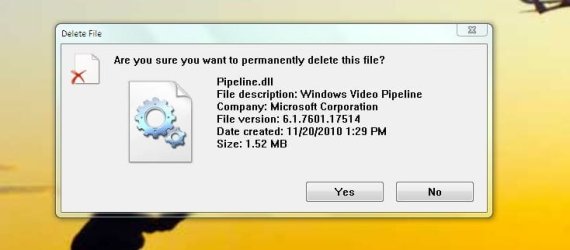
Here is a picture of how the font looks like now
I don't recall the default font looking like this. Can someone confirm this is NOT the default font look? and if so how do i turn it back to normal?
I did not set automatic restoration point so i cannot go back.
I have also been doing font modification through the registry to change the default font of sticky note. I'm thinking maybe that has set something off ?
Any help is appreciated. Thanks
Here is a picture of how the font looks like now
I don't recall the default font looking like this. Can someone confirm this is NOT the default font look? and if so how do i turn it back to normal?
I did not set automatic restoration point so i cannot go back.
I have also been doing font modification through the registry to change the default font of sticky note. I'm thinking maybe that has set something off ?
Any help is appreciated. Thanks
Attachments
My Computer
- Computer type
- Laptop
- Computer Manufacturer/Model Number
- HP
- OS
- Windows 7 Ultimate 32bit


