Default Programs - Associate a File Type or Protocol

How to Associate a File Type or Protocol Default Program in Window 7

   Information
This will show you how to associate a file extension type or protocol to open with a program you select by default in Windows 7.

These Default Programs association settings are a per user setting and not applied to all users.

   Warning
The program that you select as the default for the file extension type or protocol must support opening that file extension or protocol for the program to be able to open it. For example, a .TXT will open with Notepad or Wordpad, but it will not open with MSPaint.


OPTION ONE

Restore Default File Associations Using a Download


1. Go to the link below to select a file extension to download a .reg file for to merge and restore it's default associations for.

Restore Default Windows 7 File Extension Type Associations


OPTION TWO

Set File Associations Through Default Programs


1. Open the Control Panel (Icons view), and double click on the Default Programs icon.
2. Click on the Associate a file type or protocol with a program link. (See screenshot below)
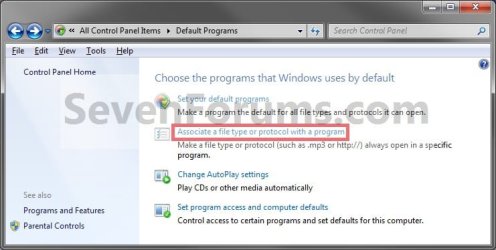
Step1.jpg
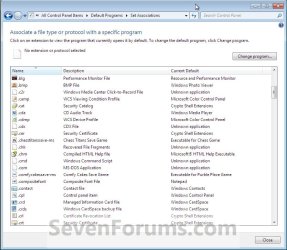
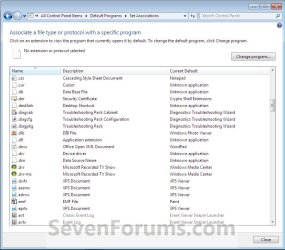
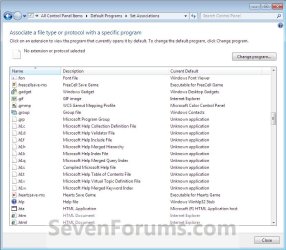
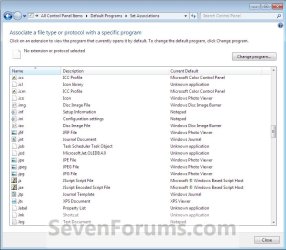
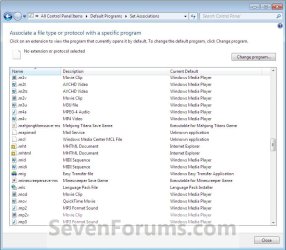
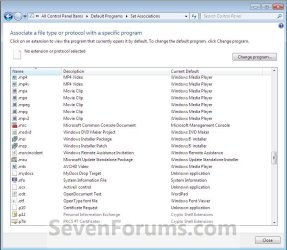
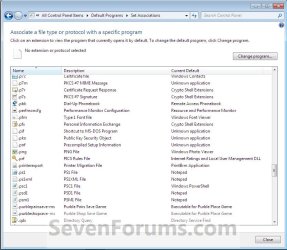
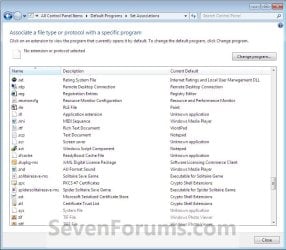
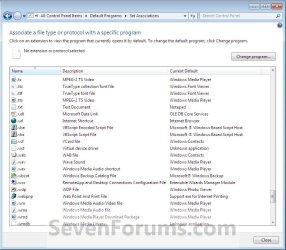
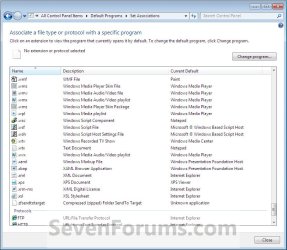
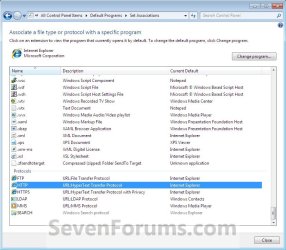
3. Under the left Name column, select a file extension type or protocol that you want to change what program will open it by default, then click on the Change Program button. (See screenshots below)
NOTE: These are the default associations in Windows 7 for these Extensions and Protocols.
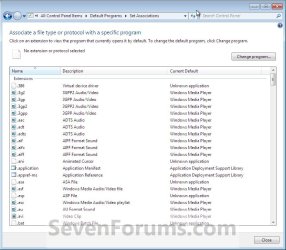
Step2.jpgStep3.jpg
Step4.jpgStep5.jpg
Step6.jpgStep7.jpg
Step8.jpgStep9.jpg
Step10.jpgStep11.jpg
Step12.jpgStep13.jpg
4. To Select a Listed Program in Open With
NOTE: This is for when the program you want to use to open the file extension type or protocol by default with is listed the Open with window.
A) Click on the arrow next to the right of Other Programs to show additional programs. (See screenshot below)
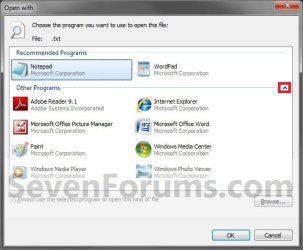
Step14.jpg
B) Go to step 6.
5. To Browse for a Program
NOTE: This is for when the program you want to use to open the file extension type or protocol by default with is not listed the Open with window.
A) Click on the Browse button. (See screenshot above)

B) Navigate to the program's exe file, select it, and click on the Open button. (See screenshot below)
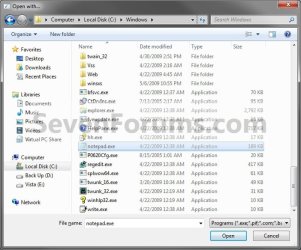
Step15.jpg
6. Select the program that you want to use as the default for the file type or protocol you selected in step 3, and click on OK. (See screenshot below step 4A)

7. Repeat the steps above to change any other file extension type or protocol default program association.

8. When finished, click on the Close button. (See screenshots below step 3)

9. Close the Default Programs window. (See screenshot below step 2)
That's it,
Shawn


Last edited:
i need to change my exe files cause i accidently changed them to open with command prompt but now i cant make ti hwo it was before
 

My Computer

OS
my OS
Hello td0615, and welcome to Seven Forums.

Here is a copy of the default registry entries to restore EXE files. After you download the REG file to your desktop, just double click on it to merge it to the registry. You may need to logoff and logon, or restart the computer to apply.

Hope this helps,
Shawn
 

Attachments

My Computer

Computer type
PC/Desktop
Computer Manufacturer/Model Number
Self built custom
OS
64-bit Windows 11 Pro for Workstations
CPU
Intel i7-8700K OC'd to 5 GHz
Motherboard
ASUS ROG Maximus XI Formula Z390
Memory
64 GB (4x16GB) G.SKILL TridentZ RGB DDR4 3600 MHz
Graphics Card(s)
ASUS ROG-STRIX-GTX1080TI-O11G-GAMING
Sound Card
Integrated
Monitor(s) Displays
2 x Samsung Odyssey G7 27"
Screen Resolution
2560x1440
Hard Drives
1TB Samsung 990 PRO M.2,
4TB Samsung 990 PRO PRO M.2,
TerraMaster F8 SSD Plus NAS
PSU
Seasonic Prime Titanium 850W
Case
Thermaltake Core P3
Cooling
Corsair Hydro H115i
Keyboard
Logitech wireless K800
Mouse
Logitech MX Master 4
Internet Speed
2 Gb/s Download and 100 Mb/s Upload
Antivirus
Malwarebyte Anti-Malware Premium
Browser
Google Chrome
Other Info
Logitech Z625 speaker system,
Logitech BRIO 4K Pro webcam,
HP Color LaserJet Pro MFP M477fdn,
APC SMART-UPS RT 1000 XL - SURT1000XLI,
Galaxy S23 Plus phone
THANKYOU

thankyou so much this whole thing has been such a pain im showing all my buddies who use windwos 7 this website
 

My Computer

OS
my OS
You're most welcome td0615. :)
 

My Computer

Computer type
PC/Desktop
Computer Manufacturer/Model Number
Self built custom
OS
64-bit Windows 11 Pro for Workstations
CPU
Intel i7-8700K OC'd to 5 GHz
Motherboard
ASUS ROG Maximus XI Formula Z390
Memory
64 GB (4x16GB) G.SKILL TridentZ RGB DDR4 3600 MHz
Graphics Card(s)
ASUS ROG-STRIX-GTX1080TI-O11G-GAMING
Sound Card
Integrated
Monitor(s) Displays
2 x Samsung Odyssey G7 27"
Screen Resolution
2560x1440
Hard Drives
1TB Samsung 990 PRO M.2,
4TB Samsung 990 PRO PRO M.2,
TerraMaster F8 SSD Plus NAS
PSU
Seasonic Prime Titanium 850W
Case
Thermaltake Core P3
Cooling
Corsair Hydro H115i
Keyboard
Logitech wireless K800
Mouse
Logitech MX Master 4
Internet Speed
2 Gb/s Download and 100 Mb/s Upload
Antivirus
Malwarebyte Anti-Malware Premium
Browser
Google Chrome
Other Info
Logitech Z625 speaker system,
Logitech BRIO 4K Pro webcam,
HP Color LaserJet Pro MFP M477fdn,
APC SMART-UPS RT 1000 XL - SURT1000XLI,
Galaxy S23 Plus phone
Umm, ok. You try a System Restore using a restore point dated before you changed the EXE association. :)
 

My Computer

Computer type
PC/Desktop
Computer Manufacturer/Model Number
Self built custom
OS
64-bit Windows 11 Pro for Workstations
CPU
Intel i7-8700K OC'd to 5 GHz
Motherboard
ASUS ROG Maximus XI Formula Z390
Memory
64 GB (4x16GB) G.SKILL TridentZ RGB DDR4 3600 MHz
Graphics Card(s)
ASUS ROG-STRIX-GTX1080TI-O11G-GAMING
Sound Card
Integrated
Monitor(s) Displays
2 x Samsung Odyssey G7 27"
Screen Resolution
2560x1440
Hard Drives
1TB Samsung 990 PRO M.2,
4TB Samsung 990 PRO PRO M.2,
TerraMaster F8 SSD Plus NAS
PSU
Seasonic Prime Titanium 850W
Case
Thermaltake Core P3
Cooling
Corsair Hydro H115i
Keyboard
Logitech wireless K800
Mouse
Logitech MX Master 4
Internet Speed
2 Gb/s Download and 100 Mb/s Upload
Antivirus
Malwarebyte Anti-Malware Premium
Browser
Google Chrome
Other Info
Logitech Z625 speaker system,
Logitech BRIO 4K Pro webcam,
HP Color LaserJet Pro MFP M477fdn,
APC SMART-UPS RT 1000 XL - SURT1000XLI,
Galaxy S23 Plus phone
i tried that it wouldnt let me it said system restore could not start
 

My Computer

OS
my OS

My Computer

Computer type
PC/Desktop
Computer Manufacturer/Model Number
Self built custom
OS
64-bit Windows 11 Pro for Workstations
CPU
Intel i7-8700K OC'd to 5 GHz
Motherboard
ASUS ROG Maximus XI Formula Z390
Memory
64 GB (4x16GB) G.SKILL TridentZ RGB DDR4 3600 MHz
Graphics Card(s)
ASUS ROG-STRIX-GTX1080TI-O11G-GAMING
Sound Card
Integrated
Monitor(s) Displays
2 x Samsung Odyssey G7 27"
Screen Resolution
2560x1440
Hard Drives
1TB Samsung 990 PRO M.2,
4TB Samsung 990 PRO PRO M.2,
TerraMaster F8 SSD Plus NAS
PSU
Seasonic Prime Titanium 850W
Case
Thermaltake Core P3
Cooling
Corsair Hydro H115i
Keyboard
Logitech wireless K800
Mouse
Logitech MX Master 4
Internet Speed
2 Gb/s Download and 100 Mb/s Upload
Antivirus
Malwarebyte Anti-Malware Premium
Browser
Google Chrome
Other Info
Logitech Z625 speaker system,
Logitech BRIO 4K Pro webcam,
HP Color LaserJet Pro MFP M477fdn,
APC SMART-UPS RT 1000 XL - SURT1000XLI,
Galaxy S23 Plus phone
LOL, we do try to. ;)
 

My Computer

Computer type
PC/Desktop
Computer Manufacturer/Model Number
Self built custom
OS
64-bit Windows 11 Pro for Workstations
CPU
Intel i7-8700K OC'd to 5 GHz
Motherboard
ASUS ROG Maximus XI Formula Z390
Memory
64 GB (4x16GB) G.SKILL TridentZ RGB DDR4 3600 MHz
Graphics Card(s)
ASUS ROG-STRIX-GTX1080TI-O11G-GAMING
Sound Card
Integrated
Monitor(s) Displays
2 x Samsung Odyssey G7 27"
Screen Resolution
2560x1440
Hard Drives
1TB Samsung 990 PRO M.2,
4TB Samsung 990 PRO PRO M.2,
TerraMaster F8 SSD Plus NAS
PSU
Seasonic Prime Titanium 850W
Case
Thermaltake Core P3
Cooling
Corsair Hydro H115i
Keyboard
Logitech wireless K800
Mouse
Logitech MX Master 4
Internet Speed
2 Gb/s Download and 100 Mb/s Upload
Antivirus
Malwarebyte Anti-Malware Premium
Browser
Google Chrome
Other Info
Logitech Z625 speaker system,
Logitech BRIO 4K Pro webcam,
HP Color LaserJet Pro MFP M477fdn,
APC SMART-UPS RT 1000 XL - SURT1000XLI,
Galaxy S23 Plus phone
Brink,

I just installed windows 7 64-bit a few days ago, and had to open a .doc file for an assignment. I had to use a piece of software called MatLab to do the problem, so I stupidly assumed that I should open the .doc file with that. I realized right away that I should have used office word to open .doc files and that I should set word to be the default. I went back into open with, set to default and selected word, but the grey box to click in order to always use word to open doc files wont let me click it. I also tried going to start,default programs, and changing the default for .doc in there too, but when I choose office word as the program it doesn't change. It still sticks with that darn MatLab software (which wont even open it anyways! uhg! so frustrating!) Can you help!?

thanks, Menutra
 

My Computer

Computer Manufacturer/Model Number
Gateway
OS
Windows 7 Professional 64-bit
Memory
3 GB
Graphics Card(s)
GeForce 8800 GTS
Sound Card
Creative Blaster X-Fi Xtreme Gamer
Monitor(s) Displays
42" Samsung LCD/20" HP LCD
Keyboard
G15
Mouse
Cyber Sniper
Internet Speed
Horrible..
Hello Menutra, and welcome to Seven Forums.

If you have Office 2007 installed for Word, then you can use the exported .reg file download below from my system to merge and restore .doc to open back with Word by default. If not, then running the Office Word installation again should restore it back.

Hope this helps,
Shawn
 

Attachments

My Computer

Computer type
PC/Desktop
Computer Manufacturer/Model Number
Self built custom
OS
64-bit Windows 11 Pro for Workstations
CPU
Intel i7-8700K OC'd to 5 GHz
Motherboard
ASUS ROG Maximus XI Formula Z390
Memory
64 GB (4x16GB) G.SKILL TridentZ RGB DDR4 3600 MHz
Graphics Card(s)
ASUS ROG-STRIX-GTX1080TI-O11G-GAMING
Sound Card
Integrated
Monitor(s) Displays
2 x Samsung Odyssey G7 27"
Screen Resolution
2560x1440
Hard Drives
1TB Samsung 990 PRO M.2,
4TB Samsung 990 PRO PRO M.2,
TerraMaster F8 SSD Plus NAS
PSU
Seasonic Prime Titanium 850W
Case
Thermaltake Core P3
Cooling
Corsair Hydro H115i
Keyboard
Logitech wireless K800
Mouse
Logitech MX Master 4
Internet Speed
2 Gb/s Download and 100 Mb/s Upload
Antivirus
Malwarebyte Anti-Malware Premium
Browser
Google Chrome
Other Info
Logitech Z625 speaker system,
Logitech BRIO 4K Pro webcam,
HP Color LaserJet Pro MFP M477fdn,
APC SMART-UPS RT 1000 XL - SURT1000XLI,
Galaxy S23 Plus phone
Thank You So Much!!!!!!!! AH! it worked!

man that was frustrating... I used to work as a computer technician, so I'm not too bad with computers... but that one had me stumped. It wasn't even letting me edit the registry like I wanted hahaha

Thank you! Brink you rock.
 

My Computer

Computer Manufacturer/Model Number
Gateway
OS
Windows 7 Professional 64-bit
Memory
3 GB
Graphics Card(s)
GeForce 8800 GTS
Sound Card
Creative Blaster X-Fi Xtreme Gamer
Monitor(s) Displays
42" Samsung LCD/20" HP LCD
Keyboard
G15
Mouse
Cyber Sniper
Internet Speed
Horrible..
Thank You So Much!!!!!!!! AH! it worked!

man that was frustrating... I used to work as a computer technician, so I'm not too bad with computers... but that one had me stumped. It wasn't even letting me edit the registry like I wanted hahaha

Thank you! Brink you rock.

You're most welcome Menutra. I'm happy to hear that you got it back as the default program now. :)
 

My Computer

Computer type
PC/Desktop
Computer Manufacturer/Model Number
Self built custom
OS
64-bit Windows 11 Pro for Workstations
CPU
Intel i7-8700K OC'd to 5 GHz
Motherboard
ASUS ROG Maximus XI Formula Z390
Memory
64 GB (4x16GB) G.SKILL TridentZ RGB DDR4 3600 MHz
Graphics Card(s)
ASUS ROG-STRIX-GTX1080TI-O11G-GAMING
Sound Card
Integrated
Monitor(s) Displays
2 x Samsung Odyssey G7 27"
Screen Resolution
2560x1440
Hard Drives
1TB Samsung 990 PRO M.2,
4TB Samsung 990 PRO PRO M.2,
TerraMaster F8 SSD Plus NAS
PSU
Seasonic Prime Titanium 850W
Case
Thermaltake Core P3
Cooling
Corsair Hydro H115i
Keyboard
Logitech wireless K800
Mouse
Logitech MX Master 4
Internet Speed
2 Gb/s Download and 100 Mb/s Upload
Antivirus
Malwarebyte Anti-Malware Premium
Browser
Google Chrome
Other Info
Logitech Z625 speaker system,
Logitech BRIO 4K Pro webcam,
HP Color LaserJet Pro MFP M477fdn,
APC SMART-UPS RT 1000 XL - SURT1000XLI,
Galaxy S23 Plus phone
Hello Menutra, and welcome to Seven Forums.

If you have Office 2007 installed for Word, then you can use the exported .reg file download below from my system to merge and restore .doc to open back with Word by default. If not, then running the Office Word installation again should restore it back.

Hope this helps,
Shawn

Thank You, Helped Me Also I Couldn't Change The Program To Open With Because The Checkbox Was Greyed Out, The Reg Key Worked A Treat, Thanks Again.
 
Last edited by a moderator:

My Computer

Computer Manufacturer/Model Number
Custom
OS
Windows 7 Ultimate
CPU
Intel Quad Core Q9300
Motherboard
Gigabyte Ga-X48-DQ6
Memory
4GB DDR2 800
Graphics Card(s)
Nvidia GeForce 8800GT
Sound Card
Onboard
Monitor(s) Displays
24" BenQ
Hard Drives
1 TB Western Digital
PSU
Coolmaster 460
Case
Coolmaster
Cooling
Custom
You're welcome Badkarma, and welcome to Seven Forums. :)
 

My Computer

Computer type
PC/Desktop
Computer Manufacturer/Model Number
Self built custom
OS
64-bit Windows 11 Pro for Workstations
CPU
Intel i7-8700K OC'd to 5 GHz
Motherboard
ASUS ROG Maximus XI Formula Z390
Memory
64 GB (4x16GB) G.SKILL TridentZ RGB DDR4 3600 MHz
Graphics Card(s)
ASUS ROG-STRIX-GTX1080TI-O11G-GAMING
Sound Card
Integrated
Monitor(s) Displays
2 x Samsung Odyssey G7 27"
Screen Resolution
2560x1440
Hard Drives
1TB Samsung 990 PRO M.2,
4TB Samsung 990 PRO PRO M.2,
TerraMaster F8 SSD Plus NAS
PSU
Seasonic Prime Titanium 850W
Case
Thermaltake Core P3
Cooling
Corsair Hydro H115i
Keyboard
Logitech wireless K800
Mouse
Logitech MX Master 4
Internet Speed
2 Gb/s Download and 100 Mb/s Upload
Antivirus
Malwarebyte Anti-Malware Premium
Browser
Google Chrome
Other Info
Logitech Z625 speaker system,
Logitech BRIO 4K Pro webcam,
HP Color LaserJet Pro MFP M477fdn,
APC SMART-UPS RT 1000 XL - SURT1000XLI,
Galaxy S23 Plus phone
I've been trying method 2, and it's not working. I select the program (an .exe) in step 5B, but it doesn't then appear as a possible program. Any ideas what might be happening?
 

My Computer

OS
Windows 7

My Computer

Computer type
PC/Desktop
Computer Manufacturer/Model Number
Self built custom
OS
64-bit Windows 11 Pro for Workstations
CPU
Intel i7-8700K OC'd to 5 GHz
Motherboard
ASUS ROG Maximus XI Formula Z390
Memory
64 GB (4x16GB) G.SKILL TridentZ RGB DDR4 3600 MHz
Graphics Card(s)
ASUS ROG-STRIX-GTX1080TI-O11G-GAMING
Sound Card
Integrated
Monitor(s) Displays
2 x Samsung Odyssey G7 27"
Screen Resolution
2560x1440
Hard Drives
1TB Samsung 990 PRO M.2,
4TB Samsung 990 PRO PRO M.2,
TerraMaster F8 SSD Plus NAS
PSU
Seasonic Prime Titanium 850W
Case
Thermaltake Core P3
Cooling
Corsair Hydro H115i
Keyboard
Logitech wireless K800
Mouse
Logitech MX Master 4
Internet Speed
2 Gb/s Download and 100 Mb/s Upload
Antivirus
Malwarebyte Anti-Malware Premium
Browser
Google Chrome
Other Info
Logitech Z625 speaker system,
Logitech BRIO 4K Pro webcam,
HP Color LaserJet Pro MFP M477fdn,
APC SMART-UPS RT 1000 XL - SURT1000XLI,
Galaxy S23 Plus phone
Back
Top