Default Programs - Associate a File Type or Protocol

How to Associate a File Type or Protocol Default Program in Window 7

   Information
This will show you how to associate a file extension type or protocol to open with a program you select by default in Windows 7.

These Default Programs association settings are a per user setting and not applied to all users.

   Warning
The program that you select as the default for the file extension type or protocol must support opening that file extension or protocol for the program to be able to open it. For example, a .TXT will open with Notepad or Wordpad, but it will not open with MSPaint.


OPTION ONE

Restore Default File Associations Using a Download


1. Go to the link below to select a file extension to download a .reg file for to merge and restore it's default associations for.

Restore Default Windows 7 File Extension Type Associations


OPTION TWO

Set File Associations Through Default Programs


1. Open the Control Panel (Icons view), and double click on the Default Programs icon.
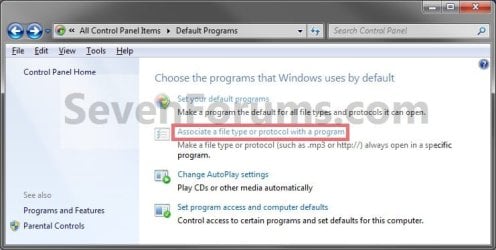
2. Click on the Associate a file type or protocol with a program link. (See screenshot below)
Step1.jpg
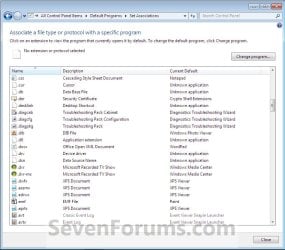
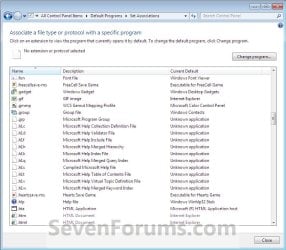
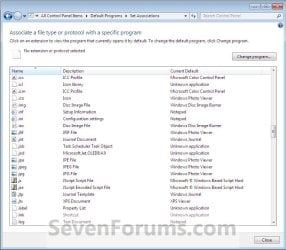
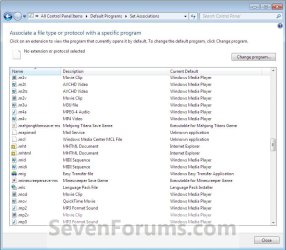
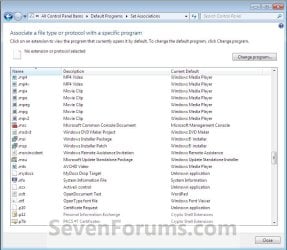
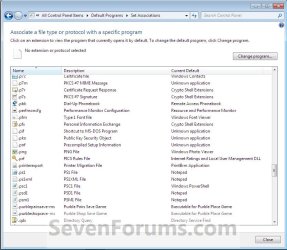
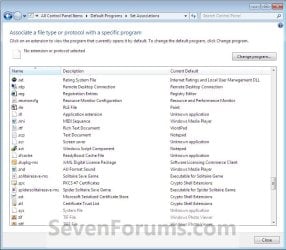
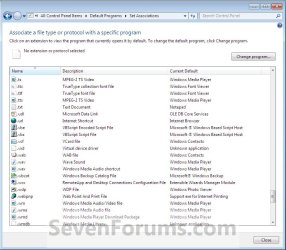
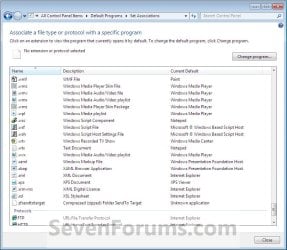
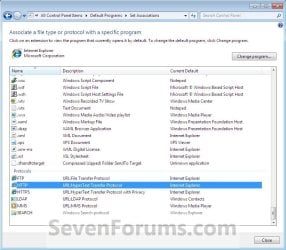
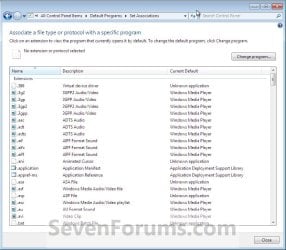
3. Under the left Name column, select a file extension type or protocol that you want to change what program will open it by default, then click on the Change Program button. (See screenshots below)
NOTE: These are the default associations in Windows 7 for these Extensions and Protocols.
Step2.jpgStep3.jpg
Step4.jpgStep5.jpg
Step6.jpgStep7.jpg
Step8.jpgStep9.jpg
Step10.jpgStep11.jpg
Step12.jpgStep13.jpg
4. To Select a Listed Program in Open With
NOTE: This is for when the program you want to use to open the file extension type or protocol by default with is listed the Open with window.
A) Click on the arrow next to the right of Other Programs to show additional programs. (See screenshot below)
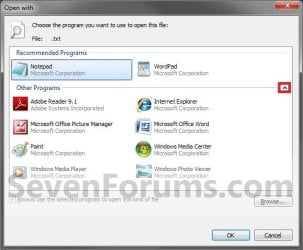
Step14.jpg
B) Go to step 6.
5. To Browse for a Program
NOTE: This is for when the program you want to use to open the file extension type or protocol by default with is not listed the Open with window.
A) Click on the Browse button. (See screenshot above)

B) Navigate to the program's exe file, select it, and click on the Open button. (See screenshot below)
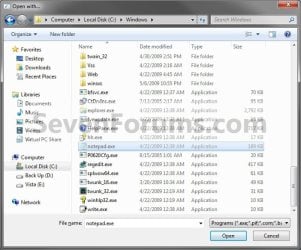
Step15.jpg
6. Select the program that you want to use as the default for the file type or protocol you selected in step 3, and click on OK. (See screenshot below step 4A)

7. Repeat the steps above to change any other file extension type or protocol default program association.

8. When finished, click on the Close button. (See screenshots below step 3)

9. Close the Default Programs window. (See screenshot below step 2)
That's it,
Shawn


Last edited:
Thanks, but that's the version I'm using. It allows for a portable install. I guess I'll fix it by reinstalling windows.
 

My Computer

OS
Windows 7
File extension isn't listed

The file extension I want to set default association for isn't listed, and checking the registry I see it is not there either. How can I add a new entry for the extension to the registry? The program in question is MetaTrader4, the extensions are .mq4 and .mqh among others.

(Have tried reinstalling with UAC turned off and with Admin privileges but it hasn't helped, also tried using compatibility wizard on the installer but again didn't help)
 

My Computer

OS
Windows 7
Hello Whitebloodcell,

According to that program's FAQ's page, MQ4 and EX4 are the only file extensions supported. MQH is not listed as being supported.

You might see if you can set the file extensions to be associated with MetaTrader EXE file by right clicking on the file and using Open With.

Hope this helps,
Shawn
 

My Computer

Computer type
PC/Desktop
Computer Manufacturer/Model Number
Self built custom
OS
64-bit Windows 11 Pro for Workstations
CPU
Intel i7-8700K OC'd to 5 GHz
Motherboard
ASUS ROG Maximus XI Formula Z390
Memory
64 GB (4x16GB) G.SKILL TridentZ RGB DDR4 3600 MHz
Graphics Card(s)
ASUS ROG-STRIX-GTX1080TI-O11G-GAMING
Sound Card
Integrated
Monitor(s) Displays
2 x Samsung Odyssey G7 27"
Screen Resolution
2560x1440
Hard Drives
1TB Samsung 990 PRO M.2,
4TB Samsung 990 PRO PRO M.2,
TerraMaster F8 SSD Plus NAS
PSU
Seasonic Prime Titanium 850W
Case
Thermaltake Core P3
Cooling
Corsair Hydro H115i
Keyboard
Logitech wireless K800
Mouse
Logitech MX Master 4
Internet Speed
2 Gb/s Download and 100 Mb/s Upload
Antivirus
Malwarebyte Anti-Malware Premium
Browser
Google Chrome
Other Info
Logitech Z625 speaker system,
Logitech BRIO 4K Pro webcam,
HP Color LaserJet Pro MFP M477fdn,
APC SMART-UPS RT 1000 XL - SURT1000XLI,
Galaxy S23 Plus phone
Well the FAQ is mistaken in the case, have been using MetaTrader for a long time and the .mqh (header files for adding library code) have always been associated before under different operating systems, even under the same operating system when different brokers are used. (Each broker distributes their own copy of MT4, for some reason some broker's distributions associate correctly). Using 'open with' doesn't seem to do anything in regards to the association.
 

My Computer

OS
Windows 7
I thought that may not have looked correct. I'm not familiar with the program's settings, but you might check to see if it may have one to set itself as the "default program" or to be able to select the file extensions. If it doesn't, then the program may only support opening the files from within the program itself instead.
 

My Computer

Computer type
PC/Desktop
Computer Manufacturer/Model Number
Self built custom
OS
64-bit Windows 11 Pro for Workstations
CPU
Intel i7-8700K OC'd to 5 GHz
Motherboard
ASUS ROG Maximus XI Formula Z390
Memory
64 GB (4x16GB) G.SKILL TridentZ RGB DDR4 3600 MHz
Graphics Card(s)
ASUS ROG-STRIX-GTX1080TI-O11G-GAMING
Sound Card
Integrated
Monitor(s) Displays
2 x Samsung Odyssey G7 27"
Screen Resolution
2560x1440
Hard Drives
1TB Samsung 990 PRO M.2,
4TB Samsung 990 PRO PRO M.2,
TerraMaster F8 SSD Plus NAS
PSU
Seasonic Prime Titanium 850W
Case
Thermaltake Core P3
Cooling
Corsair Hydro H115i
Keyboard
Logitech wireless K800
Mouse
Logitech MX Master 4
Internet Speed
2 Gb/s Download and 100 Mb/s Upload
Antivirus
Malwarebyte Anti-Malware Premium
Browser
Google Chrome
Other Info
Logitech Z625 speaker system,
Logitech BRIO 4K Pro webcam,
HP Color LaserJet Pro MFP M477fdn,
APC SMART-UPS RT 1000 XL - SURT1000XLI,
Galaxy S23 Plus phone
file ext

Brink,

There are a number of file extensions listed in the default program setting that show as "unknown." Some of these seem like they ought to have a program, like an excel library ought to be associated with excel.

Is unknown a legitimate association?
And is there is quick way to correct or reset to default all such ones?

Thanks.
 

My Computer

OS
Windows 7 Home Premium 64
Hello Fwin7fork, and welcome to Seven Forums.

File extensions that are listed with "unknown application" could just be a data file for a program or Windows 7 and is not actually opened by anything. If you look at the "Description" it will help give you an idea of what the file is for. Googling the file extension will also give you more detailed information about the file extension and if it normally uses a default program to open it or not.

Hope this helps,
Shawn
 

My Computer

Computer type
PC/Desktop
Computer Manufacturer/Model Number
Self built custom
OS
64-bit Windows 11 Pro for Workstations
CPU
Intel i7-8700K OC'd to 5 GHz
Motherboard
ASUS ROG Maximus XI Formula Z390
Memory
64 GB (4x16GB) G.SKILL TridentZ RGB DDR4 3600 MHz
Graphics Card(s)
ASUS ROG-STRIX-GTX1080TI-O11G-GAMING
Sound Card
Integrated
Monitor(s) Displays
2 x Samsung Odyssey G7 27"
Screen Resolution
2560x1440
Hard Drives
1TB Samsung 990 PRO M.2,
4TB Samsung 990 PRO PRO M.2,
TerraMaster F8 SSD Plus NAS
PSU
Seasonic Prime Titanium 850W
Case
Thermaltake Core P3
Cooling
Corsair Hydro H115i
Keyboard
Logitech wireless K800
Mouse
Logitech MX Master 4
Internet Speed
2 Gb/s Download and 100 Mb/s Upload
Antivirus
Malwarebyte Anti-Malware Premium
Browser
Google Chrome
Other Info
Logitech Z625 speaker system,
Logitech BRIO 4K Pro webcam,
HP Color LaserJet Pro MFP M477fdn,
APC SMART-UPS RT 1000 XL - SURT1000XLI,
Galaxy S23 Plus phone
Dear Brink,
I accidentally changed the default program for opening a .py file (python code) to the command prompt :cry:. It will not let me change it back to python.exe! Do you have a .reg file for this? If not, what can I do?!
Thanks,
vincemoe
 

My Computer

Computer Manufacturer/Model Number
MSI
OS
Windows 7 64 Bit Home Premium

My Computer

Computer type
PC/Desktop
Computer Manufacturer/Model Number
Self built custom
OS
64-bit Windows 11 Pro for Workstations
CPU
Intel i7-8700K OC'd to 5 GHz
Motherboard
ASUS ROG Maximus XI Formula Z390
Memory
64 GB (4x16GB) G.SKILL TridentZ RGB DDR4 3600 MHz
Graphics Card(s)
ASUS ROG-STRIX-GTX1080TI-O11G-GAMING
Sound Card
Integrated
Monitor(s) Displays
2 x Samsung Odyssey G7 27"
Screen Resolution
2560x1440
Hard Drives
1TB Samsung 990 PRO M.2,
4TB Samsung 990 PRO PRO M.2,
TerraMaster F8 SSD Plus NAS
PSU
Seasonic Prime Titanium 850W
Case
Thermaltake Core P3
Cooling
Corsair Hydro H115i
Keyboard
Logitech wireless K800
Mouse
Logitech MX Master 4
Internet Speed
2 Gb/s Download and 100 Mb/s Upload
Antivirus
Malwarebyte Anti-Malware Premium
Browser
Google Chrome
Other Info
Logitech Z625 speaker system,
Logitech BRIO 4K Pro webcam,
HP Color LaserJet Pro MFP M477fdn,
APC SMART-UPS RT 1000 XL - SURT1000XLI,
Galaxy S23 Plus phone
Thanks for the speedy reply,
unfortunately when I go to select "Always use this program to open the selected type of file" the check box and words are grey and wont let me check it, it seems as if me selecting the command prompt to open it locked it up.
 

My Computer

Computer Manufacturer/Model Number
MSI
OS
Windows 7 64 Bit Home Premium
You could also do a system restore using a restore point (if available) dated before you did this to undo the changes made.
 

My Computer

Computer type
PC/Desktop
Computer Manufacturer/Model Number
Self built custom
OS
64-bit Windows 11 Pro for Workstations
CPU
Intel i7-8700K OC'd to 5 GHz
Motherboard
ASUS ROG Maximus XI Formula Z390
Memory
64 GB (4x16GB) G.SKILL TridentZ RGB DDR4 3600 MHz
Graphics Card(s)
ASUS ROG-STRIX-GTX1080TI-O11G-GAMING
Sound Card
Integrated
Monitor(s) Displays
2 x Samsung Odyssey G7 27"
Screen Resolution
2560x1440
Hard Drives
1TB Samsung 990 PRO M.2,
4TB Samsung 990 PRO PRO M.2,
TerraMaster F8 SSD Plus NAS
PSU
Seasonic Prime Titanium 850W
Case
Thermaltake Core P3
Cooling
Corsair Hydro H115i
Keyboard
Logitech wireless K800
Mouse
Logitech MX Master 4
Internet Speed
2 Gb/s Download and 100 Mb/s Upload
Antivirus
Malwarebyte Anti-Malware Premium
Browser
Google Chrome
Other Info
Logitech Z625 speaker system,
Logitech BRIO 4K Pro webcam,
HP Color LaserJet Pro MFP M477fdn,
APC SMART-UPS RT 1000 XL - SURT1000XLI,
Galaxy S23 Plus phone
I do not have a restore point before this happened.
Thanks for all your help, if you have another option I would love to hear it, also, do you know if when changing the default program to the command prompt it locking up is a glitch?
 

My Computer

Computer Manufacturer/Model Number
MSI
OS
Windows 7 64 Bit Home Premium
Not usually. Usually you just wouldn't be able to open the file until you selected the proper default program.

If you like, export the registry .py and FileExts keys at the locations below, and upload it here. I'll be happy to look at it to see if we may be able to get this sorted. :)

HKEY_CLASSES_ROOT\.py

and

HKEY_CURRENT_USER\Software\Microsoft\Windows\CurrentVersion\Explorer\FileExts
 

My Computer

Computer type
PC/Desktop
Computer Manufacturer/Model Number
Self built custom
OS
64-bit Windows 11 Pro for Workstations
CPU
Intel i7-8700K OC'd to 5 GHz
Motherboard
ASUS ROG Maximus XI Formula Z390
Memory
64 GB (4x16GB) G.SKILL TridentZ RGB DDR4 3600 MHz
Graphics Card(s)
ASUS ROG-STRIX-GTX1080TI-O11G-GAMING
Sound Card
Integrated
Monitor(s) Displays
2 x Samsung Odyssey G7 27"
Screen Resolution
2560x1440
Hard Drives
1TB Samsung 990 PRO M.2,
4TB Samsung 990 PRO PRO M.2,
TerraMaster F8 SSD Plus NAS
PSU
Seasonic Prime Titanium 850W
Case
Thermaltake Core P3
Cooling
Corsair Hydro H115i
Keyboard
Logitech wireless K800
Mouse
Logitech MX Master 4
Internet Speed
2 Gb/s Download and 100 Mb/s Upload
Antivirus
Malwarebyte Anti-Malware Premium
Browser
Google Chrome
Other Info
Logitech Z625 speaker system,
Logitech BRIO 4K Pro webcam,
HP Color LaserJet Pro MFP M477fdn,
APC SMART-UPS RT 1000 XL - SURT1000XLI,
Galaxy S23 Plus phone
I've found that if you're trying to associate a file type with a portable app, this can be done by adding the path to the portable app to your environmental variable PATH statement.

The way I do this is:
Open a command prompt and type, "setx PATH <path_to_program>"
Example: "setx PATH C:\users\matt\Documents\progs" (This is case insensitive so you don't have to worry about uppercase anything.)

Note 1: The path can be a parent folder to a subfolder or to many recursive subfolders. For example, I used Notepad++ for my primary editor, but I use the portable version so I don't have to install the program for numerous reason I'll not describe here. I recently moved the folder to a different location and I lost access to the file association. I then ran "setx PATH <new_location>" and I was able re-associate the file types if/when necessary. But instead of adding "C:\users\matt\documents\progs\npp\unicode" I just added "C:\users\matt\documents\progs" which contained the remaining recursive sub-directories and this was sufficient to allow file associations. The beauty of doing it this way is that I can put any programs in this progs directory, in their own respective directories, and they're automatically implemented into my path statement.

Note 2: When you perform the 'setx' command, it does not append and will overwrite, so if you've ran this in the past and run it again you'll lose what you've previously entered. What I usually do is type command plus all of the paths into a text editor first appending any new, fully listed, directories, making sure I have all the paths I want to use, and then paste that in the command prompt. Also, setx will ONLY set the USER's environmental variable PATH, NOT the System's, so this will only affect your account and no others.

Finally, you can then setup your file associations.

Mileage my vary as I've only tried this on my computer, but I'm pretty sure this will work for everyone. If anyone gets a chance to try this option and it works, could you please reply as such so we can have a few people confirm their and my findings.

All of this is done without having to mess with the registry too!
 

My Computer

Computer type
PC/Desktop
Computer Manufacturer/Model Number
Custom Build
OS
Windows 7 Premium x64
CPU
Intel Core i7 960
Motherboard
Gigabyte GA-X58A-UD7
Memory
12GB DDR3-1600 Corsair
Graphics Card(s)
MSI Nvidia GTX 660 (4GB GDDR)
Hard Drives
80GB SSD
2x 1TB 7200RPM (RAID 1)
Antivirus
Avast
Browser
Google Chrome; Firefox
Association Problem

So Admin I did like you showed in the steps.And also tryed to do it with cmd and .reg file.But it's still not working.Can you help please?
 

My Computer

Computer type
PC/Desktop
Computer Manufacturer/Model Number
Unknown
OS
Windows 7 32 bit.
CPU
32bit
Motherboard
AMD Athlon(tm) II X2 250 Processor 3.00 GHz
Memory
2GB ram
Graphics Card(s)
NVIDIA GeForce 6150Se nForce 430
Hard Drives
None
Antivirus
Avast AntiVirus
Browser
Google Chrome

My Computer

Computer type
PC/Desktop
Computer Manufacturer/Model Number
Self built custom
OS
64-bit Windows 11 Pro for Workstations
CPU
Intel i7-8700K OC'd to 5 GHz
Motherboard
ASUS ROG Maximus XI Formula Z390
Memory
64 GB (4x16GB) G.SKILL TridentZ RGB DDR4 3600 MHz
Graphics Card(s)
ASUS ROG-STRIX-GTX1080TI-O11G-GAMING
Sound Card
Integrated
Monitor(s) Displays
2 x Samsung Odyssey G7 27"
Screen Resolution
2560x1440
Hard Drives
1TB Samsung 990 PRO M.2,
4TB Samsung 990 PRO PRO M.2,
TerraMaster F8 SSD Plus NAS
PSU
Seasonic Prime Titanium 850W
Case
Thermaltake Core P3
Cooling
Corsair Hydro H115i
Keyboard
Logitech wireless K800
Mouse
Logitech MX Master 4
Internet Speed
2 Gb/s Download and 100 Mb/s Upload
Antivirus
Malwarebyte Anti-Malware Premium
Browser
Google Chrome
Other Info
Logitech Z625 speaker system,
Logitech BRIO 4K Pro webcam,
HP Color LaserJet Pro MFP M477fdn,
APC SMART-UPS RT 1000 XL - SURT1000XLI,
Galaxy S23 Plus phone
Back
Top