Solved default sound device is disable

shiftALTdelete

New member
Local time
11:13 PM
Messages
7
Good Day to all of you.

I am a new here and was trying to search for may problem which could not find the related issue.

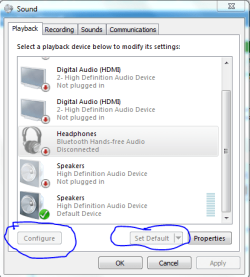
I tried to change the default playback on my laptop but the option "set default" is disabled and could not be changed. Hence, please help how could have it enable, I have attached the screen shot for reference.

Win 7 x64 bit system
Dell latitude E6430 i7

appreciated your advise and help.
 

Attachments
  • default sound disable.PNG
    default sound disable.PNG
    20.2 KB · Views: 8

My Computer

Computer type
Laptop
Computer Manufacturer/Model Number
Dell
OS
Microsoft Windows 7 Professional 64-bit 7601 Multiprocessor Free Service Pack 1
CPU
Intel(R) Core(TM) i7-3520M CPU @ 2.90GHz
Motherboard
Dell Inc. 0CPWYR
Memory
8.00 GB
Graphics Card(s)
Intel(R) HD Graphics 4000
Sound Card
(1) High Definition Audio Device (2) Bluetooth Hands-free
Screen Resolution
1366 x 768 x 32 bits (4294967296 colors) @ 60 Hz
Hard Drives
HGST HTS725050A7E630
The first thing I notice is you appear to have the generic Windows installed HD Audio Codec sound driver instead of the correct sound driver from Dell (and it appears twice).

Install the correct Dell supplied sound driver (and uninstall the HD Audio codec drivers) and see if that fixes the problem. On Dell's (I used to do Dell support) we have found that non-Dell drivers in many cases either do not work or do not work correctly.

Here is the link to the Dell IDT driver for your specific model: Click Me
 

My Computer

Computer type
PC/Desktop
Computer Manufacturer/Model Number
My Own Build
OS
Windows 10 64 bit
CPU
Intel i7 6700K
Motherboard
ASUS ROG Maximus VIII Hero
Memory
16GB Corsair Dominator
Graphics Card(s)
Intel CPU Graphics
Sound Card
RealTek
Monitor(s) Displays
27" Dell S2719dgf
Screen Resolution
2560X1440
Hard Drives
1 TB Samsung 850 EVO SSD for Win 10 Pro
500GB Samsung 850 EVO SSD for Win 10 Insider
2 TB drive for backup
PSU
EVGA Supernova 750G2
Case
BeQuiet Silent Base 600
Cooling
Deepcool Captain 120EX
Keyboard
Microsoft Wireless 2000
Mouse
Microsoft wireless
Internet Speed
100 MB/sec (Cable)
Antivirus
Microsoft Defender and Malwarebytes
Browser
Edge/Firefox
Other Info
Cakewalk (Sonar) by BandLab and Studio One 4.1 Pro recording studio software. MOTU 896Mk3 Hybrid recording interface, Frontier Tranzport wireless control unit, Behringer X-Touch Control Surface.
Five USB connected optical drives for CD Audio production using Nero BurningROM
thank you so much fireberd, now I can set default sound device.

once again appreciated your quick solution.
 

My Computer

Computer type
Laptop
Computer Manufacturer/Model Number
Dell
OS
Microsoft Windows 7 Professional 64-bit 7601 Multiprocessor Free Service Pack 1
CPU
Intel(R) Core(TM) i7-3520M CPU @ 2.90GHz
Motherboard
Dell Inc. 0CPWYR
Memory
8.00 GB
Graphics Card(s)
Intel(R) HD Graphics 4000
Sound Card
(1) High Definition Audio Device (2) Bluetooth Hands-free
Screen Resolution
1366 x 768 x 32 bits (4294967296 colors) @ 60 Hz
Hard Drives
HGST HTS725050A7E630
Good Day to all of you.

I am a new here and was trying to search for may problem which could not find the related issue.

I tried to change the default playback on my laptop but the option "set default" is disabled and could not be changed. Hence, please help how could have it enable, I have attached the screen shot for reference.

Win 7 x64 bit system
Dell latitude E6430 i7

appreciated your advise and help.

Hi shiftALTdelete,

Its great to hear that you were able to resolve this issue by updating the correct drivers. However, for future please ensure that you have all the drivers updated for your system.

Please check this link for the list of drivers available for your system:

Drivers

If you have any further queries, please feel free to contact us.
 

My Computer

Computer type
PC/Desktop
OS
Winndows 7 32 bit
thank you so much Brother Sandeep. link is very useful and helpful.
 

My Computer

Computer type
Laptop
Computer Manufacturer/Model Number
Dell
OS
Microsoft Windows 7 Professional 64-bit 7601 Multiprocessor Free Service Pack 1
CPU
Intel(R) Core(TM) i7-3520M CPU @ 2.90GHz
Motherboard
Dell Inc. 0CPWYR
Memory
8.00 GB
Graphics Card(s)
Intel(R) HD Graphics 4000
Sound Card
(1) High Definition Audio Device (2) Bluetooth Hands-free
Screen Resolution
1366 x 768 x 32 bits (4294967296 colors) @ 60 Hz
Hard Drives
HGST HTS725050A7E630
thank you so much Brother Sandeep. link is very useful and helpful.

Hi shiftALTdelete,

Its great to hear that you found the information useful. If you face any further issues with the system feel free to reach out to us.
 

My Computer

Computer type
PC/Desktop
OS
Winndows 7 32 bit
thank you so much Brother Sandeep. link is very useful and helpful.

Hi shiftALTdelete,

Its great to hear that you found the information useful. If you face any further issues with the system feel free to reach out to us.

Hello

With newly installed driver, I was able to change default sound device, however, setting my Bluetooth hands free headset as default is having a problem. Similar to my first issue, the default option is greyish which is disable. I don't think I have problem with pairing since I have done the same process with my Lenovo T400, very easy with no issue.

Could you please assists me how to have my Bluetooth headset default sound device enable.

thank you and advance.
 

My Computer

Computer type
Laptop
Computer Manufacturer/Model Number
Dell
OS
Microsoft Windows 7 Professional 64-bit 7601 Multiprocessor Free Service Pack 1
CPU
Intel(R) Core(TM) i7-3520M CPU @ 2.90GHz
Motherboard
Dell Inc. 0CPWYR
Memory
8.00 GB
Graphics Card(s)
Intel(R) HD Graphics 4000
Sound Card
(1) High Definition Audio Device (2) Bluetooth Hands-free
Screen Resolution
1366 x 768 x 32 bits (4294967296 colors) @ 60 Hz
Hard Drives
HGST HTS725050A7E630
thank you so much Brother Sandeep. link is very useful and helpful.

Hi shiftALTdelete,

Its great to hear that you found the information useful. If you face any further issues with the system feel free to reach out to us.

Hello

With newly installed driver, I was able to change default sound device, however, setting my Bluetooth hands free headset as default is having a problem. Similar to my first issue, the default option is greyish which is disable. I don't think I have problem with pairing since I have done the same process with my Lenovo T400, very easy with no issue.

Could you please assists me how to have my Bluetooth headset default sound device enable.

thank you and advance.

Hi shiftALTdelete,

Make sure that your Bluetooth device is connected to the system and working fine. Once you are getting output from the Bluetooth device open the sound properties and then select Bluetooth device as default sound output device.

If while connected it it still grayed out then make sure you update the audio drivers using the drivers page shared above.

Keep us posted with the results so we can advise you further.
 

My Computer

Computer type
PC/Desktop
OS
Winndows 7 32 bit
Hi Sandeep,

my Bluetooth device is not connecting, I have tried to connect but nothing happens, that is why I was confused which one having a problem, my sound device driver in Dell Latitude or my BBT903+. In my Lenovo T400 however, seem everything is working fine and have no issue at all. similar OS Win 7 x64 that is.

thanks men
 

My Computer

Computer type
Laptop
Computer Manufacturer/Model Number
Dell
OS
Microsoft Windows 7 Professional 64-bit 7601 Multiprocessor Free Service Pack 1
CPU
Intel(R) Core(TM) i7-3520M CPU @ 2.90GHz
Motherboard
Dell Inc. 0CPWYR
Memory
8.00 GB
Graphics Card(s)
Intel(R) HD Graphics 4000
Sound Card
(1) High Definition Audio Device (2) Bluetooth Hands-free
Screen Resolution
1366 x 768 x 32 bits (4294967296 colors) @ 60 Hz
Hard Drives
HGST HTS725050A7E630
Hi Sandeep,

my Bluetooth device is not connecting, I have tried to connect but nothing happens, that is why I was confused which one having a problem, my sound device driver in Dell Latitude or my BBT903+. In my Lenovo T400 however, seem everything is working fine and have no issue at all. similar OS Win 7 x64 that is.

thanks men

Hi shiftALTdelete,

Thanks for your reply. Please let me know what happens when you try to pair your Bluetooth headphone.

Also, let us know which bluetooth or network card is installed on the system.

Kindly update your system specs here by following this.

Keep us posted with the results so we can advise you further.
 

My Computer

Computer type
PC/Desktop
OS
Winndows 7 32 bit
thank you Sandeep for the efforts extending to me.

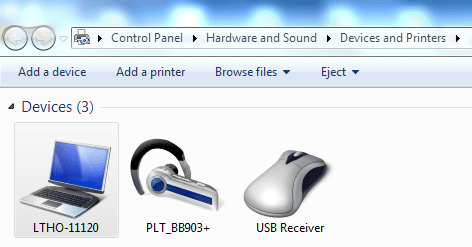
once I pair my bluetooth headset it will be added to my device as shown below, however, if I try connect it, nothing happens,
 

Attachments

  • added divices.PNG
    added divices.PNG
    18.8 KB · Views: 4
  • bluetooth device.PNG
    bluetooth device.PNG
    19.2 KB · Views: 4

My Computer

Computer type
Laptop
Computer Manufacturer/Model Number
Dell
OS
Microsoft Windows 7 Professional 64-bit 7601 Multiprocessor Free Service Pack 1
CPU
Intel(R) Core(TM) i7-3520M CPU @ 2.90GHz
Motherboard
Dell Inc. 0CPWYR
Memory
8.00 GB
Graphics Card(s)
Intel(R) HD Graphics 4000
Sound Card
(1) High Definition Audio Device (2) Bluetooth Hands-free
Screen Resolution
1366 x 768 x 32 bits (4294967296 colors) @ 60 Hz
Hard Drives
HGST HTS725050A7E630
thank you Sandeep for the efforts extending to me.

once I pair my bluetooth headset it will be added to my device as shown below, however, if I try connect it, nothing happens,

Hi shiftALTdelete,

Thanks for providing us this information.

Kindly update the bluetooth driver software for your system from the link below:

Bluetooth driver

Also, try this device on a different system to isolate the issue. Keep us posted with the results so we can advise you further.
 

My Computer

Computer type
PC/Desktop
OS
Winndows 7 32 bit
Dear Sandeep Bhai,

I have updated driver as recommended, and you know what happened? tada...my back beat 903+ Bluetooth headset works as expected.

thank you so much for your effort and never ending support. If I could add million reputation on you, I will do it again and again.

I am likewise thankful for finding this site which administrators, moderators and members are ready to extend their hand.
 

My Computer

Computer type
Laptop
Computer Manufacturer/Model Number
Dell
OS
Microsoft Windows 7 Professional 64-bit 7601 Multiprocessor Free Service Pack 1
CPU
Intel(R) Core(TM) i7-3520M CPU @ 2.90GHz
Motherboard
Dell Inc. 0CPWYR
Memory
8.00 GB
Graphics Card(s)
Intel(R) HD Graphics 4000
Sound Card
(1) High Definition Audio Device (2) Bluetooth Hands-free
Screen Resolution
1366 x 768 x 32 bits (4294967296 colors) @ 60 Hz
Hard Drives
HGST HTS725050A7E630
Dear Sandeep Bhai,

I have updated driver as recommended, and you know what happened? tada...my back beat 903+ Bluetooth headset works as expected.

thank you so much for your effort and never ending support. If I could add million reputation on you, I will do it again and again.

I am likewise thankful for finding this site which administrators, moderators and members are ready to extend their hand.

Hi shiftALTdelete,

It great to hear that the issue has been resolved to your satisfaction. We truly appreciate your kind words regarding the support you have received.

If you have any queries in future please feel free to reach out to us.
 

My Computer

Computer type
PC/Desktop
OS
Winndows 7 32 bit
Back
Top