"Default User" junction point folder issue

Yes. The first line must be done first, and etc...

Since it's a junction point, a elevated command prompt is the only option that I know of to make it easy to set.

I didn't need to, but you may need to restart afterwards to fully apply.
 

My Computer

Computer type
PC/Desktop
Computer Manufacturer/Model Number
Self built custom
OS
64-bit Windows 11 Pro for Workstations
CPU
Intel i7-8700K OC'd to 5 GHz
Motherboard
ASUS ROG Maximus XI Formula Z390
Memory
64 GB (4x16GB) G.SKILL TridentZ RGB DDR4 3600 MHz
Graphics Card(s)
ASUS ROG-STRIX-GTX1080TI-O11G-GAMING
Sound Card
Integrated
Monitor(s) Displays
2 x Samsung Odyssey G7 27"
Screen Resolution
2560x1440
Hard Drives
1TB Samsung 990 PRO M.2,
4TB Samsung 990 PRO PRO M.2,
TerraMaster F8 SSD Plus NAS
PSU
Seasonic Prime Titanium 850W
Case
Thermaltake Core P3
Cooling
Corsair Hydro H115i
Keyboard
Logitech wireless K800
Mouse
Logitech MX Master 4
Internet Speed
2 Gb/s Download and 100 Mb/s Upload
Antivirus
Malwarebyte Anti-Malware Premium
Browser
Google Chrome
Other Info
Logitech Z625 speaker system,
Logitech BRIO 4K Pro webcam,
HP Color LaserJet Pro MFP M477fdn,
APC SMART-UPS RT 1000 XL - SURT1000XLI,
Galaxy S23 Plus phone
I have restarted and the Default User is still showing...by the way, I was wondering...what would happen if you gave the "Default User" a -s instead of a positive s in the command line. Would that have a bad impact? Not saying I did it though...

Here's the Help for the Attrib command:

Displays or changes file attributes.

ATTRIB [+R | -R] [+A | -A ] [+S | -S] [+H | -H] [drive:][path][filename] [/S [/D]]
Code:
    +     Sets an attribute.
    -     Clears an attribute.
    R     Read-only file attribute.
    A     Archive file attribute.
    S     System file attribute.
    H     Hidden file attribute.
   [drive:][path][filename]         Specifies a file or files for attrib to process.
   /S    Processes matching files in the current folder and all subfolders.
   /D    Processes folders as well.
So +S marks the files System Files, and -S marks the files non-System files.
That makes sense, so I see why Brink chose +S for "Default User" since it's a system junction. Does capitalization matter by any chance? Also I copied and pasted Brink, just to let you know. :D

Also, correct me if I'm wrong, but the two command I was given, then:

Gave "Default User" the attributes "read only", "system file", and "hidden" and the S and D pretty much means it applies to all files and folders?

And, as for the Default, it's the same, except we were not making it a system file correct? Since Brink gave me the -S for it.

What I don't understand though, is why did this not then hide the Default User junction...

I guess Brink's advice now is to restart, and do the scan like he said and/or a repair install...

By the way Brink, I was just curious as to how you found out which commands I should use for my case :( for some reason this would make me feel better.
 

My Computer

OS
Vista
WF,

Did you ever run a sfc /scannow command? I didn't see any post back about that. It may help since it's a system file.

No problem WF. Those are just the attribute commands to set those folders back to their default settings on anyone's computer.
 

My Computer

Computer type
PC/Desktop
Computer Manufacturer/Model Number
Self built custom
OS
64-bit Windows 11 Pro for Workstations
CPU
Intel i7-8700K OC'd to 5 GHz
Motherboard
ASUS ROG Maximus XI Formula Z390
Memory
64 GB (4x16GB) G.SKILL TridentZ RGB DDR4 3600 MHz
Graphics Card(s)
ASUS ROG-STRIX-GTX1080TI-O11G-GAMING
Sound Card
Integrated
Monitor(s) Displays
2 x Samsung Odyssey G7 27"
Screen Resolution
2560x1440
Hard Drives
1TB Samsung 990 PRO M.2,
4TB Samsung 990 PRO PRO M.2,
TerraMaster F8 SSD Plus NAS
PSU
Seasonic Prime Titanium 850W
Case
Thermaltake Core P3
Cooling
Corsair Hydro H115i
Keyboard
Logitech wireless K800
Mouse
Logitech MX Master 4
Internet Speed
2 Gb/s Download and 100 Mb/s Upload
Antivirus
Malwarebyte Anti-Malware Premium
Browser
Google Chrome
Other Info
Logitech Z625 speaker system,
Logitech BRIO 4K Pro webcam,
HP Color LaserJet Pro MFP M477fdn,
APC SMART-UPS RT 1000 XL - SURT1000XLI,
Galaxy S23 Plus phone
Oh shoot...I copied my post to go look at something else, then I copied a link lol...losing my post in the process.

What I was going to say was...after reading your sfc scan tutorial, I pretty much found out it was useless in my case, since if it says all is ok, then it's either lying (unlikely) or thinks the Default User junction is supposed to show. If it says it is bad, then I can do a system restore...which would at most, take me back to when I first turned on the laptop on day 1.

However, I did a factory restore twice, and this brings it back to day 1, minute 1. second 1...and even this, doesn't fix the problem, so a system restore wouldn't, thus the scan is pointless.........imo.

I would do a repair install, had I not read this rant: http://www.sevenforums.com/general-discussion/79127-win7-new-vista.html about how a repair install isn't always the best thing to try out, but, I understand he is one case and not the majority.

I will consider my options, but I was wondering Brink, can't I just right click on "Default User" and check the "Hidden" box? I understand this would then say I am not allowed to since I don't have permission. But, can't I just take control of it, and then hide it? Would taking control over it, simply taking control only (while not ever going into it) affect it AT ALL? Because if doing that can make it hidden...then I'm happy, that I'm not looking at something I'm technically, according to everyone, not supposed to touch or even see, but I am willing to slightly edit its security options to make it hidden. After all, if it's hidden, that to me is the best security for it.
 

My Computer

OS
Vista
Oh and thanks for renaming the thread :D

By the way...learned a lot on my "experimental" laptop...it's the one with Vista on it, that I used to ask you questions about last year. So glad you helped me out then <3.

Ok, apparently, this Default User junction exists on my Vista to, and boy, does it really tell me to GTFO whenever I try to get into it. Not only is it completely hidden from me in the Users folder, when I try to access it by going to C:/Users/Default User, it basically says GTFO (lol but seriously...it says can't access default user, access is denied).

But lo...and behold, on Windows 7, this thing appears and I am also able to hijack it, although I learned...that's not a good idea, or at least going into it isn't. I don't blame the OS or Microsoft, since I doubt ANYONE HERE with Windows 7 has my problem. I think Dell is fully to blame. I think Dell did this mistake.

So I was wondering if I can hide it by taking control of it...I'm personally fine with that, 'cuz I AIN'T going into it..in my life.
___________________________

Please answer those above. I wanted to say another thing...you said in this tutorial on Vista forums: http://www.vistax64.com/tutorials/86163-hidden-files-folders.html

that protected files and folders have "Hidden" grayed out in their properties and they have that check marked (so I cannot change it) however, "Default User" does not have that grayed out on my Windows 7 laptop...isn't that WIERD? Because I think it's supposed to apply to Windows 7 as well. This makes me think further that Windows isn't treating "Default User" as a protected system file or folder, since it also does not hide it when I check "hide protected system files and folders"

Even more wierd, I found it strange that on my Vista laptop, after UNchecking "hide protected system files", my Default User junction did not appear in the Users folder. I could not even make that appear at all. I as just testing, to see if Vista was treating it as a protected system file, since it would show it if I unchecked that specific box. I guess it's because it's a junction and not a "file"? But I guess a junction is a file as well, not sure, but this part wasn't important...just though I should throw that in there.

Your best bet is still probably do a repair install, which I may do, I may not, but you see how all of this is wierd? (at least on the Win 7 laptop). The option to hide the junction is NOT dimmed, although I think it should be, and Windows isn't treating it as a protected system file, which it should be doing. Most likely I'll do a repair install, but first I will try to hide it by taking control of it and then doing so. I can always do a factory restore again to undo any mistake I may make, and then there's the option to do a repair install, which I understand, is your greatest advice.
 
Last edited:

My Computer

OS
Vista
The Check Disk Feature in Windows 7

I was wondering if the Check Disk will fix my following problem.

I think everyone knows about the "Default User" junction that links to the folder "Default", and how the Default User is supposed to be completely hidden under normal settings.

Is this the kind of thing "Check Disk" fixes, or what? Also where's the tutorial for this on Windows 7? I saw the Vista one but I was just wondering where is the tutorial for Win 7.
 

My Computer

OS
Vista

My Computer

Computer type
PC/Desktop
Computer Manufacturer/Model Number
Self Built
OS
Win 10 Pro x64
CPU
Intel I5-2500K @3.3GHz
Motherboard
Asrock P67 Extreme4
Memory
16GB G.Skill Ripjaws X (4x4GB)
Graphics Card(s)
EVGA GeForce 750 Ti SC 2GB
Sound Card
ASUS Xonar DG 5.1 Channels 24-bit 96KHz PCI Interface Sound
Monitor(s) Displays
auria eq2367
Screen Resolution
1920 x 1080
Hard Drives
250GB Samsung 850 EVO SSD
1TB WD Blue
1TB Hitachi
PSU
SeaSonic X 650W 80 Plus Gold
Case
Corsair Obsidian 750D
Cooling
Corsair H60, Three 140mm case fans
Keyboard
Logitech Wireless Keyboard K520
Mouse
Logitech Wireless Mouse M310
Internet Speed
Wave Broadband ~ 100 dn 5 up
Antivirus
Windows Defender, Malwarebytes Premium
Browser
Edge, IE11, Chrome
Other Info
Laptop specs: HP g7-1365dx /
CPU: AMD A6-3420M APU with Radeon(tm) HD Graphics /
RAM: Crucial 8Gb (2x4Gb) /
SSD: Crucial M4-CT128M4SSD2 ATA Device/ FW 000F /
GFX: AMD Radeon HD 6520G /
OS: Windows 10 Pro x64

My Computer

Computer Manufacturer/Model Number
Asus P5B
OS
Windows 7 Ultimate
CPU
Intel Q9550
Motherboard
Asus P5B
Memory
4x2GB HyperX
Graphics Card(s)
ATI HD3850 512
Sound Card
Creative X-Fi Platinum
Monitor(s) Displays
Samsung 50 / Samsung 24
Screen Resolution
1920*1080 / 1920*1200
Hard Drives
Multiple RAID volumes
PSU
ThermalTake ToughPower
Case
Armor
Cooling
Liquid
Keyboard
$6 2.4 gHz desktop
Internet Speed
Just this side of fast enough.
Casca, what I meant was that the Default User junction, by mistake, is not hidden and it is being shown, and it is supposedly a protected system file.

Wouldn't this count as a system file error?
 

My Computer

OS
Vista
No. That is a file attribute. Ensure that you are not "Show hidden files" enabled and/or set the offending file's attribute to hidden.

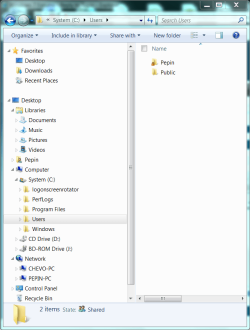
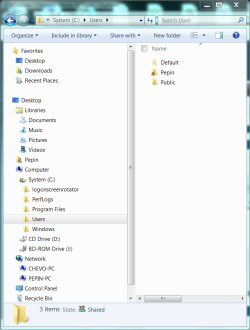
Example with Show Hidden files off and on..
.
 

Attachments

  • Capture.PNG
    Capture.PNG
    182.1 KB · Views: 17
  • Captur2e.PNG
    Captur2e.PNG
    184.5 KB · Views: 17

My Computer

Computer Manufacturer/Model Number
Asus P5B
OS
Windows 7 Ultimate
CPU
Intel Q9550
Motherboard
Asus P5B
Memory
4x2GB HyperX
Graphics Card(s)
ATI HD3850 512
Sound Card
Creative X-Fi Platinum
Monitor(s) Displays
Samsung 50 / Samsung 24
Screen Resolution
1920*1080 / 1920*1200
Hard Drives
Multiple RAID volumes
PSU
ThermalTake ToughPower
Case
Armor
Cooling
Liquid
Keyboard
$6 2.4 gHz desktop
Internet Speed
Just this side of fast enough.
Casca, what I meant was that the Default User junction, by mistake, is not hidden and it is being shown, and it is supposedly a protected system file.

Wouldn't this count as a file error?

Are you still having this same problem?

1) Just ignore it. Really... on the cosmic scale of bad things, this doesn't even make the very bottom of the list. It's a "So What?" at best. Do you really want a repeat of your previous experience with this?

2) In your Browser click Organize -> Folder and Search Options -> View...
Set it like this....

Capture.JPG

Go make a coffee and get on with your life!
 

My Computer

Computer Manufacturer/Model Number
Homebrew
OS
XP Pro SP3 X86 / Win7 Pro X86
CPU
Amd 64 x2 4200 (2.4ghz)
Motherboard
Asus M2N-MX SE Plus
Memory
Kingston DDR2 800 2gb
Graphics Card(s)
Nvidia GF-8400
Sound Card
Realtek on Motherboard
Monitor(s) Displays
Acer x-193bw
Screen Resolution
1440 x 900
Hard Drives
Western Digital 500g
PSU
350watt In-Win
Case
In-Win
Cooling
Air
Keyboard
yes
Mouse
yes
Internet Speed
5mpbs
Other Info
Also ASRock ION 330 as HTPC (on XP).
Acer Aspire as GP netbook (on XP).
Control Panel, Folder options...
.
 

Attachments

  • Capture.PNG
    Capture.PNG
    65 KB · Views: 4

My Computer

Computer Manufacturer/Model Number
Asus P5B
OS
Windows 7 Ultimate
CPU
Intel Q9550
Motherboard
Asus P5B
Memory
4x2GB HyperX
Graphics Card(s)
ATI HD3850 512
Sound Card
Creative X-Fi Platinum
Monitor(s) Displays
Samsung 50 / Samsung 24
Screen Resolution
1920*1080 / 1920*1200
Hard Drives
Multiple RAID volumes
PSU
ThermalTake ToughPower
Case
Armor
Cooling
Liquid
Keyboard
$6 2.4 gHz desktop
Internet Speed
Just this side of fast enough.
CT...I stated many times that I've had those boxes checked, and I was going to do a repair install like you and Brink recommended........but I cannot find the dvd through my big pile of discs. I was just wondering if this may fix my problem. I just make it a habit to ask before doing anything computer related. I'm just going to try it...and then move on if it does not hide the thing. I'm not that bothered by it if it's what you're thinking. :p
 

My Computer

OS
Vista
A can of worms, eh? My final input...

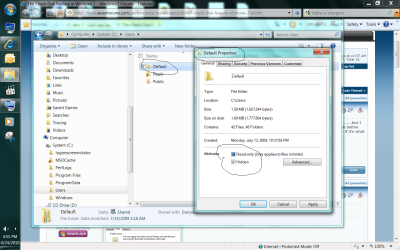
Right click the offending folder, properties, set the hidden attribute.
 

Attachments

  • Untitled.png
    Untitled.png
    432.4 KB · Views: 20

My Computer

Computer Manufacturer/Model Number
Asus P5B
OS
Windows 7 Ultimate
CPU
Intel Q9550
Motherboard
Asus P5B
Memory
4x2GB HyperX
Graphics Card(s)
ATI HD3850 512
Sound Card
Creative X-Fi Platinum
Monitor(s) Displays
Samsung 50 / Samsung 24
Screen Resolution
1920*1080 / 1920*1200
Hard Drives
Multiple RAID volumes
PSU
ThermalTake ToughPower
Case
Armor
Cooling
Liquid
Keyboard
$6 2.4 gHz desktop
Internet Speed
Just this side of fast enough.
Ok, you guys convinced me that a chkdsk would be useless. I'll try also not to bring it up anymore. Key word: try.
 

My Computer

OS
Vista
No. That is a file attribute. Ensure that you are not "Show hidden files" enabled and/or set the offending file's attribute to hidden.

Example with Show Hidden files off and on..
.

Problem is you're showing me how to hide Default...but that is already hidden in my Users folder. What isn't hidden (moronically, considering even Default is hidden) is the system junction for it, "Default User". Even Brink gave me the elevated prompt directions to hide it (the attrib stuff) and it failed. Win 7 DVD is lost, and now I have little else to try.

I could right click the junction folder and check the box "hidden", but I will have to take ownership of it first, apparently, since it's not letting me do it without permission. Was wondering if anyone here is highly against taking ownership of this junction, and I mean simply, simply taking ownership, and nothing more (besides hiding it afterwards). Will stripping ownership away from the current owner of this junction do anything negative? Like prevent accounts from being made?

I apologize if I'm tiring anyone out, but I am personally disguisted of my frequent bad luck and Dell's mess ups. I did not do anything to make this thing show. CT earlier said just not to worry about it...well what if another family member needs to use the computer and accidentally fiddles with the junction like I did? You see why I want to hide this thing?

Further disgusted at how I could not even find ONE other case on the net similar to mine. Apparently pretty much no one had this issue of a system junction appearing. The only thing the pops up on google are my own threads.
 
Last edited by a moderator:

My Computer

OS
Vista
Back
Top