Restore "All User" and "Default User" profiles?

house3272

New member
Local time
1:29 PM
Messages
5
*update*

Just found out that most of ProgramData's cleared out too.
Yea, can't really restore that stuff. Didn't lose anything thanks to my ocd filing system.
Sigh....all nighter restoring my system, here I come.

So now, changing the focus, please enlighten me as to how this happened?
Why did folders appear inside my "oldwindows" that had ties back to my active user account?
Why did deleting folders inside "oldwindows", specifically "protected operating system files" affect the active ones in C:\Users?
Why did some apps that I've installed only on this new image have files and folders inside the old?

Does Windows read everywhere for files and such?
Does putting .old in folder names prevent this?

And how do All Users, Public, and Default User work?


------------------------------------------------------

Hi there, I messed up really really bad.

Long long long story short, I made the mistake of renaming my windows.old file to oldwindows, not to sure what I was thinking at the time.
Used "take ownership" to delete some of the old files like the system32 folder and others.
"Hide protected operating system files" was unchecked when I was deleting things.
(because of the above) Windows ended up reading/associating some files, folders, and services with the old user, I think.
My permissions got screwed up. Ended up with like 8 or 9 security permission profiles for some folders.

Not too big of a deal, didn't realize this at the time so I just used a couple of fixes here and there.

Today, I went in and deleted more old stuff, and I deleted the "Default User" and "All User" profiles inside the oldwindows folder. (among lots of other things that I just can't remember right now)
Didn't know they would be associated with my current user folder.
Now my C:\Users only has my current user and Public.

Kinda bad.
I just don't have the time to do a full re-install right now (believe me, I'm going to).
There's just a couple of things (purchased programs with licensing, windows update, etc) that I can't use right now because of those missing folders that I need.
So anyone know how to restore them?
And kindly describe their functionality too?
Thanks!
 
Last edited:

My Computer

Computer type
Laptop
Computer Manufacturer/Model Number
Dell
OS
Windows 7 Ultimate x64
CPU
i7-2720
Graphics Card(s)
gt550m
Antivirus
avast
Browser
Chrome, duh.
Deleting stuff from windows.old folder doesn't affect the current win7 installation! Are you sure you changed permissions on windows.old only (or files within)? Only deleted stuff in windows.old?
 

My Computer

Computer type
Laptop
Computer Manufacturer/Model Number
ACER ASPIRE 5742G
OS
Microsoft Windows 7 Home Premium 64-bits 7601 Multiprocessor Free Service Pack 1
CPU
Intel(R) Core(TM) i3 CPU M 370 @ 2.40GHz
Motherboard
Acer Aspire 5742G
Memory
4,00 GB
Graphics Card(s)
ATI Mobility Radeon HD 5400 Series
Sound Card
(1) AMD High Definition Audio Device (2) Realtek High Defi
Screen Resolution
1366 x 768 x 32 bits (4294967296 colors) @ 60 Hz
Hard Drives
WDC WD5000BEVT-22ZAT0
Thanks for the reply, was beginning to feel retarded.


There was a windows.old and a windows.old.old cause I did 2 re-imagings for reasons I've forgotten.
I deleted the one with nothing in it, just stock win7 stuff.

Then I changed the folder name to oldwindows.
And set it as hidden, to prevent exactly this from happening.

Many files inside of it were being used by windows and other apps.


Twas quite a mess, anyways, if you don't mind, read my update and please answer some of the questions if you can.

Thanks!
 

My Computer

Computer type
Laptop
Computer Manufacturer/Model Number
Dell
OS
Windows 7 Ultimate x64
CPU
i7-2720
Graphics Card(s)
gt550m
Antivirus
avast
Browser
Chrome, duh.
In command prompt do:
Code:
dir  c:\users /ah

Do you see All Users and Default User? Not real folders btw but junctions.
"All Users" points to C:\ProgramData. Correct?
"Default User" points to C:\Users\Default. Correct?

Code:
dir C:\ProgramData
dir C:\Users\Default
Do you see files/folders?
 

My Computer

Computer type
Laptop
Computer Manufacturer/Model Number
ACER ASPIRE 5742G
OS
Microsoft Windows 7 Home Premium 64-bits 7601 Multiprocessor Free Service Pack 1
CPU
Intel(R) Core(TM) i3 CPU M 370 @ 2.40GHz
Motherboard
Acer Aspire 5742G
Memory
4,00 GB
Graphics Card(s)
ATI Mobility Radeon HD 5400 Series
Sound Card
(1) AMD High Definition Audio Device (2) Realtek High Defi
Screen Resolution
1366 x 768 x 32 bits (4294967296 colors) @ 60 Hz
Hard Drives
WDC WD5000BEVT-22ZAT0
Shows up with exactly what I can see in explorer with "Hide Protected operating system files" turned off.
Which was turned on when I was deleting stuff from the old system folder.
 

My Computer

Computer type
Laptop
Computer Manufacturer/Model Number
Dell
OS
Windows 7 Ultimate x64
CPU
i7-2720
Graphics Card(s)
gt550m
Antivirus
avast
Browser
Chrome, duh.
Thanks for the reply, was beginning to feel retarded.


There was a windows.old and a windows.old.old cause I did 2 re-imagings for reasons I've forgotten.
I deleted the one with nothing in it, just stock win7 stuff.

Then I changed the folder name to oldwindows.
And set it as hidden, to prevent exactly this from happening.

Many files inside of it were being used by windows and other apps.


Twas quite a mess, anyways, if you don't mind, read my update and please answer some of the questions if you can.

Thanks!
Close to imposible the files were used by windows!
C:\users\default is for the default user. When you creat a new user this stuff will be copied as default settings for the new user. Kind of template

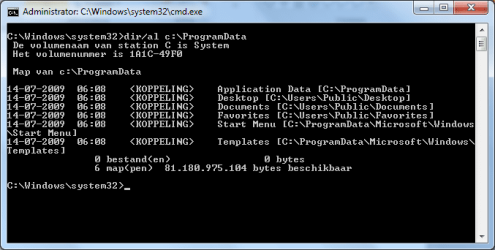
C:\users\All Users is actually C:\ProgramData. It has program settings for all users. And junctions to public desktop, documents, start menu and a few more. Actually the junctions points to C:\users\public
 

Attachments

  • Naamloos.png
    Naamloos.png
    12.9 KB · Views: 5

My Computer

Computer type
Laptop
Computer Manufacturer/Model Number
ACER ASPIRE 5742G
OS
Microsoft Windows 7 Home Premium 64-bits 7601 Multiprocessor Free Service Pack 1
CPU
Intel(R) Core(TM) i3 CPU M 370 @ 2.40GHz
Motherboard
Acer Aspire 5742G
Memory
4,00 GB
Graphics Card(s)
ATI Mobility Radeon HD 5400 Series
Sound Card
(1) AMD High Definition Audio Device (2) Realtek High Defi
Screen Resolution
1366 x 768 x 32 bits (4294967296 colors) @ 60 Hz
Hard Drives
WDC WD5000BEVT-22ZAT0
Code:
dir C:\ProgramData
dir C:\Users\Default
Do you see files/folders? Many... so old ones?
 

My Computer

Computer type
Laptop
Computer Manufacturer/Model Number
ACER ASPIRE 5742G
OS
Microsoft Windows 7 Home Premium 64-bits 7601 Multiprocessor Free Service Pack 1
CPU
Intel(R) Core(TM) i3 CPU M 370 @ 2.40GHz
Motherboard
Acer Aspire 5742G
Memory
4,00 GB
Graphics Card(s)
ATI Mobility Radeon HD 5400 Series
Sound Card
(1) AMD High Definition Audio Device (2) Realtek High Defi
Screen Resolution
1366 x 768 x 32 bits (4294967296 colors) @ 60 Hz
Hard Drives
WDC WD5000BEVT-22ZAT0
I swear there were files in many places like c:\oldwindows\Users\%username%\AppData\Local
That I couldn't delete because they were being used by windows.
Had to go safe mode to delete half of them. And the other half I still can't delete.


But the rest makes sense!
When I went into the old AllUsers , it must have sent me to my current ProgramData
:(
And as a result:

Windows can't make wireless network profiles
Windows update can't update because Background Intelligent Transfer Service can't start, something to do with files in %allusersprofile%\Application Data\Microsoft\Network\Downloader . Naturally, as it doesn't seem to exist anymore.
"AllPrograms" tab is blank, cept for: IE, Accessories, Maintenance, Startup
My 2 Adobe programs deactivated


Code:
dir C:\ProgramData
dir C:\Users\Default
Do you see files/folders? Many... so old ones?
The un-deletable files I was referring to were not in those two folders, but they are all gone.
Program Data has 5 folders total, obviously a nano fraction of what it's supposed to have.
 

My Computer

Computer type
Laptop
Computer Manufacturer/Model Number
Dell
OS
Windows 7 Ultimate x64
CPU
i7-2720
Graphics Card(s)
gt550m
Antivirus
avast
Browser
Chrome, duh.
*update*

Just found out that most of ProgramData's cleared out too.
Yea, can't really restore that stuff. Didn't lose anything thanks to my ocd filing system.
Sigh....all nighter restoring my system, here I come.

So now, changing the focus, please enlighten me as to how this happened?
Why did folders appear inside my "oldwindows" that had ties back to my active user account?
Why did deleting folders inside "oldwindows", specifically "protected operating system files" affect the active ones in C:\Users?
Why did some apps that I've installed only on this new image have files and folders inside the old?

Does Windows read everywhere for files and such?
Does putting .old in folder names prevent this?

And how do All Users, Public, and Default User work?


------------------------------------------------------

Hi there, I messed up really really bad.

Long long long story short, I made the mistake of renaming my windows.old file to oldwindows, not to sure what I was thinking at the time.
Used "take ownership" to delete some of the old files like the system32 folder and others.
"Hide protected operating system files" was unchecked when I was deleting things.
(because of the above) Windows ended up reading/associating some files, folders, and services with the old user, I think.
My permissions got screwed up. Ended up with like 8 or 9 security permission profiles for some folders.

Not too big of a deal, didn't realize this at the time so I just used a couple of fixes here and there.

Today, I went in and deleted more old stuff, and I deleted the "Default User" and "All User" profiles inside the oldwindows folder. (among lots of other things that I just can't remember right now)
Didn't know they would be associated with my current user folder.
Now my C:\Users only has my current user and Public.

Kinda bad.
I just don't have the time to do a full re-install right now (believe me, I'm going to).
There's just a couple of things (purchased programs with licensing, windows update, etc) that I can't use right now because of those missing folders that I need.
So anyone know how to restore them?
And kindly describe their functionality too?
Thanks!

Junction points in C:\windowsold\users\All Users pointed to C:\ProgramData.
Normally junction points (not all of them) are very protected by permissions , so you can't doubleclick them and don't see them because they are hidden. They don't take any space, they just point to another folder. If you did change permissions... you can delete them and destination folder will not be affected (it's just a pointer).

But if you doubleclick on it so view to files in C:\programdata and then delete all.... all in c:\programdata will be deleted.

When did this happen? 1 day go?
 

My Computer

Computer type
Laptop
Computer Manufacturer/Model Number
ACER ASPIRE 5742G
OS
Microsoft Windows 7 Home Premium 64-bits 7601 Multiprocessor Free Service Pack 1
CPU
Intel(R) Core(TM) i3 CPU M 370 @ 2.40GHz
Motherboard
Acer Aspire 5742G
Memory
4,00 GB
Graphics Card(s)
ATI Mobility Radeon HD 5400 Series
Sound Card
(1) AMD High Definition Audio Device (2) Realtek High Defi
Screen Resolution
1366 x 768 x 32 bits (4294967296 colors) @ 60 Hz
Hard Drives
WDC WD5000BEVT-22ZAT0
Happened 6 hours ago.

Said "**** it", and finally decided to clean out my oldwindows folder.

And yea, I think I went in and deleted ProgramData without double checking the address.


So say I delete these junction points, what would happen?
Cause I'm about to re image
 

My Computer

Computer type
Laptop
Computer Manufacturer/Model Number
Dell
OS
Windows 7 Ultimate x64
CPU
i7-2720
Graphics Card(s)
gt550m
Antivirus
avast
Browser
Chrome, duh.
Happened 6 hours ago.

Said "**** it", and finally decided to clean out my oldwindows folder.

And yea, I think I went in and deleted ProgramData without double checking the address.


So say I delete these junction points, what would happen?
Cause I'm about to re image
C:\programdata itself is still there?
C:\users\default is still there?

Right click on c:\programdata and do "restore previous version" select a date/time just before the deletion of files. Click restore.

Do the same for c:\users\default
 

My Computer

Computer type
Laptop
Computer Manufacturer/Model Number
ACER ASPIRE 5742G
OS
Microsoft Windows 7 Home Premium 64-bits 7601 Multiprocessor Free Service Pack 1
CPU
Intel(R) Core(TM) i3 CPU M 370 @ 2.40GHz
Motherboard
Acer Aspire 5742G
Memory
4,00 GB
Graphics Card(s)
ATI Mobility Radeon HD 5400 Series
Sound Card
(1) AMD High Definition Audio Device (2) Realtek High Defi
Screen Resolution
1366 x 768 x 32 bits (4294967296 colors) @ 60 Hz
Hard Drives
WDC WD5000BEVT-22ZAT0
Back
Top