Defrag won't start

McDougal

New member
Power User
Local time
1:27 PM
Messages
271
Hi all,

Today I decided to do a defrag with the default Windows 7 defagger. I went to run and typed dfrgui.exe to open it, and nothing happened, no error messages, nothing. I thought, maybe my Auslogics Disk Defrag is conflicting, so I used Revo Uninstaller to uninstall that, and still the same results. I tried searching disk defrag in start menu and selecting it from there, and still won't open. I am very confused as to why this is happening and I don't remember changing any settings.

Thanks for the help!

-McDougal
 

My Computer

Computer Manufacturer/Model Number
self built
OS
Windows 8 Pro x64; Win 7 Home Premium x64 SP1 on VirtualBox
CPU
Intel Core i3-2120 @ 3.3GHz
Motherboard
ASUS P8Z68-M Pro
Memory
8GB DDR3
Graphics Card(s)
ZOTAC GeForce GTX 560 Ti
Sound Card
Realteck HD Audio
Monitor(s) Displays
ASUS VS228 21.5" 1080p
Screen Resolution
1920x1080
Hard Drives
120GB SanDisk SSD;
500GB 7200RPM HDD
PSU
500W 80PLUS Bronze Certified
Case
Antec Three Hundred Illusion
Keyboard
Microsoft Comfort Curve Keyboard 2000 v1.0
Mouse
Microsoft Wireless Mobile Mouse 3000
Internet Speed
26/22Mbps Verizon FiOS
Other Info
very first PC build
As a suggestion why not stay with Auslogics or defragger. Just as good or better than the native defrag.
 

My Computer

Computer type
PC/Desktop
Computer Manufacturer/Model Number
Dell XPS 420
OS
Windows 10, Home Clean Install
CPU
Intel Core2 processsor Q8200(2.33Ghz 1333FSB) Quad Core Tech
Motherboard
Dell
Memory
6 gb
Graphics Card(s)
ATI Radeon 256MB HD3650
Sound Card
Intergrated 7.1 Channel Audio
Monitor(s) Displays
Dell SP2009W 20"
Hard Drives
640 GB Serial ATA Hard drive
Cooling
Fan
Keyboard
Dell USB Keyboard
Mouse
Dell Premium Optical USB
Internet Speed
DSL 2.85
Hello McDougal.


I put dfrgui.exe into either run or the start search and defrag opens.


Does your system consist of only a Solid State Drive (SSD)?
 

My Computer

Computer Manufacturer/Model Number
* BFK Customs *
OS
W 7 64-bit Ultimate
CPU
Intel Q9550 Yorkfield
Motherboard
ASUS P5Q Pro
Memory
8GB Dominator 8500C5D
Graphics Card(s)
ATI : XFX 5870
Sound Card
Realtek HD Audio 7-1
Monitor(s) Displays
1x 47" LCD HDMI & 3x 26" LCD HDMI
Screen Resolution
1920x1080P & 1920x1200
Hard Drives
1x 80GB Intel X25-M G2 SSD : 1x 500GB & 1x 640GB WD Caviar Black(s)
PSU
Corsair 620HX
Case
Cooler Master RC-690
Cooling
Tuniq Tower 120, 2x 140mm and 3x 120mm case fans
Keyboard
Microsoft 500
Mouse
Razer Diamondback 3G
Internet Speed
14 Mb/s
Other Info
1x Koutech 3Gb/s SATA HDD Hot Swap Rack
The reason why I switched from Auslogics is I like the idea of a scheduled defrag in the background. And no, I do not have a SSD, I have a 250GB HDD (see system specs). I am still unable to open the Windows defragger, I tried again.
 

My Computer

Computer Manufacturer/Model Number
self built
OS
Windows 8 Pro x64; Win 7 Home Premium x64 SP1 on VirtualBox
CPU
Intel Core i3-2120 @ 3.3GHz
Motherboard
ASUS P8Z68-M Pro
Memory
8GB DDR3
Graphics Card(s)
ZOTAC GeForce GTX 560 Ti
Sound Card
Realteck HD Audio
Monitor(s) Displays
ASUS VS228 21.5" 1080p
Screen Resolution
1920x1080
Hard Drives
120GB SanDisk SSD;
500GB 7200RPM HDD
PSU
500W 80PLUS Bronze Certified
Case
Antec Three Hundred Illusion
Keyboard
Microsoft Comfort Curve Keyboard 2000 v1.0
Mouse
Microsoft Wireless Mobile Mouse 3000
Internet Speed
26/22Mbps Verizon FiOS
Other Info
very first PC build
I am having the same problem. I built my machine a couple months ago, and finally got around to do a defrag. I have no other defrag programs. I do have an SSD as my boot and adobe software drive, but am trying to defrag my data HDD. This has stumpted me big time :mad:. The only thing I can think of is that I moved some default locations to the D drive to prevent needless read/wrights to my SSD and maybe that screwed things up, maybe. Windows 7 ultimate 64b is my OS and I want my index over 7 again, please help!
 

My Computer

OS
Windows 7 Ultimate x64
CPU
Intel I7 930
Motherboard
Asus Rampage III Extreme
Memory
12GB OCZ ddr3
Graphics Card(s)
Nvidia GTX480
Sound Card
On board
Monitor(s) Displays
1x 23" 1x 40"
Hard Drives
1 60GB OCZ SSD and 1TB WD caviar black
PSU
Thermaltake 875w
Case
Coolermaster HAF X
Cooling
Coolermaster Hyper 212plus
¿Any suggestions for me and McDougal? I can't even open it when I go to it's file location and run as admin. Im on the admin account, my only account. I am using MS security essentials, if that matters.
 

My Computer

OS
Windows 7 Ultimate x64
CPU
Intel I7 930
Motherboard
Asus Rampage III Extreme
Memory
12GB OCZ ddr3
Graphics Card(s)
Nvidia GTX480
Sound Card
On board
Monitor(s) Displays
1x 23" 1x 40"
Hard Drives
1 60GB OCZ SSD and 1TB WD caviar black
PSU
Thermaltake 875w
Case
Coolermaster HAF X
Cooling
Coolermaster Hyper 212plus
open up services.msc and check the disk defragmenter service .. it may have been disabled to prevent defragmenting of the SSD
 
Oops wow lol I didn't even realize there was a Disk Defragmenter service. I went to services.msc and it was stopped and set on Manual, I set it to Automatic (Delayed Start) and started the service, and I can confirm that it works! :)
 

My Computer

Computer Manufacturer/Model Number
self built
OS
Windows 8 Pro x64; Win 7 Home Premium x64 SP1 on VirtualBox
CPU
Intel Core i3-2120 @ 3.3GHz
Motherboard
ASUS P8Z68-M Pro
Memory
8GB DDR3
Graphics Card(s)
ZOTAC GeForce GTX 560 Ti
Sound Card
Realteck HD Audio
Monitor(s) Displays
ASUS VS228 21.5" 1080p
Screen Resolution
1920x1080
Hard Drives
120GB SanDisk SSD;
500GB 7200RPM HDD
PSU
500W 80PLUS Bronze Certified
Case
Antec Three Hundred Illusion
Keyboard
Microsoft Comfort Curve Keyboard 2000 v1.0
Mouse
Microsoft Wireless Mobile Mouse 3000
Internet Speed
26/22Mbps Verizon FiOS
Other Info
very first PC build
the defragmenter service is not something you want starting automatically. Unless you plan to defrag every time you boot, set it to manual... glad I could help
 
Thank you awesome it works now! I am about to defrag since the program started! I set it to manual. I guess I followed so many instructions to protect my SSD i forgot what I turned off, lol! Thank you Madtownsmartguy, can't call you an idiot after what I did!

Can I leave this on manual and disable accidentally defragging my ssd?
 

My Computer

OS
Windows 7 Ultimate x64
CPU
Intel I7 930
Motherboard
Asus Rampage III Extreme
Memory
12GB OCZ ddr3
Graphics Card(s)
Nvidia GTX480
Sound Card
On board
Monitor(s) Displays
1x 23" 1x 40"
Hard Drives
1 60GB OCZ SSD and 1TB WD caviar black
PSU
Thermaltake 875w
Case
Coolermaster HAF X
Cooling
Coolermaster Hyper 212plus
Hello again.


Windows 7 will not defrag an SSD, it's off by default for SSDs, so don't be concerned about that.
 

My Computer

Computer Manufacturer/Model Number
* BFK Customs *
OS
W 7 64-bit Ultimate
CPU
Intel Q9550 Yorkfield
Motherboard
ASUS P5Q Pro
Memory
8GB Dominator 8500C5D
Graphics Card(s)
ATI : XFX 5870
Sound Card
Realtek HD Audio 7-1
Monitor(s) Displays
1x 47" LCD HDMI & 3x 26" LCD HDMI
Screen Resolution
1920x1080P & 1920x1200
Hard Drives
1x 80GB Intel X25-M G2 SSD : 1x 500GB & 1x 640GB WD Caviar Black(s)
PSU
Corsair 620HX
Case
Cooler Master RC-690
Cooling
Tuniq Tower 120, 2x 140mm and 3x 120mm case fans
Keyboard
Microsoft 500
Mouse
Razer Diamondback 3G
Internet Speed
14 Mb/s
Other Info
1x Koutech 3Gb/s SATA HDD Hot Swap Rack
( 1786 days later . . . )

So I came upon this thread looking for a solution to my particular situation, which is simply that I absolutely cannot run the Windows®7 defragger from the command line, despite everything looking to be normal and in place.

The specifics in my case:

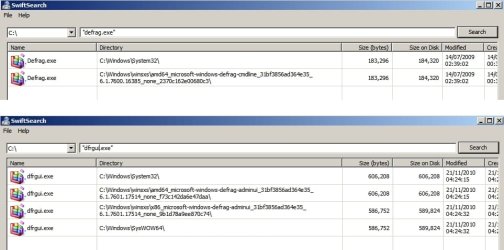
  • Firstly I do NOT have a file called defrag.exe in Windows®7; what I have is dfrgui.exe Well. I mention that because I have seen, on web pages that discuss the Windows®7 defragger, images where the author is clearly invoking defrag.exe from the command line, not dfrgui.exe. If it matters, this is Windows®7 Pro -x64.

  • When I run dfrgui.exe from an elevated command shell absolutely nothing happens, by which I mean I just get another prompt. If someone were to open a cmd shell, type just a colon ( this→ : ) at the prompt, and hit Enter, they would see exactly what I see when I type dfrgui in place of a colon.

  • The Disk Defragmenter service was, and is, set to Manual on my system, so that isn't the problem.

  • The HKLM\SOFTWARE\Microsoft\Windows\CurrentVersion\Explorer\MyComputer\DefragPath registry key is set to %systemroot%\system32\dfrgui.exe, so that's as it should be as well.

  • If I try running the Windows defragger from the GUI, it does in fact run fine, in that if I point to a drive, call up its properties, select the|Tools|tab, and click the [ Defragment now… ] button, I get the little Windows®7 Disk Defragmenter pop-up window ( with Disk, Last Run, and Progress columns ), and all functions like [ Analyze disk ], [ Defragment ], and [ Configure Schedule… ] work fine.

It appears I simply cannot run it from the command line, but everything is in place as you can see, and it should also work from there.

I'm not expecting a plethora of answers (always wanted to use that word :D  :o  :rolleyes:  :sarc:  ;) ) because, somewhat understandably, I expect most folks to be of the "leave well enough alone" persuasion, but I still want to fix this, so if anyone has any ideas not already covered by my bulleted list above, I'd love to hear them.

* * * * * *

Message to the OP (McDougal)

You can, in fact, schedule defrags with the auslogics® defragger as well. And here's a secret : a lot of commercial defraggers are really just front ends for the Windows®7 defragger, meaning they give you a much nicer user interface to see what's going on, but use the Windows defragmentation "engine" to get the actual work done… and auslogics® is one of these. If you find this surprising or even hard to believe ( I did at first ), try this :


  • open up the Windows®7 defragger and turn OFF the scheduler… make sure it isn't set to run automatically at any time on any day

  • start up the auslogics® defragger, and configure that one to a schedule… doesn't have to be very involved, just set it to something specific like, say, having drive C: defragged daily at 2:00 AM… then close it, making sure your scheduled settings were saved

  • lastly, open up the Windows®7 defragger again… you had turned off scheduling, right?… so why does it now say at the top Scheduled defragmentation is turned on… run at 2:00 am every day… next scheduled run: yyyy-mm-dd 2:00 am, lol  ?!? :eek: :shock: Point being that, since scheduling exists in the Windows®7 defragger, all a 3rd party defragger has to do is include a menu for the user to set scheduling preferences, since those parameters will just be passed along to the Windows®7 defragger as well.
 
Last edited:

My Computer

OS
Windows® 7 (64-bit)
CPU
intel® Core™ i5-4690 @ 3.50 GHz
Motherboard
GIGABYTE™ H97-D3H
Memory
8 GB DDR3
Okay on my machine Windows 7 HP:

I have the following files:

Defrag_Dfrgui.jpg

Note: I don't actually use the built in windows defrag.

However it would seem that defrag.exe exists in WINSXS so it's a missing system file on your machine (unless it's set to "hidden" view)

I'd suggest attempting to replace the file in system32 using the copy in WINSXS. I personally use software in order to replace system files so maybe wait for other suggestions on this. If nobody helps I can post the method that I use.

Note: dfrgui.exe would seem to be the Graphical User Interface (GUI) for windows defrag. That's my guess.
 
Last edited:

My Computer

Computer type
Laptop
Computer Manufacturer/Model Number
ASUS
OS
Microsoft Windows 7 Home Premium 64-bit 7601 Multiprocessor Free Service Pack 1
CPU
AMD C-60 APU with Radeon(tm) HD Graphics
Motherboard
ASUSTeK COMPUTER INC. X501U
Memory
4.00 GB
Graphics Card(s)
AMD Radeon HD 6290 Graphics
Sound Card
(1) AMD High Definition Audio Device (2) Realtek High Defi
Screen Resolution
1366 x 768 x 32 bits (4294967296 colors) @ 60 Hz
Hard Drives
Hitachi HTS545050A7E380 SATA Disk Device
Antivirus
Comodo CIS & FW, SecureAplus App Whitelisting, Threatfire
Browser
Cyberfox 64bit, Opera 64bit, Airfox
Other Info
Spy-The-Spy, HitmanPro.Alert, Norton Connect Safe, MJRegWatcher, BitDefender TrafficLight, Voodoo Shield, Zemana AntiMalware
Back
Top