Solved Degrading Windows performance

mangoa

New member
Local time
3:04 AM
Messages
11
It is now about 4 years since I have reloaded Windows 7 on my current laptop (after a disk crash). I regularly clear tmp files, my disks are not fragmented, but still I find that my computer is getting slower.:( Is there a certain degradation of performance that takes place in Windows over time? And would performance be enhanced by re-installing Windows from scratch?
 

My Computer

OS
Windows 7 Home Premium x64
Hey there and welcome to Seven Forums, Which security suite do you use? It could be your system is clogged up with malware etc.
Cheers,
Michael
 

My Computer

Computer type
Laptop
Computer Manufacturer/Model Number
Packard Bell
OS
Windows 7 Home Premium 64Bit
CPU
AMD A6-3420M 1.5GHZ OC - 2.0GHZ
Memory
4GB DDR3 1600MHZ
Graphics Card(s)
AMD RADEON 6520G+AMD RADEON HD7470M 1GB DDR3
Screen Resolution
1366x768
Hard Drives
500GB SATA
Internet Speed
18Mb Unlimited
Antivirus
AVAST!
Browser
MOZILLA FIREFOX
Hi Michael, I use Comodo Internet Security Premium. Previous scans did not detect any malware.
 

My Computer

OS
Windows 7 Home Premium x64
Thanks for the reply, Run these, these will find things you never knew you had on your system, if they come back clean, theres a good chance your clean, but lets be sure, AV programs dont pick up anything these programs will.

download AdwCleaner by Xplode and save to your Desktop.

  • Double click on AdwCleaner.exe to run the tool.


  • Vista/Windows 7/8 users right-click and select Run As Administrator.
  • Click on the Scan button.
  • AdwCleaner will begin...be patient as the scan may take some time to complete.
  • After the scan has finished, click on the Report button...a logfile (AdwCleaner[R#].txt) will open in Notepad for review (where the largest value of # represents the most recent report).
  • The contents of the log file may be confusing. Unless you see a program name that you know should not be removed, don't worry about it. If you see an entry you want to keep, let me know about it.
  • Copy and paste the contents of that logfile in your next reply.
  • A copy of all logfiles are saved in the C:\AdwCleaner folder which was created when running the tool.

Using AdwCleaner v3: Scan & Clean:
Double click on AdwCleaner.exe to run the tool again.
Click on the Scan button.
AdwCleaner will begin to scan your computer like it did before.
After the scan has finished...

This time click on the Clean button.
Press OK when asked to close all programs and follow the onscreen prompts.
Press OK again to allow AdwCleaner to restart the computer and complete the removal process.
After rebooting, a logfile report (AdwCleaner[S#].txt) will open automatically (where the largest value of # represents the most recent report).
Copy and paste the contents of that logfile in your next reply.

Please download Junkware Removal Tool to your desktop.


  • Shutdown your antivirus to avoid any conflicts.
  • Right click over JRT.exe and select Run as administrator on Windows Vista or Windows 7, double-click on XP.
  • The tool will open and start scanning your system.
  • Please be patient as this can take a while to complete.
  • On completion, a log (JRT.txt) is saved to your desktop and will automatically open.
  • Post the contents of JRT.txt into your next reply message
  • When completed make sure to re-enable your antivirus
 

My Computer

Computer type
Laptop
Computer Manufacturer/Model Number
Packard Bell
OS
Windows 7 Home Premium 64Bit
CPU
AMD A6-3420M 1.5GHZ OC - 2.0GHZ
Memory
4GB DDR3 1600MHZ
Graphics Card(s)
AMD RADEON 6520G+AMD RADEON HD7470M 1GB DDR3
Screen Resolution
1366x768
Hard Drives
500GB SATA
Internet Speed
18Mb Unlimited
Antivirus
AVAST!
Browser
MOZILLA FIREFOX
Here is the report from adwcleaner - I use Moovida and Bittorrent.

# AdwCleaner v3.023 - Report created 13/04/2014 at 10:24:09
# Updated 01/04/2014 by Xplode
# Operating System : Windows 7 Home Premium (64 bits)
# Username : Stefan - FORTESQUE
# Running from : C:\Users\Stefan\Desktop\AdwCleaner.exe
# Option : Scan

***** [ Services ] *****


***** [ Files / Folders ] *****

File Found : C:\Users\Stefan\AppData\Roaming\Mozilla\Firefox\Profiles\ul7k1xvb.default\searchplugins\Conduit.xml
File Found : C:\Users\Stefan\AppData\Roaming\Mozilla\Firefox\Profiles\ul7k1xvb.default\user.js
Folder Found C:\Program Files (x86)\BitTorrentBar
Folder Found C:\Program Files (x86)\Conduit
Folder Found C:\Program Files (x86)\Fluendo
Folder Found C:\Program Files (x86)\MyPC Backup
Folder Found C:\ProgramData\Babylon
Folder Found C:\ProgramData\BitGuard
Folder Found C:\ProgramData\boost_interprocess
Folder Found C:\ProgramData\Browser Manager
Folder Found C:\ProgramData\BrowserProtect
Folder Found C:\ProgramData\Microsoft\Windows\Start Menu\Programs\Moovida
Folder Found C:\ProgramData\Partner
Folder Found C:\ProgramData\wincert
Folder Found C:\Users\Stefan\AppData\Local\Conduit
Folder Found C:\Users\Stefan\AppData\Local\Moovida
Folder Found C:\Users\Stefan\AppData\LocalLow\BitTorrentBar
Folder Found C:\Users\Stefan\AppData\LocalLow\Conduit
Folder Found C:\Users\Stefan\AppData\LocalLow\PriceGong
Folder Found C:\Users\Stefan\AppData\Roaming\moovida-1

***** [ Shortcuts ] *****


***** [ Registry ] *****

Data Found : [x64] HKLM\SOFTWARE\Microsoft\Windows NT\CurrentVersion\Windows [AppInit_DLLs] - C:\PROGRA~2\MOVIES~1\Datamngr\x64\mgrldr.dll
Data Found : [x64] HKLM\SOFTWARE\Microsoft\Windows NT\CurrentVersion\Windows [AppInit_DLLs] - C:\PROGRA~3\Wincert\WIN64C~1.DLL
Key Found : HKCU\Software\APN DTX
Key Found : HKCU\Software\AppDataLow\Software\BitTorrentBar
Key Found : HKCU\Software\AppDataLow\Software\Conduit
Key Found : HKCU\Software\AppDataLow\Software\Freecause
Key Found : HKCU\Software\AppDataLow\Software\PriceGong
Key Found : HKCU\Software\AppDataLow\Software\SmartBar
Key Found : HKCU\Software\AppDataLow\Toolbar
Key Found : HKCU\Software\Conduit
Key Found : HKCU\Software\Microsoft\Internet Explorer\SearchScopes\{AFDBDDAA-5D3F-42EE-B79C-185A7020515B}
Key Found : HKCU\Software\Microsoft\Windows\CurrentVersion\Ext\Settings\{83FF80F4-8C74-4B80-B5BA-C8DDD434E5C4}
Key Found : HKCU\Software\Microsoft\Windows\CurrentVersion\Ext\Settings\{88C7F2AA-F93F-432C-8F0E-B7D85967A527}
Key Found : HKCU\Software\Microsoft\Windows\CurrentVersion\Ext\Settings\{AE805869-2E5C-4ED4-8F7B-F1F7851A4497}
Key Found : HKCU\Software\Microsoft\Windows\CurrentVersion\Ext\Settings\{EF99BD32-C1FB-11D2-892F-0090271D4F88}
Key Found : HKCU\Software\Microsoft\Windows\CurrentVersion\Ext\Stats\{02478D38-C3F9-4EFB-9B51-7695ECA05670}
Key Found : HKCU\Software\Microsoft\Windows\CurrentVersion\Ext\Stats\{32804100-B238-45F4-B15E-C5A2F2F7400B}
Key Found : HKCU\Software\Microsoft\Windows\CurrentVersion\Ext\Stats\{83FF80F4-8C74-4B80-B5BA-C8DDD434E5C4}
Key Found : HKCU\Software\Microsoft\Windows\CurrentVersion\Ext\Stats\{88C7F2AA-F93F-432C-8F0E-B7D85967A527}
Key Found : HKCU\Software\Microsoft\Windows\CurrentVersion\Ext\Stats\{AE805869-2E5C-4ED4-8F7B-F1F7851A4497}
Key Found : HKCU\Software\Microsoft\Windows\CurrentVersion\Ext\Stats\{EF99BD32-C1FB-11D2-892F-0090271D4F88}
Key Found : [x64] HKCU\Software\APN DTX
Key Found : [x64] HKCU\Software\Conduit
Key Found : [x64] HKCU\Software\Microsoft\Internet Explorer\SearchScopes\{AFDBDDAA-5D3F-42EE-B79C-185A7020515B}
Key Found : HKLM\Software\Babylon
Key Found : HKLM\Software\BitTorrentBar
Key Found : HKLM\SOFTWARE\Classes\AppID\{0A18A436-2A7A-49F3-A488-30538A2F6323}
Key Found : HKLM\SOFTWARE\Classes\CLSID\{1AA60054-57D9-4F99-9A55-D0FBFBE7ECD3}
Key Found : HKLM\SOFTWARE\Classes\CLSID\{32804100-B238-45F4-B15E-C5A2F2F7400B}
Key Found : HKLM\SOFTWARE\Classes\CLSID\{3C471948-F874-49F5-B338-4F214A2EE0B1}
Key Found : HKLM\SOFTWARE\Classes\CLSID\{88C7F2AA-F93F-432C-8F0E-B7D85967A527}
Key Found : HKLM\SOFTWARE\Classes\CLSID\{AE805869-2E5C-4ED4-8F7B-F1F7851A4497}
Key Found : HKLM\SOFTWARE\Classes\Prod.cap
Key Found : HKLM\SOFTWARE\Classes\protector_dll.protectorbho
Key Found : HKLM\SOFTWARE\Classes\protector_dll.protectorbho.1
Key Found : HKLM\SOFTWARE\Classes\Toolbar.CT2790392
Key Found : HKLM\Software\Conduit
Key Found : HKLM\Software\DataMngr
Key Found : HKLM\SOFTWARE\Microsoft\Internet Explorer\Low Rights\ElevationPolicy\{8B2CC83E-C8B9-4339-A687-BF81C2D54C74}
Key Found : HKLM\SOFTWARE\Microsoft\Internet Explorer\Low Rights\ElevationPolicy\{A5F74E8D-AD2B-4080-9895-EF304E5A5C9D}
Key Found : HKLM\SOFTWARE\Microsoft\Internet Explorer\SearchScopes\{AFDBDDAA-5D3F-42EE-B79C-185A7020515B}
Key Found : HKLM\SOFTWARE\Microsoft\Tracing\au__rasapi32
Key Found : HKLM\SOFTWARE\Microsoft\Tracing\au__rasmancs
Key Found : HKLM\SOFTWARE\Microsoft\Windows NT\CurrentVersion\Image File Execution Options\bitguard.exe
Key Found : HKLM\SOFTWARE\Microsoft\Windows NT\CurrentVersion\Image File Execution Options\bprotect.exe
Key Found : HKLM\SOFTWARE\Microsoft\Windows NT\CurrentVersion\Image File Execution Options\browsemngr.exe
Key Found : HKLM\SOFTWARE\Microsoft\Windows NT\CurrentVersion\Image File Execution Options\browserdefender.exe
Key Found : HKLM\SOFTWARE\Microsoft\Windows NT\CurrentVersion\Image File Execution Options\browsermngr.exe
Key Found : HKLM\SOFTWARE\Microsoft\Windows NT\CurrentVersion\Image File Execution Options\browserprotect.exe
Key Found : HKLM\SOFTWARE\Microsoft\Windows NT\CurrentVersion\Image File Execution Options\bundlesweetimsetup.exe
Key Found : HKLM\SOFTWARE\Microsoft\Windows NT\CurrentVersion\Image File Execution Options\cltmngsvc.exe
Key Found : HKLM\SOFTWARE\Microsoft\Windows NT\CurrentVersion\Image File Execution Options\delta babylon.exe
Key Found : HKLM\SOFTWARE\Microsoft\Windows NT\CurrentVersion\Image File Execution Options\delta tb.exe
Key Found : HKLM\SOFTWARE\Microsoft\Windows NT\CurrentVersion\Image File Execution Options\delta2.exe
Key Found : HKLM\SOFTWARE\Microsoft\Windows NT\CurrentVersion\Image File Execution Options\deltainstaller.exe
Key Found : HKLM\SOFTWARE\Microsoft\Windows NT\CurrentVersion\Image File Execution Options\deltasetup.exe
Key Found : HKLM\SOFTWARE\Microsoft\Windows NT\CurrentVersion\Image File Execution Options\deltatb.exe
Key Found : HKLM\SOFTWARE\Microsoft\Windows NT\CurrentVersion\Image File Execution Options\deltatb_2501-c733154b.exe
Key Found : HKLM\SOFTWARE\Microsoft\Windows NT\CurrentVersion\Image File Execution Options\iminentsetup.exe
Key Found : HKLM\SOFTWARE\Microsoft\Windows NT\CurrentVersion\Image File Execution Options\sweetimsetup.exe
Key Found : HKLM\SOFTWARE\Microsoft\Windows NT\CurrentVersion\Image File Execution Options\tbdelta.exetoolbar783881609.exe
Key Found : HKLM\SOFTWARE\Microsoft\Windows\CurrentVersion\Explorer\Browser Helper Objects\{02478D38-C3F9-4EFB-9B51-7695ECA05670}
Key Found : HKLM\SOFTWARE\Microsoft\Windows\CurrentVersion\Explorer\Browser Helper Objects\{88C7F2AA-F93F-432C-8F0E-B7D85967A527}
Key Found : HKLM\SOFTWARE\Microsoft\Windows\CurrentVersion\Explorer\Browser Helper Objects\{AE805869-2E5C-4ED4-8F7B-F1F7851A4497}
Key Found : HKLM\SOFTWARE\Microsoft\Windows\CurrentVersion\Ext\PreApproved\{02478D38-C3F9-4EFB-9B51-7695ECA05670}
Key Found : HKLM\SOFTWARE\Microsoft\Windows\CurrentVersion\Ext\PreApproved\{32804100-B238-45F4-B15E-C5A2F2F7400B}
Key Found : HKLM\SOFTWARE\Microsoft\Windows\CurrentVersion\Ext\PreApproved\{EF99BD32-C1FB-11D2-892F-0090271D4F88}
Key Found : HKLM\SOFTWARE\Microsoft\Windows\CurrentVersion\Uninstall\BitTorrentBar Toolbar
Key Found : HKLM\SOFTWARE\Microsoft\Windows\CurrentVersion\Uninstall\Moovida
Key Found : HKLM\Software\Moovida
Value Found : HKCU\Software\Microsoft\Internet Explorer\Toolbar\WebBrowser [{88C7F2AA-F93F-432C-8F0E-B7D85967A527}]
Value Found : HKCU\Software\Microsoft\Internet Explorer\URLSearchHooks [{88C7F2AA-F93F-432C-8F0E-B7D85967A527}]
Value Found : HKLM\SOFTWARE\Microsoft\Internet Explorer\Toolbar [{88C7F2AA-F93F-432C-8F0E-B7D85967A527}]
Value Found : HKLM\SOFTWARE\Microsoft\Internet Explorer\URLSearchHooks [{88C7F2AA-F93F-432C-8F0E-B7D85967A527}]
Value Found : HKLM\SYSTEM\ControlSet001\Control\Session Manager\AppCertDlls [x64]
Value Found : HKLM\SYSTEM\ControlSet001\Control\Session Manager\AppCertDlls [x86]
Value Found : HKLM\SYSTEM\ControlSet002\Control\Session Manager\AppCertDlls [x64]
Value Found : HKLM\SYSTEM\ControlSet002\Control\Session Manager\AppCertDlls [x86]
Value Found : HKLM\SYSTEM\CurrentControlSet\Control\Session Manager\AppCertDlls [x64]
Value Found : HKLM\SYSTEM\CurrentControlSet\Control\Session Manager\AppCertDlls [x86]

***** [ Browsers ] *****

-\\ Internet Explorer v8.0.7600.17267

Setting Found : HKCU\Software\Microsoft\Internet Explorer\Main [Start Page] - hxxp://www.search.ask.com/?o=APN10649A&gct=hp&d=412-20&v=n10781-222&t=4

-\\ Mozilla Firefox v23.0.1 (en-GB)

[ File : C:\Users\Stefan\AppData\Roaming\Mozilla\Firefox\Profiles\ul7k1xvb.default\prefs.js ]

Line Found : user_pref("browser.search.defaultthis.engineName", "NCH EN Customized Web Search");
Line Found : user_pref("browser.search.defaulturl", "hxxp://search.conduit.com/ResultsExt.aspx?ctid=CT2801948&SearchSource=3&q={searchTerms}");
Line Found : user_pref("extensions.trusted-ads.ExLst", "{\"u\":{\"v\":\"1.73\",\"d\":\"040914\"},\"h\":{\"pogo.com\":{\"p\":[{\"e\":\"/.*/\",\"r\":[\"/connect\\\\.facebook\\\\.net\\\\/en_US\\\\/all\\\\.js$/i\"]}]}[...]

-\\ Google Chrome v

[ File : C:\Users\Stefan\AppData\Local\Google\Chrome\User Data\Default\preferences ]

Found : homepage

*************************

AdwCleaner[R0].txt - [9699 octets] - [13/04/2014 10:24:09]

########## EOF - C:\AdwCleaner\AdwCleaner[R0].txt - [9759 octets] ##########

Should I go ahead and do the scan&clean or wait until you check the results from the first scan?
 

My Computer

OS
Windows 7 Home Premium x64
1.) Please run the cleaning from adwcleaner. And then restart your pc. It is infected. Clean anything it finds.

Conduit and Babylon are notorious nasty buggers.

2.) When that is done, please download malwarebytes antimalware from my signature below. Use the full scan option. Please save and upload the log here. Remove anything found.
 

My Computer

Computer type
PC/Desktop
Computer Manufacturer/Model Number
Custom Built
OS
Windows 10 Pro
CPU
AMD Ryzen 5 2400G Processor with Radeon RX Vega 11 Graphics
Motherboard
ASRock X470 Master SLI/AC AM4 AMD Promontory X470 SATA 6Gb/s
Memory
G.SKILL Ripjaws V Series 16GB (2 x 8GB) 288-Pin DDR4 SDRAM D
Graphics Card(s)
2047MB NVIDIA GeForce GTX 1060 6GB (EVGA)
Sound Card
Motherboard Built in
Monitor(s) Displays
Acer R240HY bidx 23.8-Inch IPS HDMI DVI VGA (1920 x 1080) Wi
Screen Resolution
1920 x 1080
Hard Drives
1TB Sandisk SSD PLUS (Main drive)
500 GB Seagate 7200 RPM (Games)
500 GB Western Digital 7200 RPM (Virtual Machines)
PSU
CORSAIR TX Series TX650M 650W 80+ Gold Modular Power Supply
Case
CORSAIR CARBIDE SPEC-02 Mid-Tower Gaming Case, Red LED Fan
Cooling
220mm, two 120mm, and four 60mm fans
Keyboard
Wired Dell keyboard
Mouse
Wireless Logitech mouse
Internet Speed
250mb down, 30mb up
Antivirus
Panda Cloud Antivirus
Browser
Chrome-ish x64
Other Info
Your awesome for reading this.
Thanks for the tip. I cleaned everything with Adwcleaner, lost Moovida but will install that again.

Then I ran Malwarebytes and cleaned up as well. Below is the log.

Thanks all for your help, I will now monitor the system for a few days to see if there is any difference in performance.

Malwarebytes log:

Malwarebytes Anti-Malware
Malwarebytes | Free Anti-Malware & Internet Security Software

Scan Date: 4/15/2014
Scan Time: 8:56:20 PM
Logfile: Malwarebytes log.txt
Administrator: Yes

Version: 2.00.1.1004
Malware Database: v2014.04.10.07
Rootkit Database: v2014.03.27.01
License: Free
Malware Protection: Disabled
Malicious Website Protection: Disabled
Chameleon: Disabled

OS: Windows 7
CPU: x64
File System: NTFS
User: Stefan

Scan Type: Threat Scan
Result: Completed
Objects Scanned: 268543
Time Elapsed: 1 hr, 12 min, 50 sec

Memory: Enabled
Startup: Enabled
Filesystem: Enabled
Archives: Enabled
Rootkits: Disabled
Shuriken: Enabled
PUP: Warn
PUM: Enabled

Processes: 0
(No malicious items detected)

Modules: 0
(No malicious items detected)

Registry Keys: 0
(No malicious items detected)

Registry Values: 0
(No malicious items detected)

Registry Data: 0
(No malicious items detected)

Folders: 1
PUP.Optional.MoviesToolBar.A, C:\Users\Stefan\AppData\Roaming\Mozilla\Firefox\Profiles\ul7k1xvb.default\koyotesoftmoviestoolbarha, , [3f7077b1c2b95cda4c4b213d44be33cd],

Files: 7
PUP.Optional.MoviesToolBar.A, C:\Users\Stefan\AppData\Roaming\Mozilla\Firefox\Profiles\ul7k1xvb.default\koyotesoftmoviestoolbarha\apnuserid.dat, , [3f7077b1c2b95cda4c4b213d44be33cd],
PUP.Optional.MoviesToolBar.A, C:\Users\Stefan\AppData\Roaming\Mozilla\Firefox\Profiles\ul7k1xvb.default\koyotesoftmoviestoolbarha\appid.dat, , [3f7077b1c2b95cda4c4b213d44be33cd],
PUP.Optional.MoviesToolBar.A, C:\Users\Stefan\AppData\Roaming\Mozilla\Firefox\Profiles\ul7k1xvb.default\koyotesoftmoviestoolbarha\geodata.xml, , [3f7077b1c2b95cda4c4b213d44be33cd],
PUP.Optional.MoviesToolBar.A, C:\Users\Stefan\AppData\Roaming\Mozilla\Firefox\Profiles\ul7k1xvb.default\koyotesoftmoviestoolbarha\setupCfg.xml, , [3f7077b1c2b95cda4c4b213d44be33cd],
PUP.Optional.MoviesToolBar.A, C:\Users\Stefan\AppData\Roaming\Mozilla\Firefox\Profiles\ul7k1xvb.default\koyotesoftmoviestoolbarha\sysid.dat, , [3f7077b1c2b95cda4c4b213d44be33cd],
PUP.Optional.MoviesToolBar.A, C:\Users\Stefan\AppData\Roaming\Mozilla\Firefox\Profiles\ul7k1xvb.default\koyotesoftmoviestoolbarha\trackid.dat, , [3f7077b1c2b95cda4c4b213d44be33cd],
PUP.Optional.ASK.A, C:\Users\Stefan\AppData\Local\Google\Chrome\User Data\Default\Preferences, Good: (), Bad: ( "startup_urls": [ "http://www.search.ask.com/?o=APN10649A&gct=hp&d=412-20&v=n10781-222&t=4" ],), ,[b1fe98903a4151e5de384cfc09fb53ad]

Physical Sectors: 0
(No malicious items detected)


(end)

 

My Computer

OS
Windows 7 Home Premium x64

Attachments

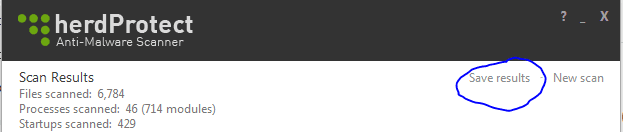
  • save results.PNG
    save results.PNG
    8.3 KB · Views: 1,221

My Computer

Computer type
PC/Desktop
Computer Manufacturer/Model Number
Custom Built
OS
Windows 10 Pro
CPU
AMD Ryzen 5 2400G Processor with Radeon RX Vega 11 Graphics
Motherboard
ASRock X470 Master SLI/AC AM4 AMD Promontory X470 SATA 6Gb/s
Memory
G.SKILL Ripjaws V Series 16GB (2 x 8GB) 288-Pin DDR4 SDRAM D
Graphics Card(s)
2047MB NVIDIA GeForce GTX 1060 6GB (EVGA)
Sound Card
Motherboard Built in
Monitor(s) Displays
Acer R240HY bidx 23.8-Inch IPS HDMI DVI VGA (1920 x 1080) Wi
Screen Resolution
1920 x 1080
Hard Drives
1TB Sandisk SSD PLUS (Main drive)
500 GB Seagate 7200 RPM (Games)
500 GB Western Digital 7200 RPM (Virtual Machines)
PSU
CORSAIR TX Series TX650M 650W 80+ Gold Modular Power Supply
Case
CORSAIR CARBIDE SPEC-02 Mid-Tower Gaming Case, Red LED Fan
Cooling
220mm, two 120mm, and four 60mm fans
Keyboard
Wired Dell keyboard
Mouse
Wireless Logitech mouse
Internet Speed
250mb down, 30mb up
Antivirus
Panda Cloud Antivirus
Browser
Chrome-ish x64
Other Info
Your awesome for reading this.
Last edited:

My Computer

Computer type
PC/Desktop
Computer Manufacturer/Model Number
Custom Built
OS
Windows 10 Pro
CPU
AMD Ryzen 5 2400G Processor with Radeon RX Vega 11 Graphics
Motherboard
ASRock X470 Master SLI/AC AM4 AMD Promontory X470 SATA 6Gb/s
Memory
G.SKILL Ripjaws V Series 16GB (2 x 8GB) 288-Pin DDR4 SDRAM D
Graphics Card(s)
2047MB NVIDIA GeForce GTX 1060 6GB (EVGA)
Sound Card
Motherboard Built in
Monitor(s) Displays
Acer R240HY bidx 23.8-Inch IPS HDMI DVI VGA (1920 x 1080) Wi
Screen Resolution
1920 x 1080
Hard Drives
1TB Sandisk SSD PLUS (Main drive)
500 GB Seagate 7200 RPM (Games)
500 GB Western Digital 7200 RPM (Virtual Machines)
PSU
CORSAIR TX Series TX650M 650W 80+ Gold Modular Power Supply
Case
CORSAIR CARBIDE SPEC-02 Mid-Tower Gaming Case, Red LED Fan
Cooling
220mm, two 120mm, and four 60mm fans
Keyboard
Wired Dell keyboard
Mouse
Wireless Logitech mouse
Internet Speed
250mb down, 30mb up
Antivirus
Panda Cloud Antivirus
Browser
Chrome-ish x64
Other Info
Your awesome for reading this.
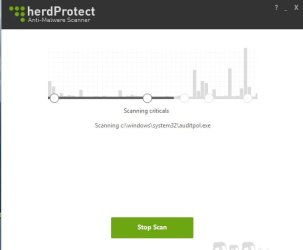
Thank you Andrew. I started herdprotect but it seems stuck since 2 hours on file C:\windows\system32\auditpol.exe. It is a big file (3GB) but would it take that long? See screenshot.
 

Attachments

  • Herdprotect screenshot.jpg
    Herdprotect screenshot.jpg
    30.6 KB · Views: 36

My Computer

OS
Windows 7 Home Premium x64
Shouldn't take that long...im not familiar with that tool so il leave it to Andrew to look over, Once Done everything Andrew has asked, I'd run JRT, its really good at finding things other programs don't and works a superb combo with AdwCleaner
 

My Computer

Computer type
Laptop
Computer Manufacturer/Model Number
Packard Bell
OS
Windows 7 Home Premium 64Bit
CPU
AMD A6-3420M 1.5GHZ OC - 2.0GHZ
Memory
4GB DDR3 1600MHZ
Graphics Card(s)
AMD RADEON 6520G+AMD RADEON HD7470M 1GB DDR3
Screen Resolution
1366x768
Hard Drives
500GB SATA
Internet Speed
18Mb Unlimited
Antivirus
AVAST!
Browser
MOZILLA FIREFOX
Thank you Andrew. I started herdprotect but it seems stuck since 2 hours on file C:\windows\system32\auditpol.exe. It is a big file (3GB) but would it take that long? See screenshot.

Herd protect uses 68 antivirus scan engines to scan your files. It's like virus total, except it scans your entire PC. Sorry I forgot to mention this. :o Expect a huge drive (1tb) with lots of files to take about 4-5 hours.

Note: Herd Protect does need a active internet connection to scan your files. IF you have slow internet the process may take longer. The argument is its worth it though, as if this tool finds anything, its most likely something to look into. That being said their are cases of false positives which is why its good to have someone look over the log before removing anything.

While you are waiting on herd protect, you could do the things suggested in this tutorial: :)

http://www.sevenforums.com/tutorials/11728-optimize-windows-7-a.html


Shouldn't take that long...im not familiar with that tool so il leave it to Andrew to look over, Once Done everything Andrew has asked, I'd run JRT, its really good at finding things other programs don't and works a superb combo with AdwCleaner


I agree with this statement on the part of JRT, we can look into this after the herd protect scan logs. After all this, the computer should defiantly be clean.
 

My Computer

Computer type
PC/Desktop
Computer Manufacturer/Model Number
Custom Built
OS
Windows 10 Pro
CPU
AMD Ryzen 5 2400G Processor with Radeon RX Vega 11 Graphics
Motherboard
ASRock X470 Master SLI/AC AM4 AMD Promontory X470 SATA 6Gb/s
Memory
G.SKILL Ripjaws V Series 16GB (2 x 8GB) 288-Pin DDR4 SDRAM D
Graphics Card(s)
2047MB NVIDIA GeForce GTX 1060 6GB (EVGA)
Sound Card
Motherboard Built in
Monitor(s) Displays
Acer R240HY bidx 23.8-Inch IPS HDMI DVI VGA (1920 x 1080) Wi
Screen Resolution
1920 x 1080
Hard Drives
1TB Sandisk SSD PLUS (Main drive)
500 GB Seagate 7200 RPM (Games)
500 GB Western Digital 7200 RPM (Virtual Machines)
PSU
CORSAIR TX Series TX650M 650W 80+ Gold Modular Power Supply
Case
CORSAIR CARBIDE SPEC-02 Mid-Tower Gaming Case, Red LED Fan
Cooling
220mm, two 120mm, and four 60mm fans
Keyboard
Wired Dell keyboard
Mouse
Wireless Logitech mouse
Internet Speed
250mb down, 30mb up
Antivirus
Panda Cloud Antivirus
Browser
Chrome-ish x64
Other Info
Your awesome for reading this.
Thank you Andrew. I started herdprotect but it seems stuck since 2 hours on file C:\windows\system32\auditpol.exe. It is a big file (3GB) but would it take that long? See screenshot.

Herd protect uses 68 antivirus scan engines to scan your files. It's like virus total, except it scans your entire PC. Sorry I forgot to mention this. :o Expect a huge drive (1tb) with lots of files to take about 4-5 hours.

Note: Herd Protect does need a active internet connection to scan your files. IF you have slow internet the process may take longer. The argument is its worth it though, as if this tool finds anything, its most likely something to look into. That being said their are cases of false positives which is why its good to have someone look over the log before removing anything.

While you are waiting on herd protect, you could do the things suggested in this tutorial: :)

http://www.sevenforums.com/tutorials/11728-optimize-windows-7-a.html


Shouldn't take that long...im not familiar with that tool so il leave it to Andrew to look over, Once Done everything Andrew has asked, I'd run JRT, its really good at finding things other programs don't and works a superb combo with AdwCleaner


I agree with this statement on the part of JRT, we can look into this after the herd protect scan logs. After all this, the computer should defiantly be clean.


Seems like a nice tool! Im gonna use it and leave my system on overnight to see if its found anything my 5-6 individuals haven't:P Cheers for bringing this program up!
 

My Computer

Computer type
Laptop
Computer Manufacturer/Model Number
Packard Bell
OS
Windows 7 Home Premium 64Bit
CPU
AMD A6-3420M 1.5GHZ OC - 2.0GHZ
Memory
4GB DDR3 1600MHZ
Graphics Card(s)
AMD RADEON 6520G+AMD RADEON HD7470M 1GB DDR3
Screen Resolution
1366x768
Hard Drives
500GB SATA
Internet Speed
18Mb Unlimited
Antivirus
AVAST!
Browser
MOZILLA FIREFOX
Thanks for your help guys, I have run JRT (took about 5 hours) and it found some more te remove (see logfile attached). Also it deleted Fluendo Moovida again after I reinstalled it. Is this really adware?
Ok, next is Herdprotect again. I will let it run all day since I will be out.
 

Attachments

My Computer

OS
Windows 7 Home Premium x64
I started Herdprotect at about 11AM yesterday. It quickly got to file C:\windows\system32\auditpol.exe and there it remained stuck until I cancelled the scan at 12:30AM last night, 13.5 hours later. Next step: I moved auditpol.exe out of the way (on flashdrive) and restarted Herdprotect. This time it got stuck on the audiolog.exe file in the same folder.
Anyway, my computer is running much better now so I guess the 3 previous adware scanners did a good job. I have read and saved the suggestions to optimize W7 and will keep those in mind.

A big thank you to Devlin and Andrew for the help!
 

My Computer

OS
Windows 7 Home Premium x64
Odd that it got stuck but thanks for the information. I am fairly confident you are clean. Let us know if you keep experiancing performance issues.
 

My Computer

Computer type
PC/Desktop
Computer Manufacturer/Model Number
Custom Built
OS
Windows 10 Pro
CPU
AMD Ryzen 5 2400G Processor with Radeon RX Vega 11 Graphics
Motherboard
ASRock X470 Master SLI/AC AM4 AMD Promontory X470 SATA 6Gb/s
Memory
G.SKILL Ripjaws V Series 16GB (2 x 8GB) 288-Pin DDR4 SDRAM D
Graphics Card(s)
2047MB NVIDIA GeForce GTX 1060 6GB (EVGA)
Sound Card
Motherboard Built in
Monitor(s) Displays
Acer R240HY bidx 23.8-Inch IPS HDMI DVI VGA (1920 x 1080) Wi
Screen Resolution
1920 x 1080
Hard Drives
1TB Sandisk SSD PLUS (Main drive)
500 GB Seagate 7200 RPM (Games)
500 GB Western Digital 7200 RPM (Virtual Machines)
PSU
CORSAIR TX Series TX650M 650W 80+ Gold Modular Power Supply
Case
CORSAIR CARBIDE SPEC-02 Mid-Tower Gaming Case, Red LED Fan
Cooling
220mm, two 120mm, and four 60mm fans
Keyboard
Wired Dell keyboard
Mouse
Wireless Logitech mouse
Internet Speed
250mb down, 30mb up
Antivirus
Panda Cloud Antivirus
Browser
Chrome-ish x64
Other Info
Your awesome for reading this.
Keeping the programs we suggested on hand is a good idea mate, Run them every week or so. JRT should never take 5 hours, usually about 6-7 minutes! Weird but im glad your all sorted, any further problems, as Andrew said, let us know! Take care buddy!
 

My Computer

Computer type
Laptop
Computer Manufacturer/Model Number
Packard Bell
OS
Windows 7 Home Premium 64Bit
CPU
AMD A6-3420M 1.5GHZ OC - 2.0GHZ
Memory
4GB DDR3 1600MHZ
Graphics Card(s)
AMD RADEON 6520G+AMD RADEON HD7470M 1GB DDR3
Screen Resolution
1366x768
Hard Drives
500GB SATA
Internet Speed
18Mb Unlimited
Antivirus
AVAST!
Browser
MOZILLA FIREFOX
Back
Top