
DEKK XPS 8700 DESKTOP CMOS 4 BEEPS ( how to do jumper???)

jjr

New member
Member
VIP
Local time
4:27 PM
Messages
315
Hi
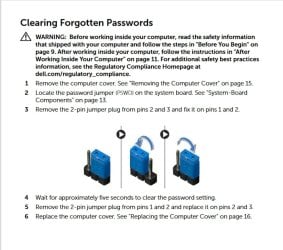
I replaced my cmos battery and now when I tried to tun on the pc I get 4 beeps. So I looked in the manual and it says to remove the blue jumper for 5 seconds a and put it back warnd and then do the same and turn it around again. Did so but now Im unsure how the jumper was in the first place.

When was does that pin supposed to be facing or better yet and video on this.

Note the PC seemed to be working fine but was unable to change the power settings o and it would always revert tp power saving mode. also at times the clock seemed to be off.. So i did a search and what I foumd it was time to replace the CMOS bettery.

Thought it was a simple bettery swap, apparently not. I did try 2 new batteries was well as trying the original one w/o any success.

Now Im really confused on what the jumer was sat at originally???

HELP ;-(

- - - Updated - - -

ok so now I understand a bit better I simply move the jumper over a pix plus in for 5 10 sec unplug wait till power drains and move jumper back to original position ( I have a ident 8700 desktop here and conformed the correct position)

So plugged back in and same issue 4 beeps, so next I power off removed the battery and held the power button in for 10 sec and reinstalled and powered back on and same thing 4 beeps.

No as much as I hate to even think it, could it be that the MOBO is bad? if so and I have to reinstall a new one I would also have to reinslall Win 7 OS? I do not think that could be done anymore correct?

What I do have is a Acronis back up will that reinstall the OS if I did replace the MOBO//
TIA
 

My Computer My Computer

At a glance

Microsoft Windows 7 Professional 64-bitIntel(R) Core(TM) i7-4790 CPU @ 3.60GHz16.00 GB Hynix/Hyundai HMT451U6BFR8A-PBNVIDIA GeForce GT 720 1920 x 1080 x 32 bits (...
Computer type
PC/Desktop
Computer Manufacturer/Model Number
DELL XPS 8700 DESKTOP
OS
Microsoft Windows 7 Professional 64-bit
CPU
Intel(R) Core(TM) i7-4790 CPU @ 3.60GHz
Motherboard
Dell Inc.Base Board 0KWVT8
Memory
16.00 GB Hynix/Hyundai HMT451U6BFR8A-PB
Graphics Card(s)
NVIDIA GeForce GT 720 1920 x 1080 x 32 bits (4294967296 colo
Sound Card
Broadcom Bluetooth Hands-free Audio
Screen Resolution
1920 x 1080 x 32 bits (4294967296 colors) @ 60 Hz
Hard Drives
ST1000DM ST1000DM003-1ER1 SCSI Disk Device
What I do have is a Acronis back up will that reinstall the OS if I did replace the MOBO//

yes it should. Otherwise, yes you can still install windows 7'

---------------------------------------------------------------------------------------------------------------------------

I would check a few things before replacing the mobo.

make sure you replaced the jumper correctly. Try a different cmos battery, it should output at least 3v.

detach all peripherals ( everything that is plugged in ) which means detaching the graphics card any hard disks as well. Just unplug the power from each of them .

Then see if you can get into bios.

If that is ok, then the problem was one of the peripherals.

If it still not ok, then try one ram stick at a time in each slot.

Let's see if we can find the service manual.....

https://www.pdf-manuals.com/pdf/del...8700-1884blk-b-h-photo-357489-user-manual.pdf

Is this the jumper you moved? page 83 of the manual

del-xps-8700-jumper.jpg
 

My Computers My Computers

  • At a glance

    7 X64i5 84002x8gb 3200mhz
    Computer type
    PC/Desktop
    OS
    7 X64
    CPU
    i5 8400
    Motherboard
    gigabyte b365m ds3h
    Memory
    2x8gb 3200mhz
    Hard Drives
    various
    PSU
    pure power 11 400w cm
    Case
    Coolermaster
    Cooling
    cryorig m9i
  • At a glance

    7x64g54008gb ddr4 2400
    Computer type
    PC/Desktop
    OS
    7x64
    CPU
    g5400
    Motherboard
    ga b365m ds3h
    Memory
    8gb ddr4 2400
    PSU
    xfx pro 450w
Thanks but have seen that, I remembered that my PC was still under warranty so off it goes to Square Trade for a new MOBO. Have changed a few new batteries , have nothing plugged let square trade fit it
 

My Computer My Computer

At a glance

Microsoft Windows 7 Professional 64-bitIntel(R) Core(TM) i7-4790 CPU @ 3.60GHz16.00 GB Hynix/Hyundai HMT451U6BFR8A-PBNVIDIA GeForce GT 720 1920 x 1080 x 32 bits (...
Computer type
PC/Desktop
Computer Manufacturer/Model Number
DELL XPS 8700 DESKTOP
OS
Microsoft Windows 7 Professional 64-bit
CPU
Intel(R) Core(TM) i7-4790 CPU @ 3.60GHz
Motherboard
Dell Inc.Base Board 0KWVT8
Memory
16.00 GB Hynix/Hyundai HMT451U6BFR8A-PB
Graphics Card(s)
NVIDIA GeForce GT 720 1920 x 1080 x 32 bits (4294967296 colo
Sound Card
Broadcom Bluetooth Hands-free Audio
Screen Resolution
1920 x 1080 x 32 bits (4294967296 colors) @ 60 Hz
Hard Drives
ST1000DM ST1000DM003-1ER1 SCSI Disk Device
Good idea. let them do it.
 

My Computers My Computers

  • At a glance

    7 X64i5 84002x8gb 3200mhz
    Computer type
    PC/Desktop
    OS
    7 X64
    CPU
    i5 8400
    Motherboard
    gigabyte b365m ds3h
    Memory
    2x8gb 3200mhz
    Hard Drives
    various
    PSU
    pure power 11 400w cm
    Case
    Coolermaster
    Cooling
    cryorig m9i
  • At a glance

    7x64g54008gb ddr4 2400
    Computer type
    PC/Desktop
    OS
    7x64
    CPU
    g5400
    Motherboard
    ga b365m ds3h
    Memory
    8gb ddr4 2400
    PSU
    xfx pro 450w
Next issue is that I have a identical XPS 8700 and was thinking about putting a new battery in that one, question is do I have a screw around with that jumper? If not I would pop one in, the jumper is a bit of a PITA due to my hands and vision.

I'am really gushy now
 

My Computer My Computer

At a glance

Microsoft Windows 7 Professional 64-bitIntel(R) Core(TM) i7-4790 CPU @ 3.60GHz16.00 GB Hynix/Hyundai HMT451U6BFR8A-PBNVIDIA GeForce GT 720 1920 x 1080 x 32 bits (...
Computer type
PC/Desktop
Computer Manufacturer/Model Number
DELL XPS 8700 DESKTOP
OS
Microsoft Windows 7 Professional 64-bit
CPU
Intel(R) Core(TM) i7-4790 CPU @ 3.60GHz
Motherboard
Dell Inc.Base Board 0KWVT8
Memory
16.00 GB Hynix/Hyundai HMT451U6BFR8A-PB
Graphics Card(s)
NVIDIA GeForce GT 720 1920 x 1080 x 32 bits (4294967296 colo
Sound Card
Broadcom Bluetooth Hands-free Audio
Screen Resolution
1920 x 1080 x 32 bits (4294967296 colors) @ 60 Hz
Hard Drives
ST1000DM ST1000DM003-1ER1 SCSI Disk Device

My Computers My Computers

  • At a glance

    7 X64i5 84002x8gb 3200mhz
    Computer type
    PC/Desktop
    OS
    7 X64
    CPU
    i5 8400
    Motherboard
    gigabyte b365m ds3h
    Memory
    2x8gb 3200mhz
    Hard Drives
    various
    PSU
    pure power 11 400w cm
    Case
    Coolermaster
    Cooling
    cryorig m9i
  • At a glance

    7x64g54008gb ddr4 2400
    Computer type
    PC/Desktop
    OS
    7x64
    CPU
    g5400
    Motherboard
    ga b365m ds3h
    Memory
    8gb ddr4 2400
    PSU
    xfx pro 450w
Age
 

My Computer My Computer

At a glance

Microsoft Windows 7 Professional 64-bitIntel(R) Core(TM) i7-4790 CPU @ 3.60GHz16.00 GB Hynix/Hyundai HMT451U6BFR8A-PBNVIDIA GeForce GT 720 1920 x 1080 x 32 bits (...
Computer type
PC/Desktop
Computer Manufacturer/Model Number
DELL XPS 8700 DESKTOP
OS
Microsoft Windows 7 Professional 64-bit
CPU
Intel(R) Core(TM) i7-4790 CPU @ 3.60GHz
Motherboard
Dell Inc.Base Board 0KWVT8
Memory
16.00 GB Hynix/Hyundai HMT451U6BFR8A-PB
Graphics Card(s)
NVIDIA GeForce GT 720 1920 x 1080 x 32 bits (4294967296 colo
Sound Card
Broadcom Bluetooth Hands-free Audio
Screen Resolution
1920 x 1080 x 32 bits (4294967296 colors) @ 60 Hz
Hard Drives
ST1000DM ST1000DM003-1ER1 SCSI Disk Device
"Now I'm really confused on what the jumper was set at originally" (edited for correctness)

And now I'm confused..... it that PC a DEKK or a Dell?

And, that's the very reason that I NEVER mess around with motherboard jumpers. Or you pull one off, and drop it, and can't find it again.
It's easier and more efficient to just remove the CMOS battery and leave it out for 20 to 30 minutes, with all other power OFF of the system.
That's plenty of time for the CMOS memory cells to drain down to zero.
Then install a new battery that you've already checked, and established to be well over 3.0 vdc. NEVER put a CMOS battery back in a motherboard that is just 3.0 vdc or below.

Good Luck,
TM :cool:
 

My Computer My Computer

At a glance

Win 7 Pro, SP1, x86, Win-11/Pro/64AMD8GB CrucialVarious
Computer type
PC/Desktop
Computer Manufacturer/Model Number
Various
OS
Win 7 Pro, SP1, x86, Win-11/Pro/64
CPU
AMD
Motherboard
Various
Memory
8GB Crucial
Graphics Card(s)
Various
Sound Card
OnBoard
Monitor(s) Displays
Acer 21.5"
Hard Drives
Crucial SSD, 500 GB
PSU
OEM
Case
SFF Slim Line Case
Cooling
OEM
Keyboard
eMachines
Mouse
Logitech Wireless
Internet Speed
varies
Antivirus
Windows Defender/Super Anti-Spyware
Browser
Firefox
Sorry Its a Dell XPS 8700 Desktop, no matter what my MOBO seems to be the issue, go figure it was only 2 years old. My last PC was a Alienware Desktop and I think I had left that on for 7 years before it failed, I guess liquid cooled and build quality do make a difference.

My XPS thst I sent in for repair actually started out as a Wim 8.1 PC that I rolled back to Win7 Pro. From what I remember that had a another drive that was to back op the OS. I did do that as I remember when I set it back to Win7. Is it possible to reinstall the OS after a now MOBO is installed?

Sorry Im not very techinical ;-( also I do have Acronis back ups but again it has been a very lone time since I screwed with this stuff.

I still cant believe what MS ruined a great OS lis Win7 and replaced with the new 10 and 11 garbage, all you read is bad bad reviews on both

On another note someone had mentioned that it was still possible to reinstall Win7, is that true?

"Now I'm really confused on what the jumper was set at originally" (edited for correctness)

And now I'm confused..... it that PC a DEKK or a Dell?

And, that's the very reason that I NEVER mess around with motherboard jumpers. Or you pull one off, and drop it, and can't find it again.
It's easier and more efficient to just remove the CMOS battery and leave it out for 20 to 30 minutes, with all other power OFF of the system.
That's plenty of time for the CMOS memory cells to drain down to zero.
Then install a new battery that you've already checked, and established to be well over 3.0 vdc. NEVER put a CMOS battery back in a motherboard that is just 3.0 vdc or below.

Good Luck,
TM :cool:
 

My Computer My Computer

At a glance

Microsoft Windows 7 Professional 64-bitIntel(R) Core(TM) i7-4790 CPU @ 3.60GHz16.00 GB Hynix/Hyundai HMT451U6BFR8A-PBNVIDIA GeForce GT 720 1920 x 1080 x 32 bits (...
Computer type
PC/Desktop
Computer Manufacturer/Model Number
DELL XPS 8700 DESKTOP
OS
Microsoft Windows 7 Professional 64-bit
CPU
Intel(R) Core(TM) i7-4790 CPU @ 3.60GHz
Motherboard
Dell Inc.Base Board 0KWVT8
Memory
16.00 GB Hynix/Hyundai HMT451U6BFR8A-PB
Graphics Card(s)
NVIDIA GeForce GT 720 1920 x 1080 x 32 bits (4294967296 colo
Sound Card
Broadcom Bluetooth Hands-free Audio
Screen Resolution
1920 x 1080 x 32 bits (4294967296 colors) @ 60 Hz
Hard Drives
ST1000DM ST1000DM003-1ER1 SCSI Disk Device
On another note someone had mentioned that it was still possible to reinstall Win7, is that true?

Yes, I do it often.
 

My Computers My Computers

  • At a glance

    7 X64i5 84002x8gb 3200mhz
    Computer type
    PC/Desktop
    OS
    7 X64
    CPU
    i5 8400
    Motherboard
    gigabyte b365m ds3h
    Memory
    2x8gb 3200mhz
    Hard Drives
    various
    PSU
    pure power 11 400w cm
    Case
    Coolermaster
    Cooling
    cryorig m9i
  • At a glance

    7x64g54008gb ddr4 2400
    Computer type
    PC/Desktop
    OS
    7x64
    CPU
    g5400
    Motherboard
    ga b365m ds3h
    Memory
    8gb ddr4 2400
    PSU
    xfx pro 450w
When I get my PC back , I will be back for help on here.
What were those zip files ?
Thanks

- - - Updated - - -

Just wanting to double check if doing that would work for sure? I would take the battery out and let the pc sit overnight just to be on the safe side.

"Now I'm really confused on what the jumper was set at originally" (edited for correctness)

And now I'm confused..... it that PC a DEKK or a Dell?

And, that's the very reason that I NEVER mess around with motherboard jumpers. Or you pull one off, and drop it, and can't find it again.
It's easier and more efficient to just remove the CMOS battery and leave it out for 20 to 30 minutes, with all other power OFF of the system.
That's plenty of time for the CMOS memory cells to drain down to zero.
Then install a new battery that you've already checked, and established to be well over 3.0 vdc. NEVER put a CMOS battery back in a motherboard that is just 3.0 vdc or below.

Good Luck,
TM :cool:
 

My Computer My Computer

At a glance

Microsoft Windows 7 Professional 64-bitIntel(R) Core(TM) i7-4790 CPU @ 3.60GHz16.00 GB Hynix/Hyundai HMT451U6BFR8A-PBNVIDIA GeForce GT 720 1920 x 1080 x 32 bits (...
Computer type
PC/Desktop
Computer Manufacturer/Model Number
DELL XPS 8700 DESKTOP
OS
Microsoft Windows 7 Professional 64-bit
CPU
Intel(R) Core(TM) i7-4790 CPU @ 3.60GHz
Motherboard
Dell Inc.Base Board 0KWVT8
Memory
16.00 GB Hynix/Hyundai HMT451U6BFR8A-PB
Graphics Card(s)
NVIDIA GeForce GT 720 1920 x 1080 x 32 bits (4294967296 colo
Sound Card
Broadcom Bluetooth Hands-free Audio
Screen Resolution
1920 x 1080 x 32 bits (4294967296 colors) @ 60 Hz
Hard Drives
ST1000DM ST1000DM003-1ER1 SCSI Disk Device
Back
Top