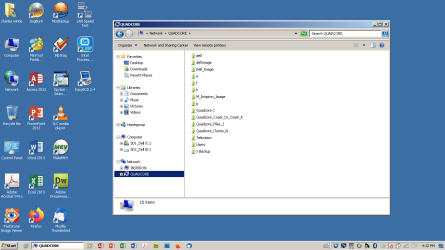
Some of the links shown here no longer work because I have deleted the partition on the other computer. My question is how do I clean up this list to get rid of the ones that do not work?
Some of the links shown here no longer work because I have deleted the partition on the other computer. My question is how do I clean up this list to get rid of the ones that do not work?
Not on this machine, you can't. The shares shown in Network > QUADCORE are the shares that the other computer QUADCORE is announcing to the network that it is sharing. Even though you have may have deleted the partitions, it still thinks its sharing them.
Go to the other computer, open an administrator command prompt and type NET SHARE to see its list of shares. Type NET SHARE <name of share> /DELETE to remove any you don't need.
You may also need to restart both machines so that the Master Browser builds an up to date list of available machines and shares.
I also have W7 Pro on my System Two, and several W7 Hyper-V VMs. My other machines run Windows 10/11. Their specs are in my Ten Forums & Eleven Forum profiles.