
Solved Delete Recently Typed in Address Bar

Tryphona

New member
Local time
10:30 AM
Messages
5
Hi there, I will attach two images and in the second image you will see an 'Internet or network address:' bar and I was wondering if you could clear the recently typed as when I press the drop down it comes up with the addresses of recently used connections which I do not want there. Hope there is a solution, thanks
 

Attachments
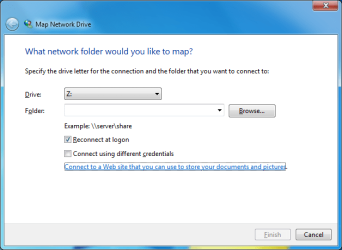
  • Untitled.png
    Untitled.png
    18.8 KB · Views: 31
  • Untitled2.png
    Untitled2.png
    15.9 KB · Views: 31

My Computer My Computer

Computer type
PC/Desktop
OS
Windows 7 Ultimate x64
Hi Tryphona.

It does say that "Type the address...", have you checked if you can select the options from the drop down list and delete them?

Cheers, Boris :)
 

My Computer My Computer

Computer type
PC/Desktop
Computer Manufacturer/Model Number
Custom build
OS
Windows 7 Home Premium
CPU
i5-3570k
Motherboard
ASUS Sabertooth z77
Memory
16 GB DDR3 G Skill Sniper
Graphics Card(s)
GIGABYTE GeForce GTX 970 GV-N970WF3OC-4GD
Monitor(s) Displays
ASUS ROG PG278Q
Screen Resolution
2560x1440@60Hz/120Hz/144Hz
Hard Drives
56GB KINGSTON SVP200S37A60G
512GB Crucial MX100
1863GB Seagate ST2000DM001-1CH164
2795GB Seagate ST3000DM001-9YN166
PSU
Corsair GS800
Case
Storm Trooper Stryker White
Keyboard
Logitech G910 Orion Spark
Mouse
Logitech G502
Antivirus
MSE
Browser
Firefox/Chrome
Other Info
Logitech G633
Logitech Mouse Matt
There is an option to delete, however that just deletes the address you've entered but still keeps it on the drop down list so it doesn't actually delete it from its memory

Matt
 

My Computer My Computer

Computer type
PC/Desktop
OS
Windows 7 Ultimate x64

My Computer My Computer

Computer type
PC/Desktop
Computer Manufacturer/Model Number
Custom build
OS
Windows 7 Home Premium
CPU
i5-3570k
Motherboard
ASUS Sabertooth z77
Memory
16 GB DDR3 G Skill Sniper
Graphics Card(s)
GIGABYTE GeForce GTX 970 GV-N970WF3OC-4GD
Monitor(s) Displays
ASUS ROG PG278Q
Screen Resolution
2560x1440@60Hz/120Hz/144Hz
Hard Drives
56GB KINGSTON SVP200S37A60G
512GB Crucial MX100
1863GB Seagate ST2000DM001-1CH164
2795GB Seagate ST3000DM001-9YN166
PSU
Corsair GS800
Case
Storm Trooper Stryker White
Keyboard
Logitech G910 Orion Spark
Mouse
Logitech G502
Antivirus
MSE
Browser
Firefox/Chrome
Other Info
Logitech G633
Logitech Mouse Matt
...clear the recently typed...

I think that you can manually delete them from here:
Code:
HKCU\Software\Microsoft\Windows\CurrentVersion\Explorer\PublishingWizard\AddNetworkPlace\AddNetPlace\LocationMRU
I cannot test.

If mapped drive list is of interest, clear those from here:
Code:
HKCU\Software\Microsoft\Windows\CurrentVersion\Explorer\Map Network Drive MRU
 

My Computer My Computer

Computer type
Laptop
Computer Manufacturer/Model Number
Employer provided Dell Latitude
OS
W7 Pro SP1 64bit
CPU
i7
Memory
8GB
Graphics Card(s)
Intel HD Graphics
Hard Drives
crappy SSD
Antivirus
Employer mandated Symantec Endpoint Protection
Browser
Pale Moon 64bit, IE11 64bit & Chrome 64bit
Thank you so much 'UNI' the first method works :)

Regards, Matt
 

My Computer My Computer

Computer type
PC/Desktop
OS
Windows 7 Ultimate x64
Back
Top