Solved make arrow in address bar smaller? (XP, FF)

ccharlie

New member
Local time
10:06 AM
Messages
7
Hi folks, I am trying to conserve browser real-estate on my (very small) monitor. I've combined my Menu bar with my address bar (location bar, whatever they call it), but the "go back one page" arrow (see JPG) is too big: the height of the entire address bar seems to be defined by that icon. I can't figure out how to change its size. I don't want a bigger icon, which is what most ppl seem to be asking for when questions around address-bar icons come up - I want a smaller one! :D (I don't think the combination of the address + menu bar is related to this issue, actually; just explaining my current set-up. That is, if you look for how to reduce icon-size, it shouldn't matter where the bar is located. Also, the size-discrepancy just bugs me.)

I've oc tried googling any number of search-terms: this has surely been asked and answered many times before, but I am having a heck of a time finding out where! Any help appreciated, thanks folks!!

The computer in question is running XP with FF 38.0.1esr
 

Attachments

  • arrow-size-in-address-bar.JPG
    arrow-size-in-address-bar.JPG
    11.3 KB · Views: 1

My Computer My Computer

Computer type
PC/Desktop
Computer Manufacturer/Model Number
HP
OS
Windows 7 Professional SP1 64-bit
CPU
Pentium dual-core 3.06gig
Memory
4gig
Graphics Card(s)
Intel(R) Q45/Q43 Express Chipset
Monitor(s) Displays
Acer V223W LCD
Screen Resolution
1680 x 1050
Hard Drives
ATA Hitachi HDE72101 SCSI Disk Device, 1T
Browser
FF 38.1.0esr
You could look for Add-Ons or Themes that might be able to do what you want.
From what I've found, FF removed the "Use Small Icons" in the Customize Toolbar options :(

I use Pale Moon and it still has the "Use Small Icons" option.
I don't use the menu toolbar, not sure if you could configure everything to your liking with Pale Moon.

Pale Moon has a portable version, so you could test drive it without installing, and see what you think.
Pale Moon - portable!
 

My Computer My Computer

Computer type
PC/Desktop
Computer Manufacturer/Model Number
home built
OS
Multi-Boot W7_Pro_x64 W8.1_Pro_x64 W10_Pro_x64 +Linux_VMs +Chromium_VM
CPU
AMD Athlon II x4 620
Motherboard
Gigabyte GA-MA785G-UD3H
Memory
6GB GSkill DDR2 800
Graphics Card(s)
AMD 4670 GPU + AMD 4200 IGP
Sound Card
on board Realtek ALC889A
Monitor(s) Displays
RCA 40" LCD TV, Insignia 32" LCD TV, HP 15" LCD monitor
Screen Resolution
1680 x 1050
Hard Drives
OCZ Vertex 3 120GB,
Samsung F3 1TB (3),
Several others - WD, Seagate, Hitachi, ...
PSU
Corsair 500 W
Case
Rosewill mid tower
Cooling
CM 90mm rifle
Keyboard
Gyration wireless, Logitech wireless, Dell USB wired
Mouse
Gyration wireless, Logitech wireless, V7 USB wired
Internet Speed
Spectrum - 100Mbps D / 10Mbps U
Antivirus
Avast, MBAM3, EMET, WinPatrol
Browser
Pale Moon, Firefox, IE
Other Info
2 multi-boot PC's
Mainly HTPC/Office/Gen purpose (no gaming).
Trendnet USB KVM.
LG DVD burner/Blue Ray Player.
Tray system for removable SATA backup drives.

Not currently OCd, under-volted.
I use Hybrid sleep, rarely re-boot or shutdown.

Hauppauge HD-PVR, Avermedia PCIe TV Tuner, Hauppauge PCI TV Tuner.
Hi, @ccharlie:

In addition to @DavidE's excellent advice and the fact that this computer is running XP (this is the Win7 forum), this extension has a lot of customization options that may do what you want:

Classic Theme Restorer


There are other, more "complicated" ways to make such modifications, e.g. via UserChrome.css, as explained here:
Editing Configuration
UserChrome.css

And you might want to check over at our "sister" forum for XP here, as members there might be more facile with things related to XP: PCHelp Forum - XP

Hope this helps,
MM
 

My Computer My Computer

Computer type
PC/Desktop
Computer Manufacturer/Model Number
Dell Studio XPS 8500
OS
OEM Windows 7 Ult (x64) SP1
CPU
Intel Core-i7 3770 @ 3.4 GHz
Motherboard
"Dell" branded
Memory
16 GB DDR3 SDRAM @ 1333 MHz
Graphics Card(s)
NVidia GeForce GT620 1 GB
Sound Card
THX TruStudio PC
Monitor(s) Displays
Dell U2410 Full HD
Hard Drives
2.0 TB SATA2 @ 7200 RPM
PSU
350W
Keyboard
MS 4000 Ergon - Wired
Mouse
Logitech Anywhere MX
Internet Speed
Cable HSI w/Turbo (router)
Antivirus
KIS-MBAM Premium-MBAE Premium
Browser
Fx (current version); IE
Other Info
And a Win7/64 Pro laptop; And a Win10/64 Pro desktop.
One other thing:

You mention that the rig runs Fx 38.0.1 ESR?

I think the current ESR build is 38.3.0, as available HERE

Cheers,
MM
 

My Computer My Computer

Computer type
PC/Desktop
Computer Manufacturer/Model Number
Dell Studio XPS 8500
OS
OEM Windows 7 Ult (x64) SP1
CPU
Intel Core-i7 3770 @ 3.4 GHz
Motherboard
"Dell" branded
Memory
16 GB DDR3 SDRAM @ 1333 MHz
Graphics Card(s)
NVidia GeForce GT620 1 GB
Sound Card
THX TruStudio PC
Monitor(s) Displays
Dell U2410 Full HD
Hard Drives
2.0 TB SATA2 @ 7200 RPM
PSU
350W
Keyboard
MS 4000 Ergon - Wired
Mouse
Logitech Anywhere MX
Internet Speed
Cable HSI w/Turbo (router)
Antivirus
KIS-MBAM Premium-MBAE Premium
Browser
Fx (current version); IE
Other Info
And a Win7/64 Pro laptop; And a Win10/64 Pro desktop.
Thanks guys - really sorry abt posting in the wrong forum, okay to trash this if you want... I didn't know that forum existed, never seen it in years of googling around! :s I figured ppl here did seem really knowledgable so would give it a try, is all.

@DavidE - thx, I do have Palemoon portable for some things but it's not my go-to browser. (In no small part bec they kept stressing how XP wouldn't be supported past last summer, I think it was?) But anyway, even just having the "Use Small Icons" nomenclature gives me something different to search for, in terms of fix/replacement! :)

(I should have said I was hoping for a way to do this without add-ons or (to me, exotic) CSS solutions. Will update ESR version, didn't realize.)

Thanks MoxieMomma, and again sorry. This is a small thing but it's driving me crazy. I just knew people here were super-helpful... didn't think abt this forum being Win7-only! my bad.
 

My Computer My Computer

Computer type
PC/Desktop
Computer Manufacturer/Model Number
HP
OS
Windows 7 Professional SP1 64-bit
CPU
Pentium dual-core 3.06gig
Memory
4gig
Graphics Card(s)
Intel(R) Q45/Q43 Express Chipset
Monitor(s) Displays
Acer V223W LCD
Screen Resolution
1680 x 1050
Hard Drives
ATA Hitachi HDE72101 SCSI Disk Device, 1T
Browser
FF 38.1.0esr
No worries, @ccharlie.
It's all good.

ESR version: I suggested that you update largely for SECURITY reasons (especially since you are running XP, which stopped getting security updates in April 2014). If you stay on the ESR, rather than the General release, it's important to stay updated.

Classic Theme Restorer is totally awesome.
I am pretty sure it will allow you to do what you want.
And it's just a great & very stable extension -- especially for us old geezers who have used Fx since the pre-Australis days -- even with minimal tweaking.

Let us know how it goes,

MM
 

My Computer My Computer

Computer type
PC/Desktop
Computer Manufacturer/Model Number
Dell Studio XPS 8500
OS
OEM Windows 7 Ult (x64) SP1
CPU
Intel Core-i7 3770 @ 3.4 GHz
Motherboard
"Dell" branded
Memory
16 GB DDR3 SDRAM @ 1333 MHz
Graphics Card(s)
NVidia GeForce GT620 1 GB
Sound Card
THX TruStudio PC
Monitor(s) Displays
Dell U2410 Full HD
Hard Drives
2.0 TB SATA2 @ 7200 RPM
PSU
350W
Keyboard
MS 4000 Ergon - Wired
Mouse
Logitech Anywhere MX
Internet Speed
Cable HSI w/Turbo (router)
Antivirus
KIS-MBAM Premium-MBAE Premium
Browser
Fx (current version); IE
Other Info
And a Win7/64 Pro laptop; And a Win10/64 Pro desktop.
Well I'd say if you want no clutter just press F11.

   Tip
Just press [ALT+Left Arrow] to go back a page or press again to go back further.

Press [ALT+Right Arrow] to go forward or press again to go forward further.

If you so that you could remove the Back Button entirely.


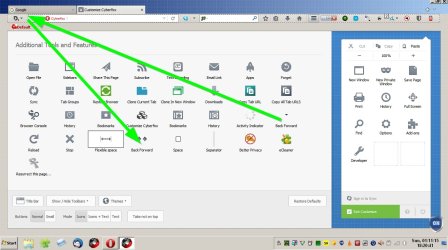
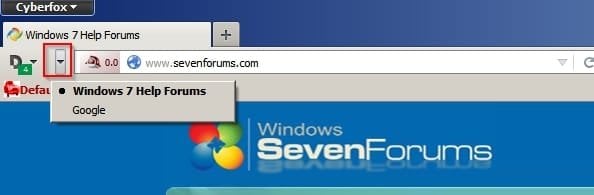
Using CTR it's possible to replace the back/ forward button with a drop down arrow.

Note: I use CyberCTR in Cyberfox rather than CTR in Firefox.

Back Forward Cyberfox 2.jpg

You get this:

Back Forward Cyberfox 3.jpg

It's possible to move buttons:

[/ATTACH]​

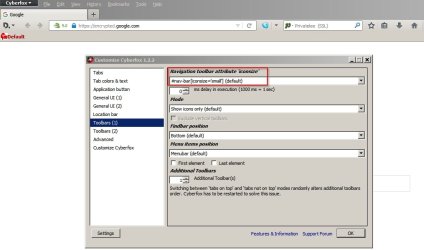
RE: Navbar icon size. I set option to "small" but it doen't make a huge difference.

Navbar Cyberfox.jpg
 
Last edited:

My Computer My Computer

Computer type
Laptop
Computer Manufacturer/Model Number
ASUS
OS
Microsoft Windows 7 Home Premium 64-bit 7601 Multiprocessor Free Service Pack 1
CPU
AMD C-60 APU with Radeon(tm) HD Graphics
Motherboard
ASUSTeK COMPUTER INC. X501U
Memory
4.00 GB
Graphics Card(s)
AMD Radeon HD 6290 Graphics
Sound Card
(1) AMD High Definition Audio Device (2) Realtek High Defi
Screen Resolution
1366 x 768 x 32 bits (4294967296 colors) @ 60 Hz
Hard Drives
Hitachi HTS545050A7E380 SATA Disk Device
Antivirus
Comodo CIS & FW, SecureAplus App Whitelisting, Threatfire
Browser
Cyberfox 64bit, Opera 64bit, Airfox
Other Info
Spy-The-Spy, HitmanPro.Alert, Norton Connect Safe, MJRegWatcher, BitDefender TrafficLight, Voodoo Shield, Zemana AntiMalware
You guys are INCREDIBLE!!! I now have a lot of options to check out and since you've all been more than generous with advice (plus those wonderful screen-caps - very helpful [geezers is right! LOVE those. :D]), I'm going to mark this closed, so as not to take up any more time & space when I shouldn'ta posted this one here in the first place.

Man this forum is impressive. Thanks so much, to everyone. :)
 

My Computer My Computer

Computer type
PC/Desktop
Computer Manufacturer/Model Number
HP
OS
Windows 7 Professional SP1 64-bit
CPU
Pentium dual-core 3.06gig
Memory
4gig
Graphics Card(s)
Intel(R) Q45/Q43 Express Chipset
Monitor(s) Displays
Acer V223W LCD
Screen Resolution
1680 x 1050
Hard Drives
ATA Hitachi HDE72101 SCSI Disk Device, 1T
Browser
FF 38.1.0esr
Back
Top