Delete Windows 7 temporary files and recover real estate.

I think i found the problem: I always uncheck an advanced option to delete temp files older than 24hrs, been doing this for years and always forget about it.

ccleaner3.jpg
 

My Computer My Computer

At a glance

Microsoft Windows 10 Professional / Windows 7...Intel i5-357016GB DDR3AMD Radeon HD 7850 2GB
Computer type
PC/Desktop
OS
Microsoft Windows 10 Professional / Windows 7 Professional
CPU
Intel i5-3570
Motherboard
Lenovo Mahobay
Memory
16GB DDR3
Graphics Card(s)
AMD Radeon HD 7850 2GB
Sound Card
(1) Realtek HD Audio (2) AMD HD Audio
Monitor(s) Displays
LG LS192WS
Screen Resolution
1440 x 900 @ 32bit color
Hard Drives
(1) SUV300S37A/120G (2) ST3500413AS SATA Disk Device AHCI mode enabled.
PSU
Corsair HX620
Case
Thermaltake V4 Black Edition
Cooling
Cooler Master Hyper 212 + Artic Silver 5 on CPU/GPU
Keyboard
Dell SK-8115
Mouse
Razer Copperhead with MAPED mat (awesome!)
Internet Speed
100 Mbps up/down
Browser
Chrome
Great tip above. Also make sure your Windows Service Pack Backup Files can be updated - often this is the single most effective way of recovering disk space.

Anyway, I've landed here cause I'm searching the 7forums for one of Brink's invaluable guides!

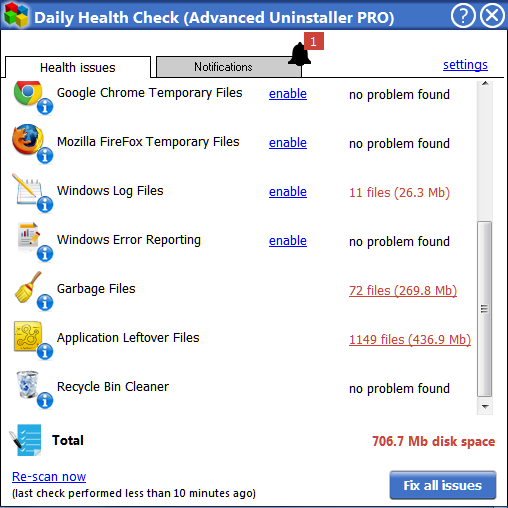
I've just installed CCleaner, because I use a free copy of Advanced Uninstaller Pro. This means that the "Daily Health Report" will identify opportunities to recover space and clean-up, but won't allow you to perform the clean operation.

K8kGBO1.png


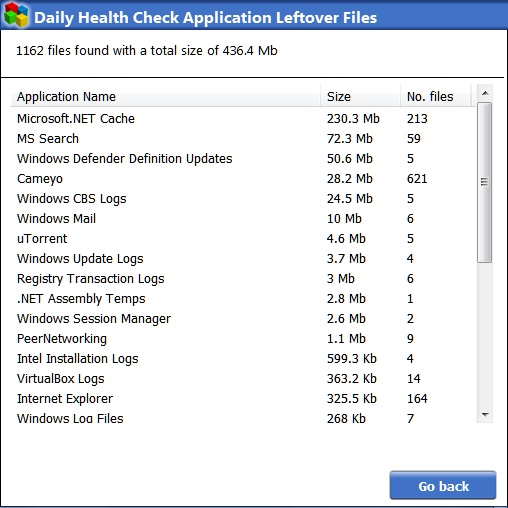
Fair enough, I thought. I'll just clean it up manually... but I've googled "clean microsoft.net cache", and the only thing I see pertains to "Temporary ASP.NET Files". I have these @ C:\Windows\Microsoft.NET\Framework64\ | C:\Windows\Microsoft.NET\Framework, but they only amount to ~ 40mB.

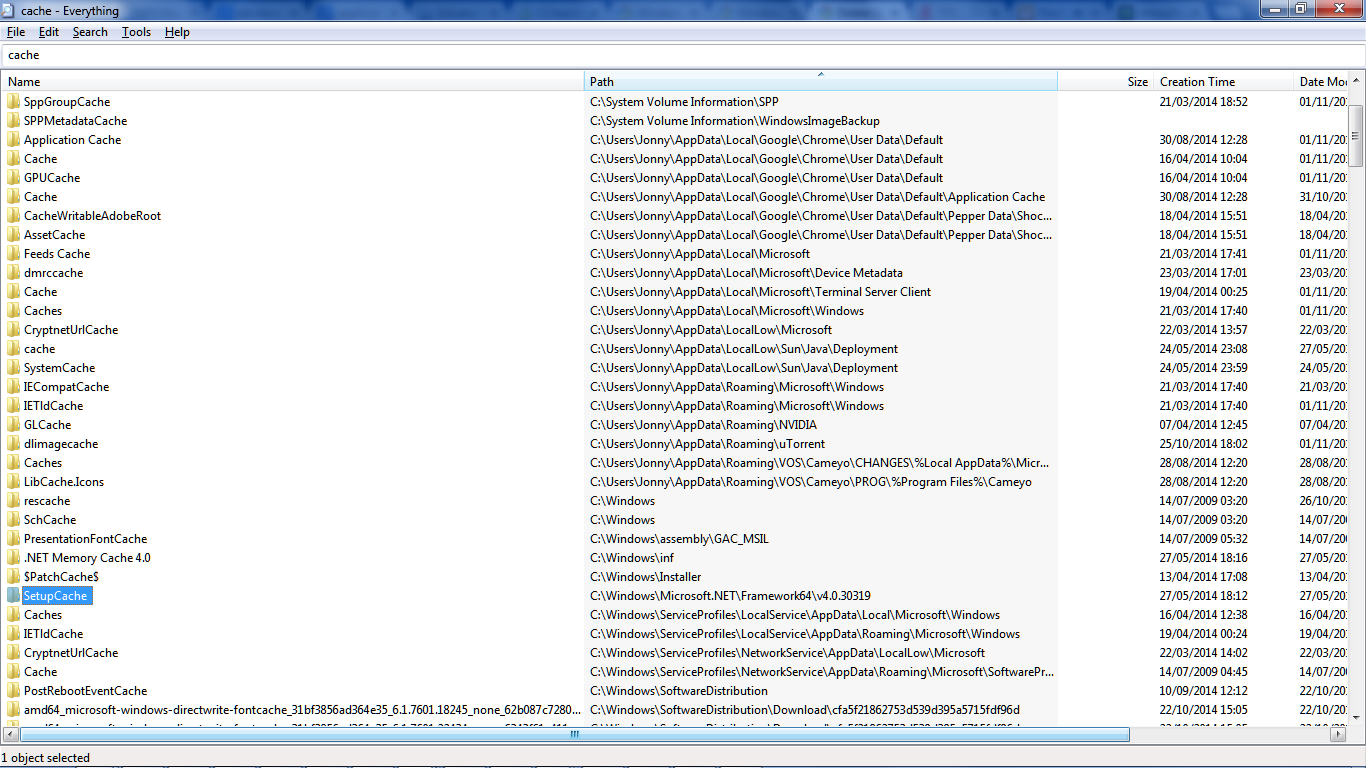
UPDATE! Location (setupcache) discovered, thanks to Everything!
4Lz4BDQ.png


FfTuoUu.png


Few points - does anyone else use advanced uninstall (paid or trial), and if so has anyone found anything that is as effective in keeping your shiny build free of digital-dust?!

I have Tune-up. I'll have to install that and see if it identifies the same stuff.
The goal is to understand everything that the Daily Health Report is identifying as cleaning opportunities, and adding to something like ccleaner's custom clean-up operation (like with %temp%)

Here's some worthy candidates

KykVGXq.png


Thoughts?

thanks!
 

My Computer My Computer

At a glance

Windows 7 Ultimate 64bit2.28GbNVIDIA
Computer type
Laptop
Computer Manufacturer/Model Number
Dell
OS
Windows 7 Ultimate 64bit
CPU
2.2
Memory
8Gb
Graphics Card(s)
NVIDIA
Screen Resolution
1280/762
Mouse
built in pad || iphone || MS wireless
Internet Speed
100MB
Antivirus
Avast
Browser
Chrome, Chrome portable
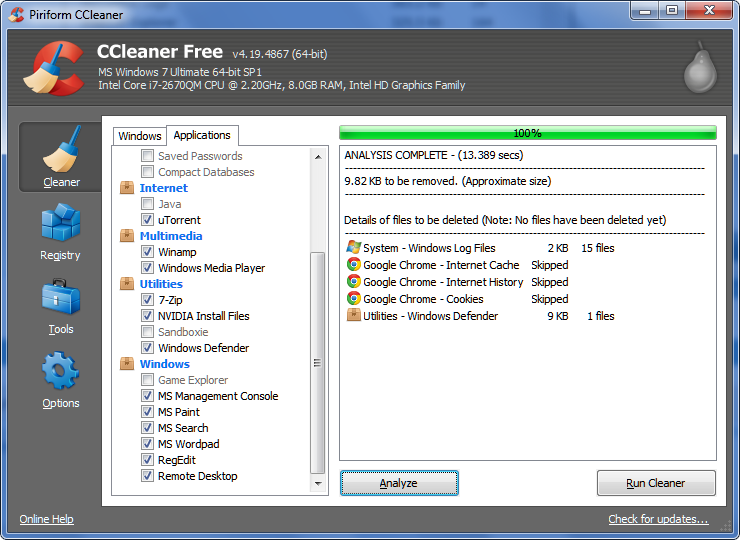
UPDATE (#2!!): If anyone else is interested in a spick-and-span OS, I've just spotted that CCleaner isn't cleaning MS Search, despite the tick

v75gQlu.png


The culprit is Windows.edb @ C:\ProgramData\Microsoft\Search\Data\Applications\Windows. There's tips for manually managing this - is this the only way to go? (Currently windows search service is disabled, not sure if that's why ccleaner can't touch windows.edb!)
 

My Computer My Computer

At a glance

Windows 7 Ultimate 64bit2.28GbNVIDIA
Computer type
Laptop
Computer Manufacturer/Model Number
Dell
OS
Windows 7 Ultimate 64bit
CPU
2.2
Memory
8Gb
Graphics Card(s)
NVIDIA
Screen Resolution
1280/762
Mouse
built in pad || iphone || MS wireless
Internet Speed
100MB
Antivirus
Avast
Browser
Chrome, Chrome portable
Back
Top