Solved Deleted Partion D

zomboromano

New member
Member
VIP
Local time
6:53 PM
Messages
132
So I've been having problems, and from my limited experience, it seems like a rootkit virus.

I know the AVG toolbar was downloaded, and I accidentally downloaded something I shouldn't have accidentally.

So I decided to do a system restore. But eventually the later dates were deleted. When I tried to restore to a date before the download it wasn't working.

So today I was so sure I knew where the boot disc was and it turns out I lost it.

So I found out that there is a recovery tool for my computer, I tried to use it to factory restore my computer, but when I tried it told me that it didn't have anything to boot from. I hit enter and it went to the (recovered) windows 7. And I ended up in the same spot I was in before.

I have Windows 7 Home Premium 64 Bit.

I have an HP p6230y (desktop)

After all of my issues. I thought I saw the problem. The partition had to be corrupt. So I decided to delete the partition. Bad idea.

Now I'm in the worst situation. I can't buy recovery discs and use them because it won't even let me do that now.

So I'm so confused. All I want is my compute restored to factory condition.

Can anyone please please help me???

I have a USB hard drive with plenty of space. just not sure what to do
 

My Computer

OS
Windows 7 Home Premium 64 Bit
Welcome to SevenForums,

OK, you're in a bit of a pickle - it sounds like you deleted the recovery partition, so you cannot do a factory restore from that. If you are desperate for a factory restore, you will need to contact HP to order some discs (it might cost you).

However, a better option is for you to simply follow the suggestions below which have been recommended and successfully performed here for many users on thousands of situations like yours:

1. Download the correct Windows 7 ISO here
2. Make a bootable USB thumb drive of that ISO using this
3. Install a fresh Windows to your PC from the bootable USB thumb drive
4. Activate this install using the 25 character key on the OEM sticker stuck to the side of your PC.

This tutorial gives you all the detail you need, but post back if you need to check anything:
http://www.sevenforums.com/tutorials/219487-clean-reinstall-factory-oem-windows-7-a.html

Make sure you backup any user data/files before doing this. The clean OEM install really is very easy to do, and we will be happy to guide you through this.

Regards,
Golden
 

My Computer

Computer type
PC/Desktop
Computer Manufacturer/Model Number
Golden Mk. I.4
OS
Windows 10 Pro x64 ; Xubuntu x64
CPU
Intel i7 860 @ 2.80 GHz O/C'ed to 4.0GHz
Motherboard
Gigabyte P55A-UD3R Rev.1. Award BIOS F13
Memory
16GB Corsair Vengance DDR3 @ 661 MHz Dual Channel (9-9-9-24)
Graphics Card(s)
EVGA NVidia GTX 560 1024MB
Sound Card
Realtek Integrated
Monitor(s) Displays
Dual Samsung SyncMaster 2494HS
Screen Resolution
1920*1080 and 1920*1080
Hard Drives
1*Samsung 840 EVO 120GB SSD;
1*OCZ Vertex 2 60GB SSD;
2*Samsung F3 SpinPoint 1TB in RAID0;
1*Samsung F1 SpinPoint 1TB;
2*Western Digital 1TB External USB 3.0
1*Western Digital 500GB External USB 3.0
1*Seagate 500GB External USB 2.0
PSU
Thermaltake ToughPower QFan 750W
Case
Thermaltake Element S VK60001W2Z
Cooling
Corsair H60 Water Cooling, 2*230mm and 2*80mm case fans
Keyboard
Logitech G110
Mouse
Logitech MX518
I already have all of my files backed up. I had a virus on my computer back in the day, did a factory reset a few times, and started getting blue screens,

a guy went way deep into it, and took care of it, but I had to pay like $400 bucks to do it.

So I started to download that first file. The Windows Home Premium.

But I'm confused. First off I don't have any windows dvd's to make recovery dvd's and again, with my partition being corrupted anyway, I'm not sure that would work.

I'm also confused as to what to install and when to do what.

And the tutorial isn't as in depth as I probably need. For example, getting a windows image is something I could probably figure out, but wouldn't it get my entire system image? My system is corrupted so I'm trying to avoid all of that.

Any help and walkthroughs through this process would be awesome.
 

My Computer

OS
Windows 7 Home Premium 64 Bit
pay like $400 bucks to do it.

Yikes! Don't do that!!! We will sort you out for free.........

The first place to start is to download the Windows 7 ISO (which you started), then use that USB tool to "burn" it to a USB drive.

Then, you boot from the USB drive and install Windows as if fresh out the box.

When you install, the first screen you get is the language screen. From that screen you can run a utility called DISKPART that will allow you to clean and completely eradicate any traces of malware/rootkits:

http://www.sevenforums.com/tutorials/682-command-prompt-startup.html
http://www.sevenforums.com/tutorials/52129-disk-clean-clean-all-diskpart-command.html

Then you just install as normal.

You will never be able to get your recovery partition back, but we have a very easy technique for making your own using Macrium Reflect once you have installed your Windows from fresh - more about that later. This is the imaging side you refer to, but don't worry about that for now.

Get the ISO downloaded and the bootable USB made up, and then post back here.

Regards,
Golden
 

My Computer

Computer type
PC/Desktop
Computer Manufacturer/Model Number
Golden Mk. I.4
OS
Windows 10 Pro x64 ; Xubuntu x64
CPU
Intel i7 860 @ 2.80 GHz O/C'ed to 4.0GHz
Motherboard
Gigabyte P55A-UD3R Rev.1. Award BIOS F13
Memory
16GB Corsair Vengance DDR3 @ 661 MHz Dual Channel (9-9-9-24)
Graphics Card(s)
EVGA NVidia GTX 560 1024MB
Sound Card
Realtek Integrated
Monitor(s) Displays
Dual Samsung SyncMaster 2494HS
Screen Resolution
1920*1080 and 1920*1080
Hard Drives
1*Samsung 840 EVO 120GB SSD;
1*OCZ Vertex 2 60GB SSD;
2*Samsung F3 SpinPoint 1TB in RAID0;
1*Samsung F1 SpinPoint 1TB;
2*Western Digital 1TB External USB 3.0
1*Western Digital 500GB External USB 3.0
1*Seagate 500GB External USB 2.0
PSU
Thermaltake ToughPower QFan 750W
Case
Thermaltake Element S VK60001W2Z
Cooling
Corsair H60 Water Cooling, 2*230mm and 2*80mm case fans
Keyboard
Logitech G110
Mouse
Logitech MX518
It will be downloaded in six minutes. So I need to install the USB tool on my desktop? What would I do on the tool to get it moved over? That's about the only part as of now that I'm confused with.

Thanks for helping a noob, I'll be sure to be on the forums after this. You all seem very helpful from all of the posts I've seen.
 

My Computer

OS
Windows 7 Home Premium 64 Bit
okay. my device is not displayed, my device is "F" and g-j are listed and refreshing doesn't help.

my device is a portable hard drive, so maybe that's why it's not displaying?
 

My Computer

OS
Windows 7 Home Premium 64 Bit
No worries mate!

When you fire up the USB tool (Yes, just save it to your desktop) it will look like this:

Capture.JPG

Simply browse to the ISO and click Next (as shown above).

Note : a minimum of 4GB is needed, and the entire USB WILL be be formatted first. Use a separate USB thumb drive/flash drive - do NOT use your backup USB drive!

Regards,
Golden
 

My Computer

Computer type
PC/Desktop
Computer Manufacturer/Model Number
Golden Mk. I.4
OS
Windows 10 Pro x64 ; Xubuntu x64
CPU
Intel i7 860 @ 2.80 GHz O/C'ed to 4.0GHz
Motherboard
Gigabyte P55A-UD3R Rev.1. Award BIOS F13
Memory
16GB Corsair Vengance DDR3 @ 661 MHz Dual Channel (9-9-9-24)
Graphics Card(s)
EVGA NVidia GTX 560 1024MB
Sound Card
Realtek Integrated
Monitor(s) Displays
Dual Samsung SyncMaster 2494HS
Screen Resolution
1920*1080 and 1920*1080
Hard Drives
1*Samsung 840 EVO 120GB SSD;
1*OCZ Vertex 2 60GB SSD;
2*Samsung F3 SpinPoint 1TB in RAID0;
1*Samsung F1 SpinPoint 1TB;
2*Western Digital 1TB External USB 3.0
1*Western Digital 500GB External USB 3.0
1*Seagate 500GB External USB 2.0
PSU
Thermaltake ToughPower QFan 750W
Case
Thermaltake Element S VK60001W2Z
Cooling
Corsair H60 Water Cooling, 2*230mm and 2*80mm case fans
Keyboard
Logitech G110
Mouse
Logitech MX518
Okay, now here's the problem! Everything I have backed up is backed up to the portable hard drive! Any way around all this?
 

My Computer

OS
Windows 7 Home Premium 64 Bit
Nope! You need a separate USB drive as it WILL be completely formatted. If you have a blank DVD - you can use that too.

Regards,
Golden
 

My Computer

Computer type
PC/Desktop
Computer Manufacturer/Model Number
Golden Mk. I.4
OS
Windows 10 Pro x64 ; Xubuntu x64
CPU
Intel i7 860 @ 2.80 GHz O/C'ed to 4.0GHz
Motherboard
Gigabyte P55A-UD3R Rev.1. Award BIOS F13
Memory
16GB Corsair Vengance DDR3 @ 661 MHz Dual Channel (9-9-9-24)
Graphics Card(s)
EVGA NVidia GTX 560 1024MB
Sound Card
Realtek Integrated
Monitor(s) Displays
Dual Samsung SyncMaster 2494HS
Screen Resolution
1920*1080 and 1920*1080
Hard Drives
1*Samsung 840 EVO 120GB SSD;
1*OCZ Vertex 2 60GB SSD;
2*Samsung F3 SpinPoint 1TB in RAID0;
1*Samsung F1 SpinPoint 1TB;
2*Western Digital 1TB External USB 3.0
1*Western Digital 500GB External USB 3.0
1*Seagate 500GB External USB 2.0
PSU
Thermaltake ToughPower QFan 750W
Case
Thermaltake Element S VK60001W2Z
Cooling
Corsair H60 Water Cooling, 2*230mm and 2*80mm case fans
Keyboard
Logitech G110
Mouse
Logitech MX518
only have cd-r's here. I guess I'll be running to get a usb drive tomorrow. I'll be back!
 

My Computer

OS
Windows 7 Home Premium 64 Bit
No worries! Lost of very helpful people here, so we'll have you up and running in no time.

Regards,
Golden
 

My Computer

Computer type
PC/Desktop
Computer Manufacturer/Model Number
Golden Mk. I.4
OS
Windows 10 Pro x64 ; Xubuntu x64
CPU
Intel i7 860 @ 2.80 GHz O/C'ed to 4.0GHz
Motherboard
Gigabyte P55A-UD3R Rev.1. Award BIOS F13
Memory
16GB Corsair Vengance DDR3 @ 661 MHz Dual Channel (9-9-9-24)
Graphics Card(s)
EVGA NVidia GTX 560 1024MB
Sound Card
Realtek Integrated
Monitor(s) Displays
Dual Samsung SyncMaster 2494HS
Screen Resolution
1920*1080 and 1920*1080
Hard Drives
1*Samsung 840 EVO 120GB SSD;
1*OCZ Vertex 2 60GB SSD;
2*Samsung F3 SpinPoint 1TB in RAID0;
1*Samsung F1 SpinPoint 1TB;
2*Western Digital 1TB External USB 3.0
1*Western Digital 500GB External USB 3.0
1*Seagate 500GB External USB 2.0
PSU
Thermaltake ToughPower QFan 750W
Case
Thermaltake Element S VK60001W2Z
Cooling
Corsair H60 Water Cooling, 2*230mm and 2*80mm case fans
Keyboard
Logitech G110
Mouse
Logitech MX518
So I will be home at 9:45 central time. I know your all in different time zones, but if anyone can help me then, or just leave helpful instructions before hand that would be great. I bought some DVD's on my way to work. so I'll be putting the operating system on the DVD, which was very self explanatory from what I saw.

Then I will need a few more steps on how to factory restore my computer, somehow start up from the discs, get windows back on the computer, and also make sure no rootkits take hold of my computer!!

I appreciate you all, and I will enjoy participating on the forum in places that I'm much more tech savvy
 

My Computer

OS
Windows 7 Home Premium 64 Bit
Hi,

When you install Windows, use the DISKPART CLEAN ALL command as suggested earlier to wipe the disk completely. Then install Windows as normal.

You keep mentioning that term 'factory restore' - you need to understand that you will never be able to restore back to a factory state since you do not have recovery discs, and you deleted the recovery partition. What you are doing now is a clean, bloat-free install : its a better option than factory recovery.

Regards,
Golden
 

My Computer

Computer type
PC/Desktop
Computer Manufacturer/Model Number
Golden Mk. I.4
OS
Windows 10 Pro x64 ; Xubuntu x64
CPU
Intel i7 860 @ 2.80 GHz O/C'ed to 4.0GHz
Motherboard
Gigabyte P55A-UD3R Rev.1. Award BIOS F13
Memory
16GB Corsair Vengance DDR3 @ 661 MHz Dual Channel (9-9-9-24)
Graphics Card(s)
EVGA NVidia GTX 560 1024MB
Sound Card
Realtek Integrated
Monitor(s) Displays
Dual Samsung SyncMaster 2494HS
Screen Resolution
1920*1080 and 1920*1080
Hard Drives
1*Samsung 840 EVO 120GB SSD;
1*OCZ Vertex 2 60GB SSD;
2*Samsung F3 SpinPoint 1TB in RAID0;
1*Samsung F1 SpinPoint 1TB;
2*Western Digital 1TB External USB 3.0
1*Western Digital 500GB External USB 3.0
1*Seagate 500GB External USB 2.0
PSU
Thermaltake ToughPower QFan 750W
Case
Thermaltake Element S VK60001W2Z
Cooling
Corsair H60 Water Cooling, 2*230mm and 2*80mm case fans
Keyboard
Logitech G110
Mouse
Logitech MX518
That makes more sense.

So basically.

When it asks for a dvd I put the dvd in, it will copy windows on it, and then when I re-insert the disk it will take me through a process of installing windows? and it will have an option to "clean all". So basically my computer will be fresh with just windows and the drivers it needs? BASICALLY factory condition without the bloatware?

(Thank you so much for the help!)
 

My Computer

OS
Windows 7 Home Premium 64 Bit
Hi,

Thats almost correct:

1. When you insert the installation DVD - at the languages screen, press SHIFT+F10 to open a command prompt.
2. Now follow the steps to perform a CLEAN ALL (it will take several hours) here from STEP3 onwards:

http://www.sevenforums.com/tutorials/52129-disk-clean-clean-all-diskpart-command.html

3. When it completes, type EXIT, then EXIT again to exit and close the command prompt window.
4. Now continue to install Windows as normal.

Thats correct : factory condition without the bloatware.

Regards,
Golden
 

My Computer

Computer type
PC/Desktop
Computer Manufacturer/Model Number
Golden Mk. I.4
OS
Windows 10 Pro x64 ; Xubuntu x64
CPU
Intel i7 860 @ 2.80 GHz O/C'ed to 4.0GHz
Motherboard
Gigabyte P55A-UD3R Rev.1. Award BIOS F13
Memory
16GB Corsair Vengance DDR3 @ 661 MHz Dual Channel (9-9-9-24)
Graphics Card(s)
EVGA NVidia GTX 560 1024MB
Sound Card
Realtek Integrated
Monitor(s) Displays
Dual Samsung SyncMaster 2494HS
Screen Resolution
1920*1080 and 1920*1080
Hard Drives
1*Samsung 840 EVO 120GB SSD;
1*OCZ Vertex 2 60GB SSD;
2*Samsung F3 SpinPoint 1TB in RAID0;
1*Samsung F1 SpinPoint 1TB;
2*Western Digital 1TB External USB 3.0
1*Western Digital 500GB External USB 3.0
1*Seagate 500GB External USB 2.0
PSU
Thermaltake ToughPower QFan 750W
Case
Thermaltake Element S VK60001W2Z
Cooling
Corsair H60 Water Cooling, 2*230mm and 2*80mm case fans
Keyboard
Logitech G110
Mouse
Logitech MX518
last two questions then before I start this up.

1: Last time I had virus problems it eventually fried my video card. The factory restore didn't help and blue screens kept occurring. I have yet to have blue screens, but I wanted to confirm that this wouldn't effect my video card.

2: I understand what to do to get Windows installed. The only part I'm confused with now is the part where you mentioned checking for the rootkit and making sure it wasn't on there. What do I need to install, where do I need to install it, and when do I use that program?
 

My Computer

OS
Windows 7 Home Premium 64 Bit
also, there was no language screen. It just asks if you want to download the latest updates before you install, and it also asks if it is an upgrade, or custom, and I'm supposing it is custom, and then it asks what hard drive to install it on, I'm supposing C. But again, not sure. So what are the instructions on this thing and where during these menu's do I click shift f10
 

My Computer

OS
Windows 7 Home Premium 64 Bit
Apparently when you select custom you "delete your programs and settings on that partition".

so maybe I don't have to run that option?
 

My Computer

OS
Windows 7 Home Premium 64 Bit
Hi,

You don't actually run a check for a rootkit using this tool - you assume you have one, and then proceed to wipe the disk (which is usually a good course of action with any installation anyway) - this wipe eradicates the rootkit. Since you have decided to do a clean install, the smartest thing to do is wipe the disk using DISKPART and CLEAN ALL.

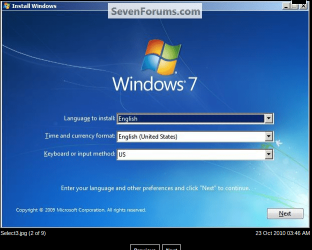
You may be getting ahead of yourself a bit. When you boot from the installation DVD, the first screen you see is this one:

b.png

At this point you use SHIFT+F10 to access DISKPART as explained in step 3 here.

This very simple procedure is explained fully in METHOD 1 in this tutorial - http://www.sevenforums.com/tutorials/119713-diskpart-pc-startup.html

Once you have finished, choose the custom installation option.

Your earlier video card issue may or may not be related to malware - I doubt that. Its more likely hardware/driver related. You can deal with that once Windows is installed, updated and activated.

Regards,
Golden
 

My Computer

Computer type
PC/Desktop
Computer Manufacturer/Model Number
Golden Mk. I.4
OS
Windows 10 Pro x64 ; Xubuntu x64
CPU
Intel i7 860 @ 2.80 GHz O/C'ed to 4.0GHz
Motherboard
Gigabyte P55A-UD3R Rev.1. Award BIOS F13
Memory
16GB Corsair Vengance DDR3 @ 661 MHz Dual Channel (9-9-9-24)
Graphics Card(s)
EVGA NVidia GTX 560 1024MB
Sound Card
Realtek Integrated
Monitor(s) Displays
Dual Samsung SyncMaster 2494HS
Screen Resolution
1920*1080 and 1920*1080
Hard Drives
1*Samsung 840 EVO 120GB SSD;
1*OCZ Vertex 2 60GB SSD;
2*Samsung F3 SpinPoint 1TB in RAID0;
1*Samsung F1 SpinPoint 1TB;
2*Western Digital 1TB External USB 3.0
1*Western Digital 500GB External USB 3.0
1*Seagate 500GB External USB 2.0
PSU
Thermaltake ToughPower QFan 750W
Case
Thermaltake Element S VK60001W2Z
Cooling
Corsair H60 Water Cooling, 2*230mm and 2*80mm case fans
Keyboard
Logitech G110
Mouse
Logitech MX518
So I actually figured it out while you were away. I just went back and forth between the tutorials and what you said. It is removing everything as we speak. I just need to know how to make the best partition or image after all this is done. I would prefer to put it on my portable hard drive with all my other backed up files if I don't need a re format for it
 

My Computer

OS
Windows 7 Home Premium 64 Bit
Back
Top