Solved Deleted Partion D

Hi,

Thats easy to do : but first thing is first. Get Windows installed, fully updated, and then activated (we will check that the activation is good). Then I'll show you how to create an image that is saved to your USB drive that you can restore/recover from (you will NOT need to format your USB drive, so no worries there).

Regards,
Golden
 

My Computer

Computer type
PC/Desktop
Computer Manufacturer/Model Number
Golden Mk. I.4
OS
Windows 10 Pro x64 ; Xubuntu x64
CPU
Intel i7 860 @ 2.80 GHz O/C'ed to 4.0GHz
Motherboard
Gigabyte P55A-UD3R Rev.1. Award BIOS F13
Memory
16GB Corsair Vengance DDR3 @ 661 MHz Dual Channel (9-9-9-24)
Graphics Card(s)
EVGA NVidia GTX 560 1024MB
Sound Card
Realtek Integrated
Monitor(s) Displays
Dual Samsung SyncMaster 2494HS
Screen Resolution
1920*1080 and 1920*1080
Hard Drives
1*Samsung 840 EVO 120GB SSD;
1*OCZ Vertex 2 60GB SSD;
2*Samsung F3 SpinPoint 1TB in RAID0;
1*Samsung F1 SpinPoint 1TB;
2*Western Digital 1TB External USB 3.0
1*Western Digital 500GB External USB 3.0
1*Seagate 500GB External USB 2.0
PSU
Thermaltake ToughPower QFan 750W
Case
Thermaltake Element S VK60001W2Z
Cooling
Corsair H60 Water Cooling, 2*230mm and 2*80mm case fans
Keyboard
Logitech G110
Mouse
Logitech MX518
So I successfully installed windows and downloaded macrium reflect, now what?
 

My Computer

OS
Windows 7 Home Premium 64 Bit
I'm supposing the macrium is different now than it was when the tutorial was made,

it asks for a windows file or asks to download it online (at 1.7 gb). It didn't seem to ask what disk drive I was saving to either. So I was getting confused with the menus.
 

My Computer

OS
Windows 7 Home Premium 64 Bit
I'm supposing the macrium is different now than it was when the tutorial was made,

it asks for a windows file or asks to download it online (at 1.7 gb). It didn't seem to ask what disk drive I was saving to either. So I was getting confused with the menus.

Did you get Macrium from this link?

Macrium Reflect FREE Edition - Information and download

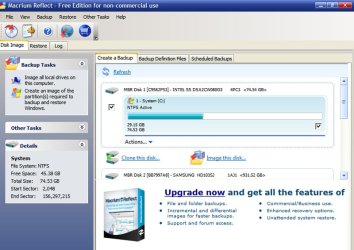
Macrium should not ask for any file. You should see something like below when you open Macrium.

What choice are you making at that point?
 

Attachments

  • Untitled-1.jpg
    Untitled-1.jpg
    85.7 KB · Views: 7

My Computer

Computer type
PC/Desktop
Computer Manufacturer/Model Number
Ignatz Special; 4 speed manual gearbox; factory air conditioning; one of one
OS
Windows 7 Home Premium SP1, 64-bit
CPU
Intel Skylake i5-6600K, not overclocked
Motherboard
AsRock Z170M Extreme 4, micro ATX
Memory
8 GB HyperX DDR4-2666 (2 x 4 GB)
Graphics Card(s)
none; graphics are integrated on CPU
Sound Card
onboard: Realtek ALC1150; external: USB Behringer UF0-202
Monitor(s) Displays
Dell S2340M 23 inch IPS
Screen Resolution
1600 x 900
Hard Drives
System: Crucial MX100 series SSD, 128 GB;
Data: Samsung Spinpoint 103SJ, 1 TB;
Backup: WD Caviar Green WD30EZRX-00D8PB0, 3 TB
PSU
Rosewill SilentNight 500 watt fanless, semi-modular
Case
Antec Solo II
Cooling
Noctua NH-U12S; Noctua F12 intake, Noctua S12A exhaust
Keyboard
Microsoft 200 6JH-00001 USB
Mouse
Dell or Microsoft optical wired; USB
Antivirus
Microsoft Security Essentials and Malwarebytes Premium
Browser
Pale Moon
Other Info
All fans PWM; speeds at idle: CPU circa 500 rpm; intake circa 600 rpm; exhaust circa 600 rpm; CPU temps 27 idle and 47 C load in a warm room (27 C/81 F) when running Intel Extreme Tuning Utility stress test.
Yes, I downloaded from that link.

I followed the instructions and clicked to make the recovery disc.

Then it asked me to either download the file from windows (it said I would need 1.7 gb) or it asked me to find the iso file. It never asked what drive or anything either. So I'm not sure where to go from here.
 

My Computer

OS
Windows 7 Home Premium 64 Bit
Normally, you would do things in this order:

1: Make the image file. I assume you have NOT done this? When you make the file, you have to choose where to save it, just like any other file. You would choose another drive of some type. This image file will take up space roughly equal to half the size of the space used on the partitions you are imaging.

2: Then make a "recovery disk". There are 2 types. Linux-based, or WinPE. The WinPE version requires that download. Without a working recovery disk, you CANNOT restore the image file created in step 1. Therefore, it is VERY important that you test this recovery disk after you make it to make sure your PC does in fact boot from it and that you can locate the image file you created in step 1.

Linux or PE based should both work. The PE version is more likely to boot on your system, but takes more time to create due to that download. You can make both if you want. Or you could make the Linux disk and see if it works. If it doesn't, make the PE disk.

I have not been following this thread, but I assume you want to back up your Windows system, not something else?

If I am right about that, then you would poke that link in the upper left of the Macrium window where it says "create an image of the partition(s) required to backup and restore Windows".

The next screen will ask you to choose your destination in the bottom half. This is where you choose your USB drive, or whatever location you want. You CANNOT choose the partition you are imaging (C).

The next screen will show you a summary to recheck your choices.

Then just hit the "finish" button at the bottom. It will take 5 or 10 minutes to complete.

Then make your recovery disk.

Then test it.
 

My Computer

Computer type
PC/Desktop
Computer Manufacturer/Model Number
Ignatz Special; 4 speed manual gearbox; factory air conditioning; one of one
OS
Windows 7 Home Premium SP1, 64-bit
CPU
Intel Skylake i5-6600K, not overclocked
Motherboard
AsRock Z170M Extreme 4, micro ATX
Memory
8 GB HyperX DDR4-2666 (2 x 4 GB)
Graphics Card(s)
none; graphics are integrated on CPU
Sound Card
onboard: Realtek ALC1150; external: USB Behringer UF0-202
Monitor(s) Displays
Dell S2340M 23 inch IPS
Screen Resolution
1600 x 900
Hard Drives
System: Crucial MX100 series SSD, 128 GB;
Data: Samsung Spinpoint 103SJ, 1 TB;
Backup: WD Caviar Green WD30EZRX-00D8PB0, 3 TB
PSU
Rosewill SilentNight 500 watt fanless, semi-modular
Case
Antec Solo II
Cooling
Noctua NH-U12S; Noctua F12 intake, Noctua S12A exhaust
Keyboard
Microsoft 200 6JH-00001 USB
Mouse
Dell or Microsoft optical wired; USB
Antivirus
Microsoft Security Essentials and Malwarebytes Premium
Browser
Pale Moon
Other Info
All fans PWM; speeds at idle: CPU circa 500 rpm; intake circa 600 rpm; exhaust circa 600 rpm; CPU temps 27 idle and 47 C load in a warm room (27 C/81 F) when running Intel Extreme Tuning Utility stress test.
So a lot of things have already happened in this thread, so with my limited knowledge I'm not sure if I've already done a couple of the things your listing.

So I haven't created a system image as it wasn't in the instructions to do so. But I did install windows on a dvd, and boot from it, and clear my whole hard drive, and then install from that disc, I'm supposing that the Windows Install disc is entirely different than the recovery disc and I would need to make the recovery discs.

Then I question whether the ISO file I used to make the install disc, is the same file I could use for this. It is about 3 gb's in space, but it was an iso file and did install windows.

Again, I just formatted my entire hard drive, and I deleted my partition earlier. So I'm looking to make my own partition of sorts, so that I can restore to it if something happens.
 

My Computer

OS
Windows 7 Home Premium 64 Bit
Hi,

Did you install all the Windows updates and perform the validation? Post your MGADIAG report here using this tutorial:

http://www.sevenforums.com/windows-...ne-activation-issue-posting-instructions.html

The best option for a 'recovery partition' is to create the Macrium image saved to your external USB drive - this way if your disk malfunctions, you can still restore the image to a new disk.

Regards,
Golden
 

My Computer

Computer type
PC/Desktop
Computer Manufacturer/Model Number
Golden Mk. I.4
OS
Windows 10 Pro x64 ; Xubuntu x64
CPU
Intel i7 860 @ 2.80 GHz O/C'ed to 4.0GHz
Motherboard
Gigabyte P55A-UD3R Rev.1. Award BIOS F13
Memory
16GB Corsair Vengance DDR3 @ 661 MHz Dual Channel (9-9-9-24)
Graphics Card(s)
EVGA NVidia GTX 560 1024MB
Sound Card
Realtek Integrated
Monitor(s) Displays
Dual Samsung SyncMaster 2494HS
Screen Resolution
1920*1080 and 1920*1080
Hard Drives
1*Samsung 840 EVO 120GB SSD;
1*OCZ Vertex 2 60GB SSD;
2*Samsung F3 SpinPoint 1TB in RAID0;
1*Samsung F1 SpinPoint 1TB;
2*Western Digital 1TB External USB 3.0
1*Western Digital 500GB External USB 3.0
1*Seagate 500GB External USB 2.0
PSU
Thermaltake ToughPower QFan 750W
Case
Thermaltake Element S VK60001W2Z
Cooling
Corsair H60 Water Cooling, 2*230mm and 2*80mm case fans
Keyboard
Logitech G110
Mouse
Logitech MX518
Windows is installed, registered, and validated. I just need help with the Macrium image, because my options listed were different than the tutorial
 

My Computer

OS
Windows 7 Home Premium 64 Bit
See comments in bold

So I haven't created a system image as it wasn't in the instructions to do so. But I did install windows on a dvd, and boot from it, and clear my whole hard drive, and then install from that disc, I'm supposing that the Windows Install disc is entirely different than the recovery disc and I would need to make the recovery discs.

The purpose of Macrium is to make a system image file from which you could restore your system to the state it was in on the day you made the image, typically in case of a disaster such as a hard drive failure or major Windows corruption of some type.

A Windows install disc is different in that it will give you only a brand new Windows installation, and will NOT include whatever programs you may have later installed.

If you are willing to reinstall Windows and your applications from the Windows install disk, you don't need Macrium.

The purpose of Macrium is to save you some time in configuring Windows and installing applications.

I assume you downloaded Macrium for that reason?

Yes, the Windows install disc is entirely different from the recovery disk.

The recovery disk is entirely different from the image file made by Macrium. You use the former to restore the latter if you have a disaster of some type. The recovery disk is a burned CD. The Macrium image file is typically stored on a hard drive or USB drive. A hard drive is preferable.


Then I question whether the ISO file I used to make the install disc, is the same file I could use for this. It is about 3 gb's in space, but it was an iso file and did install windows.

The ISO file and Windows install disc are unrelated to Macrium or making images or recovery disks.

Again, I just formatted my entire hard drive, and I deleted my partition earlier. So I'm looking to make my own partition of sorts, so that I can restore to it if something happens.

You do have a partition. It's named C. You made it when you installed Windows.

You also probably have a small "system reserved" partition, also made when you installed Windows.

Both of those will be included in the image file you make with Macrium if you intend to use Macrium.

You don't have to make any more partitions.

If you restore the Macrium image file, you would restore it to your current C partition.

You do have to have some place to store the Macrium image file. That should be on a different hard drive entirely. If you have no different hard drive, a USB drive will reportedly work. DVD disks are not recommended for that purpose.

What exactly do you want to do?
 

My Computer

Computer type
PC/Desktop
Computer Manufacturer/Model Number
Ignatz Special; 4 speed manual gearbox; factory air conditioning; one of one
OS
Windows 7 Home Premium SP1, 64-bit
CPU
Intel Skylake i5-6600K, not overclocked
Motherboard
AsRock Z170M Extreme 4, micro ATX
Memory
8 GB HyperX DDR4-2666 (2 x 4 GB)
Graphics Card(s)
none; graphics are integrated on CPU
Sound Card
onboard: Realtek ALC1150; external: USB Behringer UF0-202
Monitor(s) Displays
Dell S2340M 23 inch IPS
Screen Resolution
1600 x 900
Hard Drives
System: Crucial MX100 series SSD, 128 GB;
Data: Samsung Spinpoint 103SJ, 1 TB;
Backup: WD Caviar Green WD30EZRX-00D8PB0, 3 TB
PSU
Rosewill SilentNight 500 watt fanless, semi-modular
Case
Antec Solo II
Cooling
Noctua NH-U12S; Noctua F12 intake, Noctua S12A exhaust
Keyboard
Microsoft 200 6JH-00001 USB
Mouse
Dell or Microsoft optical wired; USB
Antivirus
Microsoft Security Essentials and Malwarebytes Premium
Browser
Pale Moon
Other Info
All fans PWM; speeds at idle: CPU circa 500 rpm; intake circa 600 rpm; exhaust circa 600 rpm; CPU temps 27 idle and 47 C load in a warm room (27 C/81 F) when running Intel Extreme Tuning Utility stress test.
I guess I don't really know to be honest.

I previously had several problems, I thought with a virus, even factory restoring didn't help. Afterwards I started getting blue screens. Luckily I had the disc that came with the computer at the time. It was the hard drive and I got a new one to replace it.

And I was having similar problems this time, minus the blue screens. From my limited knowledge it seemed to be a rootkit. I also deleted my partition which made me worried that if something happened I was screwed over.

So now that I got windows installed, I'm not sure what I want. I was assuming some type of recovery media or a system image would give me some security just in case something happened. But I honestly don't know what is best, I just want some security just in case something happens, but I guess the windows disc is some security too.

So maybe you could help me out, with your knowledge as to what might be best to help me, and what might give me some security, or if I'm okay and it's no big deal?

(I have a portable HD for things like this, and a couple of dvds if I need them)

Now if you do suggest a system image or using macrium, my question is should I re-install my important programs, and move my music/photos/videos over??? and THEN do the image, or should I do it before hand?

Thanks for you all and your knowledge, it's helping me greatly
 

My Computer

OS
Windows 7 Home Premium 64 Bit
So maybe you could help me out, with your knowledge as to what might be best to help me, and what might give me some security, or if I'm okay and it's no big deal?

(I have a portable HD for things like this, and a couple of dvds if I need them)

Now if you do suggest a system image or using macrium, my question is should I re-install my important programs, and move my music/photos/videos over??? and THEN do the image, or should I do it before hand?

The Windows install disc is the best security you can have. If things go to hell, you can always reinstall Windows from that disc. The reinstall won't include your programs or any personal files.

A Macrium image made WOULD include your programs and EVERYTHING on C at the moment the image was made.

But imaging has some shortcomings: it doesn't always work. The success rate is probably above 90% if you have a basic understanding of it.

And it takes a bit of time. And the image files are quite large and must be stored somewhere in case disaster strikes.

And Macrium does nothing but save you time. If you have the Windows install disc and are willing to take the time to re-install your programs if disaster strikes, there isn't much point in Macrium or imaging.

Most people don't use images. Some people do use images and then are disappointed when they can't restore them as desired for whatever reason.

You should back up your personal files (music, email, bookmarks, photos, video, etc) through some other method than imaging precisely because imaging doesn't always work.

When imaging DOES work, it can save you anywhere from a couple of hours to maybe 10 or 20 hours in time required to reinstall and configure Windows and your programs.

Most people who use images make one periodically--maybe monthly, because their C drive is gradually changing over time due to new programs, Windows updates, etc. They might keep the most recent couple of images and delete the oldest one every time they make a new one.

I wouldn't feel in a rush to use images. Think it over. You have nothing to worry about if you backup your data separately and have that installation disc. You can make an image a month from now after you have all your programs installed and Windows is running well.

You mention moving music, video, photos. From where to where were you thinking? Why move them? I guess I don't follow that.
 

My Computer

Computer type
PC/Desktop
Computer Manufacturer/Model Number
Ignatz Special; 4 speed manual gearbox; factory air conditioning; one of one
OS
Windows 7 Home Premium SP1, 64-bit
CPU
Intel Skylake i5-6600K, not overclocked
Motherboard
AsRock Z170M Extreme 4, micro ATX
Memory
8 GB HyperX DDR4-2666 (2 x 4 GB)
Graphics Card(s)
none; graphics are integrated on CPU
Sound Card
onboard: Realtek ALC1150; external: USB Behringer UF0-202
Monitor(s) Displays
Dell S2340M 23 inch IPS
Screen Resolution
1600 x 900
Hard Drives
System: Crucial MX100 series SSD, 128 GB;
Data: Samsung Spinpoint 103SJ, 1 TB;
Backup: WD Caviar Green WD30EZRX-00D8PB0, 3 TB
PSU
Rosewill SilentNight 500 watt fanless, semi-modular
Case
Antec Solo II
Cooling
Noctua NH-U12S; Noctua F12 intake, Noctua S12A exhaust
Keyboard
Microsoft 200 6JH-00001 USB
Mouse
Dell or Microsoft optical wired; USB
Antivirus
Microsoft Security Essentials and Malwarebytes Premium
Browser
Pale Moon
Other Info
All fans PWM; speeds at idle: CPU circa 500 rpm; intake circa 600 rpm; exhaust circa 600 rpm; CPU temps 27 idle and 47 C load in a warm room (27 C/81 F) when running Intel Extreme Tuning Utility stress test.
By moving photos and all of that over,

I mean I have anything and everything I would need backed up on my portable hard drive,

basically an install of microsoft office, avast, etc. etc, also my photos, music, videos, and any other important files, they are all on my portable hard drive, and I backed them up before I cleaned the hard drive out.

And I also have that windows install disc.

My question was pertaining to if I should image before I move everything onto my actual hard drive or if I should image after, I wasn't sure if there was any benefit to imaging my system with nothing on it, since maybe it would be more secure. But it was really just me and ignorance, but that's what I meant when I was mentioning moving photos over.
 

My Computer

OS
Windows 7 Home Premium 64 Bit
So basically what I understand is the safest way is through the windows installation disc and it's the way that will work. So I'm perfectly fine, especially with my files backed up. I only have a couple hours of installations ahead of me so it's no huge deal.

But if I choose to make an image a month from now, when all of my games, and programs are running smoothly, then I can go ahead and it's no big deal.

I'm supposing that's what your saying?

I just almost have a fear that if I wait to make an image something will happen. The last two times my computer being in jeporady has really shook me up a little bit. I don't have enough money to replace it, but in my mind it's a great computer. 8 gb of ram, windows 7, a good processor, and I put a good video card in it. It's all I could ask for to do anything and everything. I don't even watch TV anymore because of it, so I guess I'm just scraping for security here. So sorry for the ignorant questions and sometimes for asking questions I should know the answer to. I just am very careful with my computer these days. Just don't have the money to replace it.
 

My Computer

OS
Windows 7 Home Premium 64 Bit
I assume that as of this moment, your photos and other personal data are on the portable ONLY, and not yet on your C partition?

Yes. I would COPY them back, not move them back.

If you make an image AFTER you move them back, they would be included in the image.

I would of course COPY them back regardless, even if you have no intention of making an image. You should always have an original and a copy of all personal stuff. In your case, the originals on C partition along with Windows, and the copies on the portable.

And periodically keep the portable copies updated by copying all personal data from your C partition to the portable.

You say you have a copy of your Office and Avast installs on the portable. They won't help you. I assume you mean you copied them from you C:\Program Files directory? That's pointless. You can't copy installed programs between drives and expect it to work.
 

My Computer

Computer type
PC/Desktop
Computer Manufacturer/Model Number
Ignatz Special; 4 speed manual gearbox; factory air conditioning; one of one
OS
Windows 7 Home Premium SP1, 64-bit
CPU
Intel Skylake i5-6600K, not overclocked
Motherboard
AsRock Z170M Extreme 4, micro ATX
Memory
8 GB HyperX DDR4-2666 (2 x 4 GB)
Graphics Card(s)
none; graphics are integrated on CPU
Sound Card
onboard: Realtek ALC1150; external: USB Behringer UF0-202
Monitor(s) Displays
Dell S2340M 23 inch IPS
Screen Resolution
1600 x 900
Hard Drives
System: Crucial MX100 series SSD, 128 GB;
Data: Samsung Spinpoint 103SJ, 1 TB;
Backup: WD Caviar Green WD30EZRX-00D8PB0, 3 TB
PSU
Rosewill SilentNight 500 watt fanless, semi-modular
Case
Antec Solo II
Cooling
Noctua NH-U12S; Noctua F12 intake, Noctua S12A exhaust
Keyboard
Microsoft 200 6JH-00001 USB
Mouse
Dell or Microsoft optical wired; USB
Antivirus
Microsoft Security Essentials and Malwarebytes Premium
Browser
Pale Moon
Other Info
All fans PWM; speeds at idle: CPU circa 500 rpm; intake circa 600 rpm; exhaust circa 600 rpm; CPU temps 27 idle and 47 C load in a warm room (27 C/81 F) when running Intel Extreme Tuning Utility stress test.
Hi,

Personally, I have always found the Macrium images to be extremely reliable - I have used them now on over 5 different PC's to restore them back without any trouble whatsoever.

My advise is always to make an image, once you have your installation setup the way you want it - it is a significant time-saver, and requires minimal effort to implement.

Regards,
Golden
 

My Computer

Computer type
PC/Desktop
Computer Manufacturer/Model Number
Golden Mk. I.4
OS
Windows 10 Pro x64 ; Xubuntu x64
CPU
Intel i7 860 @ 2.80 GHz O/C'ed to 4.0GHz
Motherboard
Gigabyte P55A-UD3R Rev.1. Award BIOS F13
Memory
16GB Corsair Vengance DDR3 @ 661 MHz Dual Channel (9-9-9-24)
Graphics Card(s)
EVGA NVidia GTX 560 1024MB
Sound Card
Realtek Integrated
Monitor(s) Displays
Dual Samsung SyncMaster 2494HS
Screen Resolution
1920*1080 and 1920*1080
Hard Drives
1*Samsung 840 EVO 120GB SSD;
1*OCZ Vertex 2 60GB SSD;
2*Samsung F3 SpinPoint 1TB in RAID0;
1*Samsung F1 SpinPoint 1TB;
2*Western Digital 1TB External USB 3.0
1*Western Digital 500GB External USB 3.0
1*Seagate 500GB External USB 2.0
PSU
Thermaltake ToughPower QFan 750W
Case
Thermaltake Element S VK60001W2Z
Cooling
Corsair H60 Water Cooling, 2*230mm and 2*80mm case fans
Keyboard
Logitech G110
Mouse
Logitech MX518
See comments in bold

So basically what I understand is the safest way is through the windows installation disc and it's the way that will work. So I'm perfectly fine, especially with my files backed up. I only have a couple hours of installations ahead of me so it's no huge deal.

That's right. It's no big deal if you are willing to take the time to install Windows and programs manually.

But if I choose to make an image a month from now, when all of my games, and programs are running smoothly, then I can go ahead and it's no big deal.

I'm supposing that's what your saying?

That's exactly right. An image file made a month from today would include your entire C partition as it existed on THAT DAY. An image file made today would include the entire C partition as it exists TODAY.

I just almost have a fear that if I wait to make an image something will happen.

So what if it does? You can reinstall from your Windows install disk and reinstall your programs. Then reinstall your personal files from your portable backup. You lose NOTHING but the required time.

An image is NOT going to reduce the likelihood of a failed hard drive or a virus or your house burning down or anything else. It's just a time-saver.

And does not always work.
 

My Computer

Computer type
PC/Desktop
Computer Manufacturer/Model Number
Ignatz Special; 4 speed manual gearbox; factory air conditioning; one of one
OS
Windows 7 Home Premium SP1, 64-bit
CPU
Intel Skylake i5-6600K, not overclocked
Motherboard
AsRock Z170M Extreme 4, micro ATX
Memory
8 GB HyperX DDR4-2666 (2 x 4 GB)
Graphics Card(s)
none; graphics are integrated on CPU
Sound Card
onboard: Realtek ALC1150; external: USB Behringer UF0-202
Monitor(s) Displays
Dell S2340M 23 inch IPS
Screen Resolution
1600 x 900
Hard Drives
System: Crucial MX100 series SSD, 128 GB;
Data: Samsung Spinpoint 103SJ, 1 TB;
Backup: WD Caviar Green WD30EZRX-00D8PB0, 3 TB
PSU
Rosewill SilentNight 500 watt fanless, semi-modular
Case
Antec Solo II
Cooling
Noctua NH-U12S; Noctua F12 intake, Noctua S12A exhaust
Keyboard
Microsoft 200 6JH-00001 USB
Mouse
Dell or Microsoft optical wired; USB
Antivirus
Microsoft Security Essentials and Malwarebytes Premium
Browser
Pale Moon
Other Info
All fans PWM; speeds at idle: CPU circa 500 rpm; intake circa 600 rpm; exhaust circa 600 rpm; CPU temps 27 idle and 47 C load in a warm room (27 C/81 F) when running Intel Extreme Tuning Utility stress test.
I assume that as of this moment, your photos and other personal data are on the portable ONLY, and not yet on your C partition?

Yes. I would COPY them back, not move them back.

If you make an image AFTER you move them back, they would be included in the image.

I would of course COPY them back regardless, even if you have no intention of making an image. You should always have an original and a copy of all personal stuff. In your case, the originals on C partition along with Windows, and the copies on the portable.

And periodically keep the portable copies updated by copying all personal data from your C partition to the portable.

You say you have a copy of your Office and Avast installs on the portable. They won't help you. I assume you mean you copied them from you C:\Program Files directory? That's pointless. You can't copy installed programs between drives and expect it to work.

My files have been on my portable hard drive, from my understanding, every time you move something from the portable hard drive to your c drive, it moves a copy and leaves the originals in place. The reason why I got the hard drive was for cases like this, so I could back up my personal files just in case.

By copies of the installs, I mean the installers. The setup's for those programs. I realize copying from c:\Program Files is pointless. But I know how much of a pain it can be to have something happen and to have to go online and download all of your programs over again. Instead of doing that, I kept the setup files on my personal hard drive just in case.
 

My Computer

OS
Windows 7 Home Premium 64 Bit
OK to the installers thing.

A move is a move.

A copy is a copy.

Not the same thing.

If you "move" from A to B and the stuff is still on A, you didn't move. You copied.

You better find out which is happening.
 

My Computer

Computer type
PC/Desktop
Computer Manufacturer/Model Number
Ignatz Special; 4 speed manual gearbox; factory air conditioning; one of one
OS
Windows 7 Home Premium SP1, 64-bit
CPU
Intel Skylake i5-6600K, not overclocked
Motherboard
AsRock Z170M Extreme 4, micro ATX
Memory
8 GB HyperX DDR4-2666 (2 x 4 GB)
Graphics Card(s)
none; graphics are integrated on CPU
Sound Card
onboard: Realtek ALC1150; external: USB Behringer UF0-202
Monitor(s) Displays
Dell S2340M 23 inch IPS
Screen Resolution
1600 x 900
Hard Drives
System: Crucial MX100 series SSD, 128 GB;
Data: Samsung Spinpoint 103SJ, 1 TB;
Backup: WD Caviar Green WD30EZRX-00D8PB0, 3 TB
PSU
Rosewill SilentNight 500 watt fanless, semi-modular
Case
Antec Solo II
Cooling
Noctua NH-U12S; Noctua F12 intake, Noctua S12A exhaust
Keyboard
Microsoft 200 6JH-00001 USB
Mouse
Dell or Microsoft optical wired; USB
Antivirus
Microsoft Security Essentials and Malwarebytes Premium
Browser
Pale Moon
Other Info
All fans PWM; speeds at idle: CPU circa 500 rpm; intake circa 600 rpm; exhaust circa 600 rpm; CPU temps 27 idle and 47 C load in a warm room (27 C/81 F) when running Intel Extreme Tuning Utility stress test.
I know when I drag from my portable hard drive to my c drive the files are still on my portable hard drive. I understand the technical difference in terms. I just overlooked my terminology
 

My Computer

OS
Windows 7 Home Premium 64 Bit
Back
Top