Deleted Picture Folder

You are so, very welcome.
 

My Computer

Computer type
PC/Desktop
Computer Manufacturer/Model Number
Dell XPS 420
OS
Windows 10, Home Clean Install
CPU
Intel Core2 processsor Q8200(2.33Ghz 1333FSB) Quad Core Tech
Motherboard
Dell
Memory
6 gb
Graphics Card(s)
ATI Radeon 256MB HD3650
Sound Card
Intergrated 7.1 Channel Audio
Monitor(s) Displays
Dell SP2009W 20"
Hard Drives
640 GB Serial ATA Hard drive
Cooling
Fan
Keyboard
Dell USB Keyboard
Mouse
Dell Premium Optical USB
Internet Speed
DSL 2.85
I'm watching the video now and am about 18 minutes in. I think I understand now.

I first store the System Image on an external hard drive. If my computer won't start or something then I mount the Restore CD, press F10 at the bootup screen and then go through the Macrium setup and choose the image I want from the external hard drive that I saved it to.

Is this correct?
You are nearly there. I am not 100% sure what F10 is on your system. If that is the Boot Sequence selection to choose the CD reader as boot device, then you are close. But if this is like System Recovery or anything like that, then you are wrong.
All you have to make sure is that you can load the recovery program from the CD. The rest is more or less automatic - you just follow the Macrium recovery wizard (see my photos in the video).
I suggest the following. Burn the Macrium Recovery CD and load it from the CD reader - just have it running in the CD reader when you power-on the PC. If you get to the wizard, you are OK and can canel the operation. Then you know how to get it started.
 

My Computer

Computer Manufacturer/Model Number
HP, Dell, Gateway, Toshiba - 4 laptops and 2 desktops
OS
Vista, Windows7, Mint Mate, Zorin, Windows 8
CPU
from 1.6GHz Duo to i7
Monitor(s) Displays
2x HP w2207
Hard Drives
5x HDD, 7x SSD, 12x Externals
Keyboard
with trackball - no mices
Mouse
Trackball mice
Internet Speed
DSL 6000
I made a mistake and said F10. Sorry about that. I don't know which button it is at this moment. I will find out when I reboot the computer.

This is what I have understood from your video so far:


"Make an image and a Restore CD. Store that image(s) on an external hard drive.

If the computer won’t start one day then mount the Restore CD that was created using Macrium. Start the computer. When you get to the motherboard, (that's on my computer), screen press Esc or whichever button it is that allows you to access the Bootup Screen. (I can't remember at this moment what button it is. I will look later when I reboot the computer again.)

Select the CD Drive as the booting device.


You will see black writings and waiting screens.

Macrium will then pop up. Locate the image that you created of the OS. Next select a partition. Macrium renames the partitions so I must deduce which partition it is by the size. (Which is easy for me because C is only 99GB while all the other ones are much bigger.)

Next choose which partition you're wanting to create. If it's an OS then choose Active. If it's data then choose Primary."

And that's as far as I've gotten.

Edit: Another question. Which kind of CD should I use to make a Restore CD? I've got DVD disks here but I don't know if they should be used as they're kinda small.

Edit #2: And another question. The Restore CD is only used when the computer's OS cannot be accessed correct?

And here's another question: Even though data can be restored using the Restoration Wizard that is not the only way right? Can I use Macrium to restore my data files, (e.g. Pictures), right on the spot or would I have to go through the Restoration Wizard each time?

Thank you very much for all your time, assistance and patience with me!


My Computer

Computer type
PC/Desktop
Computer Manufacturer/Model Number
Custom build
OS
Windows 7 Home Premium x64
CPU
Intel Core i5-4690k
Motherboard
Gigabyte H97 SATA Express M.2 SSD UEFI DualBIOS DDR3 1600 LG
Memory
8GB
Graphics Card(s)
EVGA GeForce GTX 970
Monitor(s) Displays
2
Hard Drives
2:
- Samsung 850 EVO 250GB 2.5-Inch SATA III Internal SSD (MZ-75E250B/AM)
- Crucial MX300 275GB SATA 2.5 Inch Internal Solid State Drive - CT275MX300SSD1
PSU
Corsair 650x
Case
C70
Cooling
4 Fans
Internet Speed
Comcast Cable 22mbs
Antivirus
Microsoft Security Essentials
Browser
Chrome
I think you understood the video quite well. Now to your questions:

Q1) You can use any old CD. The recovery program including the Linux distro is very small. A DVD would be an overkill (plus I have never tried DVDs).

Q2) You use the restore CD every time you want to pull in an image.

Q3) you can "open" the image on your external disk by double clicking on it. It will mount a virtual volume (that's like a folder) from which you can copy anything you like (single file, one or more folders, etc.). You will "see" the virtual volume in Computer, but it will disappear with the next reboot.

I am glad to help you. I am on this crusade for imaging because I think it is the safest way to keep you out of trouble. I have scheduled Macrium to take an image every morning when I boot the system - both the OS and data partitions. That way nothing can happen to me during the day that I cannot quickly fix.
 

My Computer

Computer Manufacturer/Model Number
HP, Dell, Gateway, Toshiba - 4 laptops and 2 desktops
OS
Vista, Windows7, Mint Mate, Zorin, Windows 8
CPU
from 1.6GHz Duo to i7
Monitor(s) Displays
2x HP w2207
Hard Drives
5x HDD, 7x SSD, 12x Externals
Keyboard
with trackball - no mices
Mouse
Trackball mice
Internet Speed
DSL 6000
Great!!

I created a Restoration CD and rebooted. The button I must push is F12. I set the booting device as my CD drive. The restoration Wizard came up.

I pressed Next and then Macrium came up. Then I canceled and it shut down. I understand the process very well I believe. I'm going to watch the rest of your video later as I have to go out at the moment.

I will create images when I get back.

One last question at the moment: Will this disk be able to be run on any and all computers regardless of their OS? I have Win7 and my Dad has WinXP. Will this disk that was created on my computer work on my Dad's computer?

Again, thank you very much for your time and help!
 

My Computer

Computer type
PC/Desktop
Computer Manufacturer/Model Number
Custom build
OS
Windows 7 Home Premium x64
CPU
Intel Core i5-4690k
Motherboard
Gigabyte H97 SATA Express M.2 SSD UEFI DualBIOS DDR3 1600 LG
Memory
8GB
Graphics Card(s)
EVGA GeForce GTX 970
Monitor(s) Displays
2
Hard Drives
2:
- Samsung 850 EVO 250GB 2.5-Inch SATA III Internal SSD (MZ-75E250B/AM)
- Crucial MX300 275GB SATA 2.5 Inch Internal Solid State Drive - CT275MX300SSD1
PSU
Corsair 650x
Case
C70
Cooling
4 Fans
Internet Speed
Comcast Cable 22mbs
Antivirus
Microsoft Security Essentials
Browser
Chrome
Yes, the CD is Linux based and completely independent of the installed OS. Since it is loaded directly from the BIOS, it knows nothing about what is installed on the system. It could even run on a Mac.
You should realize that imaging is a very dumb process. It copies bit by bit and the only thing it really recognizes seperately apart from the partition is the MBR. Else, the recovery just copies bit by bit back. That is one reason that you cannot clone an image to a smaller partition - for that you need cloning (which the free Macrium does not do. You need the paid version for that). But that is a completely different subject.
 

My Computer

Computer Manufacturer/Model Number
HP, Dell, Gateway, Toshiba - 4 laptops and 2 desktops
OS
Vista, Windows7, Mint Mate, Zorin, Windows 8
CPU
from 1.6GHz Duo to i7
Monitor(s) Displays
2x HP w2207
Hard Drives
5x HDD, 7x SSD, 12x Externals
Keyboard
with trackball - no mices
Mouse
Trackball mice
Internet Speed
DSL 6000
Okay, knowing that the disk can be used on any PC or Mac is good! I might make another restoration disk just to do it.

Now, I have a couple more questions. My brother, who built my computer, told me that my OS was installed both on my C partition and my F partition. If my OS stops working for whatever reason how would I go about restoring it? Should I create an image that has both C and F in it?

My other question is: Is it possible for me to create a system image of just My Documents? The place where My Documents is located is over 300GB and that's too big. I wouldn't have any room for the system image. Is there any way I can choose certain things here and there to create a system image of?

Thank you.
 

My Computer

Computer type
PC/Desktop
Computer Manufacturer/Model Number
Custom build
OS
Windows 7 Home Premium x64
CPU
Intel Core i5-4690k
Motherboard
Gigabyte H97 SATA Express M.2 SSD UEFI DualBIOS DDR3 1600 LG
Memory
8GB
Graphics Card(s)
EVGA GeForce GTX 970
Monitor(s) Displays
2
Hard Drives
2:
- Samsung 850 EVO 250GB 2.5-Inch SATA III Internal SSD (MZ-75E250B/AM)
- Crucial MX300 275GB SATA 2.5 Inch Internal Solid State Drive - CT275MX300SSD1
PSU
Corsair 650x
Case
C70
Cooling
4 Fans
Internet Speed
Comcast Cable 22mbs
Antivirus
Microsoft Security Essentials
Browser
Chrome
You can use back up and restore for the documents.

System Image is the hard drive
Back up and restore is your documents
System Restore is the OS

I do not know if you can choose with Macrium.
 

My Computer

Computer type
PC/Desktop
Computer Manufacturer/Model Number
Dell XPS 420
OS
Windows 10, Home Clean Install
CPU
Intel Core2 processsor Q8200(2.33Ghz 1333FSB) Quad Core Tech
Motherboard
Dell
Memory
6 gb
Graphics Card(s)
ATI Radeon 256MB HD3650
Sound Card
Intergrated 7.1 Channel Audio
Monitor(s) Displays
Dell SP2009W 20"
Hard Drives
640 GB Serial ATA Hard drive
Cooling
Fan
Keyboard
Dell USB Keyboard
Mouse
Dell Premium Optical USB
Internet Speed
DSL 2.85
Okay, I'm creating a backup for my documents. It says that there is also a system image included for C and F in case my computer stops working and that I can use it if that happens. That's the same kind of thing that Macrium uses.

Now, does Macrium tap into the images that my own computer makes? The restore disk was made using Macrium and therefore taps into any images that Macrium has.

How would I make it so it would tap into the ones my own computer made without Macrium's help?
 

My Computer

Computer type
PC/Desktop
Computer Manufacturer/Model Number
Custom build
OS
Windows 7 Home Premium x64
CPU
Intel Core i5-4690k
Motherboard
Gigabyte H97 SATA Express M.2 SSD UEFI DualBIOS DDR3 1600 LG
Memory
8GB
Graphics Card(s)
EVGA GeForce GTX 970
Monitor(s) Displays
2
Hard Drives
2:
- Samsung 850 EVO 250GB 2.5-Inch SATA III Internal SSD (MZ-75E250B/AM)
- Crucial MX300 275GB SATA 2.5 Inch Internal Solid State Drive - CT275MX300SSD1
PSU
Corsair 650x
Case
C70
Cooling
4 Fans
Internet Speed
Comcast Cable 22mbs
Antivirus
Microsoft Security Essentials
Browser
Chrome
1. What is on your F partition. Is that the little 100MB partition with the MBR?
2. You can only image partitions, not folders. For folders you have to use backup as Richard says.
3. Macrium does not use anything it did not create. It makes it's own stand-alone images.

PS: for further discussion it may be useful if you post a snip of your Disk Management.
 

My Computer

Computer Manufacturer/Model Number
HP, Dell, Gateway, Toshiba - 4 laptops and 2 desktops
OS
Vista, Windows7, Mint Mate, Zorin, Windows 8
CPU
from 1.6GHz Duo to i7
Monitor(s) Displays
2x HP w2207
Hard Drives
5x HDD, 7x SSD, 12x Externals
Keyboard
with trackball - no mices
Mouse
Trackball mice
Internet Speed
DSL 6000
1. What is on your F partition. Is that the little 100MB partition with the MBR?

There's a lot of stuff on my F partition. There's 125GB free of 496GB. So, yeah, there's a lot of stuff on there. My C has less stuff but it's only 100GB. I made a system image of C but then I remembered that F is apart of the system as well so maybe I should put them both into the same image just in case my OS ever fails me.

Also, I'm embarrassed to say this but I don't know what MBR is.

2. You can only image partitions, not folders. For folders you have to use backup as Richard says.

Okay. I'm making a backup of my documents now but the bar seems to be stuck. It moved a little bit but for about 10-15 minutes it hasn't moved at all.

Edit: I think it just moved. Maybe backing up folders takes longer then making a system image.

3. Macrium does not use anything it did not create. It makes it's own stand-alone images.

How would I restore my documents using the image I'm making now?

PS: for further discussion it may be useful if you post a snip of your Disk Management.

Okay. Where would I find this?
 

My Computer

Computer type
PC/Desktop
Computer Manufacturer/Model Number
Custom build
OS
Windows 7 Home Premium x64
CPU
Intel Core i5-4690k
Motherboard
Gigabyte H97 SATA Express M.2 SSD UEFI DualBIOS DDR3 1600 LG
Memory
8GB
Graphics Card(s)
EVGA GeForce GTX 970
Monitor(s) Displays
2
Hard Drives
2:
- Samsung 850 EVO 250GB 2.5-Inch SATA III Internal SSD (MZ-75E250B/AM)
- Crucial MX300 275GB SATA 2.5 Inch Internal Solid State Drive - CT275MX300SSD1
PSU
Corsair 650x
Case
C70
Cooling
4 Fans
Internet Speed
Comcast Cable 22mbs
Antivirus
Microsoft Security Essentials
Browser
Chrome
How would I restore my documents using the image I'm making now?
see post #24, Q3

Okay. Where would I find this?
Press Start, type Disk Management, hit Enter.
 

My Computer

Computer Manufacturer/Model Number
HP, Dell, Gateway, Toshiba - 4 laptops and 2 desktops
OS
Vista, Windows7, Mint Mate, Zorin, Windows 8
CPU
from 1.6GHz Duo to i7
Monitor(s) Displays
2x HP w2207
Hard Drives
5x HDD, 7x SSD, 12x Externals
Keyboard
with trackball - no mices
Mouse
Trackball mice
Internet Speed
DSL 6000
Okay. Post #24 explains it greatly! This backup is taking forever though. How long does it usually take? I know it depends upon the size. I'm back up a good bit so I suppose that's why.

Here's my Disk Management:

2eutn6b.png


Edit: It seems as though the paid version of Macrium allows users to back up files and folders instead of just partitions. If you bought it do you know this to be true?
 

My Computer

Computer type
PC/Desktop
Computer Manufacturer/Model Number
Custom build
OS
Windows 7 Home Premium x64
CPU
Intel Core i5-4690k
Motherboard
Gigabyte H97 SATA Express M.2 SSD UEFI DualBIOS DDR3 1600 LG
Memory
8GB
Graphics Card(s)
EVGA GeForce GTX 970
Monitor(s) Displays
2
Hard Drives
2:
- Samsung 850 EVO 250GB 2.5-Inch SATA III Internal SSD (MZ-75E250B/AM)
- Crucial MX300 275GB SATA 2.5 Inch Internal Solid State Drive - CT275MX300SSD1
PSU
Corsair 650x
Case
C70
Cooling
4 Fans
Internet Speed
Comcast Cable 22mbs
Antivirus
Microsoft Security Essentials
Browser
Chrome
1. Your F disk is somewhat strange indeed in so far as it mentions a "Page File". You better check what this is all about.
2. The backup time is of course variable. The fastest I ever did was less than 4 minutes for appr. 20GB - but that was from an SSD to an internal HDD which is optimal. Which of your partitions do you image?

2010-01-27_123010.png
 

My Computer

Computer Manufacturer/Model Number
HP, Dell, Gateway, Toshiba - 4 laptops and 2 desktops
OS
Vista, Windows7, Mint Mate, Zorin, Windows 8
CPU
from 1.6GHz Duo to i7
Monitor(s) Displays
2x HP w2207
Hard Drives
5x HDD, 7x SSD, 12x Externals
Keyboard
with trackball - no mices
Mouse
Trackball mice
Internet Speed
DSL 6000
Q3) you can "open" the image on your external disk by double clicking on it. It will mount a virtual volume (that's like a folder) from which you can copy anything you like (single file, one or more folders, etc.). You will "see" the virtual volume in Computer, but it will disappear with the next reboot.

I actually didn't realize this but I didn't fully understand this until I tried it. I thought you were only talking about my regular PC's backups but you were referring to Macrium. And maybe even the computer backups as well. In any case, I understand this part fully now.

(Also, instead of re-booting you could just right-click and click "Unmount Macrium Image."

I have another question though:

My brother told me that my PC's OS is installed both on partition C and partition F. What should I do then? Should I make a system image in Macrium that includes both C and F?
 
Last edited:

My Computer

Computer type
PC/Desktop
Computer Manufacturer/Model Number
Custom build
OS
Windows 7 Home Premium x64
CPU
Intel Core i5-4690k
Motherboard
Gigabyte H97 SATA Express M.2 SSD UEFI DualBIOS DDR3 1600 LG
Memory
8GB
Graphics Card(s)
EVGA GeForce GTX 970
Monitor(s) Displays
2
Hard Drives
2:
- Samsung 850 EVO 250GB 2.5-Inch SATA III Internal SSD (MZ-75E250B/AM)
- Crucial MX300 275GB SATA 2.5 Inch Internal Solid State Drive - CT275MX300SSD1
PSU
Corsair 650x
Case
C70
Cooling
4 Fans
Internet Speed
Comcast Cable 22mbs
Antivirus
Microsoft Security Essentials
Browser
Chrome
1. Your F disk is somewhat strange indeed in so far as it mentions a "Page File". You better check what this is all about.
2. The backup time is of course variable. The fastest I ever did was less than 4 minutes for appr. 20GB - but that was from an SSD to an internal HDD which is optimal. Which of your partitions do you image?

2010-01-27_123010.png

I'm doing my documents, pictures, music and some other stuff in my Users that I cannot remember at this moment. It was bigger then 20GB though.

What do you mean F looks strange? What should I do? What does "Page File" mean?
 

My Computer

Computer type
PC/Desktop
Computer Manufacturer/Model Number
Custom build
OS
Windows 7 Home Premium x64
CPU
Intel Core i5-4690k
Motherboard
Gigabyte H97 SATA Express M.2 SSD UEFI DualBIOS DDR3 1600 LG
Memory
8GB
Graphics Card(s)
EVGA GeForce GTX 970
Monitor(s) Displays
2
Hard Drives
2:
- Samsung 850 EVO 250GB 2.5-Inch SATA III Internal SSD (MZ-75E250B/AM)
- Crucial MX300 275GB SATA 2.5 Inch Internal Solid State Drive - CT275MX300SSD1
PSU
Corsair 650x
Case
C70
Cooling
4 Fans
Internet Speed
Comcast Cable 22mbs
Antivirus
Microsoft Security Essentials
Browser
Chrome
WHS - Should I make a system image of both my C and F together? Since my brother told me that the OS was installed on both partitions?

Also, what's this about the "Page File"? I have no idea what that means... :o

Is it a bad thing?!

I have scheduled Macrium to take an image every morning when I boot the system - both the OS and data partitions. That way nothing can happen to me during the day that I cannot quickly fix.


Well, this is probably what I should do. But I need my question answered about the partitioned OS. I still have no idea what I should do with that.

Also, if I schedule to have Macrium make a new image every time I start the computer will it make a brand new image or will it overwrite the previous image?

(Also, I have two posts above.)
 

My Computer

Computer type
PC/Desktop
Computer Manufacturer/Model Number
Custom build
OS
Windows 7 Home Premium x64
CPU
Intel Core i5-4690k
Motherboard
Gigabyte H97 SATA Express M.2 SSD UEFI DualBIOS DDR3 1600 LG
Memory
8GB
Graphics Card(s)
EVGA GeForce GTX 970
Monitor(s) Displays
2
Hard Drives
2:
- Samsung 850 EVO 250GB 2.5-Inch SATA III Internal SSD (MZ-75E250B/AM)
- Crucial MX300 275GB SATA 2.5 Inch Internal Solid State Drive - CT275MX300SSD1
PSU
Corsair 650x
Case
C70
Cooling
4 Fans
Internet Speed
Comcast Cable 22mbs
Antivirus
Microsoft Security Essentials
Browser
Chrome
I'm doing my documents, pictures, music and some other stuff in my Users that I cannot remember at this moment. It was bigger then 20GB though.
What are you actually doing and with what program. Those are folders. I thought you made an image with Macrium - but that only works with a partitons.
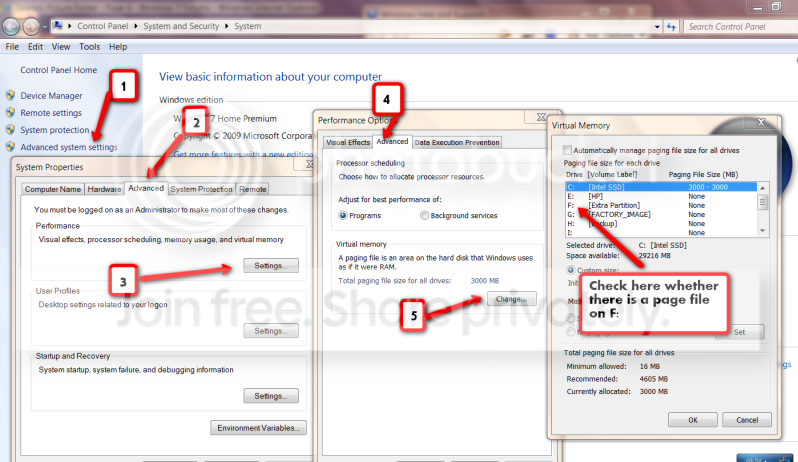
As for F, have a look whether there is indeed a page file (you may to unhide it). Or follow the instructions on the picture.

2010-04-05_1838.png
 

My Computer

Computer Manufacturer/Model Number
HP, Dell, Gateway, Toshiba - 4 laptops and 2 desktops
OS
Vista, Windows7, Mint Mate, Zorin, Windows 8
CPU
from 1.6GHz Duo to i7
Monitor(s) Displays
2x HP w2207
Hard Drives
5x HDD, 7x SSD, 12x Externals
Keyboard
with trackball - no mices
Mouse
Trackball mice
Internet Speed
DSL 6000
I'm sorry for the confusion!! When I mentioned those folders and such I was speaking about my own computer's Backup and Restore file recovery. That's what Rich suggested I believe.

I canceled that though. I am going to make an image of both C and F with Macrium. I am doing that now. The reason I'm doing C and F together is because they're both tied to the OS.

And I will do as you said right now with the above instructions. Thank you very much for taking the time to create that screenshot for me!
 
Last edited:

My Computer

Computer type
PC/Desktop
Computer Manufacturer/Model Number
Custom build
OS
Windows 7 Home Premium x64
CPU
Intel Core i5-4690k
Motherboard
Gigabyte H97 SATA Express M.2 SSD UEFI DualBIOS DDR3 1600 LG
Memory
8GB
Graphics Card(s)
EVGA GeForce GTX 970
Monitor(s) Displays
2
Hard Drives
2:
- Samsung 850 EVO 250GB 2.5-Inch SATA III Internal SSD (MZ-75E250B/AM)
- Crucial MX300 275GB SATA 2.5 Inch Internal Solid State Drive - CT275MX300SSD1
PSU
Corsair 650x
Case
C70
Cooling
4 Fans
Internet Speed
Comcast Cable 22mbs
Antivirus
Microsoft Security Essentials
Browser
Chrome
Here's the information. I have no idea how to correctly answer that page file question as I have no idea what it is or what it does. I never heard of it until today.

It definitely looks at though there's a page file though.

Please tell me. Is this a bad thing?!
I'm sweating bullets here worrying if it's a bad thing.

k2h7wp.png
 

My Computer

Computer type
PC/Desktop
Computer Manufacturer/Model Number
Custom build
OS
Windows 7 Home Premium x64
CPU
Intel Core i5-4690k
Motherboard
Gigabyte H97 SATA Express M.2 SSD UEFI DualBIOS DDR3 1600 LG
Memory
8GB
Graphics Card(s)
EVGA GeForce GTX 970
Monitor(s) Displays
2
Hard Drives
2:
- Samsung 850 EVO 250GB 2.5-Inch SATA III Internal SSD (MZ-75E250B/AM)
- Crucial MX300 275GB SATA 2.5 Inch Internal Solid State Drive - CT275MX300SSD1
PSU
Corsair 650x
Case
C70
Cooling
4 Fans
Internet Speed
Comcast Cable 22mbs
Antivirus
Microsoft Security Essentials
Browser
Chrome
Back
Top