BSOD Pictures & Scan Snipet

Lee14

New member
Local time
6:41 AM
Messages
13
Hi I'm a have a goer here over the years having read & watched computer assistance online so many times. Often I don't understand a lot of it but maybe 20 - 30 % I think.

Anyway, I will be good at describing the problem & the screenshots.

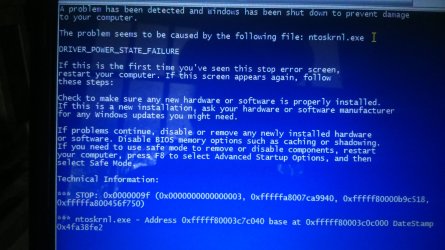
1st image is BSOD one month previous so could be unrelated as system seemed fine. It had been a year before that since BSOD per logs anyway.
2nd image is BSOD one month later, 3rd image is BSOD next day.

4th image is most recent & shows no issue with anything - except one aspect Videoprt.sys

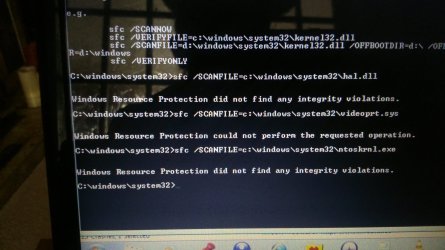
Previous to this I have been attempting to see what's going on with DISM, Chkdsk, SFC Scannow, Windows Memory Diagnostic & software.

The Hard Drive & Memory results are good per tests, ..... barring Chkdsk & SFC. I think both of those mentioned some maybe corrupt files.

I have watched more videos & discussions even here in SevenForums but could not get into SFC text or program document under Windows directory or CBS Logs. I did manage to get into DISM log but it was expansive & doing the CtrlF it did not seem to mention corruptions or bad drivers. I sign in as Administrator or to use Administrator's Elevated commands etc. but no matter it says Access is Denied to CBS. I managed many years ago to send a copy of a CBS log to my library to read but now I've got dumber so all I can do is locate the file that I cannot access.

The last couple of days the screen or computer freezes even with restarts. Oh after I done some of the above checks & attempted fixes I had restarted as I read I should do that to help fixes work or stick. It was getting hot, but since some of what I described above it does not get hot now, yet it was still unreliable yesterday. It seemed smooth though without sticking until it done it repeatedly. Screen was black or getting stuck during startup or worked normally afterwards too.

I had also tried right clicking on C Drive Windows Interface going into advanced, then properties, under tools - check for errors, Schedule Agree & Restarted.

Tried doing same checks repeatedly plus repeated restarts for many different things attempted actually. Under ChkDsk or SFC I recall it telling me about volume being in use & if asked if I would like it to try Y N, I said Y. I done restarts but upon attempts it just says that I think mostly yet it did tell me a few times about maybe some corrupt files found but could not fix. Bluescreen Month Previous.JPGBluescreen Month Later.JPGBluescreen Month Later Next Day.JPGSFC Snipet.JPG
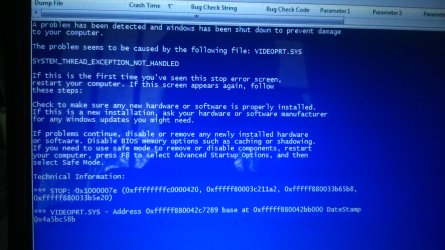
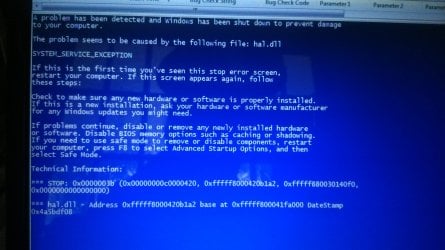
In NirSoft BlueScreenView which I found online after hours of fighting with the computer I was able to see those shots. It mentions hal.dll One Time only, ntoskrnl.exe on two crash stacks, but Once for VGA.sys & Once for Videoprt.sys

1st time poster here. Not tech savy & particularly bad with numbers & partitions or virtual desktop machines or multiple operating systems on one machine etc. so any plain simple help much appreciated Please + Thanks !!!!!!!!

I have in the past also done System Restore, updated drivers or disable re-enable things like that. Machine is Windows 7 HP64, i5 processor & I never use it gaming ever. Just internet or documents.
 

My Computers My Computers

System One System Two

  • Computer type
    Laptop
    Computer Manufacturer/Model Number
    Toshiba
    OS
    Windows 7 Home Premium 64 bit
  • Computer type
    PC/Desktop

My Computer My Computer

Computer type
PC/Desktop
Computer Manufacturer/Model Number
custom build
OS
Windows 8.1 Enterprise x64
CPU
Intel Core 2 Quad Q9400
Motherboard
Gigabyte EG45M-DS2H
Memory
8GB
Graphics Card(s)
NVIDIA GeForce 9600GT
Hard Drives
ADATA SP900
Seagate ST1000DM003-1ER162
Antivirus
Windows Defender
Browser
Opera
I have attached it I think MrPepka. Thanks I had overlooked that bit as I turned off the enhanced settings on SevenForums & was a while before I found where to post a post at first as couldn't see where to press to submit :)

By the way in case it makes a difference the computer name is not Garfield. Per system details when I review it, it's called Garfield2.

- - - Updated - - -

I don't think the software worked for me. When I've checked the zip or the original dm log collected it seems blank ? Yet when I did it it did go through the command prompt saying this takes a while and is collecting this and that and saving it. I can't understand why the download appears to me at least to be blank. Hopefully you all can see what I can't!
 

Attachments

Last edited:

My Computers My Computers

System One System Two

  • Computer type
    Laptop
    Computer Manufacturer/Model Number
    Toshiba
    OS
    Windows 7 Home Premium 64 bit
  • Computer type
    PC/Desktop
Hi
I am now on a different laptop as mine has decided to block Wifi & Bluetooth as a security tactic. Anyway I managed to get into SFC log which shows X2 faults really - Cannot repair member file regsvr32.exe.mui & same for autochk.exe.

Could not reproject corrupted file \??\c: \windows\SysWOW64 \e-US .......... regsvr32.exe.mui source file in store is also corrupted.

I have been going through pages of jargon & instructional advice but I want to do the simplest easiest fix - Without Risks.

I have the laptop years & do not want to wipe it. I am not able to do this NirBlog >> Blog Archive >> How to extract missing system files from the DVD of Windows 7/Vista.

I don't think I could anyway as it goes on about extracting & people have encountered I think 3 different permissions to get rid of the old files.

I would wonder if the old files are deleted before the new files would it not break the computer.

My laptop does not have the SP1 Update, as I blocked loads of updates & I do have my Win 7 DVD disc.

Can I instead of all the above just put in my CD & maybe keep ALL my files and settings but just Repair ?????????

Could I insert either DVD or just defragment just to prevent computer from crashing, sticking or blocking Wifi ??????????

Please somebody give me an easy option. It seems to function smoothly at times. All this suddenly went wrong because Opera crashed & then computer froze. Can somebody assure me I can just Repair without computer changing how it has been working using my WIN7 CD Please !!!
 

My Computers My Computers

System One System Two

  • Computer type
    Laptop
    Computer Manufacturer/Model Number
    Toshiba
    OS
    Windows 7 Home Premium 64 bit
  • Computer type
    PC/Desktop

My Computer My Computer

Computer type
PC/Desktop
Computer Manufacturer/Model Number
medionl/Aspire 6930G/acer x55a
OS
W7 home premium 32bit/W7HP 64bit/w10 tp insider ring
CPU
E5300 dual core
Motherboard
medion MS7366
Memory
3gb
Graphics Card(s)
Nvidia Geforce 7100 Nforce 630i
Monitor(s) Displays
avixc
Internet Speed
n (isp resticted to 72)
Antivirus
mse/pands
Browser
palemoon
Other Info
Belkin Fd7050 n USB using Railink RT2870 drivers, more upto date
Hi Torchwood another issue now is that the CD Rom for power saving purposes is off ! I think I won't be able to turn it on but will do my best.

I wish computers were simpler for users that just want them for personal documents & general internet while still being an average laptop with decent fullsize keyboard.

I will check later, thanks Torchwood. I would have done System Restore but it won't allow because of corruption.

What settings can I expect to lose by doing simplest Repair using CD if I can get it into the machine ?

- - - Updated - - -

I've got the CD ROM drive working ( although it's never used so it may glitch or freeze )

( 1 ) Can you guys let me know if I can easily save my Settings in some way prior to attempting this ??? I'll have to trust & pray the data retains itself as it's just repairing itself but I like my setup. Many years back I done a re-install when the computer was maybe 2-3 years old.

But it's now been running 8 or 9 years with data & settings per my needs. Back then there was less to lose & even when it worked then it was never smooth it was just totally unusable never running responsively at all really or functioning.

The only thing I've never liked the last 8-9 years is after Toshiba sent me the disc back then, & I put on the same version & spec as was meant to be the original, but even before & since whatever updates - the screen used to be a dimmer setting on the lowest possible but never since. I used to comfortably sit in the dark & no eye strain so used to get sleepy but never since. Even using eco it never dims as far. Anyway See Point 1

- - - Updated - - -

Thanks for the link Torchwood. I noticed it said about granting permissions regarding saved themes.

Does it make a difference if this is before /after I've used the disc for repair ?

Do you think it's easier to go this route as above or try & maybe unsuccessfully replace regsvr & autochk corrupted files.

As you can tell I am not happy to be attempting either scenarios .....

Could I make things worse or break it more by trying to fix and delete corrupted files.

I worry that I may not be able to get newer files into right place and set up properly. I'm finding all this very hard
 

My Computers My Computers

System One System Two

  • Computer type
    Laptop
    Computer Manufacturer/Model Number
    Toshiba
    OS
    Windows 7 Home Premium 64 bit
  • Computer type
    PC/Desktop
Use Bootrec.exe in the Windows RE to troubleshoot startup issues

I've just come across this article saying that before I would be able to Repair using WIN7 Disc that I may need to enter into Bootrec.exe ?

Then it goes on about other related stuff I've never heard of. I thought I had heard of most stuff like Chkdsk, Autochk, DISM & Defrags & Restores etc.

Can somebody tell me if Bootrec & Autochk are basically the same. I thought Win Systems Repair was just Autochk without using command prompt.

My computer is still not working & I am unsure what to try for easiest least riskiest foolproof method ?????

I just want it working while keeping it how it is / was. I just don't know what to do for the best.

Please give me English computers for dummies opinions & advice. I would really appreciate it
 
Last edited:

My Computers My Computers

System One System Two

  • Computer type
    Laptop
    Computer Manufacturer/Model Number
    Toshiba
    OS
    Windows 7 Home Premium 64 bit
  • Computer type
    PC/Desktop
Any advice Please ?!

Any advice guys before I ruin my machine ?!

I could do with some overall feedback on all this ... it has my head destroyed with worry :cry:
 

My Computers My Computers

System One System Two

  • Computer type
    Laptop
    Computer Manufacturer/Model Number
    Toshiba
    OS
    Windows 7 Home Premium 64 bit
  • Computer type
    PC/Desktop
Doesn't anybody come in here .... It's been 3 weeks give a day or two

Don't many people venture into SevenForums anymore ? I would have thought a lot still have old laptops etc. for entertainment.

I cannot get my hands on a repair disc - just have a wipe it all disc. I did come across articles about how to create a disc but also something issues with it not working after using it due to SP1 not having been installed or other issues.

I also say things saying pay $70usd or so for a repair disc which you have to retrieve manually from their site despite paying for it !!!
The site describes usb & disc formatting & creation all seems very uncertain to even successfully get the repair disc set up :(

The computer won't connect anymore to the internet so really I need a disc or else some kind of help for fixing corrupted autochk.exe & file regsvr32.exe.mui

I don't know what to do ........
 

My Computers My Computers

System One System Two

  • Computer type
    Laptop
    Computer Manufacturer/Model Number
    Toshiba
    OS
    Windows 7 Home Premium 64 bit
  • Computer type
    PC/Desktop
Hi Lee14,

If you're still here, I will have a look.

There are few left, because Windows 7 is not current anymore. Many have already moved on to Windows 10 or 11.
 

My Computer My Computer

Computer type
PC/Desktop
Computer Manufacturer/Model Number
Custom build
OS
Windows 10 Pro
CPU
i5-6500
Motherboard
Gigabyte B150-HD3P-CF
Memory
16GB DDR4 2133 Crucial Ballistix Sport LT
Graphics Card(s)
MSI GeForce GTX 1060 GAMING X 6G
Sound Card
Intel Display Audio
Monitor(s) Displays
Liyama ProLite XB2483HSU-B2
Screen Resolution
1920 x 1080
Hard Drives
Crucial MX200 500GB & Toshiba DT01ACA300 3TB
PSU
Corsair RM550x
Case
Fractal Design Define S
Cooling
Cooler Master TX3 i
Keyboard
Func KB-460 (MX Red)
Mouse
Corsair Gaming M65 RGB
Antivirus
Bitdefender Total Security 2016 + MBAM Pro + MBAE Pro
Browser
Google Chrome
Other Info
Creative Sound Blaster Tactic3D Rage V2 headset
Hi Axe yes I am still here hoping for help. I seem to know what the problem is, but it is too complicated to fix.
I only have a wipe rather than a repair disc, and it no longer connects to the internet. I just want a fool-proof simple way of replacing or preferably automatically fixing the corrupted autocheck & regsvr

Thanks for responding
 

My Computers My Computers

System One System Two

  • Computer type
    Laptop
    Computer Manufacturer/Model Number
    Toshiba
    OS
    Windows 7 Home Premium 64 bit
  • Computer type
    PC/Desktop

My Computer My Computer

Computer type
PC/Desktop
Computer Manufacturer/Model Number
Custom build
OS
Windows 10 Pro
CPU
i5-6500
Motherboard
Gigabyte B150-HD3P-CF
Memory
16GB DDR4 2133 Crucial Ballistix Sport LT
Graphics Card(s)
MSI GeForce GTX 1060 GAMING X 6G
Sound Card
Intel Display Audio
Monitor(s) Displays
Liyama ProLite XB2483HSU-B2
Screen Resolution
1920 x 1080
Hard Drives
Crucial MX200 500GB & Toshiba DT01ACA300 3TB
PSU
Corsair RM550x
Case
Fractal Design Define S
Cooling
Cooler Master TX3 i
Keyboard
Func KB-460 (MX Red)
Mouse
Corsair Gaming M65 RGB
Antivirus
Bitdefender Total Security 2016 + MBAM Pro + MBAE Pro
Browser
Google Chrome
Other Info
Creative Sound Blaster Tactic3D Rage V2 headset
Thanks Axe, I did tests through Toshiba software, Windows interface & DOS different commands found online. Tests came back hard disc fine.
It has prevented itself from connecting to the internet as well as disabling itself from bluetooth adapter. It had continued to work online for maybe almost a full 2 weeks if my memory is right. Definitely days and days anyway where it would freeze or not want to arrive at desktop each startup, yet it might start immediately without issue. Once it got going it may run for hours or all day before glitching. Then it decided when it was started up it would no longer connect and refused to turn on connections. Windows firewall or defender isn't stopping it & there is no paid for security on it. Where might I get a WIN7 Repair from somebody ????? Not a wipe one ! Would it leave my system as it is now without changing all my saved settings and personalisations ? Could somebody e-mail me one ?
 

My Computers My Computers

System One System Two

  • Computer type
    Laptop
    Computer Manufacturer/Model Number
    Toshiba
    OS
    Windows 7 Home Premium 64 bit
  • Computer type
    PC/Desktop
Are you still there Axe0 ???

Still haven't got my hands on a Repair disc, and still unsure and afraid of if I could get one per my last post ...
 

My Computers My Computers

System One System Two

  • Computer type
    Laptop
    Computer Manufacturer/Model Number
    Toshiba
    OS
    Windows 7 Home Premium 64 bit
  • Computer type
    PC/Desktop
Yes still here, but I'm afraid there's not much to offer.

If this really is all about corrupted files, and nothing else behind it, we most likely are unable to help with finding you a repair disc that isn't possibly dangerous. There is a slim chance that you can find something online, but because official resources have been pulled long ago there is most likely risk involved with things like malware. The best I can offer is a recommendation to upgrade to Windows 10 with an option to backup your personal files prior the upgrade using a live linux distribution OS that'll run on the memory to allow for the backup.
 

My Computer My Computer

Computer type
PC/Desktop
Computer Manufacturer/Model Number
Custom build
OS
Windows 10 Pro
CPU
i5-6500
Motherboard
Gigabyte B150-HD3P-CF
Memory
16GB DDR4 2133 Crucial Ballistix Sport LT
Graphics Card(s)
MSI GeForce GTX 1060 GAMING X 6G
Sound Card
Intel Display Audio
Monitor(s) Displays
Liyama ProLite XB2483HSU-B2
Screen Resolution
1920 x 1080
Hard Drives
Crucial MX200 500GB & Toshiba DT01ACA300 3TB
PSU
Corsair RM550x
Case
Fractal Design Define S
Cooling
Cooler Master TX3 i
Keyboard
Func KB-460 (MX Red)
Mouse
Corsair Gaming M65 RGB
Antivirus
Bitdefender Total Security 2016 + MBAM Pro + MBAE Pro
Browser
Google Chrome
Other Info
Creative Sound Blaster Tactic3D Rage V2 headset
Thanks for replying & the advice Axe0. Isn't that chargeable to get Linux OS & do all that.

The computer is 12 years old but was quick and reliable & suited Win7. I fear it won't be capable of running more modern systems & that I get on better and more smoothly with good old Win7. Everything was neat and accessible.

I'm not really in a position to be able to do all these things ....... Not being a people person also struggle to get favours or help when life throws me some pickles. Life is just one big popularity contest
 

My Computers My Computers

System One System Two

  • Computer type
    Laptop
    Computer Manufacturer/Model Number
    Toshiba
    OS
    Windows 7 Home Premium 64 bit
  • Computer type
    PC/Desktop
Try
Heidoc.... they have W7 Iso's that you can use as a Repair disk

Repair Install
 

My Computer My Computer

Computer type
PC/Desktop
Computer Manufacturer/Model Number
medionl/Aspire 6930G/acer x55a
OS
W7 home premium 32bit/W7HP 64bit/w10 tp insider ring
CPU
E5300 dual core
Motherboard
medion MS7366
Memory
3gb
Graphics Card(s)
Nvidia Geforce 7100 Nforce 630i
Monitor(s) Displays
avixc
Internet Speed
n (isp resticted to 72)
Antivirus
mse/pands
Browser
palemoon
Other Info
Belkin Fd7050 n USB using Railink RT2870 drivers, more upto date
Linux is an open source operating system, freely available for anyone to use and contribute to if they want. A few distributions of Linux that I know are often used are Ubuntu and Kali, Ubuntu is for the average user and Kali for cyber security. I would recommend to try Ubuntu, not hard to learn and it is not nearly as heavy as Windows so the hardware requirements are much lower.

Normally when a computer gets as old as your computer, it is a risk to continue running it. Hardware degrades over time. Chances are, if not already, you will see hardware problems soon enough. I appreciate that you want to continue with what you had, but unfortunately it is really not the best or safest option. Ultimately it is up to you what you decide to do, I cannot by any means force you to do anything, but I would strongly recommend upgrading the operating system and purchase a new computer.
 

My Computer My Computer

Computer type
PC/Desktop
Computer Manufacturer/Model Number
Custom build
OS
Windows 10 Pro
CPU
i5-6500
Motherboard
Gigabyte B150-HD3P-CF
Memory
16GB DDR4 2133 Crucial Ballistix Sport LT
Graphics Card(s)
MSI GeForce GTX 1060 GAMING X 6G
Sound Card
Intel Display Audio
Monitor(s) Displays
Liyama ProLite XB2483HSU-B2
Screen Resolution
1920 x 1080
Hard Drives
Crucial MX200 500GB & Toshiba DT01ACA300 3TB
PSU
Corsair RM550x
Case
Fractal Design Define S
Cooling
Cooler Master TX3 i
Keyboard
Func KB-460 (MX Red)
Mouse
Corsair Gaming M65 RGB
Antivirus
Bitdefender Total Security 2016 + MBAM Pro + MBAE Pro
Browser
Google Chrome
Other Info
Creative Sound Blaster Tactic3D Rage V2 headset
Try
Heidoc.... they have W7 Iso's that you can use as a Repair disk

Repair Install

Thanks TW. I tried to press thank thumb button for both you and Axe0 but it says I must spread some Reputation around before giving it to either of you again, so manually thank you both for replying. Anyway, yes I will try to Repair using Heidoc which I had never heard of TW. Only thing I am wondering is will that offer me an option to Repair ??????????/ because it only mentions downloading the operating system.

I think this might be the one Download Windows 7 USB DVD Download Tool 1.0 for Windows | Uptodown.com from 2009 so hopefully it would be right without SP1 pack & therefore could attempt a Repair without changing things on me ???????

Sorry for delay writing back btw
 

My Computers My Computers

System One System Two

  • Computer type
    Laptop
    Computer Manufacturer/Model Number
    Toshiba
    OS
    Windows 7 Home Premium 64 bit
  • Computer type
    PC/Desktop
Has anyone any further help please ?!!!!!!
 

My Computers My Computers

System One System Two

  • Computer type
    Laptop
    Computer Manufacturer/Model Number
    Toshiba
    OS
    Windows 7 Home Premium 64 bit
  • Computer type
    PC/Desktop
Back
Top