Deleting Files and Multiple Hard Drives

wixostrix

New member
Local time
2:29 PM
Messages
4
Location
San Francisco, CA
I have discovered an issue with Windows 7 that has become quite annoying. I have tested it with many scenarios and the issue continues to exist.

If you try to delete a file off an additional hard drive (meaning not the primary drive) the system will delete it permanently. It will not ask you to move it to the Recycle Bin, it will just ask if you want to permanently delete the file. Any file on the drive will move to the Recycle Bin with no problem.

Also, files within archives (zip files) will permanently delete even if the archive is on the primary drive.
 

My Computer My Computer

At a glance

Windows 7 Professional x64Intel Core 2 Quad Q6600 2.40 GHzCorsair XMS2 2 GBATI Redeon X1950 XTX 512 MB
Computer Manufacturer/Model Number
Custom Build
OS
Windows 7 Professional x64
CPU
Intel Core 2 Quad Q6600 2.40 GHz
Motherboard
Gigabyte GA-65P-DS3
Memory
Corsair XMS2 2 GB
Graphics Card(s)
ATI Redeon X1950 XTX 512 MB
Sound Card
Creative SoundBlaster Audigy 4
Monitor(s) Displays
Dell UltraSharp WFP2007
That is simply not true.

You can set the size of the Recycle Bin for each of your HD's, internal and external, in Recycle Bin properties. When you then want to delete the file and its size is smaller than Recycle Bin, it is moved there. Actually, the file remains where it was, it's just made non-accessible by renaming and hiding it. Windows keeps list of the real file names of everything in Recycle Bin to let you restore the file, i.e. renaming it back to the original name and making it again accessible.

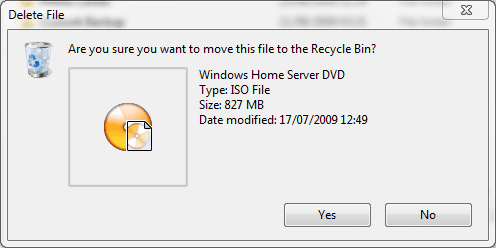
Here's an example. I want to delete a file in my external I: hard drive. Its size is smaller than the 25000MB I've reserved for Recycle Bin on that drive, so it is moved there and I can restore it whenever I want.

recycle5.PNG
recycle1.PNG
recycle2.PNG

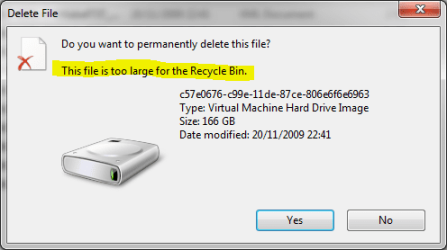
Second example: On my external J: drive is a file that I want to delete. First I get a dialog box asking if I want to delete it. I click Yes, Windows starts the process only to discover the file is too large, bigger than the 25000MB reserved to Recycle Bin. I get another dialog, asking if I want to permanently delete the file because it is too big to put in Recycle Bin.

recycle3.PNG
recycle4.PNG

Exception: The files and folders deleted from network drives are deleted permanently, as well as those deleted from removable media (rewritable CD's & DVD's and memory cards etc.).

Kari
 
Last edited:

My Computer My Computer

At a glance

Windows 10 Pro x64 EN-GB1.6 GHz Intel Core i7-720QM Processor6 GBATI Mobility Radeon HD 5850 Graphics
Computer type
Laptop
Computer Manufacturer/Model Number
HP ENVY 17-1150eg
OS
Windows 10 Pro x64 EN-GB
CPU
1.6 GHz Intel Core i7-720QM Processor
Memory
6 GB
Graphics Card(s)
ATI Mobility Radeon HD 5850 Graphics
Sound Card
Beats sound system with integrated subwoofer
Monitor(s) Displays
17" laptop display, 22" LED and 32" Full HD TV through HDMI
Screen Resolution
1600*900 (1), 1920*1080 (2&3)
Hard Drives
Internal: 2 x 500 GB SATA Hard Disk Drive 7200 rpm
External: 2TB for backups, 3TB USB3 network drive for media
Cooling
As Envy runs a bit warm, I have it on a Cooler Master pad
Keyboard
Logitech diNovo Media Desktop Laser (bluetooth)
Mouse
Logitech Performance Mouse MX
Internet Speed
50/10 Mbps VDSL
Antivirus
Windows Defender 4.3.9431.0
Browser
Maxthon 3.5.2., IE11
Actually, the file remains where it was, it's just made non-accessible by renaming and hiding it. Windows keeps list of the real file names of everything in Recycle Bin to let you restore the file, i.e. renaming it back to the original name and making it again accessible.
Thanks for the above explanation Kari :D

I always wondered how that worked.....now I know! :)
 

My Computer My Computer

At a glance

Operating System Microsoft Windows 7 Ultimate...Mobile DualCore Intel Core 2 Duo T5550, 1833 ...2GB (DDR2-667 DDR2 SDRAM)ATI Radeon Xpress 1200 Series (256 MB)
Computer Manufacturer/Model Number
Samsung R60 Plus
OS
Operating System Microsoft Windows 7 Ultimate Build 7600
CPU
Mobile DualCore Intel Core 2 Duo T5550, 1833 MHz (1
Motherboard
ATI Radeon Xpress 1100/1250
Memory
2GB (DDR2-667 DDR2 SDRAM)
Graphics Card(s)
ATI Radeon Xpress 1200 Series (256 MB)
Sound Card
Realtek ALC262 @ ATI SB600 - High Definition
Monitor(s) Displays
Samsung LTN154X3-L01 [15.4" LCD]
Screen Resolution
1280x800
PSU
na
Case
na
Cooling
na
Keyboard
na
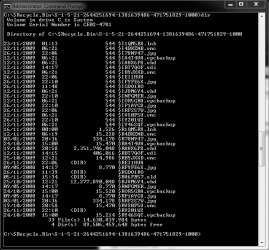
Here's a sample showing the content of the recycle bin. When user deletes a file or folder, Windows just changes the name of the deleted item by removing the first letter of the name and replacing it with $-sign, then giving a alphanumerical 'code' name (7 characters). The file extension is kept intact. The item is then hidden, shown only in recycle bin.

Recycle Bin then stores a list of original filenames; in case of user restoring the file, the matching name is picked and the file restored. The same name resolving process is also done every time the user opens Recycle Bin, to be able to show the right names.

recycle.PNG

Kari
 

My Computer My Computer

At a glance

Windows 10 Pro x64 EN-GB1.6 GHz Intel Core i7-720QM Processor6 GBATI Mobility Radeon HD 5850 Graphics
Computer type
Laptop
Computer Manufacturer/Model Number
HP ENVY 17-1150eg
OS
Windows 10 Pro x64 EN-GB
CPU
1.6 GHz Intel Core i7-720QM Processor
Memory
6 GB
Graphics Card(s)
ATI Mobility Radeon HD 5850 Graphics
Sound Card
Beats sound system with integrated subwoofer
Monitor(s) Displays
17" laptop display, 22" LED and 32" Full HD TV through HDMI
Screen Resolution
1600*900 (1), 1920*1080 (2&3)
Hard Drives
Internal: 2 x 500 GB SATA Hard Disk Drive 7200 rpm
External: 2TB for backups, 3TB USB3 network drive for media
Cooling
As Envy runs a bit warm, I have it on a Cooler Master pad
Keyboard
Logitech diNovo Media Desktop Laser (bluetooth)
Mouse
Logitech Performance Mouse MX
Internet Speed
50/10 Mbps VDSL
Antivirus
Windows Defender 4.3.9431.0
Browser
Maxthon 3.5.2., IE11
@ Kari

Everything you just said I already knew; however, it was a good explanation on how that process works for those who don't know.

Anyway, I'm away from my computer now so I cannot show screen shots at the moment but I checked the sizes of all the Recycle Bins for my drives and they all are well more than sufficient for the files I typically delete (music, pictures, documents).

Maybe this issue isn't widespread but it doesn't make it untrue. I have Windows 7 installed on two different drives and when I try to delete from the other drive it doesn't say anything about moving to the Recycle Bin. Even if I drag it to the Recycle Bin it asks me if I want to permanently delete the file.
 

My Computer My Computer

At a glance

Windows 7 Professional x64Intel Core 2 Quad Q6600 2.40 GHzCorsair XMS2 2 GBATI Redeon X1950 XTX 512 MB
Computer Manufacturer/Model Number
Custom Build
OS
Windows 7 Professional x64
CPU
Intel Core 2 Quad Q6600 2.40 GHz
Motherboard
Gigabyte GA-65P-DS3
Memory
Corsair XMS2 2 GB
Graphics Card(s)
ATI Redeon X1950 XTX 512 MB
Sound Card
Creative SoundBlaster Audigy 4
Monitor(s) Displays
Dell UltraSharp WFP2007
I have to say your issue is very strange. When Windows works as it is meant to work, only files and folders deleted from network drives and removable media are deleted permanently. Those items deleted from your computers HD's, internal or external, should always go to the Recycle Bin if they are not too big.

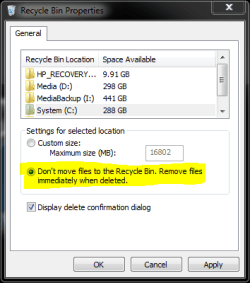
The dialog Are you sure you want to move this file to the Recycle bin? is bypassed only when you hold down the shift key when choosing Delete from the context menu (or when pressing Delete key on the keyboard), or when the option Don't move files to the Recycle Bin is chosen in the Recycle Bin properties.

recycle6.PNG

In your case, maybe a system restore to an earlier point or a repair installation would be the right solution. I honestly don't know; this issue sounds weird, I have never heard of it before.

Kari
 

My Computer My Computer

At a glance

Windows 10 Pro x64 EN-GB1.6 GHz Intel Core i7-720QM Processor6 GBATI Mobility Radeon HD 5850 Graphics
Computer type
Laptop
Computer Manufacturer/Model Number
HP ENVY 17-1150eg
OS
Windows 10 Pro x64 EN-GB
CPU
1.6 GHz Intel Core i7-720QM Processor
Memory
6 GB
Graphics Card(s)
ATI Mobility Radeon HD 5850 Graphics
Sound Card
Beats sound system with integrated subwoofer
Monitor(s) Displays
17" laptop display, 22" LED and 32" Full HD TV through HDMI
Screen Resolution
1600*900 (1), 1920*1080 (2&3)
Hard Drives
Internal: 2 x 500 GB SATA Hard Disk Drive 7200 rpm
External: 2TB for backups, 3TB USB3 network drive for media
Cooling
As Envy runs a bit warm, I have it on a Cooler Master pad
Keyboard
Logitech diNovo Media Desktop Laser (bluetooth)
Mouse
Logitech Performance Mouse MX
Internet Speed
50/10 Mbps VDSL
Antivirus
Windows Defender 4.3.9431.0
Browser
Maxthon 3.5.2., IE11
From my experience its not always delete completely, sometimes (possibly in this case) it deletes to the $Recycle Bin$ folder on the Drive.

The only way you can see it, is by enabling the "Hide protected operating system files" option in folder options.

That folder, if the deleted files does not display in the recycling bin of the host PC, the file should be in this folder.
 

My Computer My Computer

At a glance

W7 RTM Ultimate x64Intel Q8400 @ 2.66GHZ4GB DDR2-800Gainward GTS 450 GLH 1GB Edition
Computer Manufacturer/Model Number
Custom Build
OS
W7 RTM Ultimate x64
CPU
Intel Q8400 @ 2.66GHZ
Motherboard
Gigabyte GA-EG45M-UD2H
Memory
4GB DDR2-800
Graphics Card(s)
Gainward GTS 450 GLH 1GB Edition
Sound Card
Integrated 8 Channel
Monitor(s) Displays
AOC 23.6 Inch Widescreen LCD
Screen Resolution
1920x1080
Hard Drives
Seagate 500GB Internal
Western Digital 1TB Internal

Hitachi 1TB External
PSU
Apevia Java Power 500W
Case
Cooler Master HAF 922 Black
Cooling
Stock Intel CPU Fan
Keyboard
HP SK-2960 Multimedia Keyboard
Mouse
Logitech M350 Wireless Gaming Mouse
Internet Speed
1.5MB
There is a recycle bin on the other drive.

Many in fact. Look in the contents and you'll see the files deleted

Do not delete them all
 

My Computer My Computer

At a glance

Windows 7 Pro & Vista Home PremiumAthlon 64 3800+ (Orleans) 2.40GHz2GB DDR2 RAM DIMMNVIDIA GeForce 8500 GT 512 MB memory HDMI out
Computer Manufacturer/Model Number
Cheap $399.00 E-Machine
OS
Windows 7 Pro & Vista Home Premium
CPU
Athlon 64 3800+ (Orleans) 2.40GHz
Motherboard
Winfast
Memory
2GB DDR2 RAM DIMM
Graphics Card(s)
NVIDIA GeForce 8500 GT 512 MB memory HDMI out
Sound Card
creative X-Fi Exteme 7..1 channel
Monitor(s) Displays
Acer V223W 22" widescreen DVI
Screen Resolution
1680x1050
Hard Drives
WDC WD5 500GB
WDC WD25 250GB
PSU
OCZ 550 watt
Case
Gateway
Cooling
2 fans
Keyboard
Dell
Mouse
Sony Vaio
Internet Speed
18MB/s down - .72MB /s up
Yes it's very strange indeed. System restore doesn't solve the issue because it happens straight from the get-go of a new installation. I know the files are technically still on the drive until they are written over but having to go through a restore process is defeats the purpose of the Recycle Bin. The reason this is a slight issue for me is that I redirect all my personal folders to a second drive and reason it's only a slight issue is because I have Shadow Copy enabled for the drive so as long as the file isn't super new I can restore it through there.

Thanks for your help guys.
 

My Computer My Computer

At a glance

Windows 7 Professional x64Intel Core 2 Quad Q6600 2.40 GHzCorsair XMS2 2 GBATI Redeon X1950 XTX 512 MB
Computer Manufacturer/Model Number
Custom Build
OS
Windows 7 Professional x64
CPU
Intel Core 2 Quad Q6600 2.40 GHz
Motherboard
Gigabyte GA-65P-DS3
Memory
Corsair XMS2 2 GB
Graphics Card(s)
ATI Redeon X1950 XTX 512 MB
Sound Card
Creative SoundBlaster Audigy 4
Monitor(s) Displays
Dell UltraSharp WFP2007
Would be nice to know what is causing this. Please keep us posted if you find something.

Kari
 

My Computer My Computer

At a glance

Windows 10 Pro x64 EN-GB1.6 GHz Intel Core i7-720QM Processor6 GBATI Mobility Radeon HD 5850 Graphics
Computer type
Laptop
Computer Manufacturer/Model Number
HP ENVY 17-1150eg
OS
Windows 10 Pro x64 EN-GB
CPU
1.6 GHz Intel Core i7-720QM Processor
Memory
6 GB
Graphics Card(s)
ATI Mobility Radeon HD 5850 Graphics
Sound Card
Beats sound system with integrated subwoofer
Monitor(s) Displays
17" laptop display, 22" LED and 32" Full HD TV through HDMI
Screen Resolution
1600*900 (1), 1920*1080 (2&3)
Hard Drives
Internal: 2 x 500 GB SATA Hard Disk Drive 7200 rpm
External: 2TB for backups, 3TB USB3 network drive for media
Cooling
As Envy runs a bit warm, I have it on a Cooler Master pad
Keyboard
Logitech diNovo Media Desktop Laser (bluetooth)
Mouse
Logitech Performance Mouse MX
Internet Speed
50/10 Mbps VDSL
Antivirus
Windows Defender 4.3.9431.0
Browser
Maxthon 3.5.2., IE11
Have you verified there is a Recycle Bin on that physical HD?
 

My Computer My Computer

At a glance

Windows 7 Ult x64 - SP1/ Windows 8 Pro x64Intel Core i5-3570K 4.6GHz8GB (2X4GB) DDR3 1600 Corsair Vengeance CL8 1.5vSapphire HD 7770 Vapor-X OC 1GB DDR5
Computer type
PC/Desktop
Computer Manufacturer/Model Number
76~2.0
OS
Windows 7 Ult x64 - SP1/ Windows 8 Pro x64
CPU
Intel Core i5-3570K 4.6GHz
Motherboard
Gigabyte GA-Z77X UD3H, f18
Memory
8GB (2X4GB) DDR3 1600 Corsair Vengeance CL8 1.5v
Graphics Card(s)
Sapphire HD 7770 Vapor-X OC 1GB DDR5
Sound Card
Onboard VIA VT2021
Monitor(s) Displays
22" LCD Dell
Screen Resolution
1680x1050
Hard Drives
Samsung 840Pro 128GB SSD,
Seagate Barracuda 500GB SATA2 7200rpm 32MB cache, Seagate Barracuda 1TB SATA2 7200rpm 32MB cache,
PSU
Corsair HX650W
Case
Cooler Master Storm Scout
Cooling
Corsair H80 2x12cm Noctua NF P12 , 2x14cm case fans
Keyboard
Logitech Wave
Mouse
CM Sentinel
Internet Speed
Dismal
Antivirus
Avast
Browser
Opera Next
Other Info
Haswell laptop: HP Envy 17t-j, i7-4700MQ, GeForce 740M 2GB DDR3, 17.3" Full HD 1920x1080, 16GB RAM, Samsung 840 Pro 128GB, 1TB Hitachi 7200 HDD,
Desktop: eSATA ports,
External eSATA Seagate 500GB SATA2 7200rpm,
External WD USB 500GB
Giys just passing thru and havent read the thread. Could it be the partitions are logical, or in some other way different on the OP system?

K
 

My Computer My Computer

At a glance

Win 8 Release candidate 8400[email protected]4 gigsNvidia 9600M
Computer Manufacturer/Model Number
HP Pavillion dv-7 1005 Tx
OS
Win 8 Release candidate 8400
CPU
[email protected]
Memory
4 gigs
Graphics Card(s)
Nvidia 9600M
Sound Card
HD built-in
Monitor(s) Displays
17" Wxga
Screen Resolution
1440x900
Cooling
none
Internet Speed
45Mb down 5Mb up
Windows recycling sees logical partitions precisely as primary ones, no difference. This issue is very strange...
 

My Computer My Computer

At a glance

Windows 10 Pro x64 EN-GB1.6 GHz Intel Core i7-720QM Processor6 GBATI Mobility Radeon HD 5850 Graphics
Computer type
Laptop
Computer Manufacturer/Model Number
HP ENVY 17-1150eg
OS
Windows 10 Pro x64 EN-GB
CPU
1.6 GHz Intel Core i7-720QM Processor
Memory
6 GB
Graphics Card(s)
ATI Mobility Radeon HD 5850 Graphics
Sound Card
Beats sound system with integrated subwoofer
Monitor(s) Displays
17" laptop display, 22" LED and 32" Full HD TV through HDMI
Screen Resolution
1600*900 (1), 1920*1080 (2&3)
Hard Drives
Internal: 2 x 500 GB SATA Hard Disk Drive 7200 rpm
External: 2TB for backups, 3TB USB3 network drive for media
Cooling
As Envy runs a bit warm, I have it on a Cooler Master pad
Keyboard
Logitech diNovo Media Desktop Laser (bluetooth)
Mouse
Logitech Performance Mouse MX
Internet Speed
50/10 Mbps VDSL
Antivirus
Windows Defender 4.3.9431.0
Browser
Maxthon 3.5.2., IE11
So I think I solved the issue. What I did was run a Disk Cleanup for one of my secondary drives. When the cleanup window comes up, in the Recycle Bin description there is a button that says Clean up system files. I clicked that, selected the drive again, checked Recycle Bin and pushed OK. After that I can move any file to the Recycle Bin.

I tried it on my other installation, the problem existed until I did the steps below and now it too works fine. It's a little strange.
 

My Computer My Computer

At a glance

Windows 7 Professional x64Intel Core 2 Quad Q6600 2.40 GHzCorsair XMS2 2 GBATI Redeon X1950 XTX 512 MB
Computer Manufacturer/Model Number
Custom Build
OS
Windows 7 Professional x64
CPU
Intel Core 2 Quad Q6600 2.40 GHz
Motherboard
Gigabyte GA-65P-DS3
Memory
Corsair XMS2 2 GB
Graphics Card(s)
ATI Redeon X1950 XTX 512 MB
Sound Card
Creative SoundBlaster Audigy 4
Monitor(s) Displays
Dell UltraSharp WFP2007
Back
Top