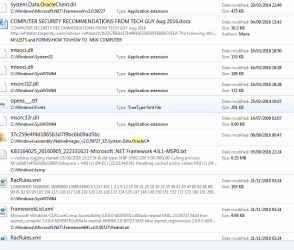
Solved deleting Java/Oracle entries from old installations

Windymiller

New member
Member
Local time
10:41 PM
Messages
91
I am trying to rid my computer of all entries referencing Java/Oracle but am nervous of interfering with the registry without advice. Searching for Oracle via Start I have the following. Can anyone help me to decide whether it would be safe/useful to continue deleting these entries please. Especially the one at the top of the list which has SYSTEM in its name.
 

Attachments

  • ORACLE SEARCH RESULT Capture.PNG
    ORACLE SEARCH RESULT Capture.PNG
    74.4 KB · Views: 2

My Computer

Computer type
PC/Desktop
Computer Manufacturer/Model Number
Mesh
OS
Windows 7 Home Premium Upgrade designed for Windows Vista
Browser
Internet Explorer
Hi:

I'm no Java expert, as I have not used it on any of my systems for a long time.

But there is a 3rd-party removal tool, JavaRa, that used to be pretty good at cleaning up Java remnants.
I've recently learned that it's no longer being actively maintained, so I guess I would recommend it "at your own risk".

Oracle does publish a "removal tool". I have no personal experience with it. But here is the link:

Java Uninstall Tool

I hope this helps a bit.

Thanks,
MM
 

My Computer

Computer type
PC/Desktop
Computer Manufacturer/Model Number
Dell Studio XPS 8500
OS
OEM Windows 7 Ult (x64) SP1
CPU
Intel Core-i7 3770 @ 3.4 GHz
Motherboard
"Dell" branded
Memory
16 GB DDR3 SDRAM @ 1333 MHz
Graphics Card(s)
NVidia GeForce GT620 1 GB
Sound Card
THX TruStudio PC
Monitor(s) Displays
Dell U2410 Full HD
Hard Drives
2.0 TB SATA2 @ 7200 RPM
PSU
350W
Keyboard
MS 4000 Ergon - Wired
Mouse
Logitech Anywhere MX
Internet Speed
Cable HSI w/Turbo (router)
Antivirus
KIS-MBAM Premium-MBAE Premium
Browser
Fx (current version); IE
Other Info
And a Win7/64 Pro laptop; And a Win10/64 Pro desktop.
Uninstalling Java is pretty simple, just use the control panel and in "programs and characteristics" applet you'll find the Java runtime entry, which will launch its uninstaller and remove it completely. Searching the file system for anything named "java" is subject to lots of false positives, and most important, completely unnecessary once you've ran the official uninstaller.

As for searching "oracle", that doesn't even makes any sense. What are you trying to achieve with that? That's even more doomed to find lots of things, completely unrelated to each other. In particular, as for the highlighted file, as you can guess from the folder, it belongs to the .NET Framework. Deleting it may cause problems in some software that relies on it, and besides deleting it just because it says "oracle" is just plain wrong.
 

My Computer

Computer type
Laptop
Computer Manufacturer/Model Number
Toshiba Sattelite A665-S6092
OS
Windows 7 Ultimate x64
CPU
Intel Core i7-740QM
Memory
8 GB DDR3
Graphics Card(s)
NVIDIA GeForce 330GT
Screen Resolution
1366x768
Hard Drives
Samsung 840 SSD 500GB
1TB USB3 external HD
Cooling
Coolermaster Notepal U3 notebook cooling pad
Internet Speed
3mbps ASDL
Antivirus
ClamWin 0.98.7
Browser
Opera 12.17 x86 (main), Firefox 38 (sec), IE11 (last resort)
Good catch on the "Oracle" issue, @Alejandro85.:)

However, JRE (aka Java) is notorious for leaving behind leftovers, bits and remnants.
We see this at the malware removal fora quite often.

So the OP still might need to use a removal tool (3rd-party or Oracle) to fully clean up leftovers?

Just a suggestion.

Cheers,
MM
 

My Computer

Computer type
PC/Desktop
Computer Manufacturer/Model Number
Dell Studio XPS 8500
OS
OEM Windows 7 Ult (x64) SP1
CPU
Intel Core-i7 3770 @ 3.4 GHz
Motherboard
"Dell" branded
Memory
16 GB DDR3 SDRAM @ 1333 MHz
Graphics Card(s)
NVidia GeForce GT620 1 GB
Sound Card
THX TruStudio PC
Monitor(s) Displays
Dell U2410 Full HD
Hard Drives
2.0 TB SATA2 @ 7200 RPM
PSU
350W
Keyboard
MS 4000 Ergon - Wired
Mouse
Logitech Anywhere MX
Internet Speed
Cable HSI w/Turbo (router)
Antivirus
KIS-MBAM Premium-MBAE Premium
Browser
Fx (current version); IE
Other Info
And a Win7/64 Pro laptop; And a Win10/64 Pro desktop.
Thanks for the replies. I searched for Oracle entries because Oracle and Java appear to be linked in some way and I do not think I have ever downloaded anything from Oracle apart from Java stuff.

I will try the Oracle Java uninstaller and then give up. I daresay if I get any trouble, it will be best approached by Malware Bytes or similar any way. I am just trying to follow advice I read on keeping my computer safe ! Not sure what "Good catch on Alejandro85" means - is this a reference to Windows Seven Forum Contributor ?

Shortcutter
 

My Computer

Computer type
PC/Desktop
Computer Manufacturer/Model Number
Mesh
OS
Windows 7 Home Premium Upgrade designed for Windows Vista
Browser
Internet Explorer
Thanks for the replies. I searched for Oracle entries because Oracle and Java appear to be linked in some way and I do not think I have ever downloaded anything from Oracle apart from Java stuff.

A manual search for "JAVA" might have been more rewarding, if you were going to take that approach.

I will try the Oracle Java uninstaller and then give up.
JavaRa v.1.16 was and is still being used quite recently in a number of computer support fora.
I suspect it would probably work OK under Windows 7.
But I do not speak from personal experience, and it might be prudent to set a system restore point before running it.

I daresay if I get any trouble, it will be best approached by Malware Bytes or similar any way.
I'm not sure what you mean by that?
Malwarebytes Anti-Malware (MBAM) will not detect, target or remove legitimate software, such as "Java".
However, certain computer disinfection tools (such as Zoek or FRST) could be used to remove Java remnants. Doing so would require the help of a trained malware expert who could write a customized script for that.


Not sure what "Good catch on Alejandro85" means
I meant that @Alejandro85 caught the fact that you were somewhat futilely trying to find JAVA remnants by searching for ORACLE entries on the computer.
That is all.
Either way, it's not a very good or safe way to remove the leftovers.
There's too much chance you might inadvertently remove something that ought not to be removed.
You could create a new problem by trying to fix one...

It's important to remove old Java leftovers from the system for security reasons.
But it's not worth obsessing over it.
The 2 removal tools ought to be sufficient.
If not, then I might either wait for someone expert here to help you get rid of it with custom scripts, or head over to a reputable computer disinfection forum for that.

Cheers,
MM

 
Last edited:

My Computer

Computer type
PC/Desktop
Computer Manufacturer/Model Number
Dell Studio XPS 8500
OS
OEM Windows 7 Ult (x64) SP1
CPU
Intel Core-i7 3770 @ 3.4 GHz
Motherboard
"Dell" branded
Memory
16 GB DDR3 SDRAM @ 1333 MHz
Graphics Card(s)
NVidia GeForce GT620 1 GB
Sound Card
THX TruStudio PC
Monitor(s) Displays
Dell U2410 Full HD
Hard Drives
2.0 TB SATA2 @ 7200 RPM
PSU
350W
Keyboard
MS 4000 Ergon - Wired
Mouse
Logitech Anywhere MX
Internet Speed
Cable HSI w/Turbo (router)
Antivirus
KIS-MBAM Premium-MBAE Premium
Browser
Fx (current version); IE
Other Info
And a Win7/64 Pro laptop; And a Win10/64 Pro desktop.
Thanks Moxie and Alejandro85. You have confirmed I was treading on dodgy ground which I already suspected. And I am getting obsessive about Java. Re: Malwarebytes, I only meant they would warn me if
a virus got through not that they would look for Java. I have downloaded Revo Uninstaller and they can`t find anything so I am marking this solved.
 

My Computer

Computer type
PC/Desktop
Computer Manufacturer/Model Number
Mesh
OS
Windows 7 Home Premium Upgrade designed for Windows Vista
Browser
Internet Explorer
Hi:

Revo Uninstaller is a good tool for many 3rd-party applications, but it's probably not the best one for this purpose. That's why we suggested the JavaRa tool or Oracle's own uninstaller.

But if you are satisfied, that's all that matters.
Thanks for taking the time to let us know.

Cheers,
MM
 

My Computer

Computer type
PC/Desktop
Computer Manufacturer/Model Number
Dell Studio XPS 8500
OS
OEM Windows 7 Ult (x64) SP1
CPU
Intel Core-i7 3770 @ 3.4 GHz
Motherboard
"Dell" branded
Memory
16 GB DDR3 SDRAM @ 1333 MHz
Graphics Card(s)
NVidia GeForce GT620 1 GB
Sound Card
THX TruStudio PC
Monitor(s) Displays
Dell U2410 Full HD
Hard Drives
2.0 TB SATA2 @ 7200 RPM
PSU
350W
Keyboard
MS 4000 Ergon - Wired
Mouse
Logitech Anywhere MX
Internet Speed
Cable HSI w/Turbo (router)
Antivirus
KIS-MBAM Premium-MBAE Premium
Browser
Fx (current version); IE
Other Info
And a Win7/64 Pro laptop; And a Win10/64 Pro desktop.
Back
Top