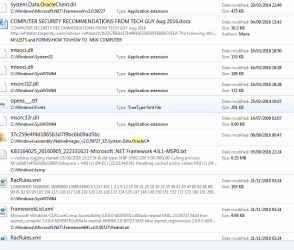
Thanks for the replies. I searched for Oracle entries because Oracle and Java appear to be linked in some way and I do not think I have ever downloaded anything from Oracle apart from Java stuff.
A manual search for "JAVA" might have been more rewarding, if you were going to take that approach.
I will try the Oracle Java uninstaller and then give up.
JavaRa v.1.16 was and is still being used quite recently in a number of computer support fora.
I suspect it would probably work OK under Windows 7.
But I do not speak from personal experience, and it might be prudent to set a system restore point before running it.
I daresay if I get any trouble, it will be best approached by Malware Bytes or similar any way.
I'm not sure what you mean by that?
Malwarebytes Anti-Malware (MBAM) will not detect, target or remove legitimate software, such as "Java".
However, certain computer disinfection tools (such as Zoek or FRST) could be used to remove Java remnants. Doing so would require the help of a trained malware expert who could write a customized script for that.
Not sure what "Good catch on Alejandro85" means
I meant that @Alejandro85 caught the fact that you were somewhat futilely trying to find JAVA remnants by searching for ORACLE entries on the computer.
That is all.
Either way, it's not a very good or safe way to remove the leftovers.
There's too much chance you might inadvertently remove something that ought not to be removed.
You could create a new problem by trying to fix one...
It's important to remove old Java leftovers from the system for security reasons.
But it's not worth obsessing over it.
The 2 removal tools ought to be sufficient.
If not, then I might either wait for someone expert here to help you get rid of it with custom scripts, or head over to a reputable computer disinfection forum for that.
Cheers,
MM