
Hi all:
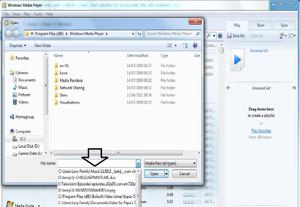
When I go to open a file in Windows Media Player (and indeed many other programs), there is a box to put in (or click on) the file name. On the right end of this box is a little down arrow which, when clicked, provides a drop-down list of previously opened files. A picture of what I am talking about is below:
My question is simple: is there a way to delete this list? I cannot really find a way to do it in the Options settings for the program. Alternatively, is there a setting somewhere that can be adjusted to not store these settings?
Thanks in advance for any help!
Bonesky
When I go to open a file in Windows Media Player (and indeed many other programs), there is a box to put in (or click on) the file name. On the right end of this box is a little down arrow which, when clicked, provides a drop-down list of previously opened files. A picture of what I am talking about is below:

My question is simple: is there a way to delete this list? I cannot really find a way to do it in the Options settings for the program. Alternatively, is there a setting somewhere that can be adjusted to not store these settings?
Thanks in advance for any help!
Bonesky
My Computer
At a glance
Windows 7 Professional - 64bit
- OS
- Windows 7 Professional - 64bit

