Solved How disable/clear File name dropdown lists in Common Dialog Boxes

Lexus45

New member
Member
Local time
10:25 AM
Messages
29
I recently moved from XP Professional SP3 to Windows 7 Professional SP1 x64 and I note that the last 20 files that were opened, saved, saved as are automatically stored and accessable/viewable via the "File Name" dropdown list at the bottom of the Windows 7 Common Dialog Boxes. Also if a file or picture was downloaded previously, that file path is also available in the dropdown box the next time an item is downloaded.

As in the past, this creates a hugh Privacy Issue on a shared computer.

In XP there was a Group Policy Setting under Windows Components>Windows Explorer>Common Open File Dialog that allowed you to suppress files from appearing in these Dialog Boxes.

Also in XP most of these items were kept in the Registry under HKCU/Software/Microsoft/Windows/CurrentVersion/Explorer/ComDlg32.
The entries were shown in plain english and could also be easily deleted. In fact this area could be cleared by a button in the classic start menu.

I note in Windows 7 Professional, that the Group Policy is still there, but it has no effect on the newer Windows 7 Dialog Boxes.
I also note that the Registry entry is still there, but it is now more elaborate and the entries are in binary code.


So, regarding the File name dropdown list at the bottom of the box:

>Does anyone know how to prevent the names from appearing by any means (looks like the last 20 names are in the list)?

>Does anyone know how to delete them either individually or all at once?

Thanks
 

My Computer My Computer

At a glance

Windows 7 Professional x64Intel
Computer Manufacturer/Model Number
Maingear
OS
Windows 7 Professional x64
CPU
Intel
Hello Lexus, and welcome to Seven Forums.

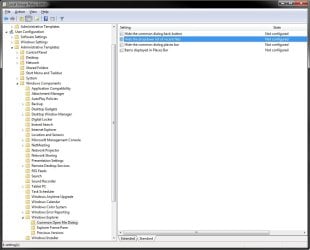
It's still there at the Group Policy location below with the Hide the dropdown list of recent files in Windows 7.

http://www.sevenforums.com/tutorial...nable-disable-dropdown-list-recent-files.html

User Configuration\Administrative Templates\Windows Components\Windows Explorer\Common Open File Dialog

GPEDIT.jpg


You might also be interested in this as well. :)

http://www.sevenforums.com/tutorials/130778-windows-explorer-auto-suggest-turn-off.html


Hope this helps,
Shawn
 
Last edited:

My Computer My Computer

At a glance

64-bit Windows 11 Pro for WorkstationsIntel i7-8700K OC'd to 5 GHz64 GB (4x16GB) G.SKILL TridentZ RGB DDR4 3600...ASUS ROG-STRIX-GTX1080TI-O11G-GAMING
Computer type
PC/Desktop
Computer Manufacturer/Model Number
Self built custom
OS
64-bit Windows 11 Pro for Workstations
CPU
Intel i7-8700K OC'd to 5 GHz
Motherboard
ASUS ROG Maximus XI Formula Z390
Memory
64 GB (4x16GB) G.SKILL TridentZ RGB DDR4 3600 MHz
Graphics Card(s)
ASUS ROG-STRIX-GTX1080TI-O11G-GAMING
Sound Card
Integrated
Monitor(s) Displays
2 x Samsung Odyssey G7 27"
Screen Resolution
2560x1440
Hard Drives
1TB Samsung 990 PRO M.2,
4TB Samsung 990 PRO PRO M.2,
TerraMaster F8 SSD Plus NAS
PSU
Seasonic Prime Titanium 850W
Case
Thermaltake Core P3
Cooling
Corsair Hydro H115i
Keyboard
Logitech wireless K800
Mouse
Logitech MX Master 4
Internet Speed
2 Gb/s Download and 100 Mb/s Upload
Antivirus
Malwarebyte Anti-Malware Premium
Browser
Google Chrome
Other Info
Logitech Z625 speaker system,
Logitech BRIO 4K Pro webcam,
HP Color LaserJet Pro MFP M477fdn,
APC SMART-UPS RT 1000 XL - SURT1000XLI,
Galaxy S23 Plus phone
Thanks.

I had previously set this when I first got my system, but forgot and then also noticed that the file names where being shown.

Interestingly, the Policy was still shown as Enabled (disabling the feature). I un-Enabled it and then re-Enabled it and it now works as it should.
Only thing I can figure out is that after I had Enabled this, I did install Office 2010 so maybe that caused some conflict.
All is well, but I also just posted requesting a manual way to delete these just in case they show up again and I need a quick fix.

I found the below from Orbital Shark and it works well; however it is cumbersome to enter the registry and perfom this manually each time so...............

how about one of the gurus on this forum with registry expertise create a registry edit file that performs these deletions and then we all can save it and create a shortcut to it on our computers to easily use whenever we need?

Don't know if it matters or not, but I am interested in this for Windows 7 64bit.

Thanks


If you want to selectively clear the Common Dialog file names MRU, you need to delete these two registry keys manually:

HKEY_CURRENT_USER \ Software \ Microsoft \ Windows \ CurrentVersion \ Explorer \ ComDlg32 \ LastVisitedPidlMRU

HKEY_CURRENT_USER \ Software \ Microsoft \ Windows \ CurrentVersion \ Explorer \ ComDlg32 \ OpenSavePidlMRU


Just tested it and it works
smile.gif


Thanks again
 
Last edited by a moderator:

My Computer My Computer

At a glance

Windows 7 Professional x64Intel
Computer Manufacturer/Model Number
Maingear
OS
Windows 7 Professional x64
CPU
Intel

My Computer My Computer

At a glance

64-bit Windows 11 Pro for WorkstationsIntel i7-8700K OC'd to 5 GHz64 GB (4x16GB) G.SKILL TridentZ RGB DDR4 3600...ASUS ROG-STRIX-GTX1080TI-O11G-GAMING
Computer type
PC/Desktop
Computer Manufacturer/Model Number
Self built custom
OS
64-bit Windows 11 Pro for Workstations
CPU
Intel i7-8700K OC'd to 5 GHz
Motherboard
ASUS ROG Maximus XI Formula Z390
Memory
64 GB (4x16GB) G.SKILL TridentZ RGB DDR4 3600 MHz
Graphics Card(s)
ASUS ROG-STRIX-GTX1080TI-O11G-GAMING
Sound Card
Integrated
Monitor(s) Displays
2 x Samsung Odyssey G7 27"
Screen Resolution
2560x1440
Hard Drives
1TB Samsung 990 PRO M.2,
4TB Samsung 990 PRO PRO M.2,
TerraMaster F8 SSD Plus NAS
PSU
Seasonic Prime Titanium 850W
Case
Thermaltake Core P3
Cooling
Corsair Hydro H115i
Keyboard
Logitech wireless K800
Mouse
Logitech MX Master 4
Internet Speed
2 Gb/s Download and 100 Mb/s Upload
Antivirus
Malwarebyte Anti-Malware Premium
Browser
Google Chrome
Other Info
Logitech Z625 speaker system,
Logitech BRIO 4K Pro webcam,
HP Color LaserJet Pro MFP M477fdn,
APC SMART-UPS RT 1000 XL - SURT1000XLI,
Galaxy S23 Plus phone
Back
Top