Deleting the "Searches" folder from my user folder?

nogills

New member
Local time
11:07 PM
Messages
14
Location
Atlanta, GA
Hey guys is there anyway to delete the Searches folder from my user folder? I mean i can delete it and whatever but it just keeps coming back. I don't even have Search Indexing enabled so I don't know why it keeps coming back. Any ideas? I just don't like an empty folder that I don't use taking up space.
 

My Computer My Computer

Computer Manufacturer/Model Number
Alienware m15x (laptop)
OS
Windows 7 Home Premium 32-bit
CPU
Intel Core 2 Duo Extreme 2.8 gHz
Memory
4 gigs (3gigs usable)
Graphics Card(s)
Nvidia 8800M GTX 512
Sound Card
onboard Realtek
Monitor(s) Displays
laptop display
Screen Resolution
1920x1200
Internet Speed
cable

My Computer My Computer

OS
Windows 7 Ultimate x64 Service Pack 1 (Build 6.1.7601)
CPU
Intel Core 2 Quad Q6600 (G0 Kentsfield) LGA775 (FC-LGA6)
Motherboard
GIGABYTE GA-EP35C-DS3R (Rev. 2.1)
Memory
Corsair TW3X4G1333C9A 4GB PC-10600 (2x XMS3 2GB)
Graphics Card(s)
ASUS nVIDIA GeForce 560
Sound Card
RealTek ALC885/889A/890
Monitor(s) Displays
ChiMei CMV CT-730D 17inch (LCD Monitor)
Screen Resolution
1280-1024 60Hertz (Ture Colour 32bit)
Hard Drives
2x Barracuda 7200.10 SATA 3.0Gb/s 160-GB Hard Drive ST3160815AS (AHCI)
PSU
ANTEC 750w Earthwatts
Case
Thermaltake Shark (VA7000SWA ATX) Full Tower
Cooling
Front 120mm fan (1400 RPM) /Rear 120mm (1400 RPM) blue LED
Keyboard
Labtec Media Desktop Y-SAD65
Mouse
Razer DeathAdder 3G Infrared Sensor (1800DPI)
Internet Speed
Telstra BigPond Elite Liberty ADSL2+ 24Mbps/256kbps
Other Info
ASUS PCE-N13 802.11n Wireless LAN card
Hello Nogills,

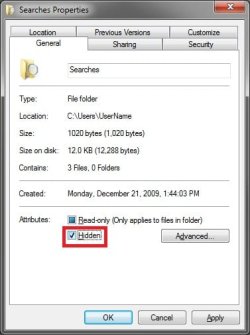
Since it is a system file, it will just keep being recreated not long after you delete it. The Searches folder is also used to save your searches in Windows Explorer as well. It is not tied to the index. You cannot delete it, but you can hide the C:\Users\(user-name)\Searches folder to not see it anymore.

Searches.jpg

Hope this helps,
Shawn
 

My Computer My Computer

Computer type
PC/Desktop
Computer Manufacturer/Model Number
Self built custom
OS
64-bit Windows 11 Pro for Workstations
CPU
Intel i7-8700K OC'd to 5 GHz
Motherboard
ASUS ROG Maximus XI Formula Z390
Memory
64 GB (4x16GB) G.SKILL TridentZ RGB DDR4 3600 MHz
Graphics Card(s)
ASUS ROG-STRIX-GTX1080TI-O11G-GAMING
Sound Card
Integrated
Monitor(s) Displays
2 x Samsung Odyssey G7 27"
Screen Resolution
2560x1440
Hard Drives
1TB Samsung 990 PRO M.2,
4TB Samsung 990 PRO PRO M.2,
TerraMaster F8 SSD Plus NAS
PSU
Seasonic Prime Titanium 850W
Case
Thermaltake Core P3
Cooling
Corsair Hydro H115i
Keyboard
Logitech wireless K800
Mouse
Logitech MX Master 4
Internet Speed
2 Gb/s Download and 100 Mb/s Upload
Antivirus
Malwarebyte Anti-Malware Premium
Browser
Google Chrome
Other Info
Logitech Z625 speaker system,
Logitech BRIO 4K Pro webcam,
HP Color LaserJet Pro MFP M477fdn,
APC SMART-UPS RT 1000 XL - SURT1000XLI,
Galaxy S23 Plus phone
I just tried making it hidden and even though I select the "Hidden" checkbox and click apply and ok, it doesn't make it hidden. I clicked refresh and even logged off and back on and it still isn't hidden. ?
 

My Computer My Computer

Computer Manufacturer/Model Number
Alienware m15x (laptop)
OS
Windows 7 Home Premium 32-bit
CPU
Intel Core 2 Duo Extreme 2.8 gHz
Memory
4 gigs (3gigs usable)
Graphics Card(s)
Nvidia 8800M GTX 512
Sound Card
onboard Realtek
Monitor(s) Displays
laptop display
Screen Resolution
1920x1200
Internet Speed
cable
Umm, it appears that it only hides it at the C:\Users\(user-name)\Searches location and not from the Start Menu location despite it being marked as hidden at both locations. It appears to be one of those special folder locations in the Start Menu like how the Desktop folder in Favorites (navigation pane) show all the available shortcuts even though you do not have them turned on for your desktop. :confused:
 

My Computer My Computer

Computer type
PC/Desktop
Computer Manufacturer/Model Number
Self built custom
OS
64-bit Windows 11 Pro for Workstations
CPU
Intel i7-8700K OC'd to 5 GHz
Motherboard
ASUS ROG Maximus XI Formula Z390
Memory
64 GB (4x16GB) G.SKILL TridentZ RGB DDR4 3600 MHz
Graphics Card(s)
ASUS ROG-STRIX-GTX1080TI-O11G-GAMING
Sound Card
Integrated
Monitor(s) Displays
2 x Samsung Odyssey G7 27"
Screen Resolution
2560x1440
Hard Drives
1TB Samsung 990 PRO M.2,
4TB Samsung 990 PRO PRO M.2,
TerraMaster F8 SSD Plus NAS
PSU
Seasonic Prime Titanium 850W
Case
Thermaltake Core P3
Cooling
Corsair Hydro H115i
Keyboard
Logitech wireless K800
Mouse
Logitech MX Master 4
Internet Speed
2 Gb/s Download and 100 Mb/s Upload
Antivirus
Malwarebyte Anti-Malware Premium
Browser
Google Chrome
Other Info
Logitech Z625 speaker system,
Logitech BRIO 4K Pro webcam,
HP Color LaserJet Pro MFP M477fdn,
APC SMART-UPS RT 1000 XL - SURT1000XLI,
Galaxy S23 Plus phone
Back
Top