Dell Desktop USB not working (need driver)

windows7fan

New member
Local time
10:14 AM
Messages
1
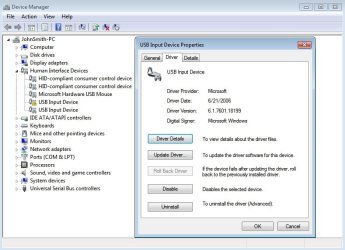
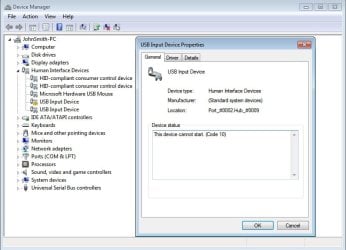
I'm getting this yellow exclamation after a clean Win 7 install using the bios mod/OEM activation method. I think the yellow exclamation is for the front side and back side USB ports because all of them are not working. Nothing happens when I plug in a USB thumb drive. Alternatively, it can be for the Apple HD Cinema Display 23' USB ports at the back of the monitor but they are working properly.

My system specs are as follows:

Dell Precision 390 with SLIC 2.1 bios mod
Win 7 Ultimate x64 SP1
Intel Q6600 quad core cpu
Intel 975x chipset (with Intel 9.4.0.1017 chipset driver installed)

I searched the Dell support page but it's useless because my setup was made for XP. Any suggestion? Thanks!
 

Attachments
  • 1.jpg
    1.jpg
    54.4 KB · Views: 0
  • 2.jpg
    2.jpg
    58.9 KB · Views: 0
  • 3.jpg
    3.jpg
    52.8 KB · Views: 0

My Computer My Computer

Computer type
PC/Desktop
OS
Windows 7 Ultimate x64
What do you mean by OEM activation method? Perform a Windows update to determine if there are any USB2.0 driver updates available.
 

My Computer My Computer

Computer type
PC/Desktop
Computer Manufacturer/Model Number
Golden Mk. I.4
OS
Windows 10 Pro x64 ; Xubuntu x64
CPU
Intel i7 860 @ 2.80 GHz O/C'ed to 4.0GHz
Motherboard
Gigabyte P55A-UD3R Rev.1. Award BIOS F13
Memory
16GB Corsair Vengance DDR3 @ 661 MHz Dual Channel (9-9-9-24)
Graphics Card(s)
EVGA NVidia GTX 560 1024MB
Sound Card
Realtek Integrated
Monitor(s) Displays
Dual Samsung SyncMaster 2494HS
Screen Resolution
1920*1080 and 1920*1080
Hard Drives
1*Samsung 840 EVO 120GB SSD;
1*OCZ Vertex 2 60GB SSD;
2*Samsung F3 SpinPoint 1TB in RAID0;
1*Samsung F1 SpinPoint 1TB;
2*Western Digital 1TB External USB 3.0
1*Western Digital 500GB External USB 3.0
1*Seagate 500GB External USB 2.0
PSU
Thermaltake ToughPower QFan 750W
Case
Thermaltake Element S VK60001W2Z
Cooling
Corsair H60 Water Cooling, 2*230mm and 2*80mm case fans
Keyboard
Logitech G110
Mouse
Logitech MX518

My Computer My Computer

Computer type
Laptop
Computer Manufacturer/Model Number
HP Pavilion dv6-6c10us
OS
x64 (6.3.9600) Win8.1 Pro & soon dual boot x64 (6.1.7601) Win7_SP1 HomePrem
CPU
AMD A6-3420M APU with Radeon(tm) HD Graphics
Motherboard
Hewlett-Packard 1805
Memory
6.00 GB
Graphics Card(s)
AMD Radeon(TM) HD 6520G
Sound Card
(1) AMD High Definition Audio Device (2) IDT High Definiti
Monitor(s) Displays
HP W2072a 20" LCD (1600 x 900) @ 60 Hz
Screen Resolution
1366 x 768 x 32 bits (4294967296 colors) @ 60 Hz
Hard Drives
ST640LM0 00 HM641JI SATA Disk Device
Keyboard
Logitech k520 wireless KB
Mouse
Logitech m320 wireless mouse (bundled with KB)
Internet Speed
15/5 | 54 MB Wireless 'n'
Antivirus
Realtime: Defender or Avast | On-demand: Malwarebytes, ESET
Browser
IE 11 on Win8, IE 10 on win 7
Other Info
Media: [Gimp, Audacity, VLC] || Comm: [WEmail 2012, Skype] || Productivity: [OpenOffice,| Textpad] || Utils: [Sysinternals, cCleaner, Speccy, Defraggler]
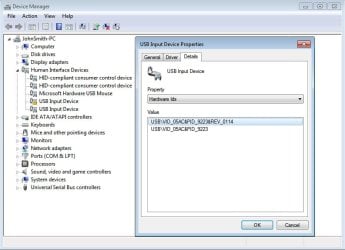
The Hardware IDs indicate it's an Apple Cinema display device.

But I'm confused. Are there USB ports on the Apple device not working??? or the computer?? Your thumb drive didn't work on which device??

Did you use the WinACD drivers on XP? Is your Cinema device working otherwise?? Someone else had similar problem with Win 7 x64 but I think their's is OK even tho that exclamation point appears.

http://www.sevenforums.com/drivers/67926-apple-cinema-display-windows-7-64bit-ultimate.html
 

My Computer My Computer

Computer type
PC/Desktop
Computer Manufacturer/Model Number
Dell Optiplex 360 and Optiplex 755
OS
Desk 1: Win 7 Pro x32; Desk 2: Windows 10 x64
Hard Drives
500GB Crucial SSD in both Desktops
Other Info
Buffalo 6TB NAS, Raid 1
Back
Top