Dell e6420 webcam issue - missing some software?

PosslPussl

New member
Local time
6:05 AM
Messages
20
Hello all, I'm not sure what the right place for this query is, so I thought I'd start here.

Does anyone have a Dell Latitude e6420 laptop still running windows 7, with the integrated webcam functioning properly in every respect?
If so I'd like to hear from you, because I think your machine must have some software that is missing on mine.

The webcam on my e6420 has two problems

1) It only works on skype - I can access the camera under skype settings, and it works, except for an unacceptable video lag - the best part of a second.

2) Apart from skype, there is no direct way of accessing the camera, it doesn't show anywhere on the Start Menu or All Programs. The only place it does show is under Device Manager, which says it's working properly and the driver is up to date.

That's why I think I might be missing some software. Somewhere on the net I saw a reference to those machines being shipped with a CD called "Dell Webcam Central" or some such similar name. Does anyone know anything about that?

I was given the machine by a friend, he bought it second hand, with the original win7 on it, no CDs came with it. I don't know how the web camera worked when he had it, but I assume that it didn't have either of the problems I've outlined above. (It can't have had those problems when it was new, or someone would have wanted their money back, wouldn't they?)

He used the machine without trouble until the free windows 10 upgrade came along, then he got the upgrade by mistake, because he didn't realize you had to opt out if you didn't want it - otherwise you got it by default. After that nothing worked properly, it had so many issues it was pretty well unuseable. So he gave up, gave me the machine and bought a new one. I messed around with Windows 10 on it, till I gave up in despair, and abandoned the project.

Until recently, when I decided I wanted to use it again. So I did a complete clean reinstall of Win7 from an OEM disk, got all the drivers from the Dell site, and now everything works fine again, except for the webcam, which sort of works, but not properly, as I've said above.

That's why I think there must have been some Dell-specific camera software on the machine that was wiped by the clean reinstall, and now needs reinstalling.

Anyone got any ideas?
Thanks,
Posslpussl
 

My Computer

Computer type
PC/Desktop
Computer Manufacturer/Model Number
HP
OS
Windows 7 Professional 64bit with SP1
CPU
Intel(R) Core(TM)2 Duo CPU
Memory
4G
Sound Card
realtek HD Audio
Antivirus
Microsoft Security Essentials
Browser
firefox, chrome
Do you still have the Factory Recovery partition (not the Win 10 Recovery Partition)?

As you installed from a OEM drive, is it activated?
Did you know that HeiDoc has the original Dell E6420 media to download?

Does the E6420 has UEFI BIOS? I ask because to install as UEFI-GPT you will need to split sources\install.wim into two slaller install.swm so you can move it to a Fat32 USB drive.

I suggest you reinstall Win 7 Pro using the media on the link. It will activate and have all the software that came with the E6420.

For the updates, use Single file with all updates - Simplix
 
Last edited:

My Computers

System One System Two

  • Computer type
    PC/Desktop
    Computer Manufacturer/Model Number
    custom build
    OS
    Windows 7 HP 64
    CPU
    i5 6600K - 800MHz to 4200MHz
    Motherboard
    GA-Z170-HD3P
    Memory
    4+4G GSkill DDR4 3000
    Graphics Card(s)
    IG - Intel 530
    Monitor(s) Displays
    Samsung 226BW
    Screen Resolution
    1680x1050
    Hard Drives
    (1) -1 SM951 – 128GB M.2 AHCI PCIe SSD drive for Windows 7 and Lubuntu
    (2) -1 WD SATA 3 - 1T for Data
    (3) -1 WD SATA 3 - 1T for backup
    PSU
    Thermaltake 450W TR2 gold
    Keyboard
    Old and good Chicony mechanical keyboard
    Mouse
    Logitech mX performance - 9 buttons (had to disable some)
    Internet Speed
    500Mb/s
    Browser
    Firefox 64
    Other Info
    TinyWall firewall
  • Computer type
    Laptop
    System Manufacturer/Model Number
    Asus Q550LF
    OS
    Windows 7 Pro
    CPU
    i7-4500U 800MHz to 3.0GHz
    Motherboard
    Asus Q550LF
    Memory
    (4+4)G DDR3 1600
    Graphics Card(s)
    IG intel 4400 + NVIDIA GeForce GT 745M
    Sound Card
    Realtek
    Monitor(s) Displays
    LG Display LP156WF4-SPH1
    Screen Resolution
    1920 x 1080
    Hard Drives
    BX500 120G SSD for Windows and programs +
    1T HDD for data
    Internet Speed
    500 Mb/s
    Browser
    Firefox
    Other Info
    TinyWall firewall
Hello Megaherz 07 - thanks for your reply.

Factory recovery partition is gone - clean reinstall wiped the whole disk.
Windows 7 is activated - everything works properly except the webcam. That works "properly" too, if you don't mind the video latency. All my skype friends notice how badly out of sync my voice and video are. That's actually all I'm trying to fix - I don't need the webcam for anything else except skype.

From your Heidoc link I've downloaded the file G13K9_PW4KGA00_W7SP1PRO64_ROW(DL).iso. As I understand it, the next step is to make a bootable USB drive from this iso file. I've never done that before, but we'll see how we go.

UEFI bios? I don't know anything about that, I'll need to do a bit of research.

Am I right in assuming that if the install works ok, the machine will then be exactly as it was when it was shipped new?

It seems a lot of fuss and bother to have to reinstall the operating system, just to get the webcam working properly. Could it simply be a driver problem?
My Windows install disk wasn't a Dell disk, so how could it have installed the correct driver?
Any idea how I can establish what the correct driver (ie. the one the machine was shipped with) is, and where to get it?

I'll report progress shortly.


PosslPussl
 

My Computer

Computer type
PC/Desktop
Computer Manufacturer/Model Number
HP
OS
Windows 7 Professional 64bit with SP1
CPU
Intel(R) Core(TM)2 Duo CPU
Memory
4G
Sound Card
realtek HD Audio
Antivirus
Microsoft Security Essentials
Browser
firefox, chrome
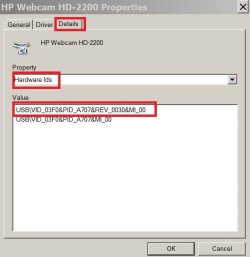
Open device Manager. Right click on webcam device and open properties. On the Details tab, select hardware ID on the pull down arrow. Select the first line, right click and select copy. Paste it here. It's a string like USB\VID_03F0&PID_A707&REV_0030&MI_00
HardwareID.JPG

To make a USB boot able drive (8G) with the iso you downloaded:

Open a CMD window as administrator and type:

diskpart
list disk (it will list all drives. Identify the USB drive number)
select disk n (replace n by the USB drive number obtained with list disk)
clean
convert mbr
create part primary
select part 1
format fs=ntfs quick
assign
active
exit (to exit diskpart)

On Win 7 use 7Zip to extract all files and folders from the Win 7 iso file to the USB drive.
On Win 10, mount the iso file and copy all files and folders to the USB drive.
 

My Computers

System One System Two

  • Computer type
    PC/Desktop
    Computer Manufacturer/Model Number
    custom build
    OS
    Windows 7 HP 64
    CPU
    i5 6600K - 800MHz to 4200MHz
    Motherboard
    GA-Z170-HD3P
    Memory
    4+4G GSkill DDR4 3000
    Graphics Card(s)
    IG - Intel 530
    Monitor(s) Displays
    Samsung 226BW
    Screen Resolution
    1680x1050
    Hard Drives
    (1) -1 SM951 – 128GB M.2 AHCI PCIe SSD drive for Windows 7 and Lubuntu
    (2) -1 WD SATA 3 - 1T for Data
    (3) -1 WD SATA 3 - 1T for backup
    PSU
    Thermaltake 450W TR2 gold
    Keyboard
    Old and good Chicony mechanical keyboard
    Mouse
    Logitech mX performance - 9 buttons (had to disable some)
    Internet Speed
    500Mb/s
    Browser
    Firefox 64
    Other Info
    TinyWall firewall
  • Computer type
    Laptop
    System Manufacturer/Model Number
    Asus Q550LF
    OS
    Windows 7 Pro
    CPU
    i7-4500U 800MHz to 3.0GHz
    Motherboard
    Asus Q550LF
    Memory
    (4+4)G DDR3 1600
    Graphics Card(s)
    IG intel 4400 + NVIDIA GeForce GT 745M
    Sound Card
    Realtek
    Monitor(s) Displays
    LG Display LP156WF4-SPH1
    Screen Resolution
    1920 x 1080
    Hard Drives
    BX500 120G SSD for Windows and programs +
    1T HDD for data
    Internet Speed
    500 Mb/s
    Browser
    Firefox
    Other Info
    TinyWall firewall
Hello Megaherz07, webcam hardware ID is USB\VID_1BCF&PID_2802&REV_1<09&MI_00

Tell me why you've asked for this please?
In the meantime I'll go buy myself a new 8G usb drive.

Thanks, Posslpussl
 

My Computer

Computer type
PC/Desktop
Computer Manufacturer/Model Number
HP
OS
Windows 7 Professional 64bit with SP1
CPU
Intel(R) Core(TM)2 Duo CPU
Memory
4G
Sound Card
realtek HD Audio
Antivirus
Microsoft Security Essentials
Browser
firefox, chrome

My Computers

System One System Two

  • Computer type
    PC/Desktop
    Computer Manufacturer/Model Number
    custom build
    OS
    Windows 7 HP 64
    CPU
    i5 6600K - 800MHz to 4200MHz
    Motherboard
    GA-Z170-HD3P
    Memory
    4+4G GSkill DDR4 3000
    Graphics Card(s)
    IG - Intel 530
    Monitor(s) Displays
    Samsung 226BW
    Screen Resolution
    1680x1050
    Hard Drives
    (1) -1 SM951 – 128GB M.2 AHCI PCIe SSD drive for Windows 7 and Lubuntu
    (2) -1 WD SATA 3 - 1T for Data
    (3) -1 WD SATA 3 - 1T for backup
    PSU
    Thermaltake 450W TR2 gold
    Keyboard
    Old and good Chicony mechanical keyboard
    Mouse
    Logitech mX performance - 9 buttons (had to disable some)
    Internet Speed
    500Mb/s
    Browser
    Firefox 64
    Other Info
    TinyWall firewall
  • Computer type
    Laptop
    System Manufacturer/Model Number
    Asus Q550LF
    OS
    Windows 7 Pro
    CPU
    i7-4500U 800MHz to 3.0GHz
    Motherboard
    Asus Q550LF
    Memory
    (4+4)G DDR3 1600
    Graphics Card(s)
    IG intel 4400 + NVIDIA GeForce GT 745M
    Sound Card
    Realtek
    Monitor(s) Displays
    LG Display LP156WF4-SPH1
    Screen Resolution
    1920 x 1080
    Hard Drives
    BX500 120G SSD for Windows and programs +
    1T HDD for data
    Internet Speed
    500 Mb/s
    Browser
    Firefox
    Other Info
    TinyWall firewall
Hello Megaherz07,

Thanks for those links.

DriverIdentifier site shows Version: 6.1.7600.16385,2006-06-21 as correct for my hardware ID, that's the driver I have.

(See attached screenshots from Device Manager - although I'm puzzled about why it shows the "Driver Version" as different from the "File Version" - ).

The Dell website didn't help, it looks like the only option is the OS reinstall from the .ISO file. I've extracted all the files with 7-Zip File Manager, so I'm ready to make the bootable USB drive.

Your instructions look pretty clear, so it should go ok - I'll let you know. The big question is - will my webcam work properly after all this fuss and bother?

Posslpussl
 

Attachments

  • webcam driver info.JPG
    webcam driver info.JPG
    68.1 KB · Views: 0

My Computer

Computer type
PC/Desktop
Computer Manufacturer/Model Number
HP
OS
Windows 7 Professional 64bit with SP1
CPU
Intel(R) Core(TM)2 Duo CPU
Memory
4G
Sound Card
realtek HD Audio
Antivirus
Microsoft Security Essentials
Browser
firefox, chrome
Back
Top