
Dell Photo 926 and Windows 7 32-Bit -- Compatible?

osu1357

New member
Local time
11:11 AM
Messages
28
Sorry .. I posted this also under Hardware and Devices .. not sure what category it fits best under...

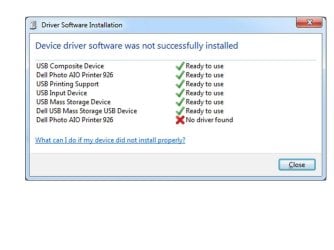
I recently performed a clean install of Windows 7 32-Bit and noticed when I installed my Dell Photo 926 printer software / drivers, that an error message came up during the install stating that the Dell 926 was not compatible with Windows 7. I checked Dell's website and my printer is supported using Vista-compatible drivers. Here is the screen shot of the error from "Installing New Device" It's strange because it shows the driver for Dell Photo AIO Printer 926 twice.. The first entry shows a green check mark .. The second shows a Red X.. Anyone know why?? I can print fine .. Just a strange error message ..
 

Attachments
  • 926.jpg
    926.jpg
    42.3 KB · Views: 22

My Computer My Computer

At a glance

Windows 7 Home Premium 64-BitIntel Core i78 GB
Computer type
PC/Desktop
Computer Manufacturer/Model Number
Dell Inspiron 5721
OS
Windows 7 Home Premium 64-Bit
CPU
Intel Core i7
Memory
8 GB
Hard Drives
1 TB
Internet Speed
20 Mbps
Antivirus
McAfee Internet Security

My Computer My Computer

At a glance

Windows 10 Home x64INTEL Core i5-750 Quad-Core 3.37GHzHyperX Fury Black Series 8GB (2 x 4GB) 1866MhzEVGA GeForce GTX 750 Superclocked 1GB 128-Bit...
Computer type
PC/Desktop
OS
Windows 10 Home x64
CPU
INTEL Core i5-750 Quad-Core 3.37GHz
Motherboard
ASUS P7P55D
Memory
HyperX Fury Black Series 8GB (2 x 4GB) 1866Mhz
Graphics Card(s)
EVGA GeForce GTX 750 Superclocked 1GB 128-Bit GDDR5
Monitor(s) Displays
LG 32MA68HY 32" IPS
Screen Resolution
1920 x 1080
Hard Drives
Samsung 840 Evo 120GB, SEAGATE 500GB Barracuda® 7200.12, SATA 3 Gb/s, 7200 RPM, 16MB cache
PSU
ANTEC TruePower New TP-550, 80 PLUS, 550W
Case
ANTEC Three Hundred Illusion
Cooling
COOLER MASTER Hyper 212 Plus, 4 x 120mm 1 x 140mm Noctua's
Internet Speed
85 + Mbps
Antivirus
Avast
Browser
Vivaldi
Dell printer 926 - Driver problem due to localization failures

Great News.... I've found the answer !!!! (after looking after it for a year...)

If your problem looks like this:
Driver setup software will only install the scanner, and the some soft, but wouldnt install the PRINTING Driver. After install, you see the printer in the control panel, but it wont print.

Reason and how to troubleshooting this:

You might be encountering problems due to programming failure(s) of the english driver for non-english users.

For example driver verions A01 named R150175.exe (aimed, according to Dell.com, both for english and international users with 64 bits OS ) wouldnt work in FRENCH WINDOWS 7 or 8 (wether 32 or 64 bits). But FRENCH ONLY LOCALIZED PILOTE named R260237.exe ( 06/05/2010 version A00) do WORK!!
You can get it there :
Pilotes et téléchargements | Dell France

So everybody...just go to your country dell support page and try to find the former drivers that were localized version only. Not english. Not international. That would do the trick!!

You can get some hint on this issue on this THREAD
Dell 926 photo and windows 8.1 (resolved) - Printers Forum - Peripherals - Dell Community

...I should also specify that :

1) I first runned Dell's cleaning patch to remove the former R150175.exe driver from my laptop (running with a french version of Windows 8.1) . You can download it on the page where Dell gives the drivers for Aio 926 (DellCleanUpUtility.Exe - inside a zip file)

2) After the reboot, I did not launch the setup of the good driver directly (by double clicking the icon): I followed the steps described in a link quoted in the thread (http://www.sevenforums.com/drivers/108055-dell-photo-926-windows-7-32-bit-compatible.html) for installing the driver in Windows Vista 64 SR2 Compatibility mode.
...So, I Hope that the right localized version of the driver installed in Vista 64 compatibility mode, will work fine for you too!
 
Last edited:

My Computer My Computer

At a glance

windows 7
OS
windows 7
Back
Top