Dell Studio XPS 16 Driver Help :)

A F 1 G 3

New member
Local time
3:54 AM
Messages
23
Just got a new laptop, need help with some drivers...

Drivers & Downloads

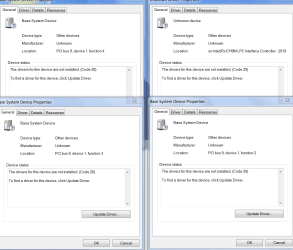
Tried downloading from there but wasn't sure of which ones were needed and which were just bloatware..some of them that I know I need weren't installing for whatever reason...anyways here's a screen cap!


Attachments
  • troubleshooting6.PNG
    troubleshooting6.PNG
    34.7 KB · Views: 333

My Computer

Computer Manufacturer/Model Number
Sony Vaio VGN-NW265F/B
OS
Windows 7 Ulimate (64-Bit)
CPU
Pentium Dual-Core CPU T4300 @ 2.10GHz (Penryn)
Memory
4.00 GB
I wouldn't worry about those if I were you. In my opinion, if a) the system runs, and b) you are not missing any features you need, there is no need to mess around with those drivers.
 

My Computer

Computer Manufacturer/Model Number
Custom
OS
Windows 7 Professional x64
CPU
Intel i7 2600K OC'd @ 4620 MHz
Motherboard
Asus P8Z68-V Pro
Memory
16GB GSkill Sniper 2133 Mhz (4x4GB)
Graphics Card(s)
EVGA GeForce GTX 480 SuperClocked+
Sound Card
Realtek High Definition Audio
Monitor(s) Displays
2x Acer S273HLbmii 27"
Screen Resolution
2 x 1920x1080
Hard Drives
64GB Crucial M4 SSD

Storage: Hitachi 1TB 5400RPM, Samsung 1.5TB 5400RPM
PSU
Corsair HW Series 750w (modular)
Case
Cooler Master HAF 932 Advanced Blue Edition
Cooling
CM Hyper 212+ CPU cooler, 3x 230mm + 1x 140mm case fans
Keyboard
Logitech MK320 (wireless)
Mouse
Logitech MK320 (wireless)
Internet Speed
30 Mb/s : 2 Mb/s
a f i g 3 , use Dells drivers Drivers & Downloads just change the product number to the model of your laptop :) if you need more help post back
 

My Computer

Computer type
PC/Desktop
Computer Manufacturer/Model Number
self build
OS
win 7 ultimate32bit, Win8.1pro wmc 32bit
CPU
amd phenom x4 9600
Motherboard
asus m2n32-sli deluxe
Memory
corsair twinxs 2x2gb
Graphics Card(s)
2x nvidia 1gb 8500gt
Sound Card
onboard
Monitor(s) Displays
23" PB Viseo 233d
Screen Resolution
1920x1080
Hard Drives
maxtor sata 500gb
maxtor sata 320gb
fujitsu sata200gb
PSU
oryxx tornado 750w
Case
thermaltake xaser lll
Cooling
artic freezer64 pro + 7 case fans
Welcome to Seven Forums. Most of the time the Base system driver is your card reader, in this case Ricoh, it's listed under Chipset, you might give it a try.Drivers & Downloads Different # from the Dell as pebbly as provided but most lkiely the same. Fabe
 

My Computer

Computer Manufacturer/Model Number
Self Built
OS
Windows 7 ultimate 64 bit / XP Home sp3
CPU
intel Core 2 Duo E8400 3.0ghz
Motherboard
Asus P5ND bios 1401
Memory
8 gigs 1066 OCZ Fata1ty
Graphics Card(s)
EVGA GTX 580 Call of Duty Black Ops Edition
Sound Card
Creative Soundblaster Audigy 2zs
Monitor(s) Displays
Asus 24in LCD's 2MS X2
Screen Resolution
1920x1080p @60Hz
Hard Drives
WD Caviar 500 Black/ WD Caviar 200 Blue
PSU
OCZ 700W GameXtreme
Case
NZXT Apollo
Cooling
Corsair H50 CPU/120mm x3 /60mm x2 /Corsair Dominator Ram
Keyboard
Logitech Bluetooth Wireless MX5000
Mouse
Logitech Bluetooth Wireless MX1000
Internet Speed
Download 19.83 Upload 0.97
Other Info
Logitech Z2300 Speakers/ Bose Noise Cancelling Headphones/Avermedia PCI-e Hybrid TV Bravo/Epson NX415 all in one/ 4 Port Powered USB Hub/ LG 10x Bluray Burner /TSST Corp DVDRW External
Thanks, for some reason when I tried to run it the first time install failed but now it took care of most of them, only one Unknown Device is left I'll see if once I restart it goes away
 

My Computer

Computer Manufacturer/Model Number
Sony Vaio VGN-NW265F/B
OS
Windows 7 Ulimate (64-Bit)
CPU
Pentium Dual-Core CPU T4300 @ 2.10GHz (Penryn)
Memory
4.00 GB
Thanks, for some reason when I tried to run it the first time install failed but now it took care of most of them, only one Unknown Device is left I'll see if once I restart it goes away

thank you for posting back and letting us know , if you need any help , we will still be here ;)
 

My Computer

Computer type
PC/Desktop
Computer Manufacturer/Model Number
self build
OS
win 7 ultimate32bit, Win8.1pro wmc 32bit
CPU
amd phenom x4 9600
Motherboard
asus m2n32-sli deluxe
Memory
corsair twinxs 2x2gb
Graphics Card(s)
2x nvidia 1gb 8500gt
Sound Card
onboard
Monitor(s) Displays
23" PB Viseo 233d
Screen Resolution
1920x1080
Hard Drives
maxtor sata 500gb
maxtor sata 320gb
fujitsu sata200gb
PSU
oryxx tornado 750w
Case
thermaltake xaser lll
Cooling
artic freezer64 pro + 7 case fans
if you look at my attachment, the only thing that is left is the upper right hand corner intel thingy....any idea???
 

My Computer

Computer Manufacturer/Model Number
Sony Vaio VGN-NW265F/B
OS
Windows 7 Ulimate (64-Bit)
CPU
Pentium Dual-Core CPU T4300 @ 2.10GHz (Penryn)
Memory
4.00 GB
if you look at my attachment, the only thing that is left is the upper right hand corner intel thingy....any idea???

download the intel chipset driver for your model from the Dell website ;) somehow it did'nt install correctly first time around :(
 

My Computer

Computer type
PC/Desktop
Computer Manufacturer/Model Number
self build
OS
win 7 ultimate32bit, Win8.1pro wmc 32bit
CPU
amd phenom x4 9600
Motherboard
asus m2n32-sli deluxe
Memory
corsair twinxs 2x2gb
Graphics Card(s)
2x nvidia 1gb 8500gt
Sound Card
onboard
Monitor(s) Displays
23" PB Viseo 233d
Screen Resolution
1920x1080
Hard Drives
maxtor sata 500gb
maxtor sata 320gb
fujitsu sata200gb
PSU
oryxx tornado 750w
Case
thermaltake xaser lll
Cooling
artic freezer64 pro + 7 case fans
If you "just got a new Dell laptop" why did you reinstall or feel the need to install? If there is some Dell download that fixes or adds something that applies to your specific installation then do the update, otherwise the old adage "if it ain't broke, don't fix it". I do a lot of support on the Dell forum and see a lot of problems caused by users udating when it wasn't really needed (especially the BIOS as a failed BIOS update and a corrupted BIOS and the only option on a Dell is to replace the motherboard).

You also have to be careful with non-Dell drivers, due to Dell's custom implementation of a lot of hardware. For example I've seen a lot of posts of people trying different sound drivers trying to get the System Mixer function that is not on some models and in most cases the non-Dell drivers will either not install or the sound, including the audio input and output ports, will not work correctly.

If you need to reinstall, the Dell recovery partition on the hard drive, accessed by F8 (for Vista and Win 7 systems) at power on will allow you to restore the PC to the original factory condition.
 

My Computer

Computer type
PC/Desktop
Computer Manufacturer/Model Number
My Own Build
OS
Windows 10 64 bit
CPU
Intel i7 6700K
Motherboard
ASUS ROG Maximus VIII Hero
Memory
16GB Corsair Dominator
Graphics Card(s)
Intel CPU Graphics
Sound Card
RealTek
Monitor(s) Displays
27" Dell S2719dgf
Screen Resolution
2560X1440
Hard Drives
1 TB Samsung 850 EVO SSD for Win 10 Pro
500GB Samsung 850 EVO SSD for Win 10 Insider
2 TB drive for backup
PSU
EVGA Supernova 750G2
Case
BeQuiet Silent Base 600
Cooling
Deepcool Captain 120EX
Keyboard
Microsoft Wireless 2000
Mouse
Microsoft wireless
Internet Speed
100 MB/sec (Cable)
Antivirus
Microsoft Defender and Malwarebytes
Browser
Edge/Firefox
Other Info
Cakewalk (Sonar) by BandLab and Studio One 4.1 Pro recording studio software. MOTU 896Mk3 Hybrid recording interface, Frontier Tranzport wireless control unit, Behringer X-Touch Control Surface.
Five USB connected optical drives for CD Audio production using Nero BurningROM
I have a Dell Studio XPS 16 Myself as you can see from my system specs, and i found that i only had to install 3 drivers manually as the rest were covered by Windows 7 excellent set of base drivers when i did a clean install to upgrade my OS from Vista x64 to Windows 7 x64. Even the AHCI mode was supported out of the box for my HDD without having to insert any special drivers into my installation and all relevant chipset drivers (e.g. ICH9 drivers) came preinstalled.

They were:-

1. The ATI Display Drivers, i prefer the newer Cat 10.3s from ATI than the basic WDDMs that Windows installed automagically when i 1st installed 7. Obtained it from their official website.

2. The Ricoh SD Card Reader Host controller. The previous Drivers that Dell provided on their driver CD sufficed.

3. The Ricoh 1394 Host Controller driver.

Windows 7 has the best out of the box driver repository yet, kudos to MS i say. This is how it should be done on all successive Windows editions. I can't imagine the amount of driver searching i would have to do if i wanted to install some legacy OS on this system for kicks (e.g. Windows XP and below)
 

My Computer

Computer Manufacturer/Model Number
DELL SXPS 1640
OS
Windows 7 x64 Professional SP1
CPU
Intel C2D T9550 2.66 GHz @ 2.793 GHz (Thanks ThrottleStop!!)
Motherboard
Intel PM45
Memory
8 GB DDR3
Graphics Card(s)
ATI MOBILITY RADEON 4670
Sound Card
CREATIVE XFI AUDIO NOTEBOOK
Monitor(s) Displays
16.1 WLED
Screen Resolution
1920x1080
Hard Drives
Seagate ST9500420AS 500GB (465GiBi) 7200 RPM Drive

External Drives:-
2 TB WD Essentials x 3
1 TB WD Mybook Gen 1
1 TB WD Mybook Gen 2
1 TB Seagate
1 TB Seagate
320 GB WD Scorpio Black (enclosed)
PSU
90W Dell Power Brick
Case
Dell Chassis
Cooling
Coolermaster Cooling Pad
Keyboard
Built-in backlighted Keyboard
Mouse
Logitech Wireless Mini Mouse
Internet Speed
4/0.5
I have a Dell Studio XPS 16 Myself as you can see from my system specs, and i found that i only had to install 3 drivers manually as the rest were covered by Windows 7 excellent set of base drivers when i did a clean install to upgrade my OS from Vista x64 to Windows 7 x64. Even the AHCI mode was supported out of the box for my HDD without having to insert any special drivers into my installation and all relevant chipset drivers (e.g. ICH9 drivers) came preinstalled.

They were:-

1. The ATI Display Drivers, i prefer the newer Cat 10.3s from ATI than the basic WDDMs that Windows installed automagically when i 1st installed 7. Obtained it from their official website.

2. The Ricoh SD Card Reader Host controller. The previous Drivers that Dell provided on their driver CD sufficed.

3. The Ricoh 1394 Host Controller driver.

Windows 7 has the best out of the box driver repository yet, kudos to MS i say. This is how it should be done on all successive Windows editions. I can't imagine the amount of driver searching i would have to do if i wanted to install some legacy OS on this system for kicks (e.g. Windows XP and below)
+1 on that , ive upgraded 3 Dell laptops [I5100, I9400 and XPS m1710] and out of the box everything worked apart from the radion graphics on the I5100 but its a very old lappy so was to be expected :D
 

My Computer

Computer type
PC/Desktop
Computer Manufacturer/Model Number
self build
OS
win 7 ultimate32bit, Win8.1pro wmc 32bit
CPU
amd phenom x4 9600
Motherboard
asus m2n32-sli deluxe
Memory
corsair twinxs 2x2gb
Graphics Card(s)
2x nvidia 1gb 8500gt
Sound Card
onboard
Monitor(s) Displays
23" PB Viseo 233d
Screen Resolution
1920x1080
Hard Drives
maxtor sata 500gb
maxtor sata 320gb
fujitsu sata200gb
PSU
oryxx tornado 750w
Case
thermaltake xaser lll
Cooling
artic freezer64 pro + 7 case fans
If you "just got a new Dell laptop" why did you reinstall or feel the need to install? If there is some Dell download that fixes or adds something that applies to your specific installation then do the update, otherwise the old adage "if it ain't broke, don't fix it". I do a lot of support on the Dell forum and see a lot of problems caused by users udating when it wasn't really needed (especially the BIOS as a failed BIOS update and a corrupted BIOS and the only option on a Dell is to replace the motherboard).

You also have to be careful with non-Dell drivers, due to Dell's custom implementation of a lot of hardware. For example I've seen a lot of posts of people trying different sound drivers trying to get the System Mixer function that is not on some models and in most cases the non-Dell drivers will either not install or the sound, including the audio input and output ports, will not work correctly.

If you need to reinstall, the Dell recovery partition on the hard drive, accessed by F8 (for Vista and Win 7 systems) at power on will allow you to restore the PC to the original factory condition.

dont like all the bloatware and w.e else factory laptops come with behind the scenes when shipped...reformat = mandatory for me when getting a new laptop...

question towards solarmystic, how did you get windows (properties on my computer) to read 4GB of memory rather than 4GB of memory with only 2.96 useable??

also i just remembered, how do you turn bluetooth off??? cant seem to find anywhere that i can and its just running for no reason (i dont use BT)

and the intel drivers didnt give me an install error but the driver is still an unknown device under device manager
 

My Computer

Computer Manufacturer/Model Number
Sony Vaio VGN-NW265F/B
OS
Windows 7 Ulimate (64-Bit)
CPU
Pentium Dual-Core CPU T4300 @ 2.10GHz (Penryn)
Memory
4.00 GB
@A F I G 3

Bluetooth can be turned off in the BIOS if I am not mistaken through an option.

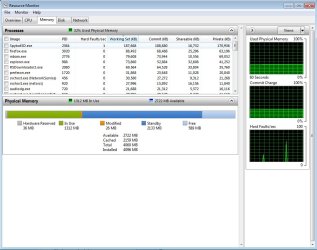
What do you mean by 2.96GB usable.. you mean the amount of hardware reserved Physical Memory is a lot that you only have 2.96 usable? This is the picture i get from my Resource Monitor RAM screen shot
 

Attachments

  • resmon.jpg
    resmon.jpg
    87.2 KB · Views: 23

My Computer

Computer Manufacturer/Model Number
DELL SXPS 1640
OS
Windows 7 x64 Professional SP1
CPU
Intel C2D T9550 2.66 GHz @ 2.793 GHz (Thanks ThrottleStop!!)
Motherboard
Intel PM45
Memory
8 GB DDR3
Graphics Card(s)
ATI MOBILITY RADEON 4670
Sound Card
CREATIVE XFI AUDIO NOTEBOOK
Monitor(s) Displays
16.1 WLED
Screen Resolution
1920x1080
Hard Drives
Seagate ST9500420AS 500GB (465GiBi) 7200 RPM Drive

External Drives:-
2 TB WD Essentials x 3
1 TB WD Mybook Gen 1
1 TB WD Mybook Gen 2
1 TB Seagate
1 TB Seagate
320 GB WD Scorpio Black (enclosed)
PSU
90W Dell Power Brick
Case
Dell Chassis
Cooling
Coolermaster Cooling Pad
Keyboard
Built-in backlighted Keyboard
Mouse
Logitech Wireless Mini Mouse
Internet Speed
4/0.5
You can also just disable the device in device manager, if it's bothers you that much. I don't think their is any advantage gained by removing, disabling it or turning it off. That's only because I subscribe to "If it ain't broke don't fix it" ideals. Fabe
 

My Computer

Computer Manufacturer/Model Number
Self Built
OS
Windows 7 ultimate 64 bit / XP Home sp3
CPU
intel Core 2 Duo E8400 3.0ghz
Motherboard
Asus P5ND bios 1401
Memory
8 gigs 1066 OCZ Fata1ty
Graphics Card(s)
EVGA GTX 580 Call of Duty Black Ops Edition
Sound Card
Creative Soundblaster Audigy 2zs
Monitor(s) Displays
Asus 24in LCD's 2MS X2
Screen Resolution
1920x1080p @60Hz
Hard Drives
WD Caviar 500 Black/ WD Caviar 200 Blue
PSU
OCZ 700W GameXtreme
Case
NZXT Apollo
Cooling
Corsair H50 CPU/120mm x3 /60mm x2 /Corsair Dominator Ram
Keyboard
Logitech Bluetooth Wireless MX5000
Mouse
Logitech Bluetooth Wireless MX1000
Internet Speed
Download 19.83 Upload 0.97
Other Info
Logitech Z2300 Speakers/ Bose Noise Cancelling Headphones/Avermedia PCI-e Hybrid TV Bravo/Epson NX415 all in one/ 4 Port Powered USB Hub/ LG 10x Bluray Burner /TSST Corp DVDRW External
@A F I G 3

Bluetooth can be turned off in the BIOS if I am not mistaken through an option.

What do you mean by 2.96GB usable.. you mean the amount of hardware reserved Physical Memory is a lot that you only have 2.96 usable? This is the picture i get from my Resource Monitor RAM screen shot


Nvm on the 2.96GB usable statement I figured that part out...was a setting I messed with in msconfig..btw guys if anyone ever runs into bluetooth problems for this model laptop send them here...the problem was the driver wasn't installed with Windows 7 and Dell doesn't have the driver directly on their page for this model laptop...the link is here:

Drivers and Downloads
 

My Computer

Computer Manufacturer/Model Number
Sony Vaio VGN-NW265F/B
OS
Windows 7 Ulimate (64-Bit)
CPU
Pentium Dual-Core CPU T4300 @ 2.10GHz (Penryn)
Memory
4.00 GB
Back
Top