departition hard drive

blueflash

New member
Local time
10:29 PM
Messages
9
I have a w7 home premium x64 pc with 1TB hard drive.
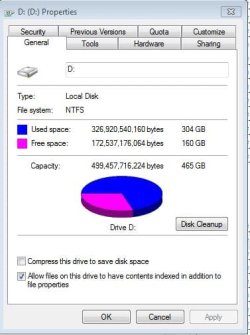
When I bought it, the HD was partitioned half and half to C and D drives. In doing so, about 200GB was "lost" to the D drive - using "Properties",it shows about 300GB in use but actually only about 100GB are in use.

If I copy all the data I want from D to C (or an external HD) can I remove the D partition without having to reload w7 and all my programs?

Thanks
 

My Computer

OS
home premium 64 bit
I have a w7 home premium x64 pc with 1TB hard drive.
When I bought it, the HD was partitioned half and half to C and D drives. In doing so, about 200GB was "lost" to the D drive - using "Properties",it shows about 300GB in use but actually only about 100GB are in use.

If I copy all the data I want from D to C (or an external HD) can I remove the D partition without having to reload w7 and all my programs?

Thanks

Yes, you can.

But I'd like to hear more about this HD with the "lost" 200 GB.

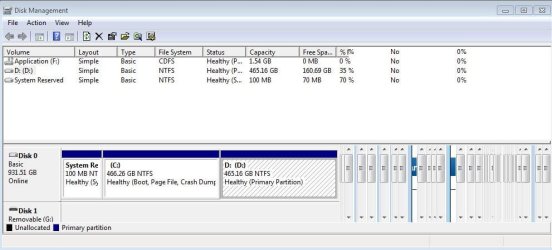
Can you post a picture of your Disk Management screen.
 

My Computer

Computer type
PC/Desktop
Computer Manufacturer/Model Number
Ignatz Special; 4 speed manual gearbox; factory air conditioning; one of one
OS
Windows 7 Home Premium SP1, 64-bit
CPU
Intel Skylake i5-6600K, not overclocked
Motherboard
AsRock Z170M Extreme 4, micro ATX
Memory
8 GB HyperX DDR4-2666 (2 x 4 GB)
Graphics Card(s)
none; graphics are integrated on CPU
Sound Card
onboard: Realtek ALC1150; external: USB Behringer UF0-202
Monitor(s) Displays
Dell S2340M 23 inch IPS
Screen Resolution
1600 x 900
Hard Drives
System: Crucial MX100 series SSD, 128 GB;
Data: Samsung Spinpoint 103SJ, 1 TB;
Backup: WD Caviar Green WD30EZRX-00D8PB0, 3 TB
PSU
Rosewill SilentNight 500 watt fanless, semi-modular
Case
Antec Solo II
Cooling
Noctua NH-U12S; Noctua F12 intake, Noctua S12A exhaust
Keyboard
Microsoft 200 6JH-00001 USB
Mouse
Dell or Microsoft optical wired; USB
Antivirus
Microsoft Security Essentials and Malwarebytes Premium
Browser
Pale Moon
Other Info
All fans PWM; speeds at idle: CPU circa 500 rpm; intake circa 600 rpm; exhaust circa 600 rpm; CPU temps 27 idle and 47 C load in a warm room (27 C/81 F) when running Intel Extreme Tuning Utility stress test.
1. Why do you want to remove the D partition - and what is currently on it. It may be a good candidate for your user data.

2. You probably have more than 2 partitions. Some may be hidden. As ignatz requested, a picture of Disk Management will help clarify that.
 

My Computer

Computer Manufacturer/Model Number
HP, Dell, Gateway, Toshiba - 4 laptops and 2 desktops
OS
Vista, Windows7, Mint Mate, Zorin, Windows 8
CPU
from 1.6GHz Duo to i7
Monitor(s) Displays
2x HP w2207
Hard Drives
5x HDD, 7x SSD, 12x Externals
Keyboard
with trackball - no mices
Mouse
Trackball mice
Internet Speed
DSL 6000
whs - I want to get back the "lost" 200GB or so

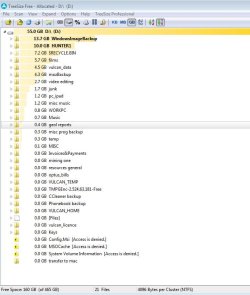
ignatz - attached files show D. When I do Properties on each of the folders shown on D and add up their size, I get about 55GB as shown by "Treesize", not approx 300GB as shown by Fig1
 

Attachments

  • fig1.JPG
    fig1.JPG
    34.7 KB · Views: 7
  • fig2.JPG
    fig2.JPG
    60.4 KB · Views: 5
  • fig3.JPG
    fig3.JPG
    63.5 KB · Views: 21

My Computer

OS
home premium 64 bit
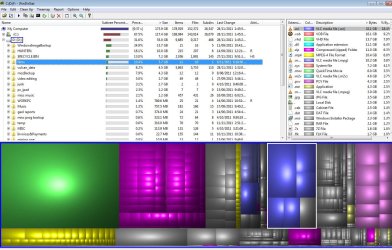
The way you add things up does not tell you anything. You have to run WinDirStat to get a true picture of which files are on your disk.

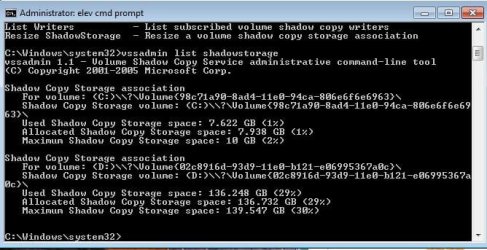
in addition there may be a lot of shadowstorage for the restore points. To see that, open an elevated command prompt and run this command: vssadmin list shadowstorage

Only if you add the 2 together, you will know what is on your disk.

And you did not "loose" the 200GBs. It is just another partition. And since it is good practice to seperate the user data from the operating system partition. I suggest you use it for your own data. Then you do not risk to loose your data when you have to reinstall your system.
 

My Computer

Computer Manufacturer/Model Number
HP, Dell, Gateway, Toshiba - 4 laptops and 2 desktops
OS
Vista, Windows7, Mint Mate, Zorin, Windows 8
CPU
from 1.6GHz Duo to i7
Monitor(s) Displays
2x HP w2207
Hard Drives
5x HDD, 7x SSD, 12x Externals
Keyboard
with trackball - no mices
Mouse
Trackball mice
Internet Speed
DSL 6000
Thanks for your help so far. Have run the two progs as you suggested. WinDirStat seems to show only 55GB in use on D.
Not sure what shadowstorage is or whether it is excessively large. But adding that (say 136GB) to the 55GB gives about 190GB. Properties from Explorer on D shows 327GB in use - is this incorrect?
 

Attachments

  • fig4.JPG
    fig4.JPG
    57.5 KB · Views: 9
  • fig5.JPG
    fig5.JPG
    187.3 KB · Views: 9

My Computer

OS
home premium 64 bit
The shadowstorge on C: is OK. On D: it is excessive. Reduce it to e.g. 10GB. The command is:

vssadmin resize shadowstorage /for=D: /on=D: /maxsize=10GB
 

My Computer

Computer Manufacturer/Model Number
HP, Dell, Gateway, Toshiba - 4 laptops and 2 desktops
OS
Vista, Windows7, Mint Mate, Zorin, Windows 8
CPU
from 1.6GHz Duo to i7
Monitor(s) Displays
2x HP w2207
Hard Drives
5x HDD, 7x SSD, 12x Externals
Keyboard
with trackball - no mices
Mouse
Trackball mice
Internet Speed
DSL 6000
I have reduced shadowstorage as advised. Now Explorer Properties shows 187GB in use, WinDirStat still shows 55GB in use.
I am struggling to understand why there is a difference and what it means.
 

My Computer

OS
home premium 64 bit
whs - I want to get back the "lost" 200GB or so

ignatz - attached files show D. When I do Properties on each of the folders shown on D and add up their size, I get about 55GB as shown by "Treesize", not approx 300GB as shown by Fig1

Does anyone else think the Disk Management screen shot is kind of funky? What's all that stuff on the right hand side after the disk partitions? Could the partition table be messed up or is it just the DM display is showing empty views?

Something looks strange.
 

My Computer

Computer Manufacturer/Model Number
HP Media Center
OS
Windows 7 32 bit
CPU
AMD 5200+ dual core
Memory
2 GB
Graphics Card(s)
NVidia GeForce 6150SE 128 MB
Monitor(s) Displays
CRT
Screen Resolution
1280x1024
Hard Drives
500 GB Sata internal :

SIIG USB 3.0 docking stations w/WD Caviar Black 6 Gb/s drives
Keyboard
PS/2
Mouse
PS/2 Wheel Mouse
Other Info
SIIG USB 3.0 PCIexpress card.
whs - I want to get back the "lost" 200GB or so

ignatz - attached files show D. When I do Properties on each of the folders shown on D and add up their size, I get about 55GB as shown by "Treesize", not approx 300GB as shown by Fig1

Does anyone else think the Disk Management screen shot is kind of funky? What's all that stuff on the right hand side after the disk partitions? Could the partition table be messed up or is it just the DM display is showing empty views?

Something looks strange.

Yeah, I wondered, too.

I also see an F "Application" drive with a CDFS file system. Is that what is shown on the right side?
 

My Computer

Computer type
PC/Desktop
Computer Manufacturer/Model Number
Ignatz Special; 4 speed manual gearbox; factory air conditioning; one of one
OS
Windows 7 Home Premium SP1, 64-bit
CPU
Intel Skylake i5-6600K, not overclocked
Motherboard
AsRock Z170M Extreme 4, micro ATX
Memory
8 GB HyperX DDR4-2666 (2 x 4 GB)
Graphics Card(s)
none; graphics are integrated on CPU
Sound Card
onboard: Realtek ALC1150; external: USB Behringer UF0-202
Monitor(s) Displays
Dell S2340M 23 inch IPS
Screen Resolution
1600 x 900
Hard Drives
System: Crucial MX100 series SSD, 128 GB;
Data: Samsung Spinpoint 103SJ, 1 TB;
Backup: WD Caviar Green WD30EZRX-00D8PB0, 3 TB
PSU
Rosewill SilentNight 500 watt fanless, semi-modular
Case
Antec Solo II
Cooling
Noctua NH-U12S; Noctua F12 intake, Noctua S12A exhaust
Keyboard
Microsoft 200 6JH-00001 USB
Mouse
Dell or Microsoft optical wired; USB
Antivirus
Microsoft Security Essentials and Malwarebytes Premium
Browser
Pale Moon
Other Info
All fans PWM; speeds at idle: CPU circa 500 rpm; intake circa 600 rpm; exhaust circa 600 rpm; CPU temps 27 idle and 47 C load in a warm room (27 C/81 F) when running Intel Extreme Tuning Utility stress test.
whs - I want to get back the "lost" 200GB or so

ignatz - attached files show D. When I do Properties on each of the folders shown on D and add up their size, I get about 55GB as shown by "Treesize", not approx 300GB as shown by Fig1

Does anyone else think the Disk Management screen shot is kind of funky? What's all that stuff on the right hand side after the disk partitions? Could the partition table be messed up or is it just the DM display is showing empty views?

Something looks strange.

Yeah, I wondered, too.

I also see an F "Application" drive with a CDFS file system. Is that what is shown on the right side? Capacity 1.54 GB, all used.
 

My Computer

Computer type
PC/Desktop
Computer Manufacturer/Model Number
Ignatz Special; 4 speed manual gearbox; factory air conditioning; one of one
OS
Windows 7 Home Premium SP1, 64-bit
CPU
Intel Skylake i5-6600K, not overclocked
Motherboard
AsRock Z170M Extreme 4, micro ATX
Memory
8 GB HyperX DDR4-2666 (2 x 4 GB)
Graphics Card(s)
none; graphics are integrated on CPU
Sound Card
onboard: Realtek ALC1150; external: USB Behringer UF0-202
Monitor(s) Displays
Dell S2340M 23 inch IPS
Screen Resolution
1600 x 900
Hard Drives
System: Crucial MX100 series SSD, 128 GB;
Data: Samsung Spinpoint 103SJ, 1 TB;
Backup: WD Caviar Green WD30EZRX-00D8PB0, 3 TB
PSU
Rosewill SilentNight 500 watt fanless, semi-modular
Case
Antec Solo II
Cooling
Noctua NH-U12S; Noctua F12 intake, Noctua S12A exhaust
Keyboard
Microsoft 200 6JH-00001 USB
Mouse
Dell or Microsoft optical wired; USB
Antivirus
Microsoft Security Essentials and Malwarebytes Premium
Browser
Pale Moon
Other Info
All fans PWM; speeds at idle: CPU circa 500 rpm; intake circa 600 rpm; exhaust circa 600 rpm; CPU temps 27 idle and 47 C load in a warm room (27 C/81 F) when running Intel Extreme Tuning Utility stress test.
Back
Top