Desktop Background - Change

How to Change the Windows 7 Desktop Background

   Information
This will show you how to change your desktop background to either a wallpaper picture (image), solid color, or slideshow of you choice in Windows 7.

   Note
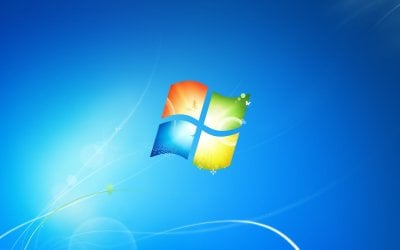
The default Windows 7 desktop background image is located in the folder below. If you had deleted it by mistake, you can click on the Download button below to download it in a ZIP file. See example screeenshot below.

C:\Windows\Web\Wallpaper\Windows\img0.jpg.


Download


   Tip

   Warning
The Windows 7 Starter edition does not include the Personalization features such as the change desktop background option.

Lets talk about Windows 7 Starter - Windows 7 Team Blog - The Windows Blog

The Windows 7 Home Basic edition does not have the Personalization feature either, and will only allow you to change the desktop background by right clicking on a image and clicking on Set as desktop background.

You can use the tutorial at the link below to be able to change the desktop background like in Personalization in the Windows 7 Starter and Home Basic editions.

How to Change the Desktop Background in Windows 7 Starter and Home Basic Editions


EXAMPLE: Default Windows 7 Desktop Background img0.jpg


OPTION ONE

To Change Desktop Background Wallpaper from Context Menu of Image
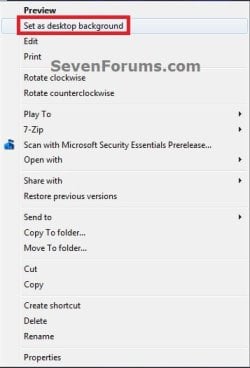
1. Right click on the image you want as your wallpaper, and click on Set as desktop background. (see screenshot below) Context-Menu.jpg


OPTION TWO

To Change Desktop Background Wallpaper in "Personalization" Settings

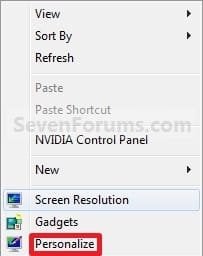
1. Right click on a empty space on the desktop and click on Personalize. (see screenshot below)
173d1230590219-desktop-background-change-right_click.jpg

2. Click on the Desktop Background link at the bottom of the window. (see screenshot below)
NOTE: The name in gray under Desktop Background is the current desktop background file name. Personalize.jpg
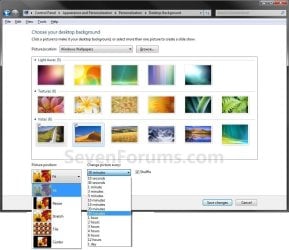
3. Select a Picture Location A) Click on the drop down arrow menu to select from the list of available picture folder locations, or click on the Browse button to navigate to the picture folder location. (see screenshot below step 7)
NOTE: To use another regional wallpaper, see the yellow TIP box at the top of the tutorial. To remove a folder from the Picture location, see How to Remove the Windows 7 Desktop Background Picture Location History.
B) Select the picture folder and click on Select Folder.
4. Select a Desktop Background A) Right click on an available picture, or click (check) on the box in the upper left corner of the picture, to select it. (see screenshot below step 7)
NOTE: You can continue to right click on the images to see it previewed on your desktop until you decide which one you like best.
5. Select the Picture Position A) Click on the drop down arrow menu, and click on the picture position you want for the desktop background. (see bottom of screenshot below step 7)
6. For a Desktop SlideShow A) For how, see: How to Create a Desktop Slideshow in Windows 7
7. Click on Save changes to apply the changes. (see screenshots below) change-2.jpg
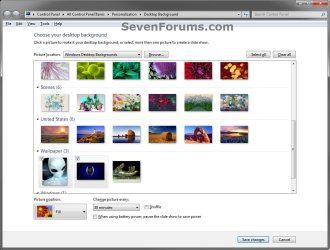
Desktop_Background.jpg

8. Close the Personalize window when done. (see screenshot below step 2)


OPTION THREE

To Change Desktop Background Wallpaper Manually in Registry Editor

1. Open the Start Menu, type regedit in the search box and press Enter.

2. If prompted by UAC, then click on Yes.

3. In regedit, navigate to the location below. (see screenshot below) HKEY_CURRENT_USER\Control Panel\Desktop

REG-1.jpg
4. In the right pane of the Desktop key in regedit, right click on the Wallpaper string value and click on Modify. (see screenshot above)

5. Type in the full path of the image file (ex: .jpg or .bmp), and click on OK. (see screenshot below)
NOTE: Be sure that the name of the image file does not contain any spaces in it. If it does, rename the image file first so that it doesn't. If you use a image file name with a space in it's name, then you would just get a solid black desktop background instead. Reg-2.jpg
6. Close regedit.

7. log off and log on to apply.
That's it,
Shawn


Attachments

  • Right_Click.jpg
    Right_Click.jpg
    7.6 KB · Views: 1,179,689
  • img0.zip
    img0.zip
    621.3 KB · Views: 99,391
Last edited:
still having trouble

so, I have the ability to change the pictures and screen savers and anything to "personalize" my comp, but when it comes to changing the "picture position" for the desktop background, it always goes to "stretch" even after I "save changes". it is like it automatically defaults to that setting and wont go to any other setting. does anyone have any ideas?
thanks for the help
LP
 

My Computer

OS
Windows 7
"stretch" issues continued

The stretch option being stuck as a permanent option seems to be a common theme in this thread. It's why I ended up here as well. I am curious as to which driver/software update from HP helped @Cirux as I have an HP system as well, and I am having the exact problem described. Primarily, I am trying to use the slide show, and I would prefer to do it straight through my personalization rather than having to download another program for it. I have a Gadget that does it, but it's not ideal as it cuts away parts of images.
 

My Computer

Computer Manufacturer/Model Number
HP Pavillion dv6-1360us
OS
Windows 7 64-bit Home Premium
CPU
Intel(r) Core(tm)2 Duo CPU P7450 @ 2.1GHz
Memory
4.0 gb
Graphics Card(s)
ATI Mobility Radeon HD 4650
Hard Drives
500GB
Hello Lucy, and welcome to Seven Forums.

As a test, you might create a new administrator account to see how if it may work properly while logged on to it.

Hope this helps for now,
Shawn
 

My Computer

Computer type
PC/Desktop
Computer Manufacturer/Model Number
Self built custom
OS
64-bit Windows 11 Pro for Workstations
CPU
Intel i7-8700K OC'd to 5 GHz
Motherboard
ASUS ROG Maximus XI Formula Z390
Memory
64 GB (4x16GB) G.SKILL TridentZ RGB DDR4 3600 MHz
Graphics Card(s)
ASUS ROG-STRIX-GTX1080TI-O11G-GAMING
Sound Card
Integrated
Monitor(s) Displays
2 x Samsung Odyssey G7 27"
Screen Resolution
2560x1440
Hard Drives
1TB Samsung 990 PRO M.2,
4TB Samsung 990 PRO PRO M.2,
TerraMaster F8 SSD Plus NAS
PSU
Seasonic Prime Titanium 850W
Case
Thermaltake Core P3
Cooling
Corsair Hydro H115i
Keyboard
Logitech wireless K800
Mouse
Logitech MX Master 4
Internet Speed
2 Gb/s Download and 100 Mb/s Upload
Antivirus
Malwarebyte Anti-Malware Premium
Browser
Google Chrome
Other Info
Logitech Z625 speaker system,
Logitech BRIO 4K Pro webcam,
HP Color LaserJet Pro MFP M477fdn,
APC SMART-UPS RT 1000 XL - SURT1000XLI,
Galaxy S23 Plus phone
Hello Lucy, and welcome to Seven Forums.

As a test, you might create a new administrator account to see how if it may work properly while logged on to it.

Hope this helps for now,
Shawn


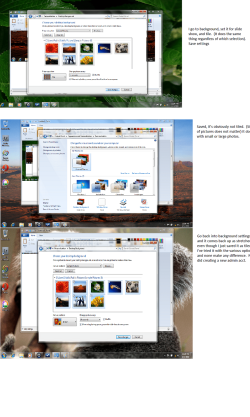
I also did that with no difference. I'm uploading screenshots showing that I select "tiled" background as an option, save, close, and open it back up to show that it's reverted to "stretch."
 

Attachments

  • Untitled.png
    Untitled.png
    342.2 KB · Views: 229

My Computer

Computer Manufacturer/Model Number
HP Pavillion dv6-1360us
OS
Windows 7 64-bit Home Premium
CPU
Intel(r) Core(tm)2 Duo CPU P7450 @ 2.1GHz
Memory
4.0 gb
Graphics Card(s)
ATI Mobility Radeon HD 4650
Hard Drives
500GB
I'm not sure I've seen this before or not. Was this a clean or upgrade install of Windows 7?
 

My Computer

Computer type
PC/Desktop
Computer Manufacturer/Model Number
Self built custom
OS
64-bit Windows 11 Pro for Workstations
CPU
Intel i7-8700K OC'd to 5 GHz
Motherboard
ASUS ROG Maximus XI Formula Z390
Memory
64 GB (4x16GB) G.SKILL TridentZ RGB DDR4 3600 MHz
Graphics Card(s)
ASUS ROG-STRIX-GTX1080TI-O11G-GAMING
Sound Card
Integrated
Monitor(s) Displays
2 x Samsung Odyssey G7 27"
Screen Resolution
2560x1440
Hard Drives
1TB Samsung 990 PRO M.2,
4TB Samsung 990 PRO PRO M.2,
TerraMaster F8 SSD Plus NAS
PSU
Seasonic Prime Titanium 850W
Case
Thermaltake Core P3
Cooling
Corsair Hydro H115i
Keyboard
Logitech wireless K800
Mouse
Logitech MX Master 4
Internet Speed
2 Gb/s Download and 100 Mb/s Upload
Antivirus
Malwarebyte Anti-Malware Premium
Browser
Google Chrome
Other Info
Logitech Z625 speaker system,
Logitech BRIO 4K Pro webcam,
HP Color LaserJet Pro MFP M477fdn,
APC SMART-UPS RT 1000 XL - SURT1000XLI,
Galaxy S23 Plus phone
Clean. Bought it a couple of months ago.
 

My Computer

Computer Manufacturer/Model Number
HP Pavillion dv6-1360us
OS
Windows 7 64-bit Home Premium
CPU
Intel(r) Core(tm)2 Duo CPU P7450 @ 2.1GHz
Memory
4.0 gb
Graphics Card(s)
ATI Mobility Radeon HD 4650
Hard Drives
500GB
You might consider doing a repair install to see if can fix this for you. You will not lose anything.
 

My Computer

Computer type
PC/Desktop
Computer Manufacturer/Model Number
Self built custom
OS
64-bit Windows 11 Pro for Workstations
CPU
Intel i7-8700K OC'd to 5 GHz
Motherboard
ASUS ROG Maximus XI Formula Z390
Memory
64 GB (4x16GB) G.SKILL TridentZ RGB DDR4 3600 MHz
Graphics Card(s)
ASUS ROG-STRIX-GTX1080TI-O11G-GAMING
Sound Card
Integrated
Monitor(s) Displays
2 x Samsung Odyssey G7 27"
Screen Resolution
2560x1440
Hard Drives
1TB Samsung 990 PRO M.2,
4TB Samsung 990 PRO PRO M.2,
TerraMaster F8 SSD Plus NAS
PSU
Seasonic Prime Titanium 850W
Case
Thermaltake Core P3
Cooling
Corsair Hydro H115i
Keyboard
Logitech wireless K800
Mouse
Logitech MX Master 4
Internet Speed
2 Gb/s Download and 100 Mb/s Upload
Antivirus
Malwarebyte Anti-Malware Premium
Browser
Google Chrome
Other Info
Logitech Z625 speaker system,
Logitech BRIO 4K Pro webcam,
HP Color LaserJet Pro MFP M477fdn,
APC SMART-UPS RT 1000 XL - SURT1000XLI,
Galaxy S23 Plus phone
Lucy: go to HP United States - Computers, Laptops, Servers, Printers and more -> support and drivers -> notebooks and tablet pc's -> notebook PC's -> HP pavilion PC's -> (whatever your computer is, mine was dv6) -> (again, whatever your computer is, mine was 1350us) -> microsoft windows 64 bit -> scroll down to software - solutions, there should be an option for wallpaper picture position enabler. I had the same problem, you just need to download the driver for it :) hope this helps
 

My Computer

OS
windows 7
Hello folks, when I right click my desk top I do not get the personalised Icon, has anyone expereinced this before
 

My Computer

OS
Windows 7
Hello Unknownsaylor, and welcome to Seven Forums.

I'm not sure what edition of Windows 7 you have, but the Windows 7 Starter edition does not include the Personalization or Aero features with it.

Hope this helps,
Shawn
 

My Computer

Computer type
PC/Desktop
Computer Manufacturer/Model Number
Self built custom
OS
64-bit Windows 11 Pro for Workstations
CPU
Intel i7-8700K OC'd to 5 GHz
Motherboard
ASUS ROG Maximus XI Formula Z390
Memory
64 GB (4x16GB) G.SKILL TridentZ RGB DDR4 3600 MHz
Graphics Card(s)
ASUS ROG-STRIX-GTX1080TI-O11G-GAMING
Sound Card
Integrated
Monitor(s) Displays
2 x Samsung Odyssey G7 27"
Screen Resolution
2560x1440
Hard Drives
1TB Samsung 990 PRO M.2,
4TB Samsung 990 PRO PRO M.2,
TerraMaster F8 SSD Plus NAS
PSU
Seasonic Prime Titanium 850W
Case
Thermaltake Core P3
Cooling
Corsair Hydro H115i
Keyboard
Logitech wireless K800
Mouse
Logitech MX Master 4
Internet Speed
2 Gb/s Download and 100 Mb/s Upload
Antivirus
Malwarebyte Anti-Malware Premium
Browser
Google Chrome
Other Info
Logitech Z625 speaker system,
Logitech BRIO 4K Pro webcam,
HP Color LaserJet Pro MFP M477fdn,
APC SMART-UPS RT 1000 XL - SURT1000XLI,
Galaxy S23 Plus phone
Thanks for quick response but does that mean i cant personalise my desk top???
 

My Computer

OS
Windows 7

My Computer

Computer type
PC/Desktop
Computer Manufacturer/Model Number
Self built custom
OS
64-bit Windows 11 Pro for Workstations
CPU
Intel i7-8700K OC'd to 5 GHz
Motherboard
ASUS ROG Maximus XI Formula Z390
Memory
64 GB (4x16GB) G.SKILL TridentZ RGB DDR4 3600 MHz
Graphics Card(s)
ASUS ROG-STRIX-GTX1080TI-O11G-GAMING
Sound Card
Integrated
Monitor(s) Displays
2 x Samsung Odyssey G7 27"
Screen Resolution
2560x1440
Hard Drives
1TB Samsung 990 PRO M.2,
4TB Samsung 990 PRO PRO M.2,
TerraMaster F8 SSD Plus NAS
PSU
Seasonic Prime Titanium 850W
Case
Thermaltake Core P3
Cooling
Corsair Hydro H115i
Keyboard
Logitech wireless K800
Mouse
Logitech MX Master 4
Internet Speed
2 Gb/s Download and 100 Mb/s Upload
Antivirus
Malwarebyte Anti-Malware Premium
Browser
Google Chrome
Other Info
Logitech Z625 speaker system,
Logitech BRIO 4K Pro webcam,
HP Color LaserJet Pro MFP M477fdn,
APC SMART-UPS RT 1000 XL - SURT1000XLI,
Galaxy S23 Plus phone
Personalization does not stay?

I have a brand spanking new ASUS Notebook UL30VT Windows 7 Home Premium 64. OH Joy!! The desktop personalization does not stay? Every time the system boots initially it has the desktop background but then changes to a default blistering white ASUS logo screen! It is so bright some of of the icons become invisible. Any ideas why this is happening and how I might resolve this? Thanks!!
 

My Computer

Computer Manufacturer/Model Number
ASUS Notebook UL30VT
OS
Windows 7 Home Premium 64
Hello Doug, and welcome to Seven Forums.

You might double check to see if you may have a startup program that is loading the ASUS logo screen as your desktop background and overriding the Oceanis program. If you do, then temporarily disable it to confirm it before deleting it.

Hope this helps,
Shawn
 

My Computer

Computer type
PC/Desktop
Computer Manufacturer/Model Number
Self built custom
OS
64-bit Windows 11 Pro for Workstations
CPU
Intel i7-8700K OC'd to 5 GHz
Motherboard
ASUS ROG Maximus XI Formula Z390
Memory
64 GB (4x16GB) G.SKILL TridentZ RGB DDR4 3600 MHz
Graphics Card(s)
ASUS ROG-STRIX-GTX1080TI-O11G-GAMING
Sound Card
Integrated
Monitor(s) Displays
2 x Samsung Odyssey G7 27"
Screen Resolution
2560x1440
Hard Drives
1TB Samsung 990 PRO M.2,
4TB Samsung 990 PRO PRO M.2,
TerraMaster F8 SSD Plus NAS
PSU
Seasonic Prime Titanium 850W
Case
Thermaltake Core P3
Cooling
Corsair Hydro H115i
Keyboard
Logitech wireless K800
Mouse
Logitech MX Master 4
Internet Speed
2 Gb/s Download and 100 Mb/s Upload
Antivirus
Malwarebyte Anti-Malware Premium
Browser
Google Chrome
Other Info
Logitech Z625 speaker system,
Logitech BRIO 4K Pro webcam,
HP Color LaserJet Pro MFP M477fdn,
APC SMART-UPS RT 1000 XL - SURT1000XLI,
Galaxy S23 Plus phone
Images

Hi there,
whenever i download an image off the net to use as a background it always appears blocky. I have tried different resolutions of images but they all end up the same, am i doing something wrong?
 

My Computer

Computer Manufacturer/Model Number
toshiba satellite L500
OS
windows 7
Hello Deldiablo, and welcome to Seven Forums.

Could you upload and attach an example of one these images for us to take a look at and test on our system to see what may be wrong? :)
 

My Computer

Computer type
PC/Desktop
Computer Manufacturer/Model Number
Self built custom
OS
64-bit Windows 11 Pro for Workstations
CPU
Intel i7-8700K OC'd to 5 GHz
Motherboard
ASUS ROG Maximus XI Formula Z390
Memory
64 GB (4x16GB) G.SKILL TridentZ RGB DDR4 3600 MHz
Graphics Card(s)
ASUS ROG-STRIX-GTX1080TI-O11G-GAMING
Sound Card
Integrated
Monitor(s) Displays
2 x Samsung Odyssey G7 27"
Screen Resolution
2560x1440
Hard Drives
1TB Samsung 990 PRO M.2,
4TB Samsung 990 PRO PRO M.2,
TerraMaster F8 SSD Plus NAS
PSU
Seasonic Prime Titanium 850W
Case
Thermaltake Core P3
Cooling
Corsair Hydro H115i
Keyboard
Logitech wireless K800
Mouse
Logitech MX Master 4
Internet Speed
2 Gb/s Download and 100 Mb/s Upload
Antivirus
Malwarebyte Anti-Malware Premium
Browser
Google Chrome
Other Info
Logitech Z625 speaker system,
Logitech BRIO 4K Pro webcam,
HP Color LaserJet Pro MFP M477fdn,
APC SMART-UPS RT 1000 XL - SURT1000XLI,
Galaxy S23 Plus phone
hi here are a couple of the images, my laptop resolution is 1366 x 788 i have tried bigger and smaller images but no difference,

Thanks
 

Attachments

  • images.jpg
    images.jpg
    4.7 KB · Views: 659
  • B0CA03F5SNCAU4HN77CAHP9XBJCAXXR0WDCAYW3EHGCAAKWZUBCAZHPGSKCAKR9LXMCA6V9IUMCAISFBK1CAW8DGNRCAPMCU.jpg
    B0CA03F5SNCAU4HN77CAHP9XBJCAXXR0WDCAYW3EHGCAAKWZUBCAZHPGSKCAKR9LXMCA6V9IUMCAISFBK1CAW8DGNRCAPMCU.jpg
    1.1 KB · Views: 688

My Computer

Computer Manufacturer/Model Number
toshiba satellite L500
OS
windows 7
Could you upload the actual full size copies instead? You can place them in a ZIP file if they are to large. I can't test these since they are to small. ;)
 

My Computer

Computer type
PC/Desktop
Computer Manufacturer/Model Number
Self built custom
OS
64-bit Windows 11 Pro for Workstations
CPU
Intel i7-8700K OC'd to 5 GHz
Motherboard
ASUS ROG Maximus XI Formula Z390
Memory
64 GB (4x16GB) G.SKILL TridentZ RGB DDR4 3600 MHz
Graphics Card(s)
ASUS ROG-STRIX-GTX1080TI-O11G-GAMING
Sound Card
Integrated
Monitor(s) Displays
2 x Samsung Odyssey G7 27"
Screen Resolution
2560x1440
Hard Drives
1TB Samsung 990 PRO M.2,
4TB Samsung 990 PRO PRO M.2,
TerraMaster F8 SSD Plus NAS
PSU
Seasonic Prime Titanium 850W
Case
Thermaltake Core P3
Cooling
Corsair Hydro H115i
Keyboard
Logitech wireless K800
Mouse
Logitech MX Master 4
Internet Speed
2 Gb/s Download and 100 Mb/s Upload
Antivirus
Malwarebyte Anti-Malware Premium
Browser
Google Chrome
Other Info
Logitech Z625 speaker system,
Logitech BRIO 4K Pro webcam,
HP Color LaserJet Pro MFP M477fdn,
APC SMART-UPS RT 1000 XL - SURT1000XLI,
Galaxy S23 Plus phone
Well, if that is the size that you downloaded, then that is your problem. One is only 150x113, and the other is only 102x150. They would appear as you described if used as a wallpaper since they are to small. It looks like you have downloaded the thumbnail version of the image instead of the larger (actual) version. You may have needed to click on them at the site where you got them to get a larger version instead.

Hope this helps,
Shawn
 

My Computer

Computer type
PC/Desktop
Computer Manufacturer/Model Number
Self built custom
OS
64-bit Windows 11 Pro for Workstations
CPU
Intel i7-8700K OC'd to 5 GHz
Motherboard
ASUS ROG Maximus XI Formula Z390
Memory
64 GB (4x16GB) G.SKILL TridentZ RGB DDR4 3600 MHz
Graphics Card(s)
ASUS ROG-STRIX-GTX1080TI-O11G-GAMING
Sound Card
Integrated
Monitor(s) Displays
2 x Samsung Odyssey G7 27"
Screen Resolution
2560x1440
Hard Drives
1TB Samsung 990 PRO M.2,
4TB Samsung 990 PRO PRO M.2,
TerraMaster F8 SSD Plus NAS
PSU
Seasonic Prime Titanium 850W
Case
Thermaltake Core P3
Cooling
Corsair Hydro H115i
Keyboard
Logitech wireless K800
Mouse
Logitech MX Master 4
Internet Speed
2 Gb/s Download and 100 Mb/s Upload
Antivirus
Malwarebyte Anti-Malware Premium
Browser
Google Chrome
Other Info
Logitech Z625 speaker system,
Logitech BRIO 4K Pro webcam,
HP Color LaserJet Pro MFP M477fdn,
APC SMART-UPS RT 1000 XL - SURT1000XLI,
Galaxy S23 Plus phone
Back
Top