
Desktop bricked after using RT Seven Lite, won't boot into BIOS

Hashim

New member
Local time
10:48 AM
Messages
38
A day or so ago, I was using the beta version of RT Seven Lite on my Windows 7 x64 desktop to slipstream a Windows 7 x86 ISO. I waited hours for it to be done before realising it seemed to be frozen, so I force-closed the program and shut down the computer hoping to try again the following day, but I had no idea doing so would affect the OS. The following day, the computer refuses to boot up at all - the power light comes on, the CPU fan starts turning a little then stops, and the display is blank - no booting even into the BIOS.

So far, I've tried:

- Moving the CMOS jumper to reset position, taking out the battery for 1 min, putting the battery back in, then moving the jumper back
- Same as above, but waiting for 5 mins instead
- Taking out the battery alone, waiting for 15 mins, and then putting it back in

I'm currently trying waiting for an hour before putting the battery back in.

Nothing so far has worked, and whereas when the problem first started about a day or two ago, the CPU fan actually started running for a few seconds, now it'll start for just half a second or so and then stop.

Anyone got any ideas on what could have happened and what I could do to fix it? Thanks in advance.

I really, really would appreciate some help getting this fixed, I need this computer to get work done so badly and I can't afford for it to be out of use for any longer, let alone install a whole new system.

Also, it might be worth mentioning that for a few days before it had bricked I was hearing a whining sound from my comp, like a harddrive was trying too hard or something. Maybe that was the cause instead of disturbing RT Seven Lite, who knows?
 

My Computer My Computer

At a glance

Windows 7 Ultimate 64-BitIntel Core i3-2100 @ 3.10GHz (Dual-Core)16GB DDR3Intel Graphics HD (Integrated)
Computer type
PC/Desktop
OS
Windows 7 Ultimate 64-Bit
CPU
Intel Core i3-2100 @ 3.10GHz (Dual-Core)
Motherboard
ASRock H61M-HVS
Memory
16GB DDR3
Graphics Card(s)
Intel Graphics HD (Integrated)
Hard Drives
Kingston 128GB SSD (OS Drive)
HITACHI 1TB HDD (Storage Drive)
It may be coincidental. A whining sound often can be a failing power supply. It sounds to me like your power supply may have failed during the ISO creation. That might be why it "froze" and didn't finish.

The first thing to do is to open the case and check that all the power supply connections are snug and attached properly. Smell the inside of the case for a burning smell.

If you get nothing from doing that, do you have a friend with a power supply that you can borrow for a little while? Just enough to see if the computer will boot and run. It's a better alternative than buying one to test with, in case it isn't the power supply.

It's highly unlikely that a piece of software will brick your BIOS or power supply, or motherboard for that matter. I think this is just coincidence, and a probable hardware failure.
 

My Computer My Computer

At a glance

Win 7 Pro x64/Win 10 Pro x64 dual bootAMD FX 8350 Vishera @ 420016 GB Mushkin Blackline DDR3-2400 @ 1866 (9-1...XFX Radeon R9 280 Double D Black Edition
Computer type
PC/Desktop
Computer Manufacturer/Model Number
Mellon Labs (custom build)
OS
Win 7 Pro x64/Win 10 Pro x64 dual boot
CPU
AMD FX 8350 Vishera @ 4200
Motherboard
ASUS M5A97 R2.0
Memory
16 GB Mushkin Blackline DDR3-2400 @ 1866 (9-10-10-10-31)
Graphics Card(s)
XFX Radeon R9 280 Double D Black Edition
Sound Card
Realtek HD Audio on MB. Sounds great.
Monitor(s) Displays
Acer 24", Acer 22"
Screen Resolution
3840 x 1080
Hard Drives
1 x Mushkin Chronos 120 GB SSD (Win 10)
1 x Samsung 850 EVO 250 GB SSD (Win 7)
1 x WD 1TB SATA Blue
1 x WD 1TB SATA Green
PSU
Corsair TX-750
Case
CoolerMaster HAF 912+
Cooling
Coolermaster Seidon 240M Liquid AIO. 6 case fans
Keyboard
Logitech G710+
Mouse
Logitech G500s
Internet Speed
Much better since I got fiber, but still way overpriced.
Antivirus
MSE, Malware Bytes for scanning
Browser
Firefox
Other Info
Corsair VOID USB headphones.

A Mellon Labs X-1 - LCD Smartie driven system status display.

Brought to you by the letter E
It may be coincidental. A whining sound often can be a failing power supply. It sounds to me like your power supply may have failed during the ISO creation. That might be why it "froze" and didn't finish.

The first thing to do is to open the case and check that all the power supply connections are snug and attached properly. Smell the inside of the case for a burning smell.

If you get nothing from doing that, do you have a friend with a power supply that you can borrow for a little while? Just enough to see if the computer will boot and run. It's a better alternative than buying one to test with, in case it isn't the power supply.

It's highly unlikely that a piece of software will brick your BIOS or power supply, or motherboard for that matter. I think this is just coincidence, and a probable hardware failure.

Brilliant, thanks for the reassurance, even if knowing I'll need a new PSU isn't much reassurance, haha.

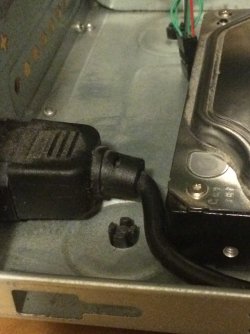
No burning smell, and no disconnected cables, although the single, main power lead from the PSU is kinda riding up on the HDD, as seen in the attachment - not sure whether that affects anything.

I've asked for a PSU to borrow, but I'm not likely to get it anytime soon unfortunately. How likely is it that it's the PSU? Is it at all possible that I've just done the CMOS reset wrong?
 

Attachments

  • IMG_53072.jpg
    IMG_53072.jpg
    247.9 KB · Views: 2
Last edited:

My Computer My Computer

At a glance

Windows 7 Ultimate 64-BitIntel Core i3-2100 @ 3.10GHz (Dual-Core)16GB DDR3Intel Graphics HD (Integrated)
Computer type
PC/Desktop
OS
Windows 7 Ultimate 64-Bit
CPU
Intel Core i3-2100 @ 3.10GHz (Dual-Core)
Motherboard
ASRock H61M-HVS
Memory
16GB DDR3
Graphics Card(s)
Intel Graphics HD (Integrated)
Hard Drives
Kingston 128GB SSD (OS Drive)
HITACHI 1TB HDD (Storage Drive)
Highly possible is the short circuit &or certain components failure, on the MB.

Power supply unit do have protection if the MB misbehave, by immediate cut-off.
When on booting, the PSU will check on the MB, and if detect there MB &or components failed.
As you mentioned, it did start, but cut-off immediately, do not mean PSU failure.
This is the fail-safe condition, not PSU failure.

The reason is that you physically cut-off the power, mean PSU is still fine.
Even if you use another PSU, it would still be the same.
Alternately, use your PSU to connect to another computer, it would work.

CMOS jumper is for BIOS reset, nothing more.
If the jumper connect wrongly, there may have additional issue.
 

My Computer My Computer

At a glance

Windows 7 x64
Computer type
Laptop
Computer Manufacturer/Model Number
Toshiba L630 and L735
OS
Windows 7 x64
Hard Drives
240 GB SSD
Highly possible is the short circuit &or certain components failure, on the MB.

Power supply unit do have protection if the MB misbehave, by immediate cut-off.
When on booting, the PSU will check on the MB, and if detect there MB &or components failed.
As you mentioned, it did start, but cut-off immediately, do not mean PSU failure.
This is the fail-safe condition, not PSU failure.

The reason is that you physically cut-off the power, mean PSU is still fine.
Even if you use another PSU, it would still be the same.
Alternately, use your PSU to connect to another computer, it would work.

CMOS jumper is for BIOS reset, nothing more.
If the jumper connect wrongly, there may have additional issue.

So... what is a motherboard short circuit caused by, and what would I need to do to fix it?
 

My Computer My Computer

At a glance

Windows 7 Ultimate 64-BitIntel Core i3-2100 @ 3.10GHz (Dual-Core)16GB DDR3Intel Graphics HD (Integrated)
Computer type
PC/Desktop
OS
Windows 7 Ultimate 64-Bit
CPU
Intel Core i3-2100 @ 3.10GHz (Dual-Core)
Motherboard
ASRock H61M-HVS
Memory
16GB DDR3
Graphics Card(s)
Intel Graphics HD (Integrated)
Hard Drives
Kingston 128GB SSD (OS Drive)
HITACHI 1TB HDD (Storage Drive)
A motherboard short or open circuit would be caused by a failed component on the motherboard. It may or may not exhibit some physical damage in the circuitry that you could visibly detect. (i.e. burned components or the smell of smoke).

I disagree with Eric on this point: If it were just a BIOS problem, your fans would still spin after you turned the PC on. Since the fans don't spin, it's safe to look hard at the power supply first before moving on to the motherboard. If your power supply checks out ok, THEN we can look at doing something with the motherboard.

And if your motherboard has a problem, you can't usually fix it, unless you have access to some sophisticated soldering and diagnostic equipment. It's easier and more reliable to just replace it.

Since you have to wait to borrow a supply, maybe you can take yours to a computer shop and have them test it for a small fee?
 

My Computer My Computer

At a glance

Win 7 Pro x64/Win 10 Pro x64 dual bootAMD FX 8350 Vishera @ 420016 GB Mushkin Blackline DDR3-2400 @ 1866 (9-1...XFX Radeon R9 280 Double D Black Edition
Computer type
PC/Desktop
Computer Manufacturer/Model Number
Mellon Labs (custom build)
OS
Win 7 Pro x64/Win 10 Pro x64 dual boot
CPU
AMD FX 8350 Vishera @ 4200
Motherboard
ASUS M5A97 R2.0
Memory
16 GB Mushkin Blackline DDR3-2400 @ 1866 (9-10-10-10-31)
Graphics Card(s)
XFX Radeon R9 280 Double D Black Edition
Sound Card
Realtek HD Audio on MB. Sounds great.
Monitor(s) Displays
Acer 24", Acer 22"
Screen Resolution
3840 x 1080
Hard Drives
1 x Mushkin Chronos 120 GB SSD (Win 10)
1 x Samsung 850 EVO 250 GB SSD (Win 7)
1 x WD 1TB SATA Blue
1 x WD 1TB SATA Green
PSU
Corsair TX-750
Case
CoolerMaster HAF 912+
Cooling
Coolermaster Seidon 240M Liquid AIO. 6 case fans
Keyboard
Logitech G710+
Mouse
Logitech G500s
Internet Speed
Much better since I got fiber, but still way overpriced.
Antivirus
MSE, Malware Bytes for scanning
Browser
Firefox
Other Info
Corsair VOID USB headphones.

A Mellon Labs X-1 - LCD Smartie driven system status display.

Brought to you by the letter E
A motherboard short or open circuit would be caused by a failed component on the motherboard. It may or may not exhibit some physical damage in the circuitry that you could visibly detect. (i.e. burned components or the smell of smoke).

I disagree with Eric on this point: If it were just a BIOS problem, your fans would still spin after you turned the PC on. Since the fans don't spin, it's safe to look hard at the power supply first before moving on to the motherboard. If your power supply checks out ok, THEN we can look at doing something with the motherboard.

And if your motherboard has a problem, you can't usually fix it, unless you have access to some sophisticated soldering and diagnostic equipment. It's easier and more reliable to just replace it.

Since you have to wait to borrow a supply, maybe you can take yours to a computer shop and have them test it for a small fee?

Kinda strapped for cash atm, so I'm doing my best to make sure I don't have to hand it in to the shop.

Hopefully I'll have a PSU sometime later on today, so I'll give it a test when I do get hold of it. Also, it didn't occur to me to mention this before, because I didn't realise all motherboards should have LEDs on when they're running, but I'm not seeing any LEDs on in the whole system at all. It's completely dead. I suppose that lends weight to your theory of the PSU being faulty?

So you don't think this was caused by using RT Seven Lite at all, that that was completely coincidental and that this is probably a separate failing of the PSU that would have occurred anyway?
 

My Computer My Computer

At a glance

Windows 7 Ultimate 64-BitIntel Core i3-2100 @ 3.10GHz (Dual-Core)16GB DDR3Intel Graphics HD (Integrated)
Computer type
PC/Desktop
OS
Windows 7 Ultimate 64-Bit
CPU
Intel Core i3-2100 @ 3.10GHz (Dual-Core)
Motherboard
ASRock H61M-HVS
Memory
16GB DDR3
Graphics Card(s)
Intel Graphics HD (Integrated)
Hard Drives
Kingston 128GB SSD (OS Drive)
HITACHI 1TB HDD (Storage Drive)
So you don't think this was caused by using RT Seven Lite at all, that that was completely coincidental and that this is probably a separate failing of the PSU that would have occurred anyway?
I believe that it was just a coincidence. I think that the whining sound a couple of days before the failure was a bit of a warning. I doubt very much that any software will brick anything but your BIOS, and I think your BIOS is all right. On most PCs the fans and LEDS work without BIOS intervention.

If you aren't getting any lights on the motherboard, that's a pretty good indication that power is missing somewhere. You may have lost only one of your power rails, but it's enough to keep your computer from working. That's why I'm suggesting to test the PSU first. You're doing that, so that is great. We'll get to the bottom of it. :)
 

My Computer My Computer

At a glance

Win 7 Pro x64/Win 10 Pro x64 dual bootAMD FX 8350 Vishera @ 420016 GB Mushkin Blackline DDR3-2400 @ 1866 (9-1...XFX Radeon R9 280 Double D Black Edition
Computer type
PC/Desktop
Computer Manufacturer/Model Number
Mellon Labs (custom build)
OS
Win 7 Pro x64/Win 10 Pro x64 dual boot
CPU
AMD FX 8350 Vishera @ 4200
Motherboard
ASUS M5A97 R2.0
Memory
16 GB Mushkin Blackline DDR3-2400 @ 1866 (9-10-10-10-31)
Graphics Card(s)
XFX Radeon R9 280 Double D Black Edition
Sound Card
Realtek HD Audio on MB. Sounds great.
Monitor(s) Displays
Acer 24", Acer 22"
Screen Resolution
3840 x 1080
Hard Drives
1 x Mushkin Chronos 120 GB SSD (Win 10)
1 x Samsung 850 EVO 250 GB SSD (Win 7)
1 x WD 1TB SATA Blue
1 x WD 1TB SATA Green
PSU
Corsair TX-750
Case
CoolerMaster HAF 912+
Cooling
Coolermaster Seidon 240M Liquid AIO. 6 case fans
Keyboard
Logitech G710+
Mouse
Logitech G500s
Internet Speed
Much better since I got fiber, but still way overpriced.
Antivirus
MSE, Malware Bytes for scanning
Browser
Firefox
Other Info
Corsair VOID USB headphones.

A Mellon Labs X-1 - LCD Smartie driven system status display.

Brought to you by the letter E
So you don't think this was caused by using RT Seven Lite at all, that that was completely coincidental and that this is probably a separate failing of the PSU that would have occurred anyway?
I believe that it was just a coincidence. I think that the whining sound a couple of days before the failure was a bit of a warning. I doubt very much that any software will brick anything but your BIOS, and I think your BIOS is all right. On most PCs the fans and LEDS work without BIOS intervention.

If you aren't getting any lights on the motherboard, that's a pretty good indication that power is missing somewhere. You may have lost only one of your power rails, but it's enough to keep your computer from working. That's why I'm suggesting to test the PSU first. You're doing that, so that is great. We'll get to the bottom of it. :)

That's good to hear, at least. Now I know I can carry on messing with the software once I'm done with all this, and also that I'm a step closer to solving this.

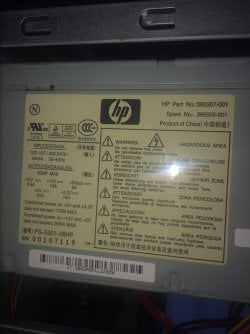
Okay, I managed to get hold of a PSU, but its max output is 300W, as opposed to my current one's 450. Would it be safe to try with this one, or would I need to get hold of one with the same or higher output? I've never installed a PSU before, and judging by all the wires I've had to fiddle with to take the current one out, I want to be sure I'm going down the right path before I commit to this nightmare, lol.
 

My Computer My Computer

At a glance

Windows 7 Ultimate 64-BitIntel Core i3-2100 @ 3.10GHz (Dual-Core)16GB DDR3Intel Graphics HD (Integrated)
Computer type
PC/Desktop
OS
Windows 7 Ultimate 64-Bit
CPU
Intel Core i3-2100 @ 3.10GHz (Dual-Core)
Motherboard
ASRock H61M-HVS
Memory
16GB DDR3
Graphics Card(s)
Intel Graphics HD (Integrated)
Hard Drives
Kingston 128GB SSD (OS Drive)
HITACHI 1TB HDD (Storage Drive)
Okay, I managed to get hold of a PSU, but its max output is 300W, as opposed to my current one's 450. Would it be safe to try with this one, or would I need to get hold of one with the same or higher output?
If your computer is the one in your specs you should be safe to try that 300W power supply just to see if it will boot. I wouldn't try overclocking your processor or heavy gaming though lol.

Just a reminder to remember to hook up the CPU power. It's usually a 4 or 8 pin connector beside the CPU. The corresponding wires on the PSU are usually labelled "P4" or "P5" with P4 being the most common. Make sure that particular one gets connected or the PC won't boot.
 

My Computer My Computer

At a glance

Win 7 Pro x64/Win 10 Pro x64 dual bootAMD FX 8350 Vishera @ 420016 GB Mushkin Blackline DDR3-2400 @ 1866 (9-1...XFX Radeon R9 280 Double D Black Edition
Computer type
PC/Desktop
Computer Manufacturer/Model Number
Mellon Labs (custom build)
OS
Win 7 Pro x64/Win 10 Pro x64 dual boot
CPU
AMD FX 8350 Vishera @ 4200
Motherboard
ASUS M5A97 R2.0
Memory
16 GB Mushkin Blackline DDR3-2400 @ 1866 (9-10-10-10-31)
Graphics Card(s)
XFX Radeon R9 280 Double D Black Edition
Sound Card
Realtek HD Audio on MB. Sounds great.
Monitor(s) Displays
Acer 24", Acer 22"
Screen Resolution
3840 x 1080
Hard Drives
1 x Mushkin Chronos 120 GB SSD (Win 10)
1 x Samsung 850 EVO 250 GB SSD (Win 7)
1 x WD 1TB SATA Blue
1 x WD 1TB SATA Green
PSU
Corsair TX-750
Case
CoolerMaster HAF 912+
Cooling
Coolermaster Seidon 240M Liquid AIO. 6 case fans
Keyboard
Logitech G710+
Mouse
Logitech G500s
Internet Speed
Much better since I got fiber, but still way overpriced.
Antivirus
MSE, Malware Bytes for scanning
Browser
Firefox
Other Info
Corsair VOID USB headphones.

A Mellon Labs X-1 - LCD Smartie driven system status display.

Brought to you by the letter E
Before connecting the PSU, do just connect the basic first.

MB, & 1 HDD with Windows OS, for start, as 300W is more than enough.

PSU connectors to MB is unique, should not mix, and do ensure it is slot in tight.
You are testing the MB and HDD and system.

Other HDD, optical drive, etc, best to avoid for the time being.
Otherwise you would not know which item is the cause of the failure.


Edit: Go to BIOS first, as to ensure it can see HDD and other setting. And do F10 to confirm the setting as you had being doing the jumper.
 

My Computer My Computer

At a glance

Windows 7 x64
Computer type
Laptop
Computer Manufacturer/Model Number
Toshiba L630 and L735
OS
Windows 7 x64
Hard Drives
240 GB SSD
Okay, I managed to get hold of a PSU, but its max output is 300W, as opposed to my current one's 450. Would it be safe to try with this one, or would I need to get hold of one with the same or higher output?
If your computer is the one in your specs you should be safe to try that 300W power supply just to see if it will boot. I wouldn't try overclocking your processor or heavy gaming though lol.

Just a reminder to remember to hook up the CPU power. It's usually a 4 or 8 pin connector beside the CPU. The corresponding wires on the PSU are usually labelled "P4" or "P5" with P4 being the most common. Make sure that particular one gets connected or the PC won't boot.

Before connecting the PSU, do just connect the basic first.

MB, & 1 HDD with Windows OS, for start, as 300W is more than enough.

PSU connectors to MB is unique, should not mix, and do ensure it is slot in tight.
You are testing the MB and HDD and system.

Other HDD, optical drive, etc, best to avoid for the time being.
Otherwise you would not know which item is the cause of the failure.


Edit: Go to BIOS first, as to ensure it can see HDD and other setting. And do F10 to confirm the setting as you had being doing the jumper.
Okay, I finally installed the PSU, and the good news is you were right - the PSU was definitely the problem. I managed to get the computer up and running with the borrowed PSU, though I did have a worrying - though small - problem with Windows 7; namely, the timedate.cpl file had its file association reset, and restoring the computer to different restore points didn't fix it, so I had to manually set that file to open with the Control Panel. It's primarily worrying because it makes me question what else might have come undone. I considered a Repair Install, but don't really think it's worth the hassle right now, so instead I'm just running a virus/malware check. Even more worrying, the whining noise is persisting, coming from the secondary hard-drive, and the rest of the computer seems to be making more noise than usual. Odd.

Anyway, it looks like my main worry right now should be shopping for a new PSU. Can either of you recommend a cheap one? One of the first ones I came across was this:

Ace Black 120mm Fan 550W Fully Wired Efficient Power Supply - Ebuyer

I really can't afford to spend that much on it, so I'm wanting to stick within that sort of price range. Would that be sufficient for my comp? I do notice it does only have the one 12V rail.
 

My Computer My Computer

At a glance

Windows 7 Ultimate 64-BitIntel Core i3-2100 @ 3.10GHz (Dual-Core)16GB DDR3Intel Graphics HD (Integrated)
Computer type
PC/Desktop
OS
Windows 7 Ultimate 64-Bit
CPU
Intel Core i3-2100 @ 3.10GHz (Dual-Core)
Motherboard
ASRock H61M-HVS
Memory
16GB DDR3
Graphics Card(s)
Intel Graphics HD (Integrated)
Hard Drives
Kingston 128GB SSD (OS Drive)
HITACHI 1TB HDD (Storage Drive)
Anyway, it looks like my main worry right now should be shopping for a new PSU. Can any of you recommend a cheap one?
I realize that you are on a limited budget. That being said, the last thing that you should try to economize on is your PSU. It's the heart of your system. I looked at the site you linked and was able to find a couple of better PSUs at what I would consider a modest price. Now, I know that these are at least 2 to 3 times what you were looking at in terms of price, but I can't stress it enough: Don't cheap out on your PSU.

Anyway, here are a couple of PSUs that are better choices:

EVGA 430W Fully Wired 80+ Power Supply - Ebuyer

Corsair VS Series 550 Watt VS550 Power Supply - Ebuyer

Obviously, they are higher in price than the one you linked, but given that they are pretty good brands they should be solid performers. If there is anyway that you can scrape together enough money, one of those two would be a good bet.

And I'm concerned about this whining sound from your hard disk. Does it change with disk activity?
 

My Computer My Computer

At a glance

Win 7 Pro x64/Win 10 Pro x64 dual bootAMD FX 8350 Vishera @ 420016 GB Mushkin Blackline DDR3-2400 @ 1866 (9-1...XFX Radeon R9 280 Double D Black Edition
Computer type
PC/Desktop
Computer Manufacturer/Model Number
Mellon Labs (custom build)
OS
Win 7 Pro x64/Win 10 Pro x64 dual boot
CPU
AMD FX 8350 Vishera @ 4200
Motherboard
ASUS M5A97 R2.0
Memory
16 GB Mushkin Blackline DDR3-2400 @ 1866 (9-10-10-10-31)
Graphics Card(s)
XFX Radeon R9 280 Double D Black Edition
Sound Card
Realtek HD Audio on MB. Sounds great.
Monitor(s) Displays
Acer 24", Acer 22"
Screen Resolution
3840 x 1080
Hard Drives
1 x Mushkin Chronos 120 GB SSD (Win 10)
1 x Samsung 850 EVO 250 GB SSD (Win 7)
1 x WD 1TB SATA Blue
1 x WD 1TB SATA Green
PSU
Corsair TX-750
Case
CoolerMaster HAF 912+
Cooling
Coolermaster Seidon 240M Liquid AIO. 6 case fans
Keyboard
Logitech G710+
Mouse
Logitech G500s
Internet Speed
Much better since I got fiber, but still way overpriced.
Antivirus
MSE, Malware Bytes for scanning
Browser
Firefox
Other Info
Corsair VOID USB headphones.

A Mellon Labs X-1 - LCD Smartie driven system status display.

Brought to you by the letter E
... Now, I know that these are at least 2 to 3 times what you were looking at in terms of price, but I can't stress it enough: Don't cheap out on your PSU...
Exactly.

I went the cheap PSU route many years ago. In the long run it will cost you much more, both in parts and in troubleshooting. Look at what you've been through the past few days with this problem. Are you ready for more phantom glitches on a regular basis due to unstable power? How about watching your whole MB go "poof" when something fries internally in the PSU? A slower CPU can be tolerated. A cheaper MB might have a few less features. A crummy PSU can and will do in the whole works.
 

My Computer My Computer

At a glance

Main - Windows 7 Pro SP1 64-Bit; 2nd - Window...Main - Core i7 2600K; 2nd - Core i7 920Main - 16GB Corsair Vengeance; 2nd - 12GB Cor...Main - XFX Radeon 6870 1GB; 2nd - XFX Radeon ...
Computer Manufacturer/Model Number
Self
OS
Main - Windows 7 Pro SP1 64-Bit; 2nd - Windows Server 2008 R2
CPU
Main - Core i7 2600K; 2nd - Core i7 920
Motherboard
Main - Asus P8Z68-V Pro/Gen3; 2nd - Gigabyte GA-EX58-UDR3
Memory
Main - 16GB Corsair Vengeance; 2nd - 12GB Corsair Vengeance
Graphics Card(s)
Main - XFX Radeon 6870 1GB; 2nd - XFX Radeon 4870 1GB
Sound Card
Both: Onboard Realtek Azalia
Monitor(s) Displays
Main - Hann 25" + I-INC 25" + Acer 23"; 2nd - Upgrading Soon
Screen Resolution
Main - 1920x1080 (All Three Monitors); 2nd - Upgrading Soon
Hard Drives
Main - (1) Crucial M4 128GB (Boot)
Main - (1) Seagate 2TB 64MB Cache (Data)
Main - (1) Seagate 2TB 64MB Cache (Data Backup)
2nd - (1) Intel X25-M SSD 80GB (Boot)
2nd - (3) Seagate 1TB 32MB Cache (Data Backup)
2nd - (1) Seagate 320GB (Because)
PSU
Main - OCZ 600W Modular; 2nd - OCZ 600W
Case
Main - Thermaltake Element G; 2nd - NZXT something or other
Cooling
Main - Corsair H80; 2nd - Prolimatech Megahalems
Keyboard
Main - Razer Reclusa; 2nd - Old MS Keyboard
Mouse
Main - Logitech MX Revolution; 2nd - Old MS Mouse
Internet Speed
20Mbps Time-Warner Cable
Before getting the PSU, check the size and which side the connectors and main power connector are.

Although it is standard, it is better to check.
As some PSU have the wrong side, when i forgot to check, have to go for the exchange.
 

My Computer My Computer

At a glance

Windows 7 x64
Computer type
Laptop
Computer Manufacturer/Model Number
Toshiba L630 and L735
OS
Windows 7 x64
Hard Drives
240 GB SSD
I realize that you are on a limited budget. That being said, the last thing that you should try to economize on is your PSU. It's the heart of your system. I looked at the site you linked and was able to find a couple of better PSUs at what I would consider a modest price. Now, I know that these are at least 2 to 3 times what you were looking at in terms of price, but I can't stress it enough: Don't cheap out on your PSU.

Anyway, here are a couple of PSUs that are better choices:

EVGA 430W Fully Wired 80+ Power Supply - Ebuyer

Corsair VS Series 550 Watt VS550 Power Supply - Ebuyer

Obviously, they are higher in price than the one you linked, but given that they are pretty good brands they should be solid performers. If there is anyway that you can scrape together enough money, one of those two would be a good bet.

And I'm concerned about this whining sound from your hard disk. Does it change with disk activity?

Exactly.

I went the cheap PSU route many years ago. In the long run it will cost you much more, both in parts and in troubleshooting. Look at what you've been through the past few days with this problem. Are you ready for more phantom glitches on a regular basis due to unstable power? How about watching your whole MB go "poof" when something fries internally in the PSU? A slower CPU can be tolerated. A cheaper MB might have a few less features. A crummy PSU can and will do in the whole works.

Before getting the PSU, check the size and which side the connectors and main power connector are.

Although it is standard, it is better to check.
As some PSU have the wrong side, when i forgot to check, have to go for the exchange.

Okay, firstly, let me apologise for both never getting back to this thread and for resurrecting it now. You guys helped me out of a massive jam, and I can't express enough how much I appreciate it, even if it might not have looked that way. I was stressed as hell at the time, and just the thought of buying a new PSU filled me with so much anxiety that I kind of just forgot about the whole thing and this thread. Wilful ignorance, if you will, lol.

Until, of course, now. Inevitably, here I am a few months later needing to reconsider an investment into a PSU because I'm still running it on my relative's 300W one. According to Windows, I had a supposed HDD failure around 24 hours ago, at which point I posted to SuperUser (the StackExchange site) in a rush here and got back the response that the PSU could be the problem rather than the HDD. I then remembered this thread, and given that I'm still running on a cheap, underpowered PS despite all the advice given in this thread, it does make more sense to me to replace the PSU first and see if it helps.

So I'm back considering a PSU purchase, and I just wanted to confirm with you guys that I'm buying one that will fit in my case and work for my purposes. I looked closer at the Ebuyer link that Mellon Head linked to, and came across the Corsair VS450, which is a model down from the specific model that MH recommended, but also £10 cheaper, making it the ideal compromise between affordability and price for me.

The problem is that I don't know whether it's suitable for my case, because I'm unsure exactly how to judge a PSU and. The two things that worry me are the physical dimensions of it nd whether it'll fit in my case, and the amount of cables it has - mainly whether they'll be too much, or even too little of a certain type of cable.

Attached is my current, borrowed PSU - a PS-5301-08HP.

B
ecause it's so generic, searching the model number doesn't really tell me anything about its dimensions, and it's pretty tricky to physically count the amount and types of cables that it has. I basically just need someone to assure me that the chosen PSU will fit in my system. A quick primer on how to choose a PSU and the dimensions of them would also be massively appreciated. How do you guys usually go about choosing your PSUs? Do you use tools that make these things easier?

Thanks in advance, and sorry again.
 

Attachments

  • IMG_5764.JPG
    IMG_5764.JPG
    514.9 KB · Views: 1

My Computer My Computer

At a glance

Windows 7 Ultimate 64-BitIntel Core i3-2100 @ 3.10GHz (Dual-Core)16GB DDR3Intel Graphics HD (Integrated)
Computer type
PC/Desktop
OS
Windows 7 Ultimate 64-Bit
CPU
Intel Core i3-2100 @ 3.10GHz (Dual-Core)
Motherboard
ASRock H61M-HVS
Memory
16GB DDR3
Graphics Card(s)
Intel Graphics HD (Integrated)
Hard Drives
Kingston 128GB SSD (OS Drive)
HITACHI 1TB HDD (Storage Drive)
Hashim,

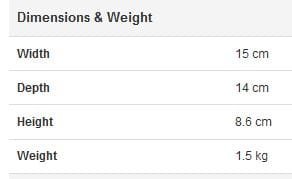
The best advice that I can give you on a PSU is that you have to pick one that will fit in your case properly. You are going to have to take out the one you have now and measure its dimensions. Length, width, & height. Compare it to the dimensions of the VS450 that you mentioned. I've reproduced them here:

Dimensions.JPG

The VS450 should work out ok, as long as it fits in the case. It has the appropriate power connections, and more than likely has enough of them. New supplies are pretty good that way.

So, as long as the measurements are the same, or there is enough room where the old supply sits, you should be good to go.
 

My Computer My Computer

At a glance

Win 7 Pro x64/Win 10 Pro x64 dual bootAMD FX 8350 Vishera @ 420016 GB Mushkin Blackline DDR3-2400 @ 1866 (9-1...XFX Radeon R9 280 Double D Black Edition
Computer type
PC/Desktop
Computer Manufacturer/Model Number
Mellon Labs (custom build)
OS
Win 7 Pro x64/Win 10 Pro x64 dual boot
CPU
AMD FX 8350 Vishera @ 4200
Motherboard
ASUS M5A97 R2.0
Memory
16 GB Mushkin Blackline DDR3-2400 @ 1866 (9-10-10-10-31)
Graphics Card(s)
XFX Radeon R9 280 Double D Black Edition
Sound Card
Realtek HD Audio on MB. Sounds great.
Monitor(s) Displays
Acer 24", Acer 22"
Screen Resolution
3840 x 1080
Hard Drives
1 x Mushkin Chronos 120 GB SSD (Win 10)
1 x Samsung 850 EVO 250 GB SSD (Win 7)
1 x WD 1TB SATA Blue
1 x WD 1TB SATA Green
PSU
Corsair TX-750
Case
CoolerMaster HAF 912+
Cooling
Coolermaster Seidon 240M Liquid AIO. 6 case fans
Keyboard
Logitech G710+
Mouse
Logitech G500s
Internet Speed
Much better since I got fiber, but still way overpriced.
Antivirus
MSE, Malware Bytes for scanning
Browser
Firefox
Other Info
Corsair VOID USB headphones.

A Mellon Labs X-1 - LCD Smartie driven system status display.

Brought to you by the letter E
Hashim,

The best advice that I can give you on a PSU is that you have to pick one that will fit in your case properly. You are going to have to take out the one you have now and measure its dimensions. Length, width, & height. Compare it to the dimensions of the VS450 that you mentioned. I've reproduced them here:

View attachment 397083

The VS450 should work out ok, as long as it fits in the case. It has the appropriate power connections, and more than likely has enough of them. New supplies are pretty good that way.

So, as long as the measurements are the same, or there is enough room where the old supply sits, you should be good to go.

Okay, I finally took my current PSU out to measure it, and these are the specs I got:

Height: 14 cm
Width: 15 cm
Depth: 8.5 cm

...which seem like similar numbers to the VS450 but don't correspond to the same metrics, so I'm probably confused as to what exactly constitutes height, width, and depth.

I was measuring the PSU while standing as it would in the case, with the power connector facing the ground, the vents facing the inside of the case, and the label facing the right side of the case. Placed like that, I measured height from the top to the bottom of the PSU's front panel (where the vents are), width from vertically across the front panel, and depth from the front panel to the back. Are those the right way to measure those metrics, or am I getting it wrong somewhere?
 

My Computer My Computer

At a glance

Windows 7 Ultimate 64-BitIntel Core i3-2100 @ 3.10GHz (Dual-Core)16GB DDR3Intel Graphics HD (Integrated)
Computer type
PC/Desktop
OS
Windows 7 Ultimate 64-Bit
CPU
Intel Core i3-2100 @ 3.10GHz (Dual-Core)
Motherboard
ASRock H61M-HVS
Memory
16GB DDR3
Graphics Card(s)
Intel Graphics HD (Integrated)
Hard Drives
Kingston 128GB SSD (OS Drive)
HITACHI 1TB HDD (Storage Drive)
If you are going to buy a new PSU locally at a computer shop, take the old one with you so they can make sure all the connections & the dimensions are the same. Doing that will assure you that it will fit & if reconnected correctly it should work straight away.
 

My Computer My Computer

At a glance

Windows 7 Home Premium 64 bit sp1Intel i5 3570 3.4Ghz Ivy Bridge SKT 1155 quad...G-Skill Rip Jaws 16Gb (8x2) DDR3 -1600 PC3 12...Gigabyte NVIDIA GT610 1Gb DDR3 810/1200 PCI-E...
Computer type
PC/Desktop
Computer Manufacturer/Model Number
Self built using existing case
OS
Windows 7 Home Premium 64 bit sp1
CPU
Intel i5 3570 3.4Ghz Ivy Bridge SKT 1155 quad core
Motherboard
Gigabyte Z77-HD3 SKT 1155 2xSata 3, 4x USB 3.0
Memory
G-Skill Rip Jaws 16Gb (8x2) DDR3 -1600 PC3 12800 CL 10 red
Graphics Card(s)
Gigabyte NVIDIA GT610 1Gb DDR3 810/1200 PCI-E 2.0 Silent
Sound Card
NVIDIA High Definition & Realtech High Definition Audio
Monitor(s) Displays
2 x Philips 226V4L 16:9 aspect ratio
Screen Resolution
1920 x 1080 HD
Hard Drives
Samsung 840 Pro 256gb SSD, SATA 3.
Hitachi Touro Portable 1tb, USB 3.0 HDD used for image b/ups.
PSU
Corsair VS450
Case
Codeng
Cooling
PSU fan & CPU fan
Keyboard
Logitech
Mouse
Logitech Wireless trackball M570
Internet Speed
Wireless 3G. 3mg down & 550kb up.
Antivirus
Bitdefender Internet Security 2020
Browser
Opera (Current Version) & Firefox
Other Info
MS Office 2013 Pro. Davis weather station software. MGE Nova 600 avr UPS.
If you are going to buy a new PSU locally at a computer shop, take the old one with you so they can make sure all the connections & the dimensions are the same. Doing that will assure you that it will fit & if reconnected correctly it should work straight away.

Probably wasn't going to do that because it typically works out more expensive. I was going to buy from the Ebuyer link.
 

My Computer My Computer

At a glance

Windows 7 Ultimate 64-BitIntel Core i3-2100 @ 3.10GHz (Dual-Core)16GB DDR3Intel Graphics HD (Integrated)
Computer type
PC/Desktop
OS
Windows 7 Ultimate 64-Bit
CPU
Intel Core i3-2100 @ 3.10GHz (Dual-Core)
Motherboard
ASRock H61M-HVS
Memory
16GB DDR3
Graphics Card(s)
Intel Graphics HD (Integrated)
Hard Drives
Kingston 128GB SSD (OS Drive)
HITACHI 1TB HDD (Storage Drive)
Back
Top