- Local time
- 1:29 PM
- Messages
- 41
My Computer
At a glance
W72 GB
- Computer type
- PC/Desktop
- Computer Manufacturer/Model Number
- HP
- OS
- W7
- Memory
- 2 GB
- Hard Drives
- Two SATA HD's
- Antivirus
- Microsoft Security Essentials
- Browser
- IE 8


RTSevenLite hasn't been updated for years and I find it unreliable.
Try this instead: https://www.ntlite.com
No problem kemperhills, don't bother with RTSevenLite though, I think it's been abandoned and I could never get it to work properly. NTLite has always worked for me.
What is it you want to use it for exactly? Integrating updates and drivers? I use NTlite with Dr. Windows Update Pack for all the updates. When running the installer, just select to extract the updates but don't install them. You'll have to Google it though, I can't link you to that site as it's in German, although if you use Chrome it will translate it for you. Nothing wrong with the packs though, I've been using them for a couple years and they're updated every month after patch tuesday.
Here's a guide that might help:
https://www.youtube.com/watch?v=4zCm4c062uI
You could also try WinToolkit Win Toolkit - Win Toolkit - WinCert.net Forums
https://www.youtube.com/watch?v=XFRrsQmoSmk
Before you run it I would run these commands:
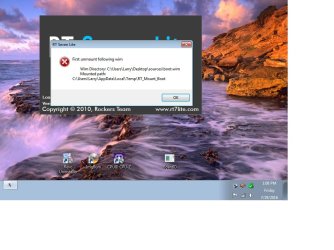
dism /unmount-Wim /MountDir:<mountDir> /commit (MountDir being the path that's showing in your error message)
dism /Cleanup-Wim (just to cleanup any images you may have previously mounted)

Yep, wise decision, saves a lot of hassle, especially if you have a lot of systems to install on.

I downloaded and installed RT Seven Lite, beta version. When I click on the RT icon it tries to load and then I get the following error message.
Could someone help me get this program to work.

