IMHO avoid mucking with the registry if at all possible. There too many things need changing to backdoor force the devices in....
I've done some more digging... Learned and found some interesting stuff.
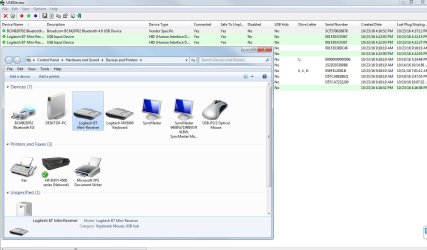
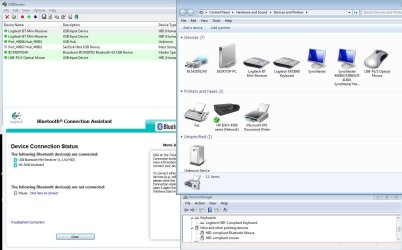
I checked the Asus B150M-C D3 USB3 drivers for your Desktop. And, sure enough, the USB3 compatible IDs shown by the transceiver when connected to the Desktop ARE defined in those drivers. So question becomes: why isn't windows finding the USB3 hub driver when it goes searching??
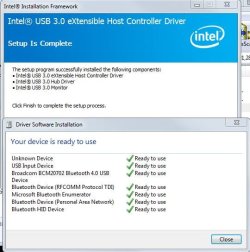
Start by uninstalling and reinstalling the USB3 drivers. I see 2 versions on the support site. Be sure to choose the latest version. Connect the transceiver. Still same problem?
I'll reinstall the 3.0's from the CD that came with the Motherboard b/c thats how I did it when I first got it.
My Computer
At a glance
Windows 7 Ultimate 64Bit (SP1)Intel® Core™ i3-6100 Processor (3M Cache, 3.7...Kingston 16GB Hyper X Fury Blue DDR3 1600Mhz ...On board (Asus B150M-C D3) VGA and DVI on Ext...
- Computer type
- PC/Desktop
- Computer Manufacturer/Model Number
- Custom built by myself
- OS
- Windows 7 Ultimate 64Bit (SP1)
- CPU
- Intel® Core™ i3-6100 Processor (3M Cache, 3.70 GHz)
- Motherboard
- Asus B150M-C D3
- Memory
- Kingston 16GB Hyper X Fury Blue DDR3 1600Mhz (2x 8GB sticks)
- Graphics Card(s)
- On board (Asus B150M-C D3) VGA and DVI on Extended Desktop
- Sound Card
- On Board (Asus B150M-C D3)
- Monitor(s) Displays
- Left DVI: Samsung 920WM - Right VGA: Samsung 941BW
- Hard Drives
- WD WD5000AADS 500GB SATA Green--WD 1TB WD1001FALS SATA Black--WD 320GB WD3200JB
- PSU
- Cooler Master 700W Silent Pro
- Case
- See through Side panel--right hinge door--5x 5" & 2x 3" bays
- Cooling
- Side, Front, Rear fan & Power supply fan
- Keyboard
- Logitech MX5000 BT
- Mouse
- Logitech MX500
- Internet Speed
- 40Mb down--10Mb Up
- Antivirus
- AVG Internet Security
- Browser
- Chrome-Firefox-Opera-IE-TOR
- Other Info
- 2x LG DVD-RW--NZXT Fan contoller--4in1 Card reader